Profit-based ad optimization: how to send net profit to Meta Conversions API with Make
Stop optimizing for revenue. Calculate net profit per order in Make, send it to Meta as the conversion value, and let the algorithm find customers who make you money.

Your ROAS looks great. Still, your accountant says you lost money.
That’s because ad platforms optimize for pure revenue, which means the order total, without accounting for cost of goods, shipping, payment fees, and product returns. A $200 sale with a 6% margin looks like a win. But in the bank account, it barely registers.
Profit on ad spend (POAS) fixes this.
With Make's latest release of the Facebook Conversions for API app, you can send a custom value and currency code with each conversion event. Meta can then optimize toward the products that earn you the most rather than the ones that sell for the most.
Here’s how.
Explained: How Meta’s targeting works
Meta runs the ad system behind Facebook and Instagram, and it decides who sees which ad. It learns from results: every time you report a purchase, you attach the order value, and Meta looks for more people like the customers who bought.
That value is the lever. If you send revenue, a $200 sale counts for more than a $60 one, so Meta looks for more buyers like the $200 customer. If you send profit, the sale that earns you the most counts for more. That could be the $60 product or the $200 one, depending on the margin. A bigger order total doesn't mean a bigger net profit.
The next section shows the numbers behind this.
Why a high ROAS can hide a shrinking margin
For years, Return on Ad Spend (ROAS) has been the north star for e-commerce advertisers. The math is simple: revenue divided by ad spend. It also ignores everything between the sale and the profit.
That's why products with big price tags and small margins, or no margin once shipping and returns are paid, tend to beat cheaper, high-margin items for budget.
Here's a hypothetical example. Say Meta spends $20 to get each purchase of either product:
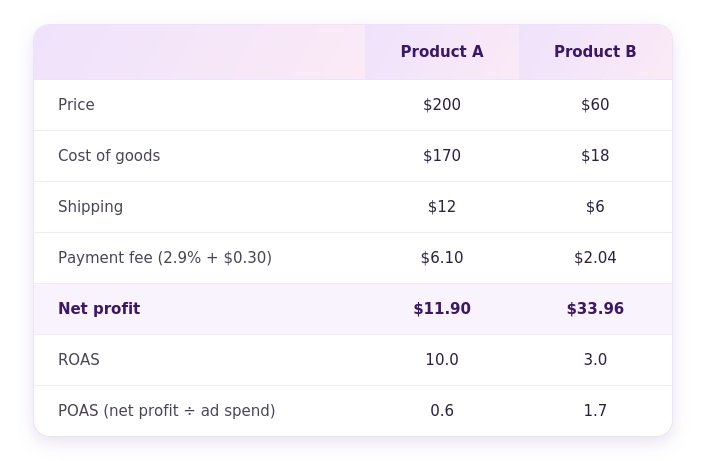
On ROAS, Product A looks more than three times better. On POAS, it loses $8.10 on every order once you subtract the ad spend, while Product B earns $13.96.
A revenue signal tells Meta to buy more of A. A profit signal tells it to buy more of B.
Make bridges your store and Meta
Meta Conversions API (CAPI) shares events server to server: straight from your backend or e-commerce platform to Meta, with no chance for optimization in-between. In this standard setup, each Purchase event carries the total transaction revenue as its value.
Routing those events through Make changes one key thing. The order lands in a scenario first. The scenario calculates net profit line by line and puts that figure in the value parameter before the event goes to Meta. Meta still receives the same Purchase event it always does. Only the number inside is different.
Every step of that calculation lives on Make’s visual canvas, so your finance team can check the math as easily as your marketing team can.
How to calculate the net profit
A profit signal is only as good as the data behind it. Before you build, make sure you can pull these four inputs for every order:
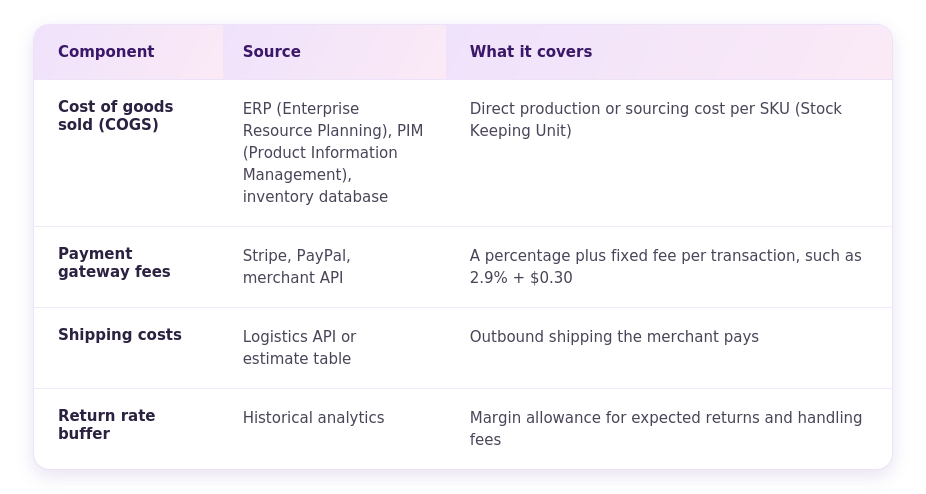
The final formula is:
Net profit = order gross revenue - (total COGS + shipping expense + payment gateway fees + tax and return allowances)
Stale COGS data is the most common weak spot. If your cost figures are a year old, Meta will optimize toward a margin that no longer exists. Clean the source first, then proceed.
Build the scenario in Make
The scenario needs four modules. Each order arrives as a bundle and moves through them in this order:
- Capture the order: add a Shopify or WooCommerce module that watches for new orders. If your store isn't covered by a native app, use a Custom webhook module instead. Trigger it on "order placed" or "payment completed," depending on when you count a sale.
- Look up COGS: use an HTTP module or the app module for your ERP, PIM, or inventory database to retrieve the cost of goods sold for each line item in the order.
- Calculate net profit: add Iterator and Array aggregator modules to sum COGS across line items. Then use Make's built-in math functions to subtract COGS, shipping, gateway fees, and your return allowance from gross revenue.
- Send the event to Meta: add the Facebook Conversions for API module and map the calculated net profit to the value parameter of the Purchase event. Set the currency code to match your order.
Test with a single order before you turn on scheduling. Run the scenario once, then open the output bundle at each module and check the numbers against a manual calculation. Keep an eye on operations, too: a COGS lookup per line item runs once for every item, so large orders use more of them.
Set expectations before you switch campaigns
Once profit-based events reach Meta, update your campaigns in Ads Manager to optimize for value.
The first thing you'll notice is a drop in reported revenue. That is normal. The value field now holds net profit, so every figure in your reports shrinks. Tell your team and your agency before the numbers change, so nobody reads a reporting shift as a performance problem.
Then give Meta time. The algorithm needs data to learn from the new signal. As it does, it should shift audience targeting and catalog promotion toward higher-margin products and the customer profiles that produce more profit.
The goal is more net profit per ad dollar, not a bigger revenue number, so compare POAS before and after the switch, not ROAS.
Optimize for profit with Make and Meta
Meta will chase whatever number you hand it. For years, that number has been the one on the receipt.
The receipt doesn't know what the product cost, though. It doesn’t know what the courier charged, or how many boxes came back. Your systems do know that. With Make, you can finally connect the two, and keep every step of the calculation visible while you do.
Optimize for profit with the Meta Conversions for API app in Make
Related blogs
Tool and strategies modern teams need to help their companies grow.
Marketing
Turn Meta leads into revenue with Make and Conversions API for CRM
Your CRM and Meta aren't talking. Here's what that's costing you, and how a closed feedback loop between your pipeline and Meta's algorithm fixes lead quality for good.

Natalia Mrazova
June 25, 2026
Marketing
11 best marketing automation tools 2026: ranked and reviewed
Eleven marketing automation platforms ranked on AI readiness, workflow flexibility, integrations, and pricing for mid-market teams scaling in 2026.

Raife Dowley
June 18, 2026
%20(1).png)
AI
Plan and build better workflows with Maia by Make, upgraded
Your visual co-worker just got an upgrade on Waves 2026! Maia can now plan first, remember your preferences with Memory, and resolve errors for you. Here’s what’s new and how each update fits your work.

Andrés García Raffo
October 20, 2026