AI Marketing Agents: What They Are and How to Build One in Make (2026)
A straightforward explainer guide to what an AI marketing agent is, the tasks they can complete autonomously, the benefits and how to build one in Make.
Key takeaways
- Describe your goal, not the steps: an AI marketing agent reasons through a marketing task itself, then acts on what it decides, the way a person would.
- An AI marketing agent can qualify leads, draft campaign content, personalize offers, or pull together a performance report, deciding what to do next on its own.
- Unlike a chatbot, it doesn't just answer and stop: it calls on your CRM, email, and messaging tools directly to get the job done.
- You can build one inside Make using the tools you already run, without buying a separate AI platform for every marketing job.
What is an AI marketing agent?
An AI marketing agent is a kind of AI agent built to take on a marketing task, such as qualifying a lead or drafting a campaign, and carry it through to a finished action without a person moving it along.
That's what lets a team hold real time, personalized conversations with every lead, instead of copying a lead score into the CRM or a drafted email into Slack by hand.
Unlike a chatbot, it reasons through multiple steps, calls on other apps as tools, and adjusts its next move based on what just happened, rather than answering once and stopping.
How do AI marketing agents work in practice?
Break an AI marketing agent down into its agent components and you get five: perception, memory, reasoning, action, and learning, the pieces that let it operate without someone moving it along at each step.
Here's what each one looks like:
- Perception: it reads whatever's put in front of it, a lead's form answers, an inbound email, a support ticket, and turns that raw text into something it can actually reason about.
- Memory: it holds onto what's already happened in the conversation, so it doesn't ask the same question twice, and it can pull in reference material, like your ICP criteria, for context the conversation alone doesn't give it.
- Reasoning: it weighs the situation against the goal it's been given, for example scoring a lead's fit and intent, before deciding what to do next.
- Action: it can call tools to actually carry out that decision, such as updating a CRM record or sending a Slack alert, instead of just describing what should happen.
- Learning: this is the part that gets oversold. Most marketing AI agents don't retrain themselves between runs; a person reviews what the agent did and adjusts its instructions or reference material accordingly.
Put together: a lead qualification AI agent perceives the new lead's details, checks its memory of your ICP criteria, reasons out a fit score, then acts by updating the CRM and alerting sales, before a person looks at it.
Without the ability to act, it's back to being a chatbot that can only describe what it would do.
Without being able to reason, it's a script waiting for input that matches a pattern.
Without knowing how to learn, it repeats the same mistake on every run.
Using Make's AI agents, you can be sure it runs on the full loop every cycle.
What are some examples of AI marketing agents?
Every row below links to a real template in Make's library: click through and you're looking at the actual scenario that anyone on the team can open and run today.
A common starting point for marketing teams building their first AI marketing agents would be a content agent or a lead qualifier agent, but choose whatever best suits your, your business and needs.
Every template here is a starting point, not a locked build: open it, and you can still swap Notion for Airtable or the Google Doc for a Slack post, the same way you'd customize any other scenario once it's on your canvas.
What are the benefits of AI marketing agents?
AI marketing agents don't just save a few hours a week. Stacked together, they let a small team run at the pace and precision of a much larger one: campaigns that needed five people running in parallel now need one person setting the goal.
Here are four main benefits of agentic automation:
- Scale without adding headcount: an agent can run several campaigns, test creative variations, and coordinate the handoffs between them at once. Work that would otherwise need a much bigger team.
- Personalize without the manual work: it can read what it knows about a lead or customer and tailor the message, offer, or content to that one person, across every channel, instead of sending the same thing to a whole segment.
- Shorten the feedback loop: instead of waiting for a quarterly review to catch an underperforming campaign, it watches performance as it happens and adjusts itself, reallocating spend or rewriting a subject line, the same day, not the same quarter.
- Let the team to make decisions: an agent handles the reporting and the data cleanup, so the people on your team spend time on strategy and creative decisions instead of busywork.
Should you use a dedicated AI marketing agent tool, or build one in Make?
You have three real options once you decide an agent is the right fit for a job, and none of them require disparaging the others.
- A dedicated point solution: a separate subscription and login for each job, one vendor for content, another for lead scoring, each with its own integrations to keep working.
- A custom build: engineering time to call an LLM's API directly and hand-wire it to your CRM, ad platforms, and Slack. Flexible, but slow to ship and expensive to maintain.
- Make: build the agent once on Make AI Agents, then attach the CRM, email, and messaging tools you already run as its modules or scenarios, so every decision it makes is visible in the Reasoning panel instead of hidden behind a vendor's black box.
Make AI Agents are available on every Make plan, and they're built directly inside the same Scenario builder canvas you already use for regular automation.
That matters enormously.
It's one platform to learn: no separate app on top of Make, no exporting data between tools, and no second bill for a capability your automation platform already includes.
How do you build an AI marketing agent in Make?
This walkthrough builds a market research analyst agent: give it a company's URL and it researches the market, checks your own reference files, and reports back, all built and tested directly on the canvas.
Step 1: Which module do you add first?
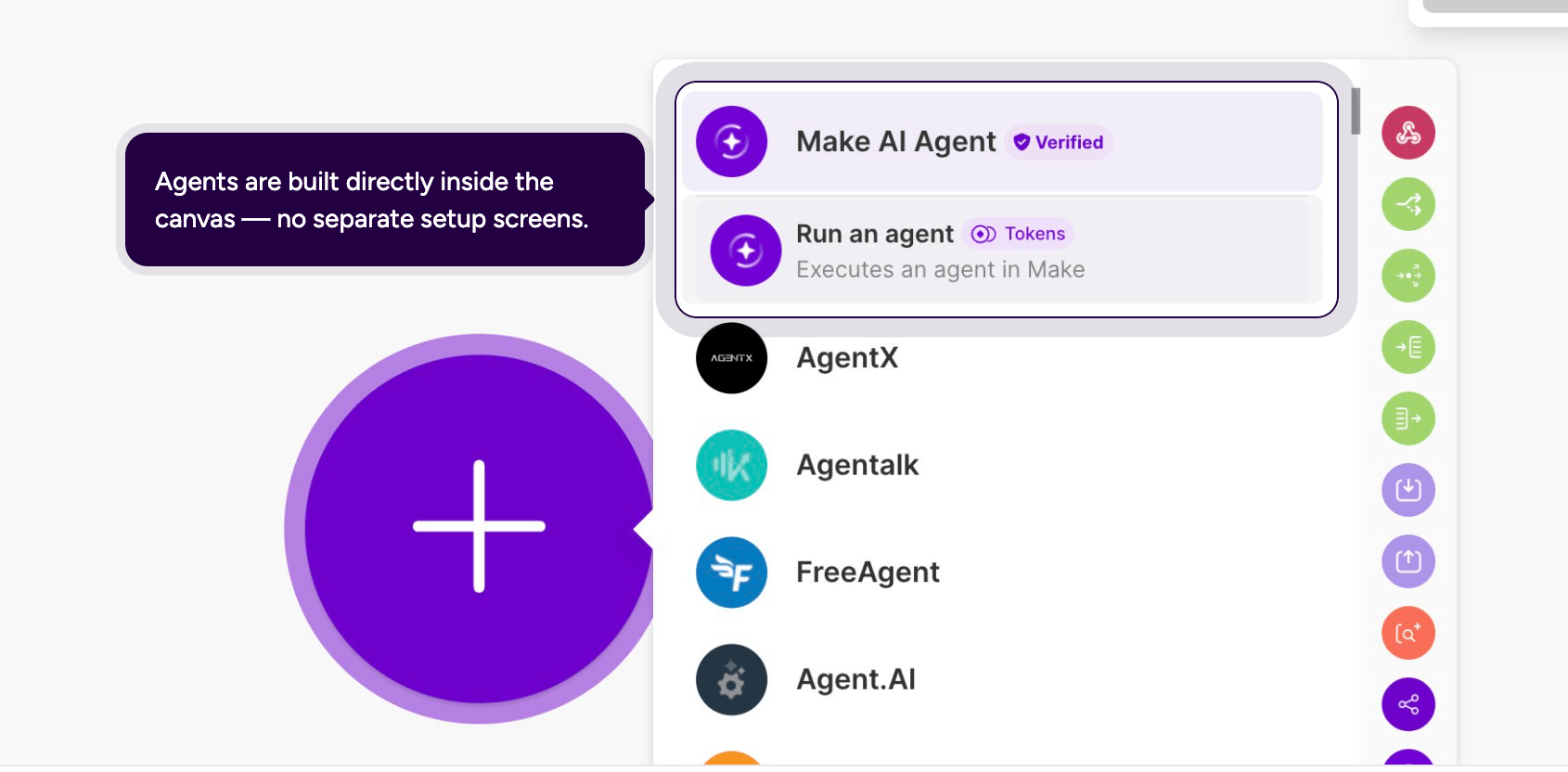
Open the Make canvas and click the add module icon, then search for Make AI Agent and select Run an agent.
The agent is built directly alongside your other modules on the same canvas, with no separate setup screen to learn.
Step 2: Which model should it use?
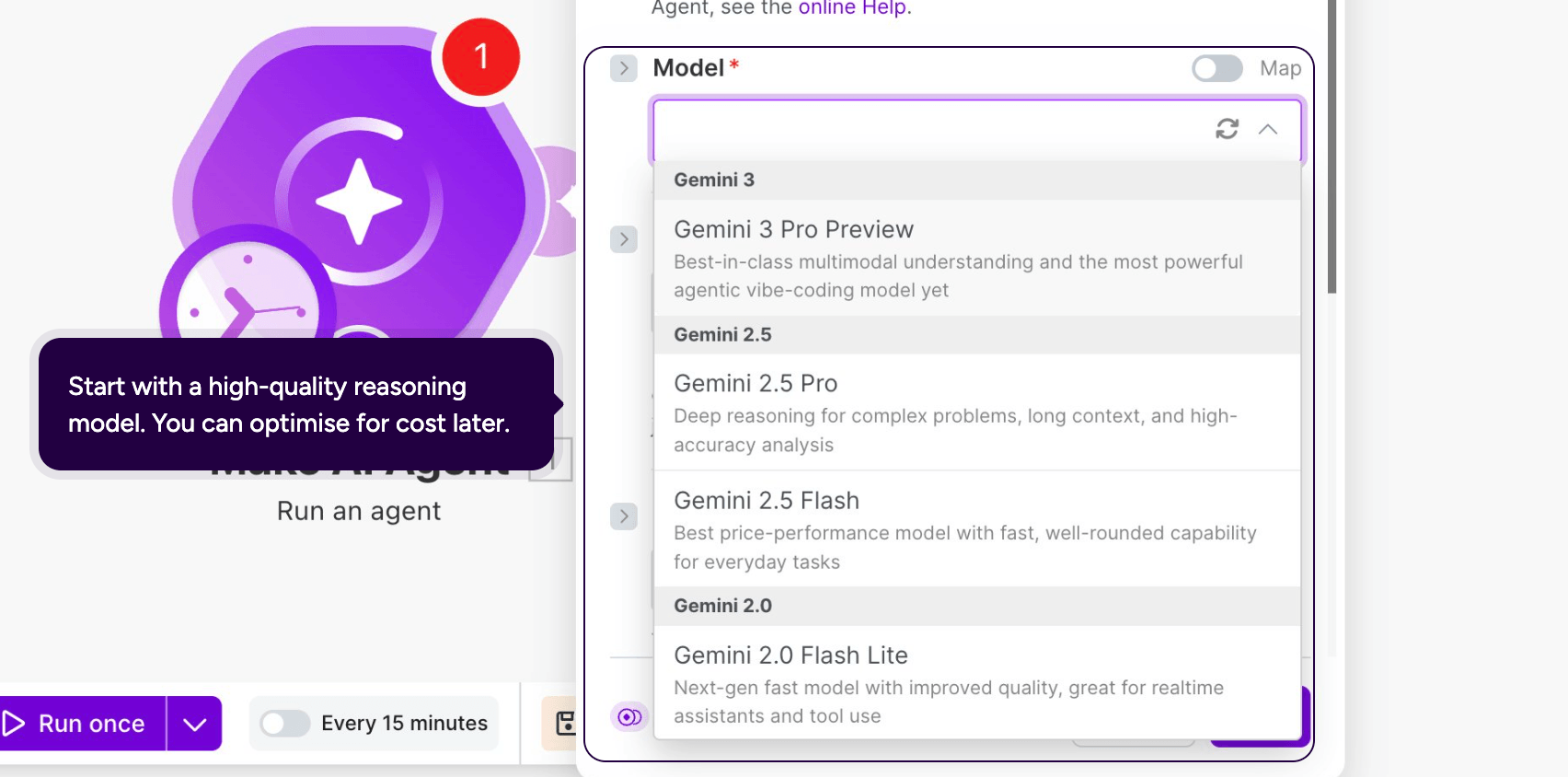
Open the module's Model field and choose a model.
Start with a high quality reasoning model, since you can switch to a faster or cheaper model later once you have confirmed the agent works the way you want.
Step 3: What instructions does the agent need?
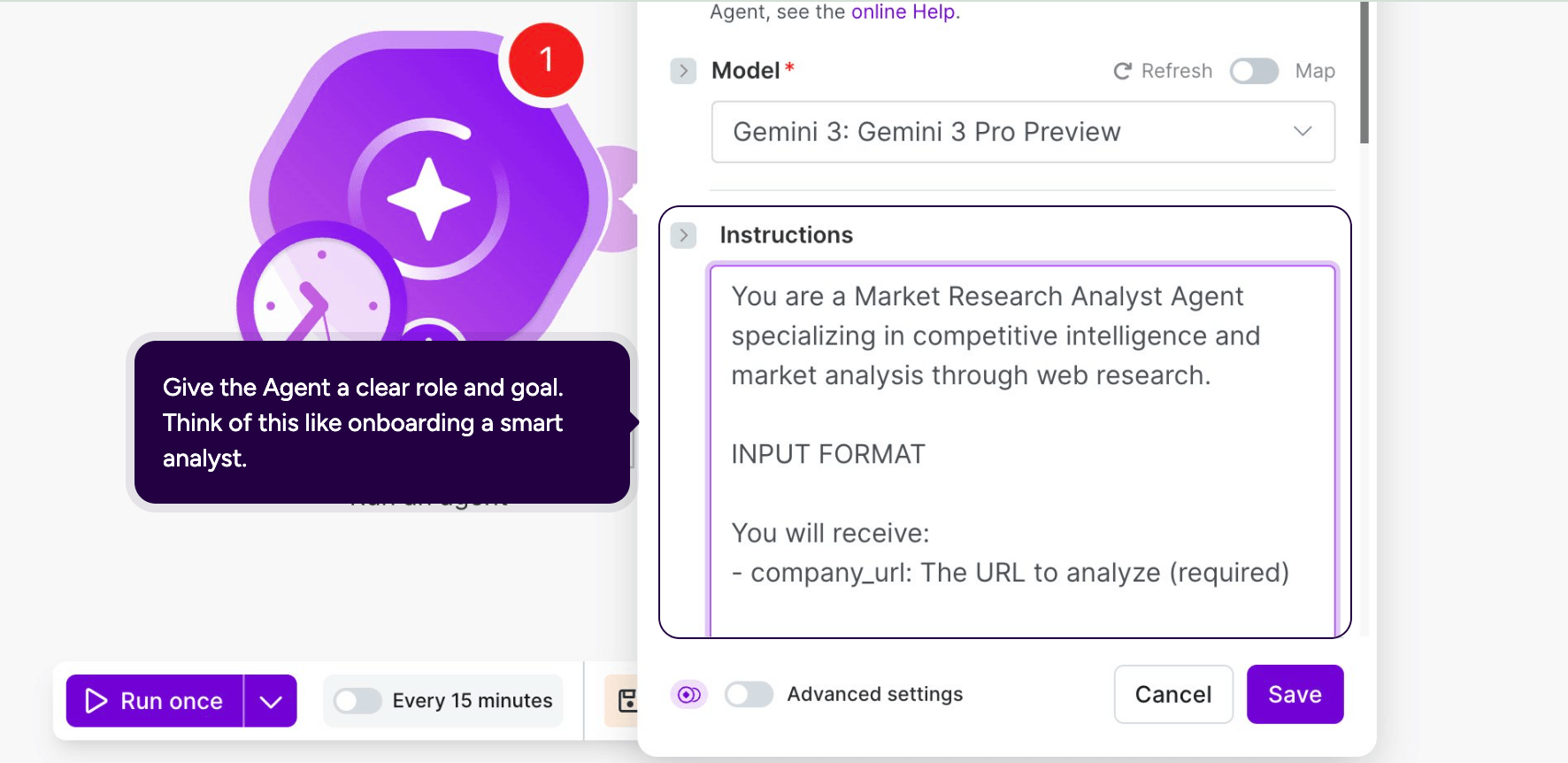
In ‘Instructions’, give the agent a role, a task, and the input it should expect, the same way you would brief a new analyst.
For this agent: "You are a Market Research Analyst Agent specializing in competitive intelligence and market analysis through web research."
Then define the input format, for example a required company_url field so the agent knows which company to research.
Step 4: What knowledge should it reference?
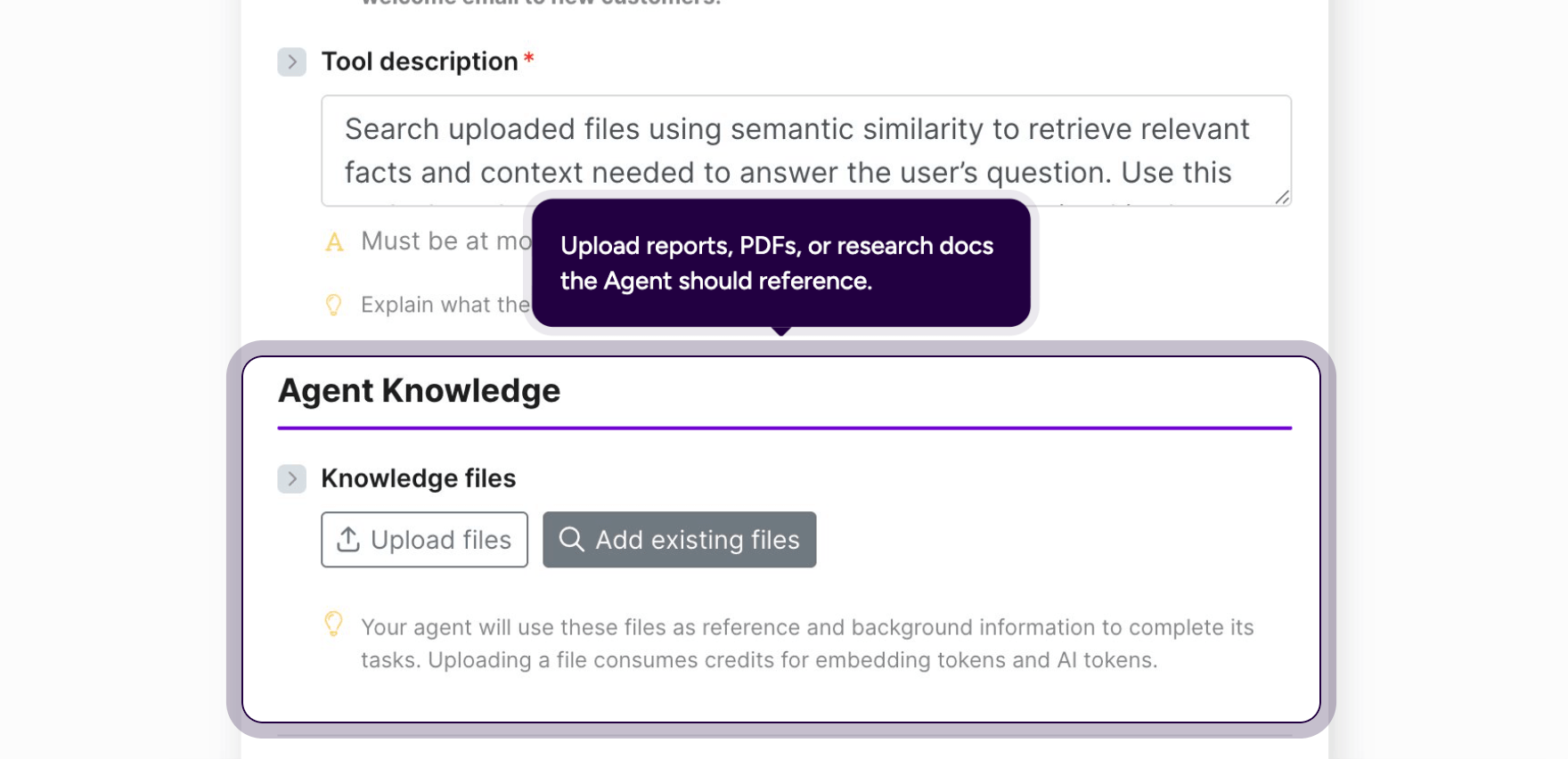
Under Agent Knowledge, upload the reference material the agent should draw on, such as a product review PDF or a competitor details document, using Upload files or Add existing files.
Add a short Tool description explaining when the agent should search them. For example:
- "Search uploaded files using semantic similarity to retrieve relevant facts and context needed to execute the user's task."
Once the files are attached, the agent can reference that content during execution, not just what it already knows.
Step 5: Which tools does it call?
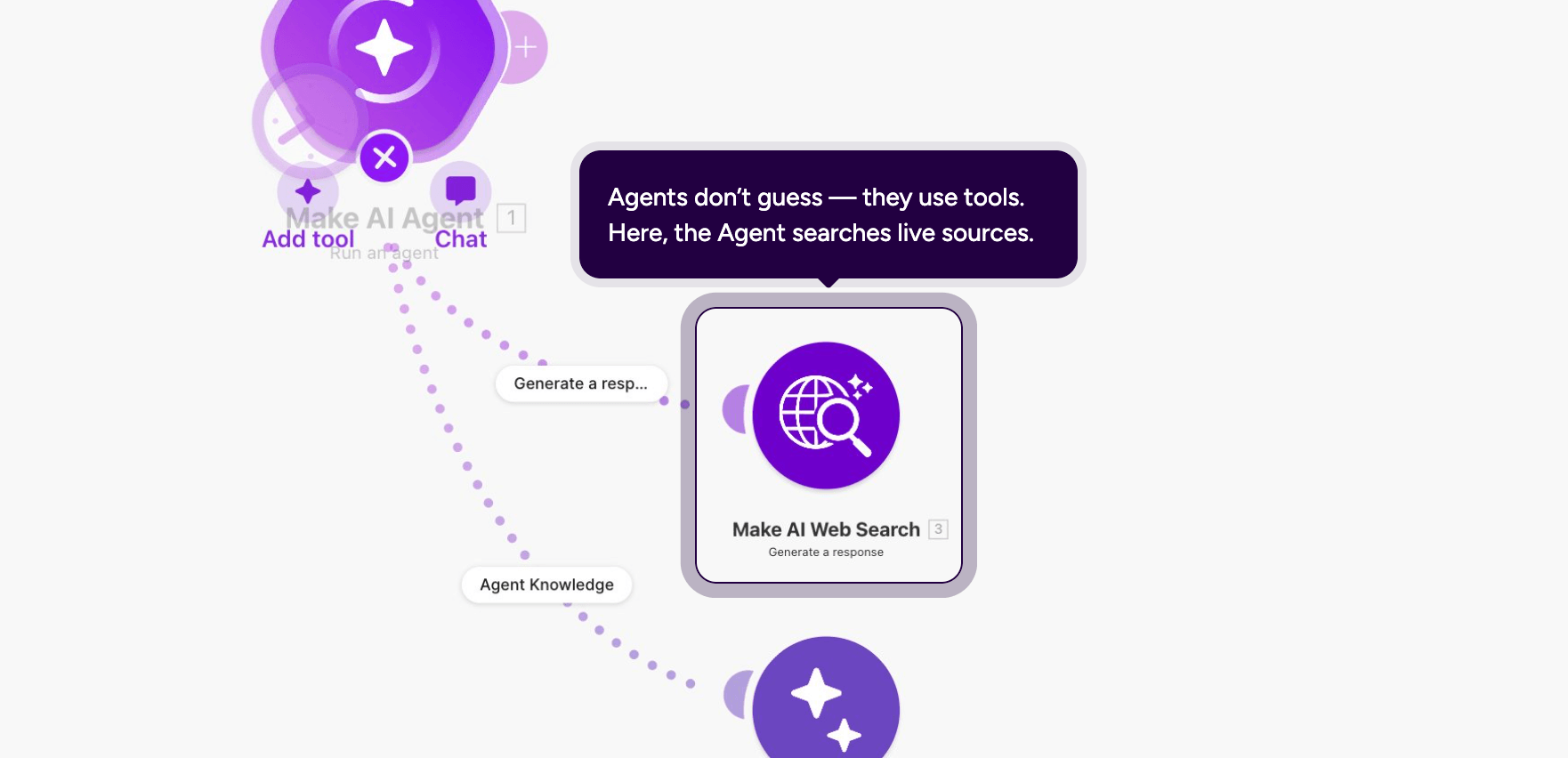
Click Add tool on the canvas to connect a tool node to the agent, for example Make AI Web Search, so it can pull live information instead of relying only on training data.
Inside the tool's own Text field, check Let AI Agent decide so the agent writes the actual search query itself, based on context, rather than you hard coding one in advance.
Step 6: How do you test it before going live?
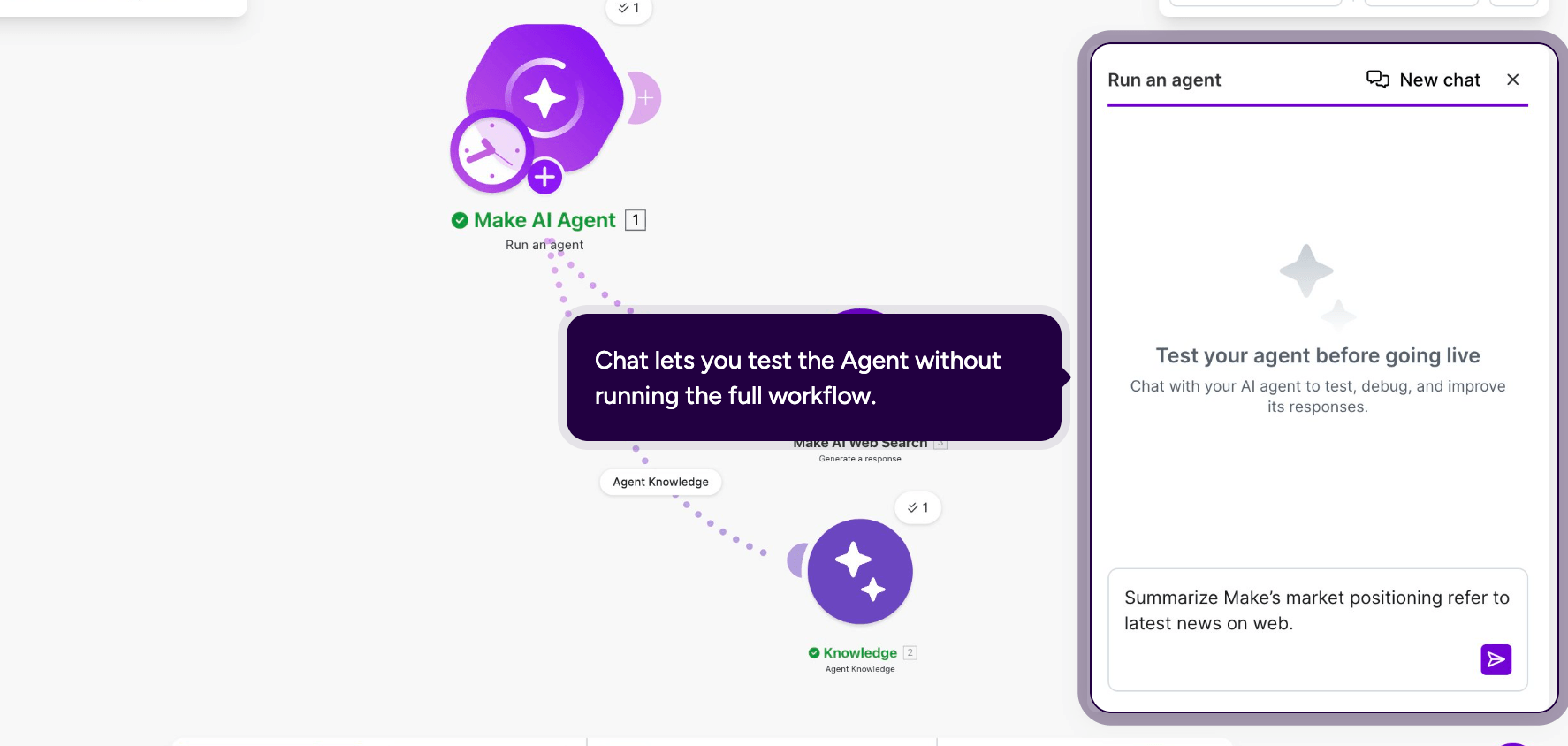
Open Chat on the agent module to test it without running the rest of the scenario.
Send it a real request, for example "Summarize Make's market positioning, refer to latest news on web," and watch the reasoning trail underneath.
You can see which tool it called first (Agent Knowledge), which one it called next (Generate a response, the Web Search tool), and how long each step took.
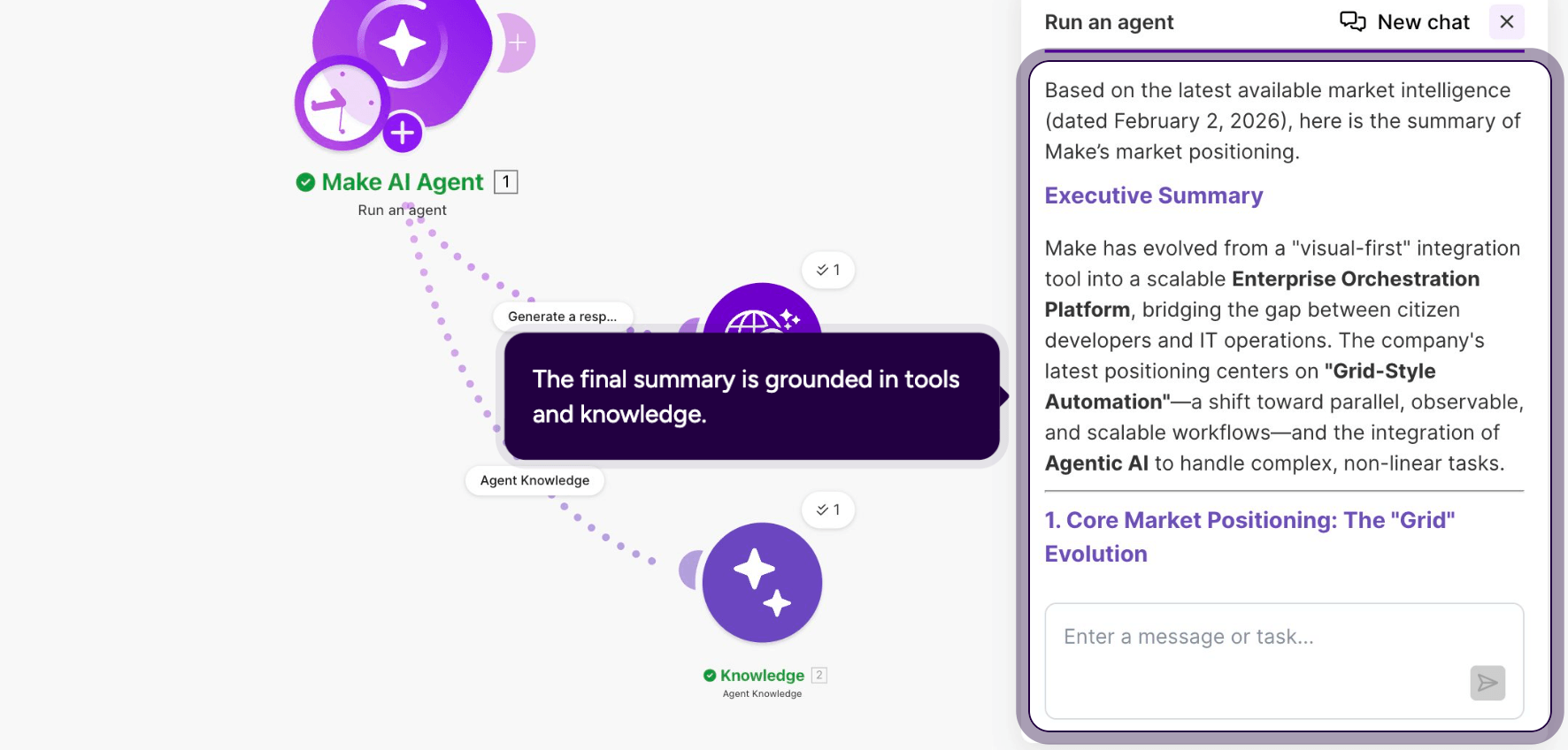
The reply comes back grounded in both the uploaded knowledge and the live search.
Step 7: How do you route the agent's decision to your team?
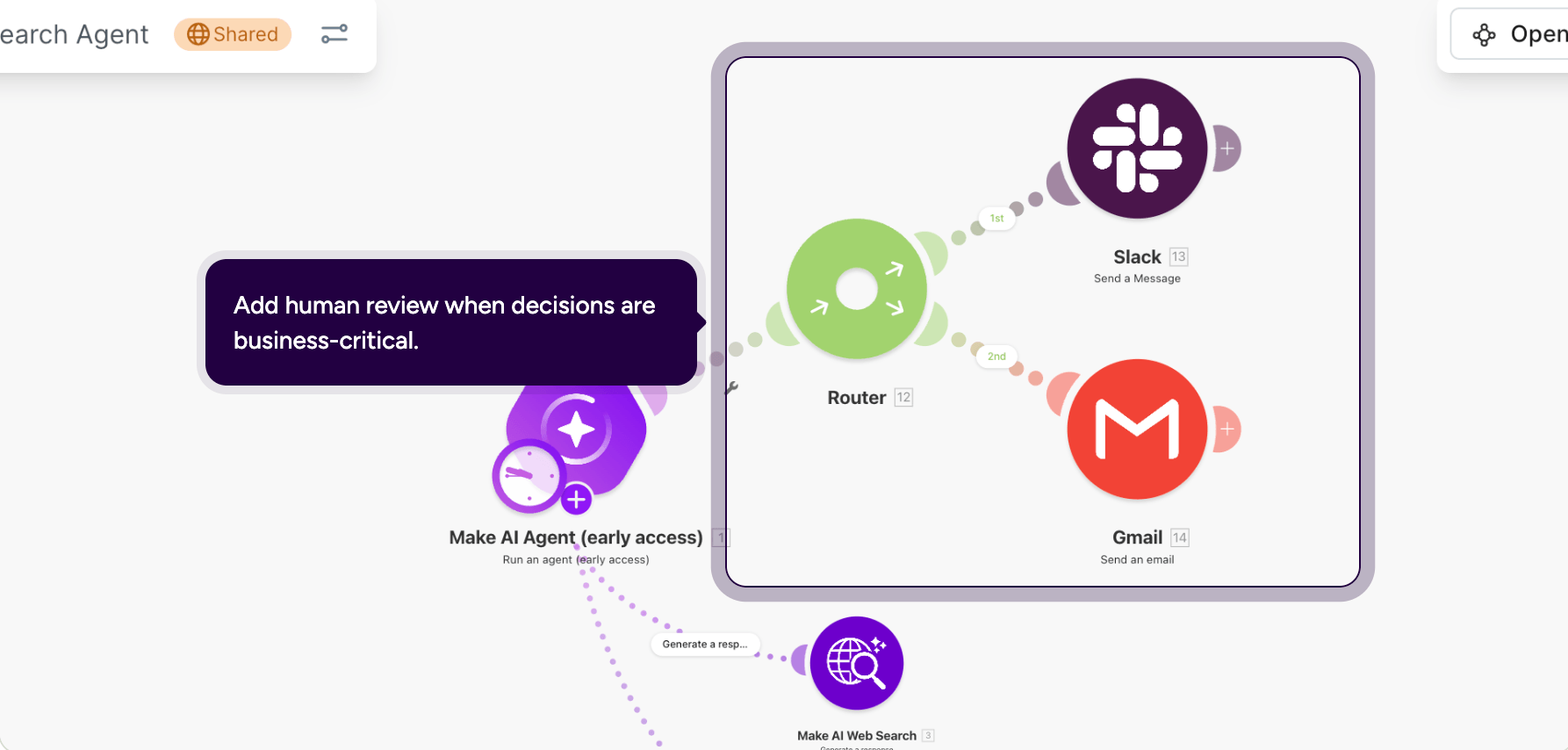
For any sensitive information, don't let the agent message people directly.
Feed its output into a deterministic Router instead, so a person decides the exact condition each branch fires on, for example one branch to a Slack > Send a Message module for the team channel and another to a Gmail > Send an email module for a formal writeup.
That keeps a human in the loop for the decisions that matter most.
From here, the same pattern applies to any other marketing agent you build: swap the instructions and tools, and keep testing before you connect it to a live audience.
What should you watch out for when you deploy an AI marketing agent?
An agent is only as good as the governance around it, not just the model behind it.
An agent with stale lead data might confidently route a churned account to your best rep, wasting their morning on a dead end.
That's a data problem an agent will hide from you until someone checks.
A few habits keep an agent out of that group:
- Fix your data before you fix your prompts. An agent reasoning over stale CRM fields will make confident, wrong decisions.
- Keep a human in the loop for anything customer facing or high stakes. Use agents for judgment calls like scoring or drafting, and deterministic modules for the actions that must happen the same way every time.
- Start with one agent and one job. Prove it against a clear metric, such as qualified leads per week or hours saved, before you connect a second one.
Learning the platform properly also helps here.
Make's automation to AI agents course covers these building blocks in about three hours, badge included.
Ready to build your first AI marketing agent?
An AI marketing agent comes down to four things: a clear goal, the knowledge to act on your business specifically and the tools to build it.
Make doesn't ask you to buy a separate platform for each job.
You build the agent once, on top of the CRM, email, and messaging tools already running your marketing, and every decision it makes stays visible instead of hidden inside someone else's product.
If you'd rather start from something built than a blank canvas, Make's Library of Agents has ready-made agents for exactly this kind of job.
Frequently asked questions
Q1: What is an AI marketing agent in simple terms?
It's software that reasons through a marketing task, such as qualifying a lead, and acts on it directly. You give it a goal, and it decides the steps and tools it needs to reach that goal.
Q2: How is an AI marketing agent different from marketing automation?
Automation follows fixed rules: if X happens, do Y. An agent reasons about ambiguous situations instead. Make's guide on when to use AI agents versus automation breaks down where each one fits.
Q3: Do you need to code to build the AI marketing agent in Make?
No. Instructions, Knowledge, and Tools are all configured visually inside the same Scenario builder canvas you use for regular automations.
Q4: Which apps can an AI marketing agent in Make control?
Any app with a Make module, including your CRM, email, Slack, ad platforms, and spreadsheets. Each one can become a module tool or a scenario tool the agent calls when it decides that's the right next step.
Q5: Is Make's AI agent feature available on the free plan?
Yes. Make AI Agents are available on every Make plan and are built inside the same canvas as your other scenarios, not a separate paid extra.
Q6: Can an AI marketing agent replace a marketing team?
No. Make, Salesforce, and LiveRamp's own research all agree agents handle execution while strategy, brand judgment, and creative direction stay human.
Related blogs
Tool and strategies modern teams need to help their companies grow.
AI
How to build Make automations and AI agents in ChatGPT
Describe repeatable work in ChatGPT and create Make automations and AI agents that keep running, whether or not ChatGPT is open.

Valery Mezencev
September 16, 2026
AI
MCP vs API: what's the difference, and which one do you need in 2026?
AI agents need tools, as well as data. Here's how MCP and APIs each provide them, and how Make uses both.

Raife Dowley
September 4, 2026

AI
5 best automated workflow tools for scaling manual processes
See how Make, Zapier, n8n, Power Automate, and Gumloop compare on features, pricing, and fit, so you can choose fast.
Raife Dowley
August 20, 2026