Aug 4, 2026 | 6 minutes
More visibility, more control: what's new in governance in Make
Give your team room to build, and your admins the proof it's under control
As more teams build on Make, admins need a clear way to see who's doing what, and builders need room to experiment without putting every draft and personal credential in front of the whole org. Private Spaces gives every team member an isolated workspace for scenarios and AI agents, and new Audit Logs events give admins a single record of the identity and credential changes that matter.
Real-time email alerts mean that the moment someone else uses a connection or key, its owner knows, and Custom Roles means opening Make to more teams no longer comes down to an all-or-nothing choice on access. Together, these updates are Make's core promise in action: that in the age of AI, business can run as a glass box, not a black box.
A private space for every builder
Take a RevOps manager who wants to prototype a few Salesforce scenarios before rolling them out to the wider team. With Private Spaces, they get a workspace of their own to build freely, then share only what's ready, when it's ready: no need to loop in an admin to set anything up, and nothing extra for anyone to track down the line.
Private Spaces gives every org member an isolated workspace for scenarios and AI agents, hidden from the rest of the org by default. It's a dedicated sandbox for every builder, governed from the start.
Private Spaces itself is available on every Make plan, including Free. The Enterprise-only piece is the optional admin visibility described below.
Admins keep every control they need without seeing inside: an org-wide toggle turns Private Spaces on for everyone in one click, a default monthly credit limit applies automatically, and per-member overrides let admins raise, lower, or zero out any individual's limit, which is useful for disabling a space without removing someone from the org entirely. On the Enterprise plan, admins also get optional read-only visibility into any member's Private Space: scenario names, modules used, and credit usage, with no access to run history, data stores, or connection details.
That last point matters more than it sounds. It means security and compliance teams get real oversight without it costing anyone their privacy.
In your own space, you work your own way. That's the trade Private Spaces resolves: freedom to build, without losing the governance to manage it.
Admins can turn Private Spaces on for their org from Organization settings. See how to enable private settings here.
A record of everything that matters
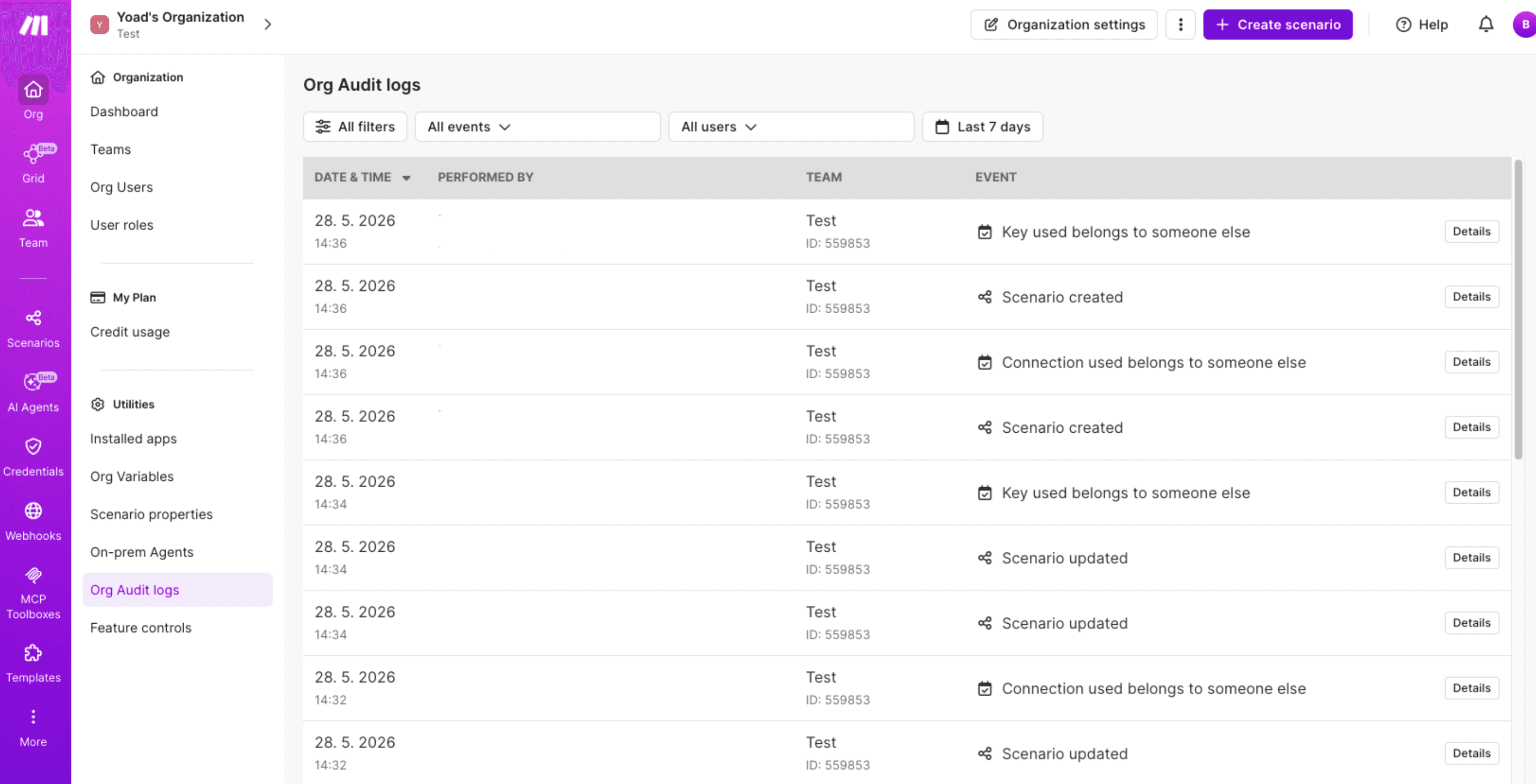
New Audit Logs events give admins the record compliance reviews actually ask for first, in one place instead of scattered across separate views.
That includes identity and access events, SSO enabled, updated, or disabled; two-factor authentication turned on or off; organization role changes; member removals, alongside credential oversight events: a connection or key used by someone other than its owner.
For an admin, that means catching something like two-factor authentication being disabled the moment it happens, logged immediately rather than surfacing in next quarter's access review.
Audit Logs are available on the Enterprise plan.
An alert the moment it matters
Audit Logs are the record. The email alert ensures a person actually sees it in time.
The moment a connection or key is used by someone other than its owner.
That owner will then get an email. A shared API key set up months ago gets reused by a teammate, and instead of stumbling onto it in a scenario log, the person it belongs to knows the second it happens.
This alert is available on every Make plan, not just Enterprise, so every org gets it even without Audit Logs.
It surfaces the same credential misuse that Enterprise orgs also see logged in Audit Logs, so nothing here requires digging through logs to catch.
Custom roles for every team
As more teams build on Make, Custom Roles gives org admins and org owners on the Enterprise plan a way to open the platform up without an all-or-nothing choice on access. They can define roles beyond the predefined ones already in Make, with exactly the permissions the work requires, and assign them at the organization or team level.
Someone who needs to view and run scenarios but never edit them gets precisely that, with no over-permissioning to unblock one team.
Every role carries a name and a description, so admins see what it does before assigning it, and every creation, update, deletion, and assignment lands in the Audit Log.
That lets operations, finance, and support all build in Make with boundaries everyone understands, driving broader adoption while keeping one consistent, visible access model across the org.
Custom Roles is available now to org admins and org owners on the Enterprise plan.
Learn more in the step-by-step guide.
Part of a bigger governance investment
These three updates don't stand alone. They're the latest piece of a wider investment in making orgs manageable at scale, alongside:
Credentials Requests - a secure, shareable way to collect third-party credentials without asking someone to hand them over directly or join the org.
Mandatory two-factor authentication enforcement - admins can require it org-wide, with a status column to audit who's set up.
Feature controls page - provides organization administrators and owners with granular, centralized control over experimental and AI features. The controls page is designed to give you simple ON/OFF toggles to independently enable or disable individual features across your entire organization.
The pattern across all of it is the same: as orgs grow on Make, we keep adding more precise ways for admins to see and control what's happening, without asking teams to slow down to get there.
Build fast and stay in control
None of this asks a team to slow down to earn its admins' trust.
Private Spaces gives builders room to work. Audit Logs and real-time alerts give admins the record and the signal to trust it.
That's what a glass box looks like in practice: visibility for the people accountable for the outcome, and privacy for the people doing the building.
Ready to make the automation revolution happen?