How to connect Mailchimp and NetSuite using Make in 2026
Skip rigid point-solution connectors and build a Mailchimp-to-NetSuite sync in Make you control down to the field.
Mailchimp doesn't offer a native NetSuite integration, so most teams either export subscriber lists by hand or lock themselves into a third-party connector with a fixed field map.
Building the Mailchimp NetSuite integration yourself in Make solves both problems at once.
This guide builds one working scenario: Mailchimp watches for new or updated subscribers, then NetSuite creates or updates a matching record automatically. It prevents duplicate NetSuite records by keying every sync on a stable Mailchimp identifier instead of a name or email address that can change.
You'll need admin-level access to both platforms, plus a few decisions made about record types and field mapping before you open the Scenario Builder. Both are covered below.
- The finished scenario runs on two modules: Mailchimp > Watch Subscribers as the trigger and NetSuite > Create or Update a Record as the action.
- A stable external ID built from the Mailchimp member ID is what stops duplicate NetSuite records.
- The NetSuite app in Make currently requires an Enterprise-plan workspace, so confirm access before you start building.
- You decide how unsubscribed contacts are handled: send every status change through, filter them out, or run a separate scenario.
What are the benefits of a Mailchimp-NetSuite integration for marketing and RevOps teams?
Connecting Mailchimp and NetSuite gives marketing and revenue operations teams one accurate customer picture instead of two systems that drift apart. The benefits show up fastest in four places.
- Unified customer record: subscriber activity and account or purchase history sit on the same NetSuite record, so a rep or marketer never has to check two systems to understand one contact.
- Behavior-triggered follow-up: a status change in NetSuite, or a new subscriber in Mailchimp, can drive a timed marketing action instead of waiting on a manual list export. Make's guide to marketing automation covers more patterns like this.
- No duplicate records: the external-ID pattern this guide builds prevents the "same contact created twice" problem that shows up constantly in third-party connector reviews.
- Faster segmentation: once real NetSuite account data reaches Mailchimp-relevant fields, segments can be built on account status and history, not just email engagement.
What do you need before connecting Mailchimp and NetSuite in Make?
Gather these five things before you open Make, so the build itself is pure execution rather than decision-making.
- A Make account with access to the NetSuite app, which is available on the Make Enterprise plan.
- A Mailchimp account with an active audience or list, and permission to create a Make connection for both services.
- A NetSuite account with administrator or integration permissions, since later steps require enabling features and creating an integration record.
- A record-type decision made up front: "Customer" for existing customers, or "Lead" or "Prospect" for marketing contacts.
- A field-mapping plan sketched out: email, first name, last name, phone, and Mailchimp member ID mapped to a NetSuite external ID.
Why do manual Mailchimp-to-NetSuite handoffs create duplicate and stale records?
Without a stable external ID, re-running an export creates a second NetSuite record for the same subscriber instead of updating the first. Marketing exports a list, someone on the sales or ops side manually matches names against existing NetSuite records, and any mismatch becomes a duplicate customer or a missed update.
Stale data compounds the problem: an unsubscribe or profile change in Mailchimp doesn't reach NetSuite until the next manual export runs. Segmentation and outreach end up running on status that's already out of date, which is exactly what the external-ID pattern later in this guide is built to prevent.
What does the Make scenario for Mailchimp and NetSuite look like?
The scenario is two modules: Mailchimp > Watch Subscribers as the trigger, and NetSuite > Create or Update a Record as the action.
One action module handles both the create and update case, based on whether the external ID already matches an existing record, so there's no need for separate branches.
Watch Subscribers is a polling trigger, meaning it checks Mailchimp on a schedule rather than firing instantly on a webhook. That's why the schedule interval you choose later directly controls how quickly NetSuite reflects a Mailchimp change.
You'll assemble this entire flow visually inside the Scenario Builder, mapping each field between modules rather than writing integration code by hand.
How do you build the Mailchimp NetSuite integration in Make?
Each step below builds one piece of the scenario described above, in the order you’ll configure it inside the Scenario Builder.
Step 1: Decide what to sync
Choose one Mailchimp audience and the NetSuite record type to represent its subscribers.
Nothing gets built in Make yet; these are decisions to settle before you open the Scenario Builder in Step 2.
“Lead” is a sensible default for marketing prospects; use “Customer” if the audience represents existing customers.
- Record type: pick “Lead” for marketing prospects or “Customer” for an audience that’s already paying.
- Subscription status: this scenario uses Mailchimp > Watch Subscribers and passes along whatever status it provides, rather than filtering out unsubscribed contacts. A dedicated unsubscribe trigger, Mailchimp > Watch Unsubscribes, is a separate trigger and must run in its own scenario.
- Fields to sync: plan to carry over the subscriber’s email, name, status, and Mailchimp member ID as standard, then decide which NetSuite fields will hold anything extra, such as phone number, audience, signup date, or tags.
Step 2: Prepare and connect the accounts
Add the Mailchimp and NetSuite modules to the scenario and create a connection for each.
Mailchimp’s standard connection is generally sufficient; custom OAuth credentials are an optional advanced setup for the Mailchimp app.
NetSuite setup requires an administrator. Make’s guide to automating NetSuite lists SuiteScript (client and server), SuiteTalk SOAP and REST Web Services, and Token-Based Authentication among the prerequisites.
- The administrator creates and enables the NetSuite integration record, configures its token-based authorization flow, and assigns a role with access to the selected record type and any custom fields, scoped to what the integration actually needs.
- When creating the Make NetSuite connection, provide the Consumer Key and Consumer Secret generated for the integration, then authenticate if prompted.
- The NetSuite app in Make is Enterprise-tier, so confirm the organization’s plan supports it before going further.
Step 3: Configure the Mailchimp trigger
Select Mailchimp > Watch Subscribers, connect the account, and choose the audience to monitor. This is a polling trigger, so it checks periodically rather than firing instantly.
- Starting point: “From now on” covers future activity only; an earlier starting point may process older trigger records that are available, but don’t assume it performs a complete import of every existing audience member.
- Per-cycle limit: set a limit appropriate to your audience size and how many operations each run should consume.
Step 4: Upsert subscribers in NetSuite and map fields
Add NetSuite > Create or Update a Record after the Mailchimp trigger. Select the intended record type and configure the action to match records by external ID.
- Use a stable ID derived from the Mailchimp member ID, optionally with a source prefix, and map the subscriber’s data to the matching NetSuite fields. Make’s HubSpot NetSuite integration guide solves the same deduplication problem for a different source system.
- Map only fields that exist and are available to the connected NetSuite role; field names and available mappings depend on the chosen record type, and custom fields must already exist in NetSuite and may need to be selected in the module before mapping.
Important: matching by external ID does not automatically find an existing NetSuite record just because its email address matches. For existing records, populate the corresponding Mailchimp-based external ID before syncing, or add a separate email-lookup-and-update design.
Step 5: Set the schedule and test
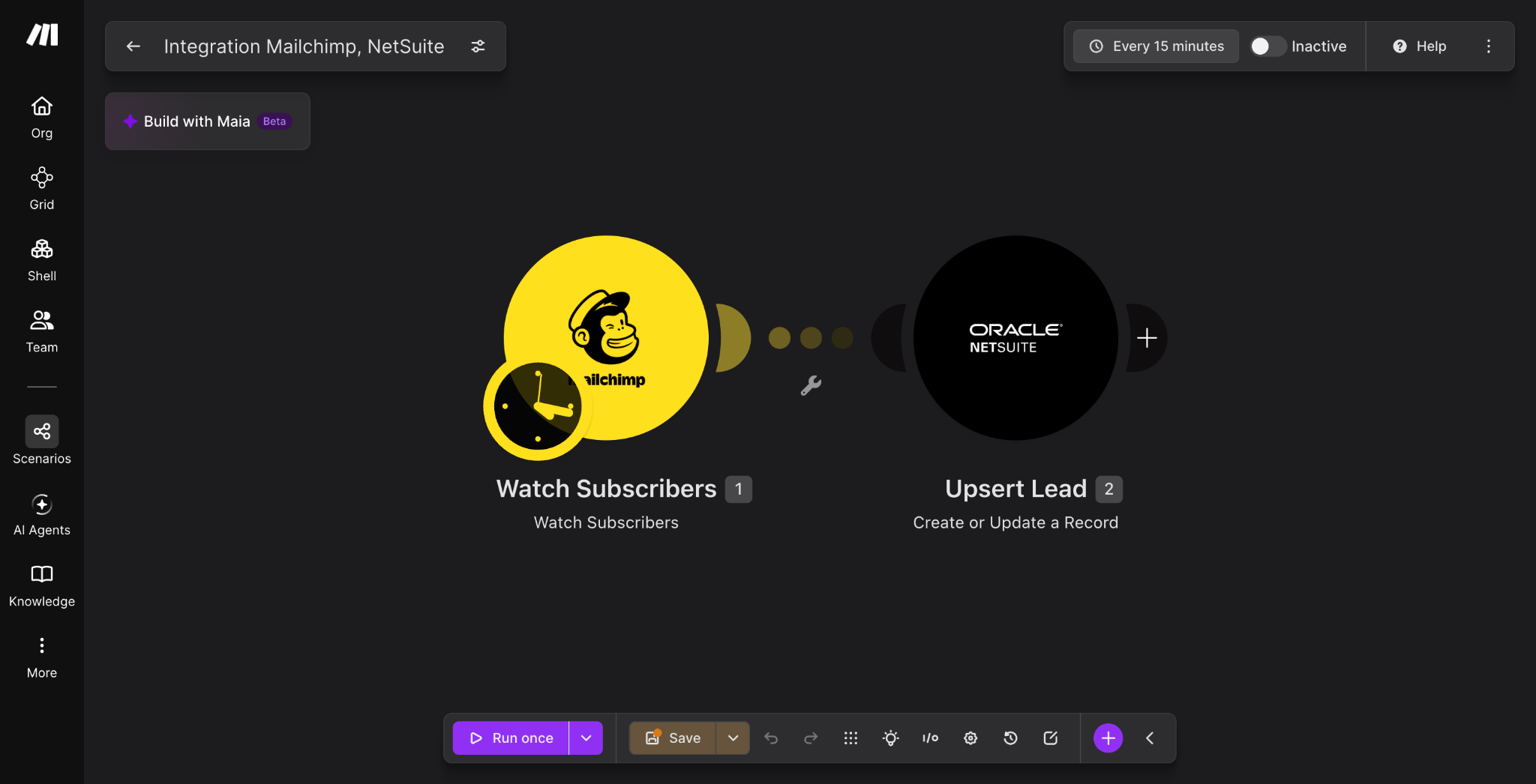
Set the schedule in the scenario settings. Choose an interval appropriate for your needs, e.g. 15 mins, keeping in mind that Mailchimp’s trigger is polling and therefore not instant.
- Test with a new subscriber, then change that subscriber’s details and confirm the intended NetSuite record is updated.
- Also test an existing NetSuite record with the same email but no matching external ID, missing optional fields, status changes, special characters, and invalid NetSuite values. The same-email test matters most: without a matching external ID or email-lookup logic, the upsert may not update the existing record, which is where an email-lookup fallback built with Make’s guide to connecting any API can help.
- Once testing passes, consider isolating this logic as a reusable piece if you’ll need the same pattern elsewhere; Make’s subscenarios feature is built for exactly that.
What outcomes can you expect from a Mailchimp-NetSuite sync?
Once this scenario is live, manual CSV exports between the two systems stop, and duplicate customer records stop appearing because every write checks the external ID first.
Segmentation and follow-up also get faster, since NetSuite reflects current Mailchimp status within one scheduling interval instead of whenever the next export happens to run.
This is worth tracking against your existing email marketing metrics to see the before-and-after.
What’s the next logical build after this one?
This scenario moves data one way, from Mailchimp into NetSuite.
The next logical build closes the loop: writing NetSuite’s customer or lead status back into a Mailchimp merge field or tag, so your segments reflect real account data instead of just email activity.
Open the Scenario Builder and add a second scenario that watches NetSuite records and updates Mailchimp in return, so both systems stay in sync.
Frequently asked questions
Q1: Does Mailchimp have a native NetSuite integration?
No. Mailchimp doesn't offer a built-in NetSuite connector, which is why teams either use a third-party point solution or build a custom scenario in a platform like Make.
Q2: How long does it take to connect Mailchimp and NetSuite in Make?
The scenario itself takes a few hours to configure once your Mailchimp and NetSuite credentials are ready. Most of the time goes into NetSuite-side setup: enabling features, creating the integration record, and assigning the right role.
Q3: Can this sync run bidirectionally?
The scenario in this guide is one-directional, from Mailchimp into NetSuite. A bidirectional sync is possible by adding a second scenario that watches NetSuite records and writes changes back into Mailchimp.
Q4: Which NetSuite record type should marketing contacts map to?
Use Customer for contacts who are already paying customers, and Lead or Prospect for contacts who are still in a marketing or sales pipeline. This decision should be made before building, since it affects which module configuration and permissions you need.
Q5: How do you prevent duplicate records between Mailchimp and NetSuite?
Map a stable identifier, such as the Mailchimp member ID, into a NetSuite external ID field, and use it as the existence check inside "Create or Update a Record". Avoid using a subscriber's name as the identifier, since names change and can be shared across contacts.
Related guides
Tool and strategies modern teams need to help their companies grow.
Operations
HubSpot NetSuite integration: step-by-step 2026 guide
Build a HubSpot NetSuite integration in Make to sync deals, customers, and invoices automatically. Step-by-step guide with troubleshooting tips.

Raife Dowley
June 16, 2026
Sales
Jira Salesforce integration: Connect dev & sales teams: 2026
Build a Jira Salesforce integration in Make to sync cases, issues, and status updates between sales and engineering teams.
Raife Dowley
July 1, 2026
AI
Agent observability 2026: see what your agents are doing
Observe exactly what your AI agents did on every run, which tools they called, and why they made each decision.
Raife Dowley
August 25, 2026