HubSpot NetSuite integration: step-by-step 2026 guide
Build a HubSpot NetSuite integration in Make to sync deals, customers, and invoices automatically. Step-by-step guide with troubleshooting tips.
Connecting HubSpot and NetSuite through Make turns closed-won deals into NetSuite customers and sales orders, removing the manual re-entry between systems.
With 51% of sales leaders with AI already saying tech silos delay or limit their initiatives, reliable data flow between CRM and ERP is the foundation those initiatives run on.
This guide walks revenue operations teams through a working scenario that mirrors the pattern in our HubSpot Salesforce integration guide, adapted for NetSuite.
What you need before integrating HubSpot and NetSuite
Before building the HubSpot NetSuite integration in Make, gather the access, permissions, and field maps that keep the sync reliable from day one.
The checklist below covers the accounts, credentials, and data decisions you need in place before you open the Scenario Builder.
- Make account on a paid plan with enough operations for two-way syncs, and a workspace where you can publish a scenario.
- HubSpot account access with a private app token that grants read and write scopes on deals, companies, contacts, and line items.
- NetSuite API role configured for token-based authentication, with permissions on customers, sales orders, and invoices.
- A field mapping document covering deal stage to sales order status, currency, tax codes, and unique IDs.
- Sandbox environments in both systems, plus the Make integrations catalog open to confirm available modules.
Why manual HubSpot to NetSuite handoffs break revenue operations
Manual HubSpot to NetSuite handoffs break revenue operations because closed deals sit in marketing's CRM while finance waits to create customers, sales orders, and invoices in the ERP.
The result is data entry delays that stretch quote-to-cash by days, plus revenue leakage risk when reps forget to forward deal details, attach the right billing contact, or flag the correct subsidiary and currency.
Revenue operations teams feel this across three friction points. Sales closes a deal in HubSpot, then a finance coordinator rekeys the company, contact, line items, and pricing into NetSuite, often hours or days later.
Field mismatches surface during month-end close, forcing reconciliation work across both systems.
When deal terms change post-signature, updates rarely propagate, leaving NetSuite out of sync with the source of truth.
Beyond clerical cost, manual handoffs distort forecasting and commission calculations.
A structured scenario in Make removes the rekeying step entirely, which is an approach detailed further in this sales automation overview.
The Make scenario that syncs HubSpot deals to NetSuite records
The Make scenario that syncs HubSpot deals to NetSuite records watches closed-won deals in HubSpot, finds or creates the matching customer in NetSuite, and then writes a sales order with line items mapped from deal products.
It runs on a webhook trigger for near-real-time handoffs and uses a fallback scheduled scenario to catch anything missed.
Workflow diagram showing HubSpot deal data flowing through Make scenario into NetSuite customer and sales order records
The trigger module is HubSpot - Watch Deals, filtered to the closed-won stage.
A Router routes to a customer lookup using NetSuite - Search Records, with a fallback NetSuite - Create a Record when no match exists.
Field mapping flows through a Set Variable step so currency, tax codes, and subsidiary IDs stay consistent.
The sync logic ends with NetSuite - Create a Sales Order, attaching the HubSpot deal ID for traceability.
You assemble the whole flow in the visual Scenario Builder, and extend it through custom API connections for any NetSuite endpoint not covered by the prebuilt modules.
How to build the HubSpot NetSuite integration in Make
Building the HubSpot NetSuite integration in Make takes seven configured modules inside one scenario, plus a data store for deduplication.
The flow watches HubSpot for qualifying contact or deal changes, looks up the matching NetSuite customer, creates or updates the record, then writes the NetSuite ID back to HubSpot for future reference.
Open the Scenario Builder and follow the steps below in order.
Step 1: How do you configure the HubSpot trigger?
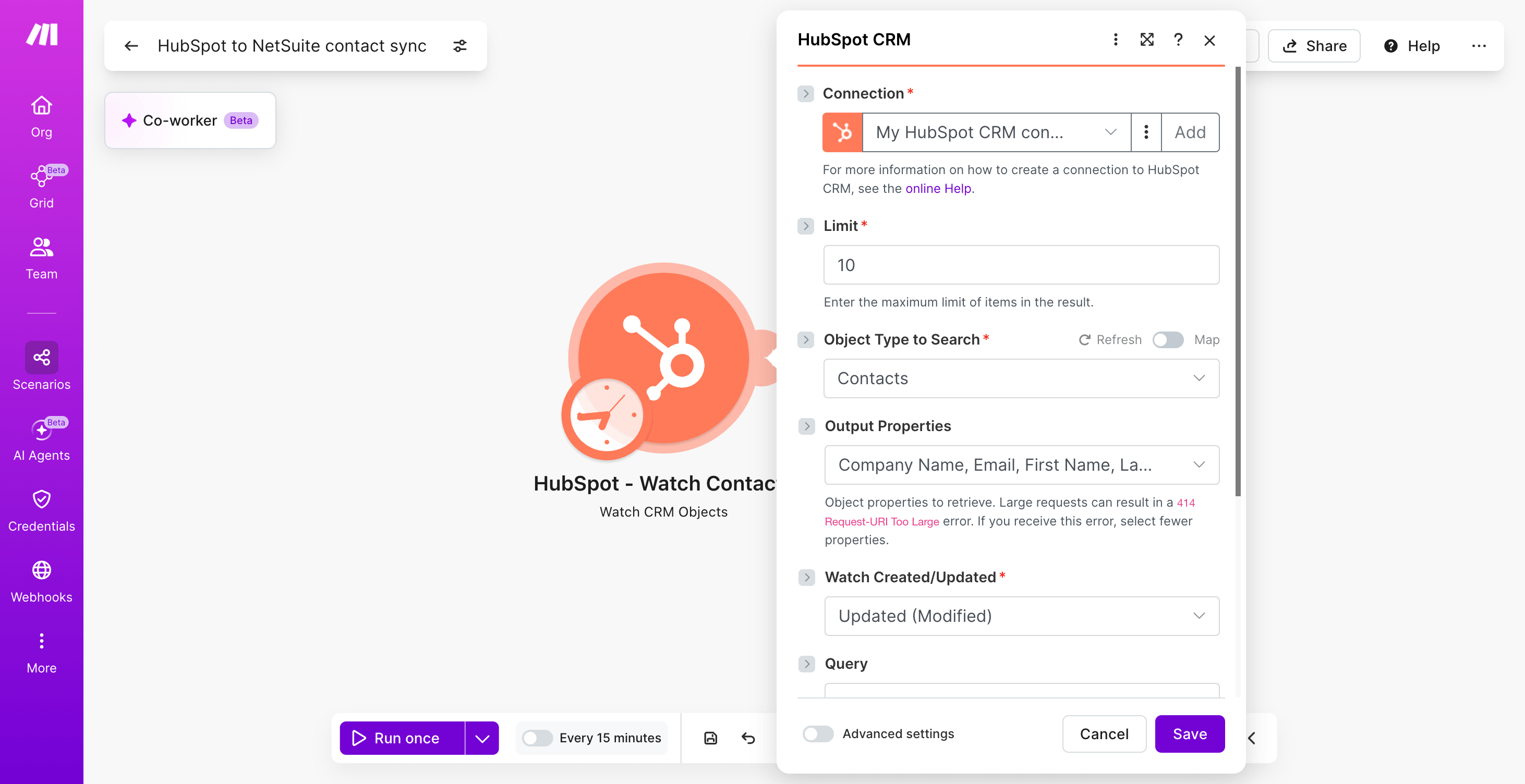
Add the HubSpot CRM - Watch Contacts module as your trigger.
Point it at the HubSpot connection with CRM read scopes and set watch type to Updated so edits flow through, not only new records.
- Set limit to 10 per operation to control throughput.
- Include properties: email, firstname, lastname, phone, company, lifecyclestage, hs_lead_status.
- Schedule the scenario at every 15 minutes for near-real-time sync.
Step 2: How do you filter for sync-ready contacts?
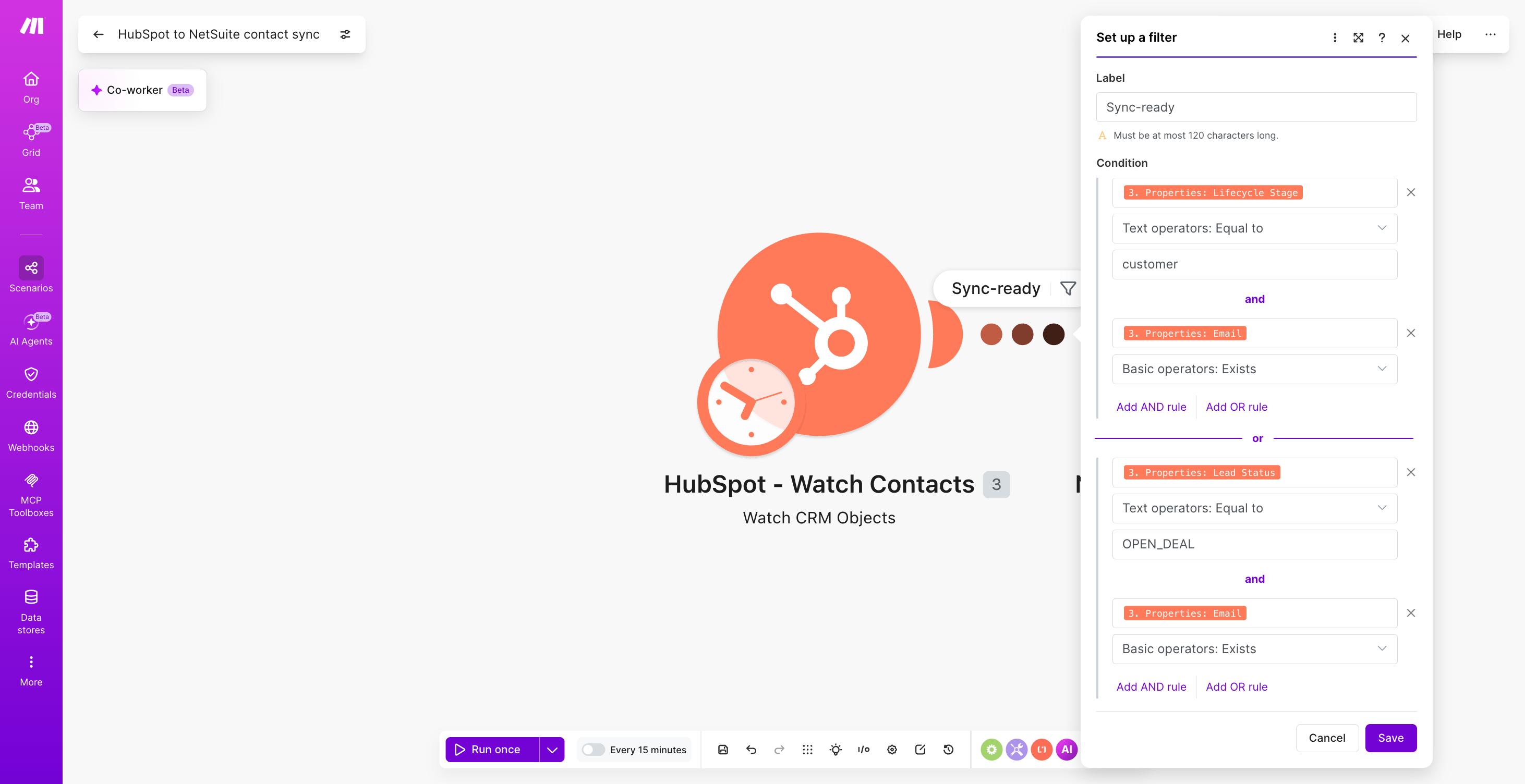
Place a filter between the trigger and the next module so only qualified records reach NetSuite.
Set the condition to lifecyclestage equals customer OR hs_lead_status equals OPEN_DEAL, and email exists.
Step 3: How do you dedupe with a data store lookup?
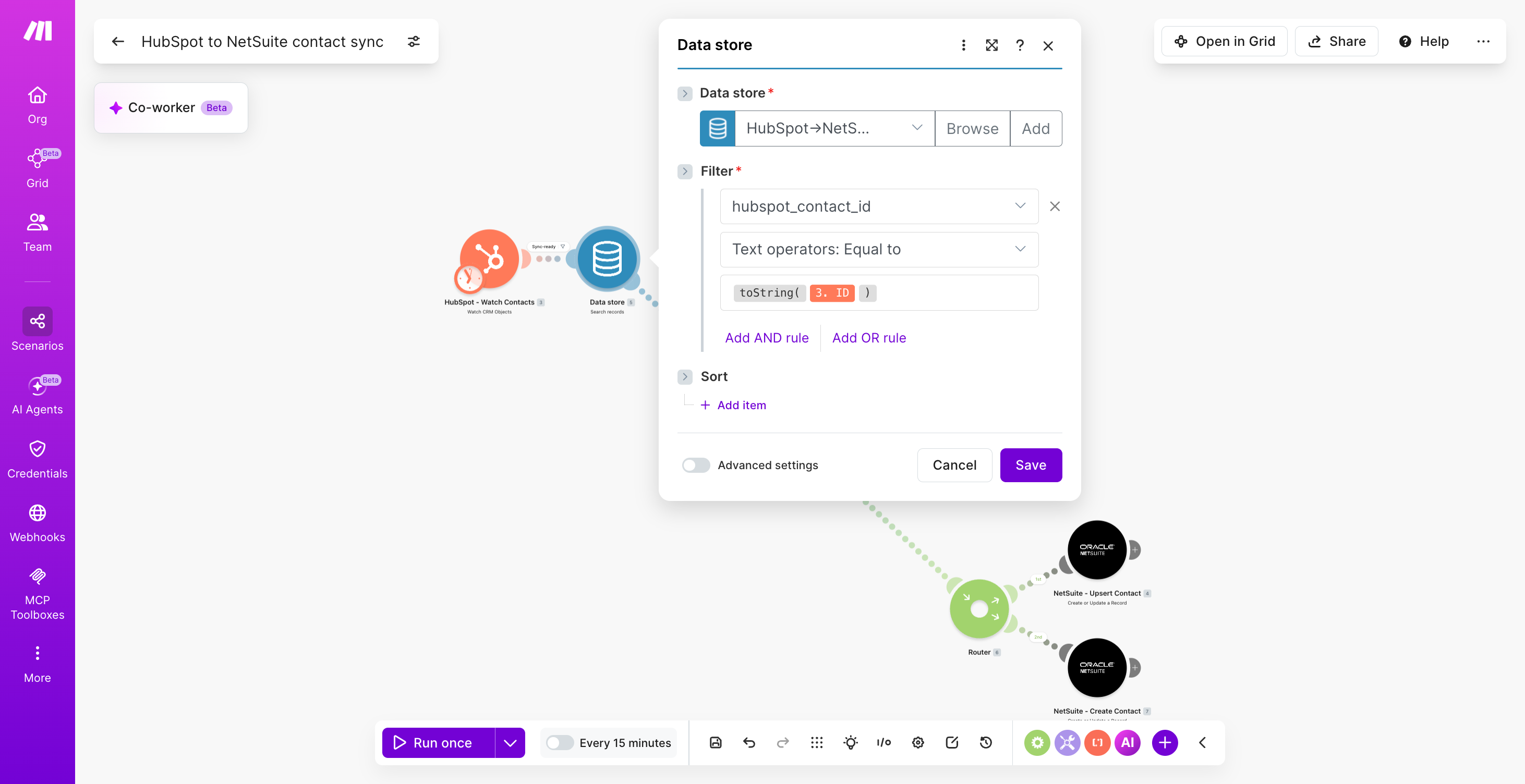
Add the Data store - Search Records module keyed on HubSpot contact ID.
If a record exists, the bundle carries the existing NetSuite internal ID; if not, the scenario proceeds to create one.
PRO TIP: Use a Make data store with HubSpot vid as the primary key and netsuite_internal_id as a secondary field. Pair it with a Router that routes based on whether the Data store - Search Records returned a match. This stops duplicate NetSuite customers when HubSpot fires repeated webhooks during enrichment, which native middleware cannot prevent without custom logic.
Step 4: How do you route create vs update with a Router?
Insert a Router with two routes: one for new customers (no data store match) and one for updates (match found).
Each route hits a different NetSuite module.
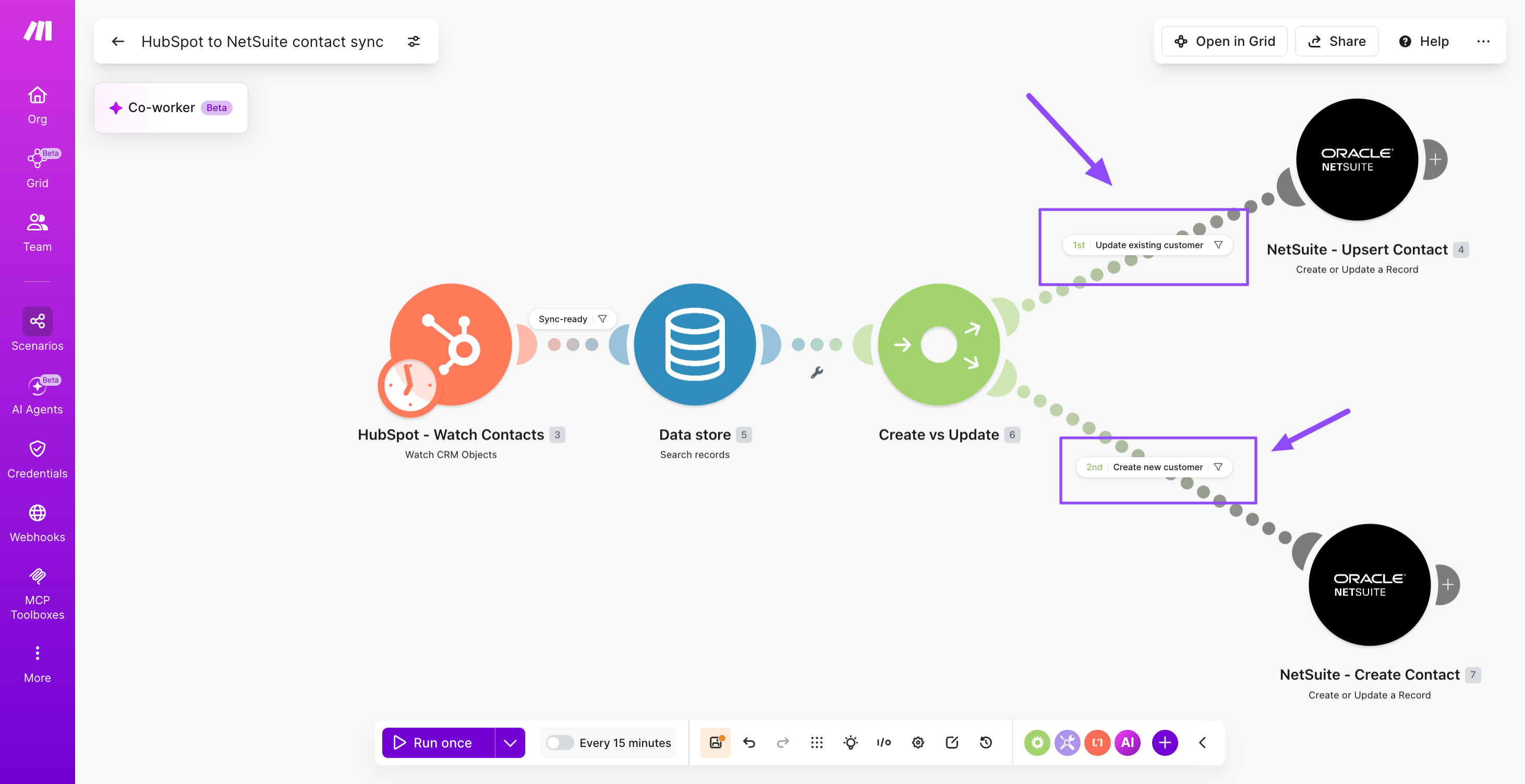
Step 5: How do you map fields to NetSuite?
On the create route, add NetSuite - Create a Record (record type Customer). On the update route, add NetSuite - Update a Record.
Map firstname to firstName, lastname to lastName, email to email, company to companyName, phone to phone, and lifecyclestage to a custom entity field.
The LLM integration tutorial covers how to enrich missing fields with AI before mapping.
Step 6: How do you write the NetSuite ID back to HubSpot?
Add HubSpot CRM - Update a Contact and write the returned NetSuite internalId into a custom property called netsuite_customer_id.
Then update the Data store - Add/Replace a Record with the new mapping for future runs.
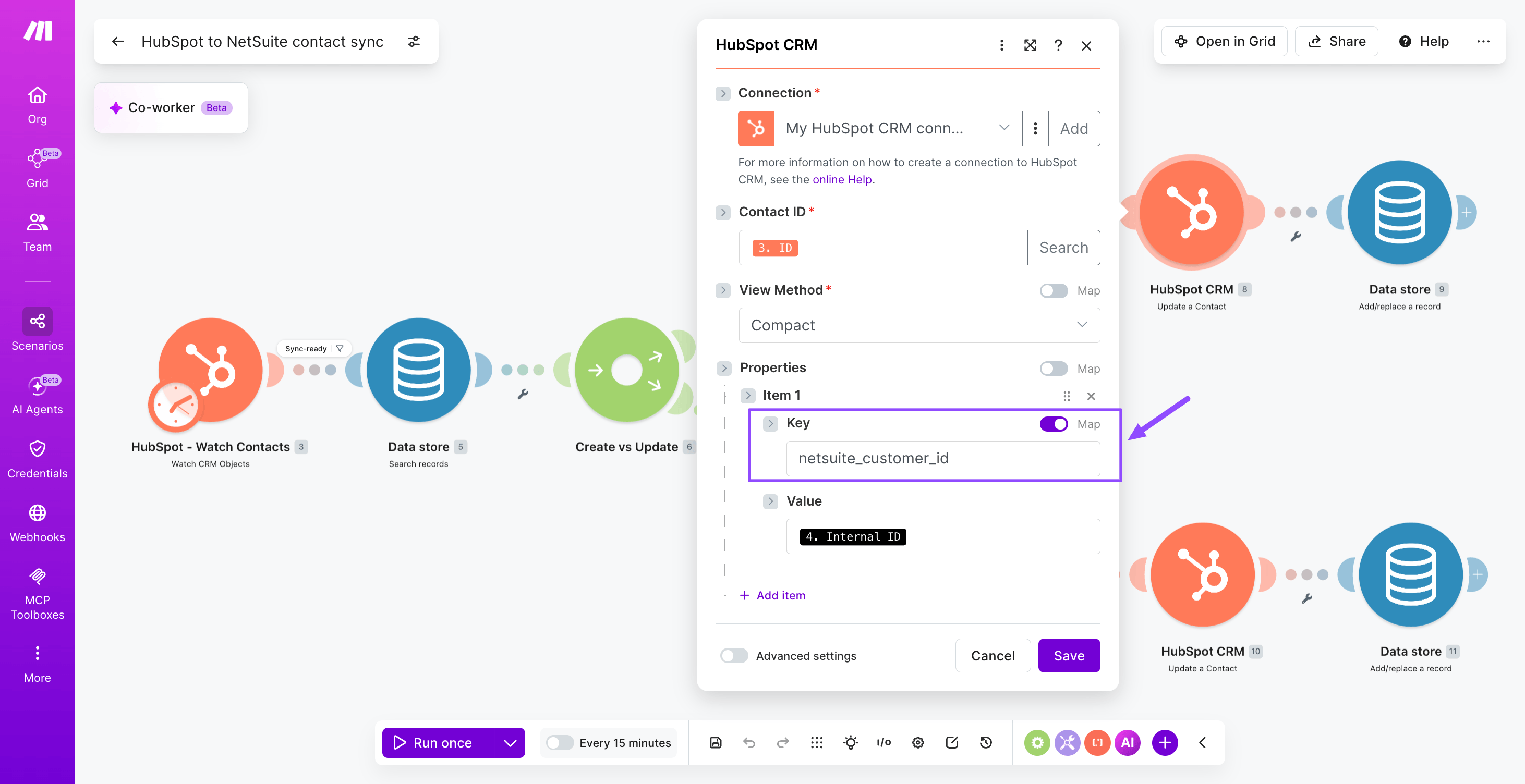
Step 7: How do you add error handling and modularize?
Right click each NetSuite module and add a Break error handler with three retries.
Then refactor the create and update routes into the subscenarios feature so other scenarios can call them.
PRO TIP: Wrap the NetSuite connection in a Set Variable that holds the subsidiary ID per environment, so sandbox and production share one scenario.
How to test and troubleshoot the integration
Test the HubSpot NetSuite scenario by triggering a controlled deal change in a sandbox before enabling production sync.
Run the scenario manually with a single test deal that matches your closed-won criteria, then open the execution log to inspect each bundle as it flows through every module.
The execution log shows input and output payloads per operation, which is where most mapping defects surface.
Confirm the NetSuite - Create a Record step returns a valid internal ID, then verify the customer and sales order appear correctly in NetSuite.
For patterns on validating finance scenarios end to end, this finance automation example shows comparable verification logic.
Common issues to watch for during testing and when you check execution log output:
- Authentication failures on the NetSuite - Search Records connection caused by expired token-based credentials.
- Duplicate customer records when the email match filter on HubSpot - Watch Deals misses casing differences.
- Currency or subsidiary field mismatches rejecting the NetSuite - Create a Record payload.
- Rate limit errors during bulk backfills, resolved by lowering parallel operation count.
Outcomes you can expect from a HubSpot NetSuite sync
A HubSpot NetSuite integration built in Make reduces manual data entry and improves accuracy between sales and finance systems.
Sales reps stop rekeying closed-won deals into NetSuite, finance stops chasing missing tax IDs or billing addresses, and quote-to-cash cycles shorten because customer and order records appear in NetSuite within minutes of a deal closing in HubSpot.
Before and after comparison showing manual CRM ERP work versus automated HubSpot and NetSuite sync outcomes.
Teams running this scenario typically report cleaner master data, fewer duplicate customers, and faster month-end close because invoices tie back to verified deal sources.
For comparable operational gains, see the Perk success story, where back-office automation removed repetitive handoffs and freed analysts for higher-value work.
Variations and next steps for HubSpot NetSuite workflows
The base scenario for HubSpot to NetSuite sync extends naturally into adjacent revenue operations workflows, from invoice writeback to multi-subsidiary routing and AI-assisted enrichment.
Each variation reuses the same core connection pattern, swapping triggers, filters, or destination modules to fit a different business outcome.
Teams ready to go further can layer agent logic on top, using the agentic loop concept to let an AI reason over deal context before writing to NetSuite.
Where to next?
A scenario that syncs HubSpot deals to NetSuite customers and sales orders turns a brittle handoff into a reliable revenue pipeline.
With HubSpot - Watch Deals, NetSuite - Search Records, a Router, and NetSuite - Create a Record, finance receives clean data the moment a deal closes, sales sees billing status without leaving the CRM, and duplicates stop multiplying across systems.
Every step is visible in Make's execution log: which records matched, which were created, and which failed, with its run history making troubleshooting instant.
Extend it with invoice writebacks, line-item mapping, or quote approvals when your requirements grow.
Open the Scenario Builder and get started for free.
Frequently asked questions
Q1: Does HubSpot have a native NetSuite integration? HubSpot offers a paid native NetSuite connector through its Operations Hub, but it covers a fixed set of objects and field mappings. Make gives you full control over which HubSpot deals, contacts, and companies sync to which NetSuite records, with custom field logic.
Q2: How long does it take to connect HubSpot and NetSuite in Make? A working HubSpot to NetSuite scenario typically takes a few hours to build once your NetSuite token-based authentication and HubSpot private app credentials are ready. Add time for field mapping, deduplication logic, error routes, and end-to-end testing against sandbox records.
Q3: Can I sync NetSuite invoices back into HubSpot? Yes. Add a second scenario using NetSuite - Search Records for invoices, then push amounts and statuses into a custom HubSpot deal property or a custom object via HubSpot - Update a Deal. This closes the loop for revenue reporting.
Q4: What HubSpot object should map to a NetSuite customer? Map the HubSpot company object to the NetSuite customer record, since both represent the billing entity. Keep contacts mapped to NetSuite contacts under that customer. Deals map to sales orders or opportunities depending on whether you invoice from NetSuite.
Q5: How do I prevent duplicate records between HubSpot and NetSuite? Use a deterministic external ID – usually the HubSpot company ID – stored on a custom NetSuite field. Before creating, run NetSuite - Search Records on that field, then Router to update existing matches or create new customers, never both.
Related guides
Tool and strategies modern teams need to help their companies grow.
Operations
Jira GitHub integration: How to link commits & issues in 2026
Stop manually copying commit hashes. Learn how to automate your engineering workflow and keep Jira boards updated in real time.

Raife Dowley
June 15, 2026
How-to guides
How to build an LLM integration: 2026 guide
A scenario-level walkthrough of connecting an LLM to your business systems with routing, validation, and operational guardrails.
Raife Dowley
May 27, 2026
How-to guides
Salesforce Outlook integration: How to sync emails and calendars in 2026
Build a Make scenario that keeps Salesforce contacts, emails, and calendar events in sync with Outlook, no manual logging required.
Raife Dowley
June 12, 2026