AI SDR: how it works, benefits & examples
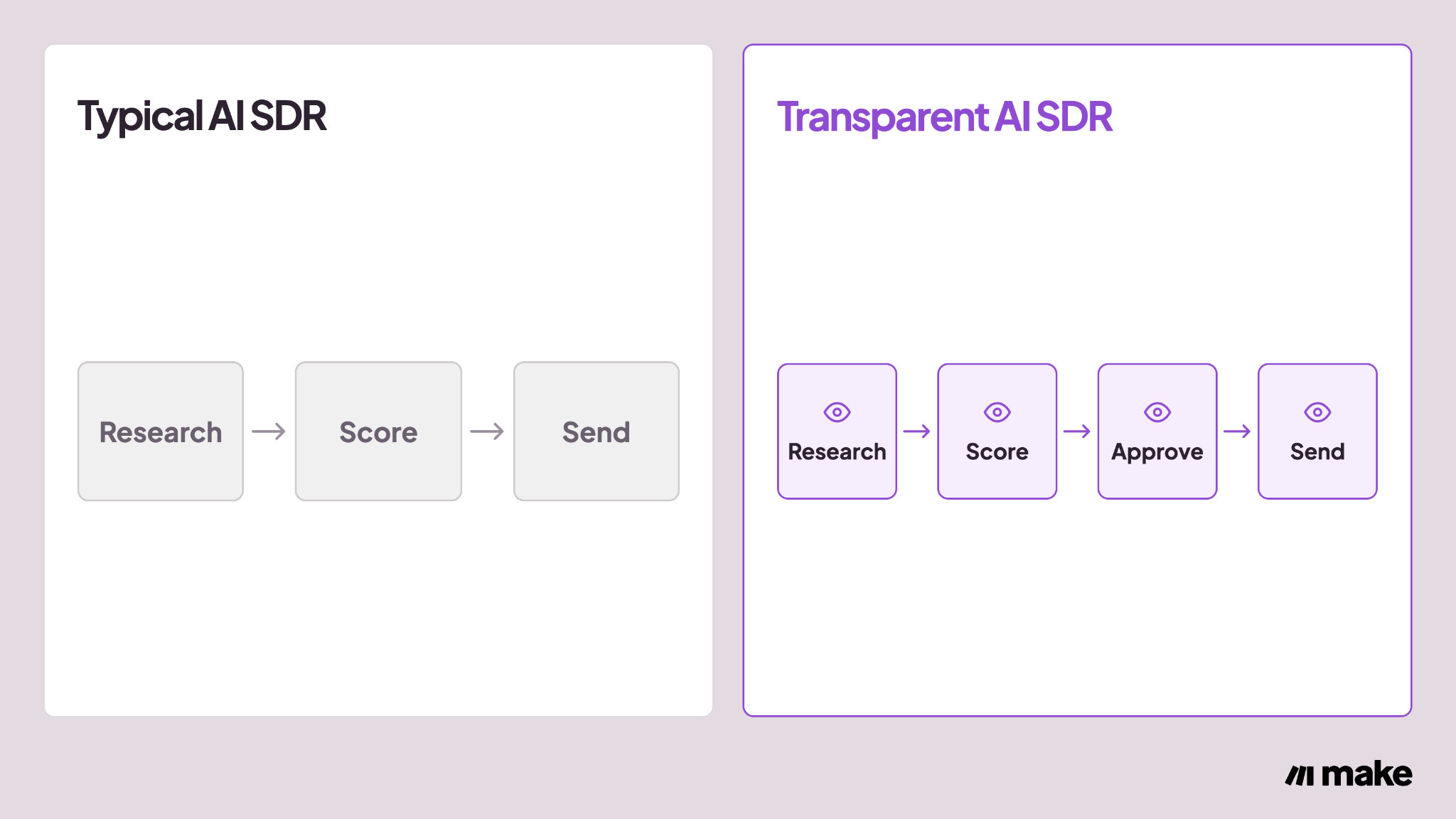
Most AI SDR tools hide how they score leads. See how a transparent version works, with human approval before anything is sent.
A human sales development representative (SDR) spends the day researching prospects, checking whether they fit, and sending the first message. An AI SDR can take over that work, but most versions on the market never show why they qualified or contacted a given lead.
This article explains what an AI SDR actually does, where it genuinely helps, and where the approach breaks down without oversight.
It also shows how to build one in Make that keeps the speed and consistency benefits while adding a visible qualification score and a human approval step before anything sends.
Key takeaways
- An AI SDR is software that uses AI to handle top-of-funnel sales work: researching prospects, scoring how well they fit, and starting outreach.
- Most AI SDR tools qualify and contact leads without showing their reasoning. A 2026 survey found only 17% of workers who use AI at work would trust it to act with minimal human oversight.
- An AI SDR handles top-of-funnel tasks like research, scoring, and first outreach well, but it still needs a human for discovery calls, objection handling, and closing.
- A transparent AI SDR built in Make can display its qualification score on the CRM record and route uncertain leads through a Slack approval step before anything is sent.
What is an AI SDR?
An AI SDR is software that uses artificial intelligence to do the work a human SDR normally does at the top of the sales funnel. That work includes researching a prospect, qualifying them against a set of criteria, and starting outreach such as an email or a message.
The term overlaps with AI BDR (business development representative) and the broader label AI sales agent, and vendors use the three terms inconsistently.
In practice, an AI SDR and an AI BDR both work at the top of the funnel, usually split by inbound versus outbound.
An AI sales agent, by contrast, can cover any stage of the sales process, including demos or renewals. The bullet list below lays out the practical difference between the three terms.
- AI SDR: automates top-of-funnel research, qualification, and first outreach, typically for inbound leads.
- AI BDR: performs similar top-of-funnel work, typically for outbound prospecting.
- AI sales assistant: supports a human rep at any stage, such as drafting a follow-up or summarizing a call, without owning the qualification decision.
The "AI" part is doing specific work.
It reads a prospect's company data and recent activity, drafts a message in the brand's voice, and decides whether that prospect clears a qualification bar before anything goes out.
Using AI this way is no longer a niche approach. A 2026 BDR report from 6sense found that 99% of BDRs reported using AI in their role in 2026, up from 62% in 2025.
For a closer look at what this looks like once built, Make's how-to guide on the AI sales agent walks through one end-to-end.
What are the benefits of an AI SDR?
Because an AI SDR runs around the clock and applies the same criteria to every prospect, it changes four things about top-of-funnel work.
- Faster first response: an AI SDR can research and reply to a new inbound lead much sooner than a rep working through a queue of other tasks.
- Consistent qualification: every prospect is checked against the same criteria, so two similar leads get the same qualification decision regardless of which rep would have picked them up.
- Round-the-clock coverage: leads that arrive outside office hours get a first response and initial research instead of sitting untouched until morning.
- More time for human judgment: reps spend less time on repetitive research and more time on the calls and objections that need a person.
These benefits only hold up if the underlying data is accurate and logged where the team can actually see it. Make's sales automation guide covers how research, scoring, and logging fit together as one workflow, not a single disconnected agent.
Similarly, every qualification decision an AI SDR makes is only useful if it lands in the system reps already use.
Make's HubSpot Salesforce sync guide shows how to keep that data consistent when a company runs both CRMs at once.
How does an AI SDR work?
Delivering those benefits consistently depends on a specific sequence of steps.
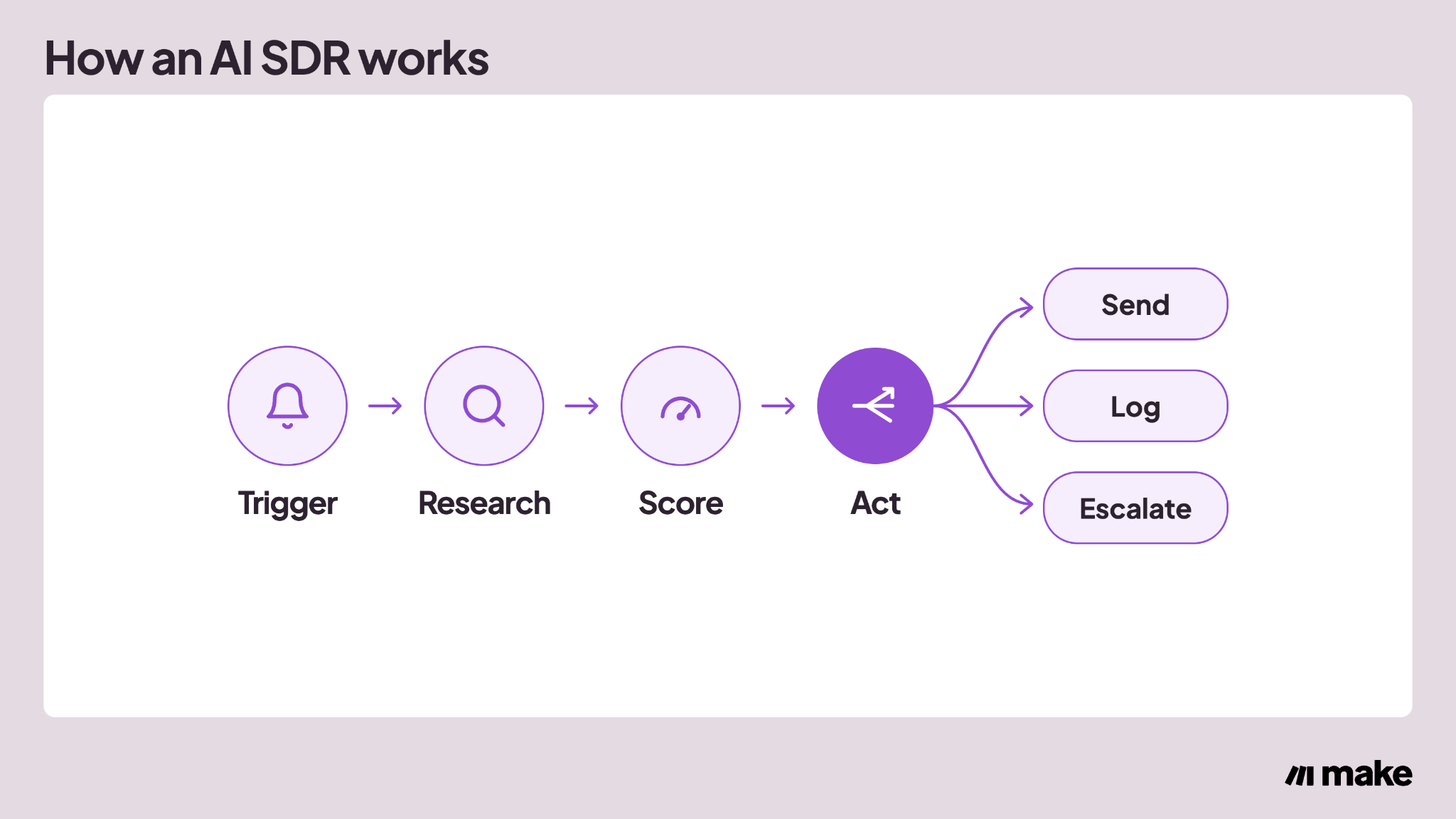
An AI SDR follows roughly the same sequence regardless of vendor, even though the underlying models differ, and four stages turn a new signal into either a qualified lead or a rejected one.
It watches for a trigger
The process starts with a trigger: a new inbound reply, a form submission, or a signal such as a funding round or a hiring surge at a target account. Nothing happens until one of these events fires.
It researches the prospect
Once triggered, the AI SDR pulls data on the prospect and their company, such as role, company size, and recent activity. This research step is what separates an AI SDR from a basic autoresponder, since the message that follows is built on up-to-date information instead of a generic template.
It scores and qualifies the lead
The AI SDR then checks the prospect against a defined ideal customer profile (ICP): the company size, industry, and role that tend to convert. It also weighs signals like engagement and intent.
This produces a qualification score, a rating that states how well the prospect matches, rather than a hidden yes-or-no decision.
It drafts outreach or logs the result
Depending on the score, the AI SDR either drafts a personalized message and sends it or logs the lead in the CRM for a rep to review. Some tools also book a meeting directly, using calendar availability pulled through a connected scheduling tool.
In Make, this decision logic is handled by AI Agents, the feature built for this kind of multistep agent. Make's AI Agents documentation explains how it chooses which connected tool to run for a given lead.
What are the risks and limitations of AI SDR?
The scoring and sending steps above are also where things go wrong if nobody is watching. An AI SDR's biggest risk is not inaccuracy.
It is making a qualification call, and acting on it, without anyone able to see why. This is not a hypothetical concern.
A 2026 AI oversight survey asked 1,000 U.S. workers across different functions, who use AI in their jobs whether they would trust it to act with minimal human involvement. Only 17% said yes.
The table below lists the three risks that come up most often with AI SDRs, what causes each one, and the specific control that addresses it.
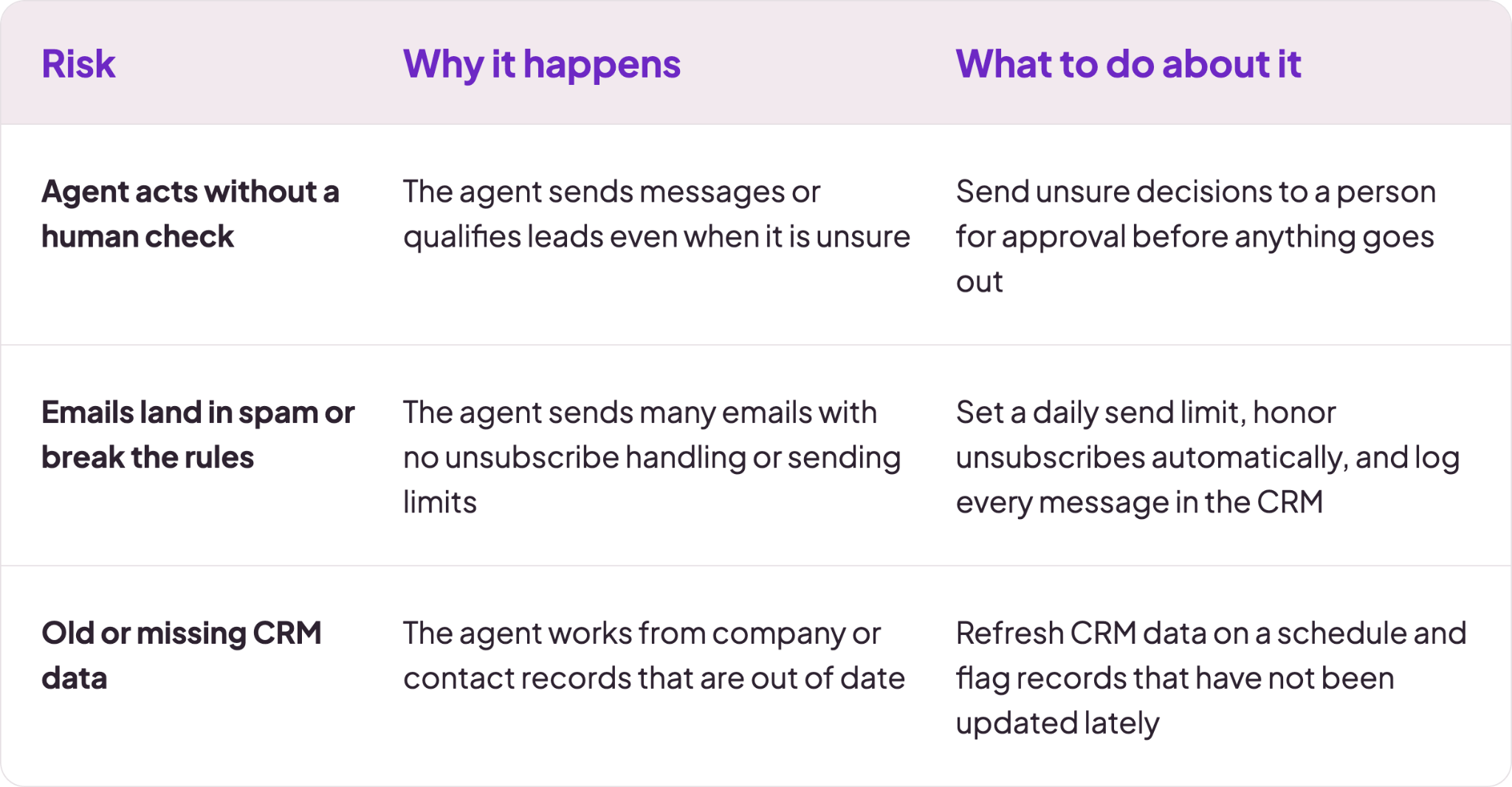
Make's guide to AI marketing agents flags a version of the third risk. Stale CRM data can lead an agent to route a churned account to a top rep as if it were still active.
The AI SDR fix follows the same logic: keep the source data current and give the agent a way to flag uncertainty to humans instead of guessing.
Keep in mind that an AI SDR is also not built for the rest of the sales cycle. It can score and qualify a lead and start a conversation, but discovery calls, pricing negotiations, and closing still need a human in the loop.
So, define a clear handoff point, such as a qualification score threshold, where the AI SDR stops and a rep takes over.
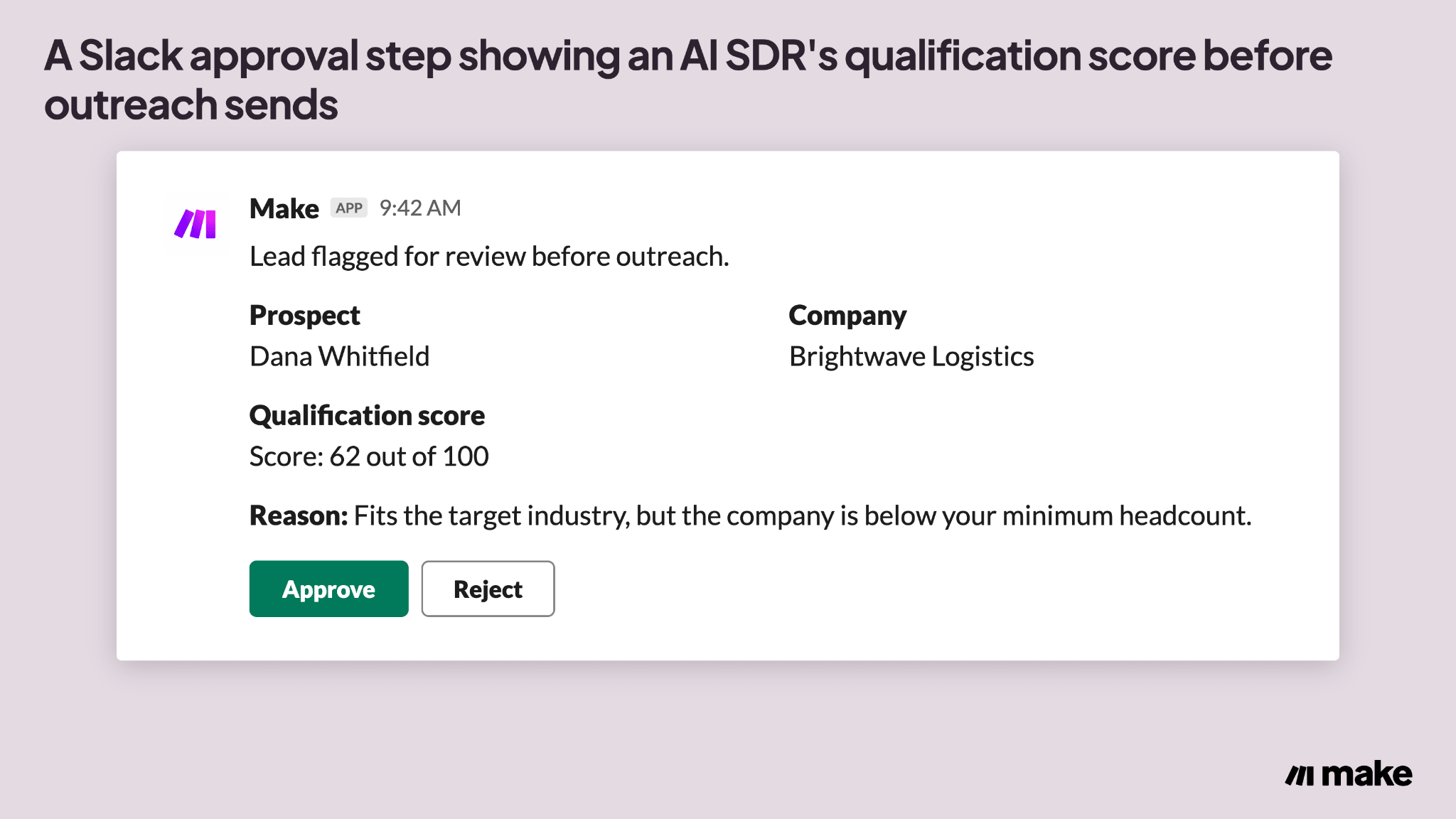
The image below shows what this may look like in practice, where your AI SDR agent sends updates to a private Slack channel you created.
AI SDR examples
With risks managed, it helps to see what a well-scoped AI SDR actually looks like in practice. The four patterns below are examples of what teams are building today, not an exhaustive list.
Inbound reply and triage
When a new message arrives in a sales inbox, the AI SDR reads it, drafts a reply, and checks the prospect against the ICP.
Qualified prospects get meeting times right away, and everyone else gets logged for a rep to review.
Outbound prospect research
For outbound prospecting, the AI SDR works from a target list built around signals such as a recent funding round or a hiring surge.
It researches each account, drafts a personalized first message, and queues it for sending or approval.
Make's prospecting automation use case covers this same pattern, built around freeing reps from routine research and follow-up.
Intent-based qualification
Some AI SDRs qualify leads earlier in the funnel, scoring website visitors or marketing-qualified leads before a rep ever sees them.
A lead that revisits a pricing page several times in the same week, for example, gets a higher intent score than one that reads a single blog post.
Follow-up and reply handling
An AI SDR can also keep a conversation going across multiple interactions. For a single rep, it’s easy to overlook prospect communication when managing dozens of threads at once. An AI SDR sends a scheduled follow-up if a prospect goes quiet, and flags the thread for a human once the prospect asks a question the agent is not confident answering.
How Make helps you build a transparent AI SDR
The examples above show what an AI SDR can do well. Making that reliable long-term means closing the specific limitations covered earlier.
Make gives an AI SDR a visible qualification score, a human approval step before anything sends, and a direct line to the CRM data it depends on. Those three pieces are what keep those earlier risks from applying the same way they do to a closed, vendor-built AI SDR.
A trigger module watches for a new lead, such as a form submission or a CRM record change. For the full build, step by step, Make’s guide to building AI agents covers connecting tools, testing, and refining an agent’s behavior beyond this specific sales pattern.
AI Agents researches the prospect using whatever connected tools it has been given, such as a data enrichment app or the CRM itself. Because that research pulls live data instead of a static list, the stale-record risk from earlier doesn’t carry over the same way.
The agent also writes its qualification score directly to the CRM record, so it is visible to anyone who opens that lead instead of sitting in a log file. That visibility is the direct fix for the autonomy risk covered earlier: the score and its reasoning are visible before anyone has to ask for them.
- Trigger: a new lead appears in the CRM or a form is submitted.
- Research and score: An AI agent can pull prospect data and writes a visible qualification score to the record.
- Route: a Router sends high-confidence leads to outreach and flags the rest for review.
- Approve: a Slack > Create a Message step asks a rep to approve or reject before anything sends.
A Router splits the scenario this way: high-confidence leads move straight to outreach, and everything else routes to a review step.
For leads that need review, a Slack > Create a Message module posts the lead, its score, and the reasoning behind the score to a sales channel.
A rep approves or rejects the message there, before anything sends. Make’s Slack integration handles that posting step itself, routing the request to whichever channel or person needs to see it.
Make’s Human in the Loop app modules are built for exactly this kind of checkpoint: they generate a review link and only continue the workflow once a person approves, adjusts, or cancels the request.
This same pattern works with whichever CRM a team already uses. Make’s Salesforce integration connects the agent’s research and scoring directly to CRM records, so a rep sees the same score the agent used to make its decision.
For a team that wants to adjust the agent’s qualification criteria without rebuilding the scenario, Make’s conversational AI coworker Maia can make that change from a plain-language request. Make’s Maia page explains how that works.
Ready to see your AI SDR's reasoning before it sends?
The case for an AI SDR was never really about autonomy for its own sake. It is about covering the top of the funnel without losing the ability to see, and correct, what the system decided.
Open Make's Scenario Builder, add a Make AI Agent to a lead-intake scenario, and route the first version through a Slack approval step before it contacts a real prospect.
For a look at what a build like this can become, Make's sales success stories cover three companies that rebuilt parts of their sales process with automation.
Frequently asked questions
Q1: Will AI replace human SDRs?
No. An AI SDR (sales development representative) handles top-of-funnel research, qualification, and first outreach, but discovery calls, objection handling, and closing still need a human rep.
Q2: Do AI SDRs actually work?
Yes, for the tasks they are built for: research, qualification, and first-touch outreach. Results vary by vendor and by how well the underlying data and qualification criteria are set up.
Q3: What's the difference between an AI SDR and an AI BDR?
An AI BDR (business development representative) and an AI SDR (sales development representative) both automate top-of-funnel work. Teams often use AI SDR for inbound-focused work and AI BDR for outbound prospecting, though vendors use the terms inconsistently.
Q4: Can an AI SDR make cold calls?
Some AI SDR tools can place or assist with calls, but most focus on email, chat, and other text-based outreach. Voice-based outreach raises compliance considerations that text-based outreach does not.
Q5: Does an AI SDR integrate with a CRM?
Most AI SDR tools sync with a CRM system such as Salesforce or HubSpot, logging research, scores, and outreach history on the lead record. Confirm the specific integrations a vendor supports before buying, since coverage varies.
Q6: How much does an AI SDR cost?
Pricing varies widely by vendor, by how many contacts or credits are included, and by how much of the workflow is automated. Request current pricing directly from a vendor rather than relying on published figures, which change often.
Related blogs
Tool and strategies modern teams need to help their companies grow.
AI
What is sales automation? A 2026 guide with examples
The operational layer that runs lead routing, follow-ups, and CRM updates, explained for revenue operators and builders who want to ship one.

Raife Dowley
June 10, 2026
AI
7 AI automation examples you can build in Make (2026)
Seven real AI automation examples, each paired with a Make scenario template so you can clone the exact module chain instantly.
Raife Dowley
September 24, 2026
AI
5 best AI automation tools for teams in 2026: Full breakdown
A hands-on comparison of five leading AI automation platforms, covering features, pricing, and the best fit for your team's workflows.
Raife Dowley
August 4, 2026