Apr 30, 2026 | 7 minutes
Make vs Zapier: Why users switch to Make
What are the differences between Make and Zapier that lead Zapier users to switch to Make’s AI automation? Learn how these platforms fare against each other.
Zapier is often the tool of choice if you're new to automation, but building in restricted, predefined ways can quickly lead to frustration.
In the end of the day, it all comes down to this:
You can force-fit the way you work to match your automation tool's constraints, or you can have the tool seamlessly mold around your processes.
That’s where Make comes in. The agile platform lets you manage all automation and AI agents in a single visual landscape, offering a glass-box view into complex logic. It lets any team with advanced automation needs build fast without breaking customers’ trust. This comparison examines the differences that matter most to businesses seeking value from automation and AI.
Make and Zapier: What are the differences?
From the visual aspect and automation capabilities to AI, costs, and support, here’s how Make differs from Zapier:
Visual tool with a transparent automation logic
Make takes a visual-first approach to workflow automation. Your automations (scenarios) are depicted on a visual canvas as distinct app modules. Clearly visible app connections help you understand how the data flows across your scenario.
You can drag and drop the modules anywhere in the builder and organize them in clusters to stay organized. This is especially useful as your scenarios grow in size and complexity.
Make's drag-and-drop Scenario Builder also includes real-time data flow animations, giving immediate visual feedback on what your automation is doing at every step. This adds a layer of transparency that turns hidden logic into a glass-box experience, helping teams understand exactly how the automation works.
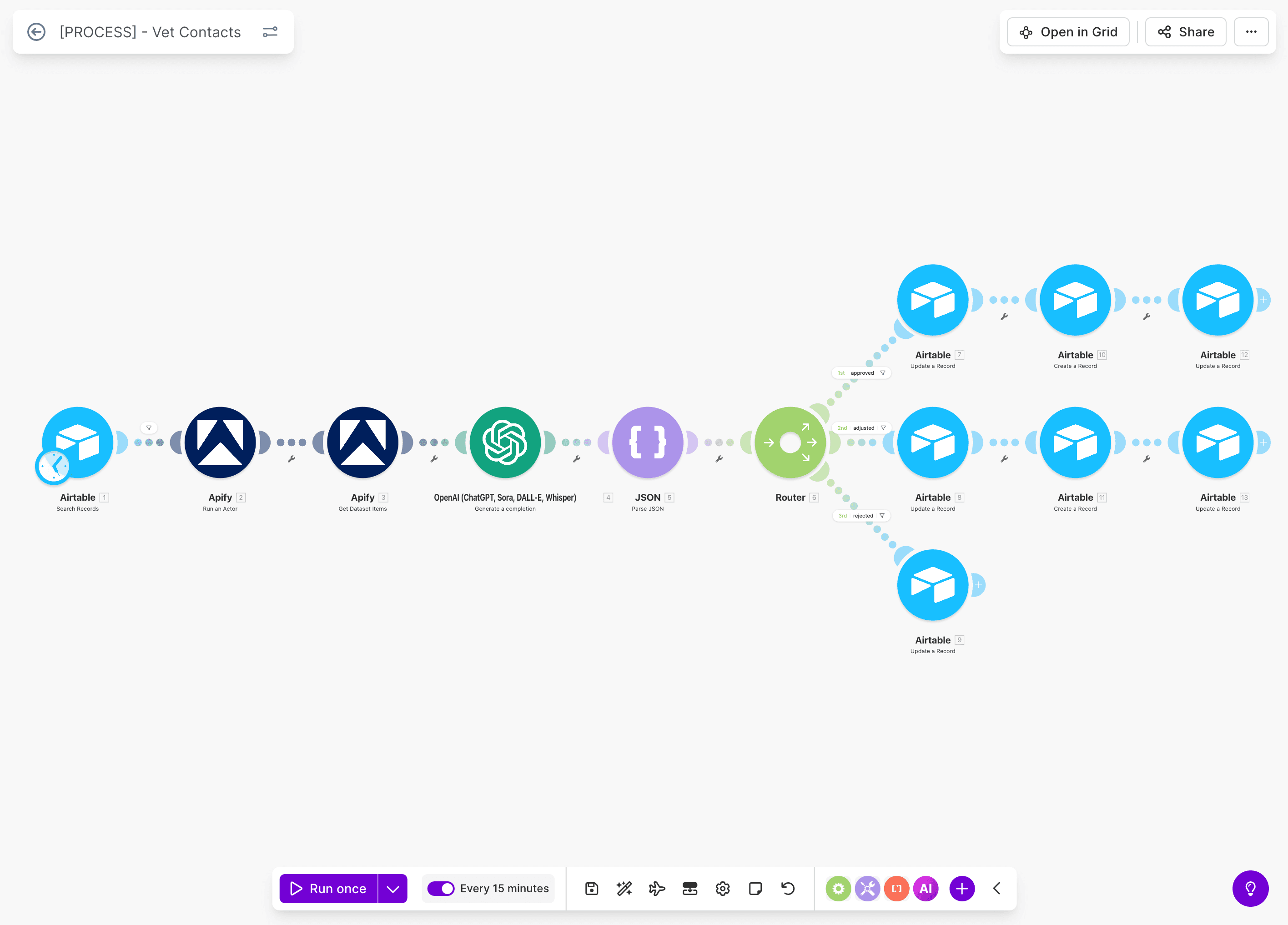
For users needing custom logic, the platform provides no-code and low-code options for conditional logic, loops, and data transformations. This approach serves beginners while speeding up output for advanced users.
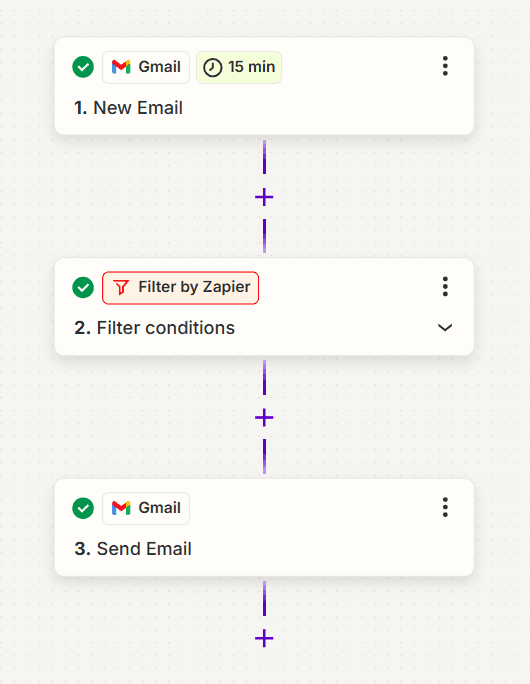
In contrast, Zapier's automations editor is more linear, rigid, and table-like. You can move your Zaps' branches around, but less flexibly. As a result, visualizing your automation's data paths and getting buy-in from business stakeholders can be more challenging.
Zapier's step-by-step interface is geared toward straightforward automations but becomes a hindrance for complex projects.
Automation capabilities comparison
Make supports 3,000+ app integrations, of which 560 are AI apps, and generally provides roughly double the number of preset actions per app compared to Zapier. While Zapier lets you integrate 8,000+ apps and is possibly the most-connected AI automation platform out there.
Zapier's integration strength lies in covering the long tail of applications: if a tool has an API, there's a good chance Zapier has integrated it. However, teams building complex workflows often encounter limitations in what each integration can accomplish.
The "Webhooks by Zapier" feature does allow connections to custom APIs to address this, though users report that this customization is required too often, as many integrations are missing key functions.
Automate more actions in virtually any app
Simply looking at the number of apps doesn't paint an accurate picture of the range of actions you can automate.
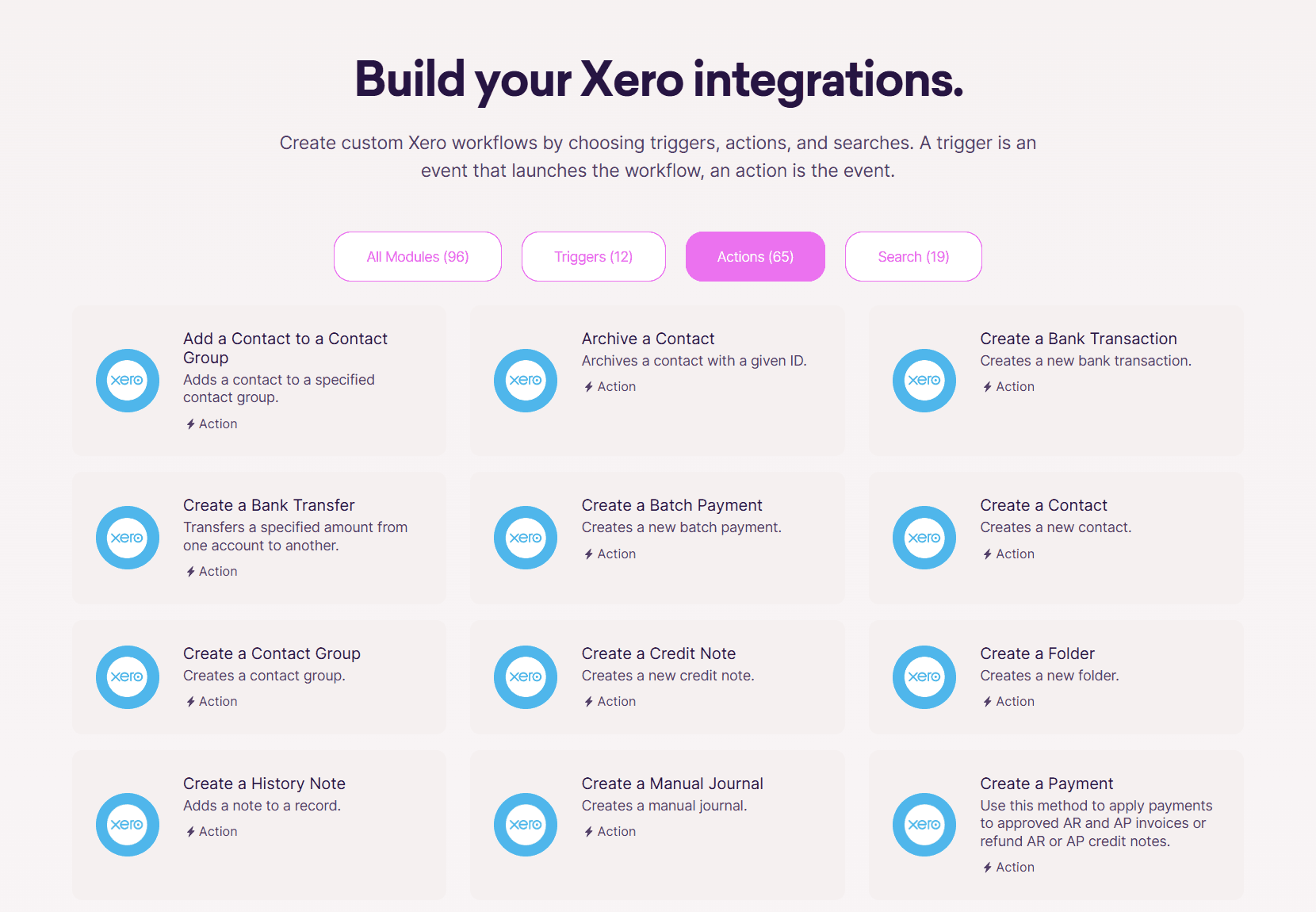
Make generally provides more pre-existing actions per app than Zapier. In other words, Make lets you automate more types of app actions. For instance, Zapier supports only 25 actions in Xero while Make supports 84, including searches. These additional supported actions include downloading an invoice, deleting a purchase order, and getting information on a payment.
Executing unsupported actions in Zapier might involve making API requests, a beta feature available in a much smaller pool of apps.
On top of this, Make's HTTP module lets you connect virtually any app that has made its API available, even if Make doesn't officially support it. On paid plans, the Make Code app also supports custom Python and JavaScript, while Enterprise plans include Custom Functions for advanced data manipulation that can be applied inline.
Here are more key Make capabilities Zapier lacks:
Upcoming natural language automation and AI agents building via Maia by Make – a tool that will further simplify AI automation.
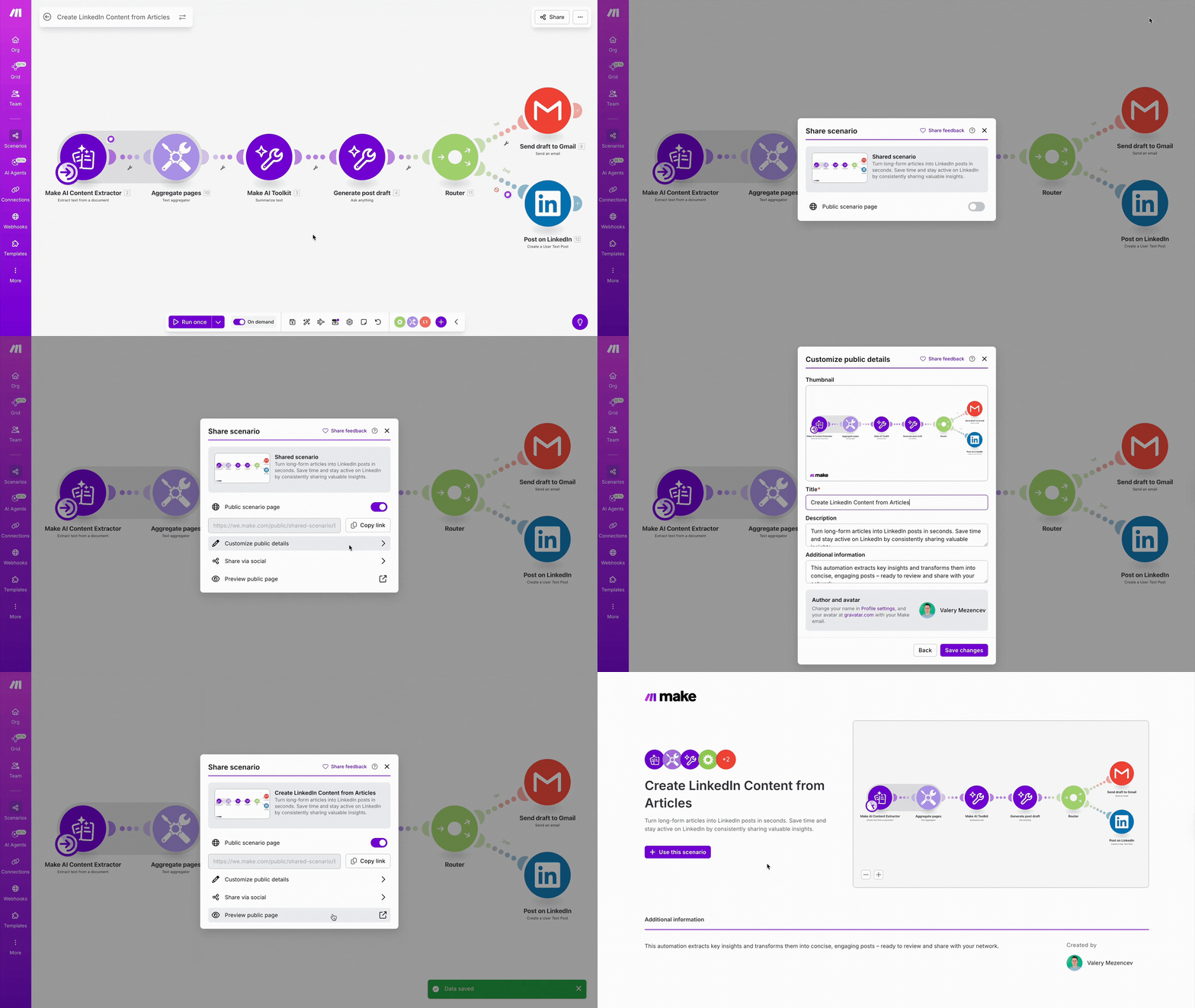
Scenario Sharing for easily importing proven workflows.
Scenario Run Replay for re-running workflows using historical data to identify errors.
If-else and Merge modules (currently in Open Beta) for splitting scenarios into conditional paths.
Multi-step workflows and instant webhook execution in all Make plans.
The ability to choose the range of data that your scenarios should process, like all data since a certain date or all data received from this moment.
Aggregators to merge data based on your needs.
Scenario inputs to trigger automations.
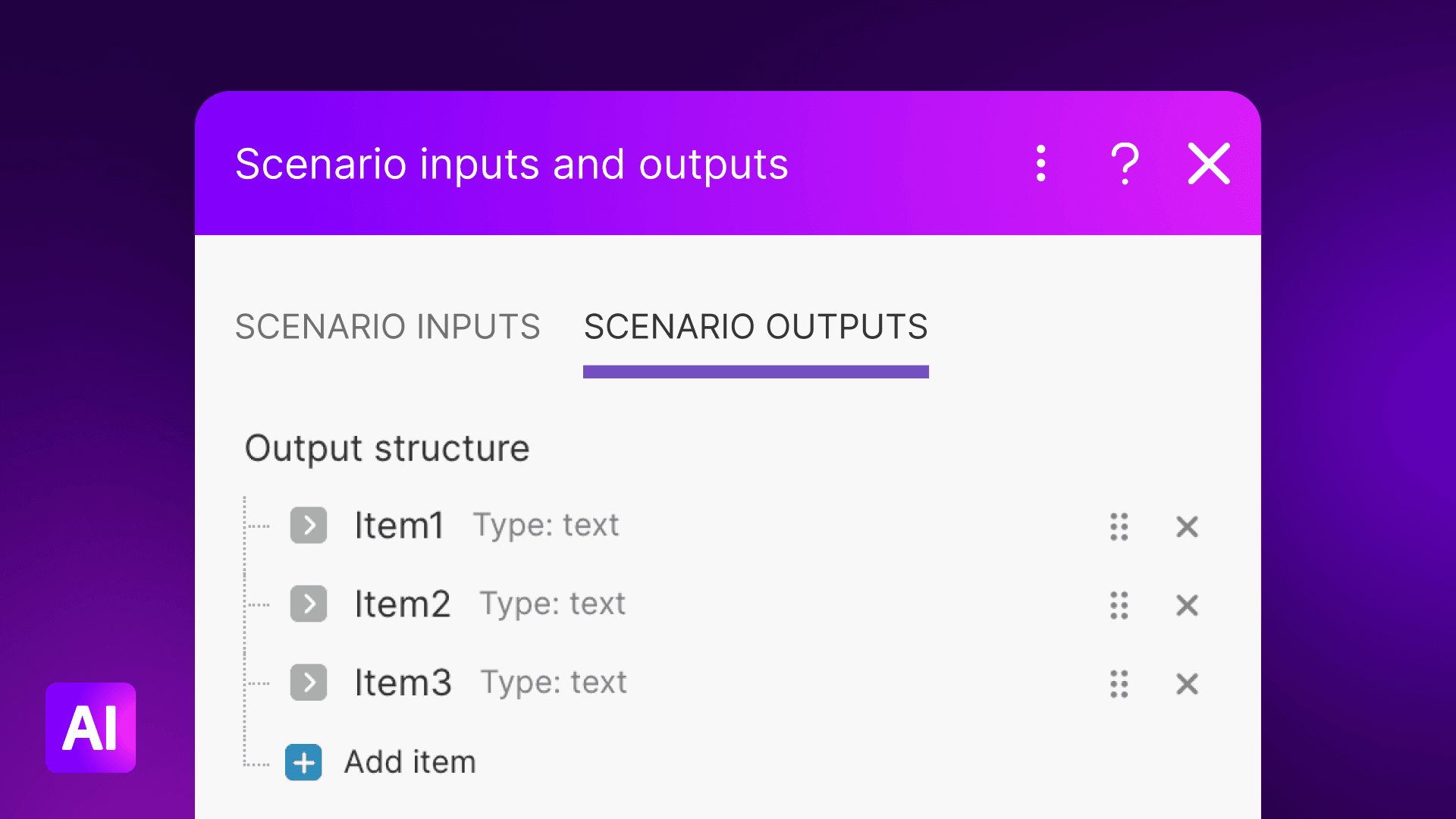
On-demand scheduling to trigger scenarios via authorized API calls.
Dynamic connections for adding placeholder account connections, users can flexibly replace with their own before running the scenario.
The option to disable the logging of data flowing through the scenario – useful for businesses working with sensitive data.
Array manipulation, JSON/XML parsing and serialization, cycles, and phases.
Make has also taken multiple features available in Zapier to the next level:
Most Make scenarios can handle an unlimited number of modules. In contrast, Zapier always has a fixed limit of 100 steps per Zap.
Make scenarios can accommodate unlimited routes that can run as many times as you need. Meanwhile, Zapier allows for up to 10 branches per automation Path and up to three nested Path steps in each Zap.
Working with files, including image resizing and format conversion, encryption, and archiving. Zapier does provide some file manipulation capabilities, but they aren't as advanced as Make's.
While Zapier is a functional tool for simple integrations, Make's range of technical features makes its automation capabilities a significant upgrade.
Process mapping with Make Grid
One of Make's standout features is Make Grid, included in all paid plans. Make Grid automatically generates real-time maps that illustrate relationships between workflows, data flows, and dependencies across your entire automation landscape.
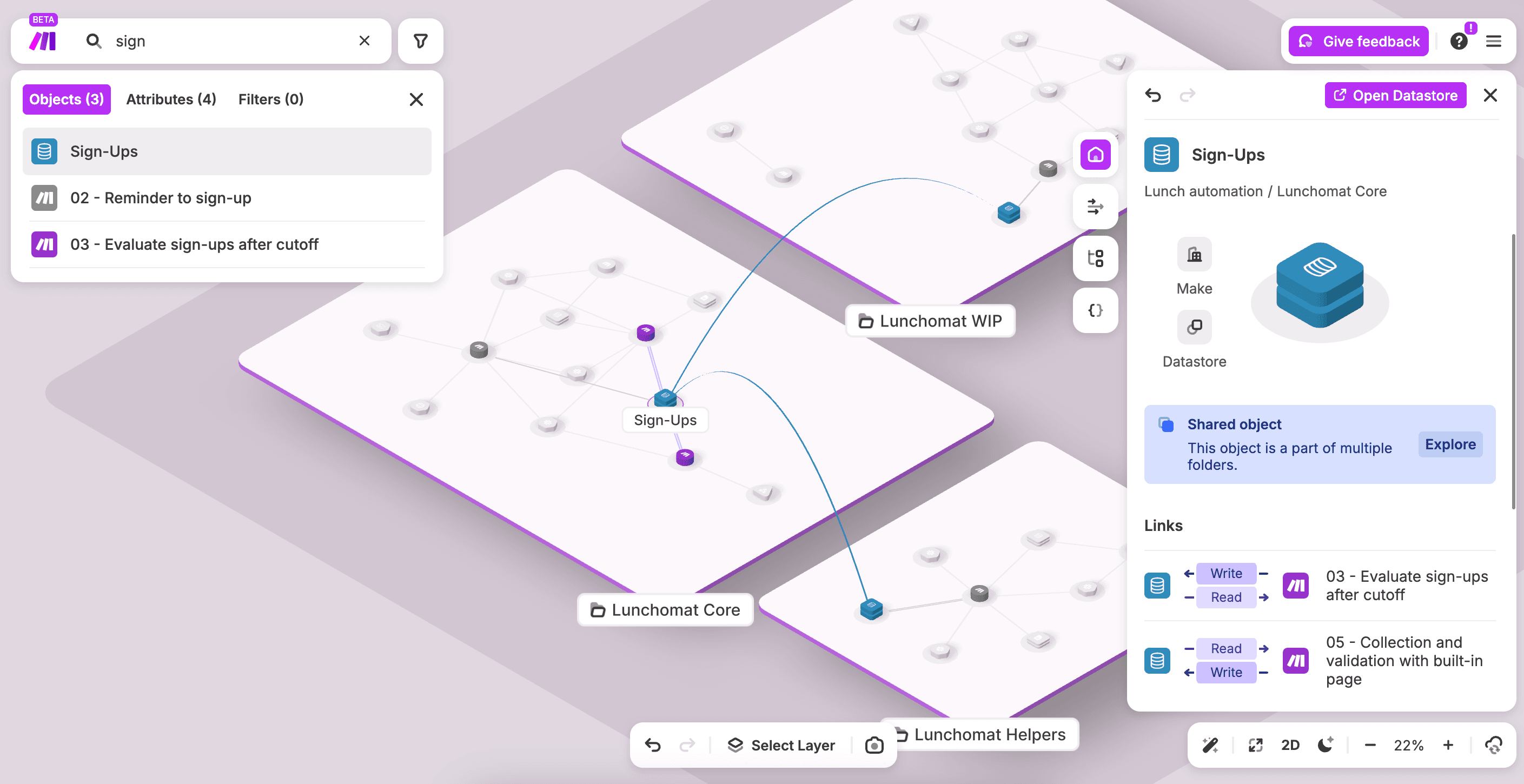
Standalone and reused AI automations, agents, sub-scenarios, and alerts are depicted in a way that is instantly shareable with and understood by colleagues of varying technical skill levels.
For organizations managing dozens or hundreds of workflows and multiple AI agents, Make Grid saves hours of documentation time and reduces the risk of breaking dependencies when modifying workflows.
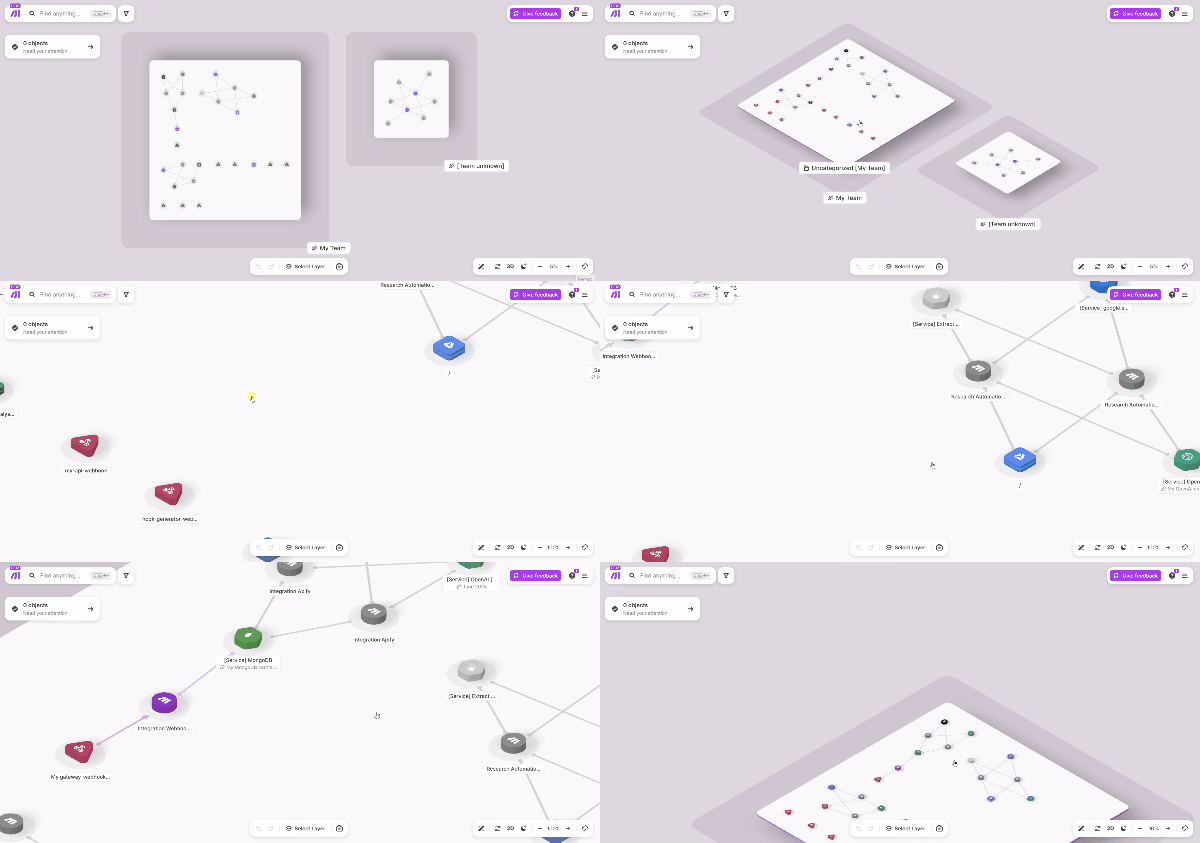
In contrast, Zapier Canvas provides basic workflow visualization but functions primarily as a planning and documentation tool rather than a live orchestration system. It doesn't automatically map existing workflows, show real-time data flows, or automatically discover dependencies between workflows.
Users must manually create Canvas boards and update them as Zaps change, often relying on written explanations to supplement the limited visual representations. As workflows grow more complex, with multiple branches nested within branches, managing them in Zapier becomes increasingly difficult.
AI and agentic automation
All major AI providers, including OpenAI, Google AI, Anthropic Claude, and Microsoft Azure AI, are among Make's pre-built AI apps. These modules can handle tasks like text analysis, image recognition, content generation, and sentiment analysis without custom code.
Make AI Agents are digital colleagues capable of non-deterministic decision-making and tool use. Users can provide Agents with context by simply uploading files, with no need to build custom retrieval-augmented generation (RAG) workflows with vector databases.
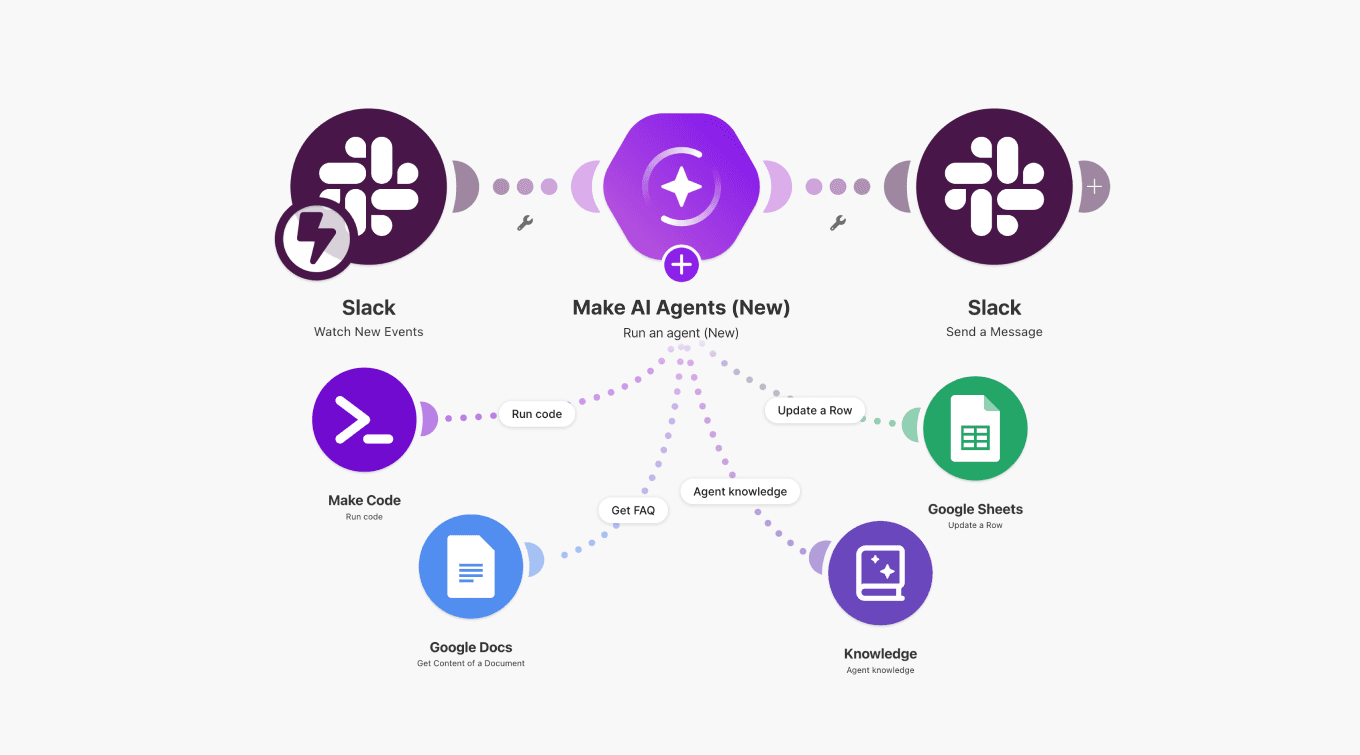
Agents are built, run, and debugged inside the Scenario Builder, meaning users can create agents that interpret input, choose the right tools, and adapt within workflows.
Make MCP Server lets you turn your Make scenarios into callable tools any AI can use, connecting ChatGPT, Claude, Cursor, and other MCP-compatible AI agents to 3,000+ apps and 30,000+ actions, with no local setup or additional servers required.
Zapier does offer AI agent functionality through Zapier Agents. With Zapier Agents, users can create AI agents that can handle complex tasks autonomously, and Zapier Copilot can help build and maintain these with natural language.
However, users report challenges orchestrating multiple agents or building complex AI-driven processes. Full access requires purchasing an additional package on top of a base subscription, as Zapier Agents are not included in basic subscription plans.
Zapier's MCP support allows agents to connect to tools and services through Model Context Protocol, though setup requires more manual configuration compared to Make's pre-configured MCP server integrations.
Pricing comparison
We've seen many Make users switch from Zapier after finding Make to be a much more cost-effective AI automation solution.
Make uses a credit-based pricing model. Each module that processes data in a scenario typically consumes one credit, though features that handle multiple data bundles or use AI may consume more.
Make's most affordable paid plan is $9/month for 10,000 credits on annual billing. A free plan is also available with 1,000 credits per month, with no time limit.
Zapier's paid plans start from $19.99/month for 750 tasks on annual billing. Zapier's free plan allows only two-step workflows. This means the price per action is significantly higher in Zapier than in Make.
Importantly, all of Make's paid plans are fully equipped with Make AI Agents, Make Grid, and other AI features. With Zapier, AI agents and chatbot capabilities are packaged separately at additional cost, meaning even a starter setup fully equipped for agentic use cases can cost over six times more than Make's Core plan.
Enterprise-grade security and compliance
For larger organizations, Make operates as a mature, enterprise-ready AI automation platform. Make is cloud-first at all subscription levels, while Zapier is self-hosted on most plans, with some comparatively expensive cloud options.
Make’s infrastructure runs across multiple zones within Amazon AWS environments. Our security measures include SOC 2 Type II, SOC 3, and ISO 27001 compliance, plus GDPR compliance, AES-256 encryption for data at rest, and TLS 1.2/1.3 for data in transit.
Enterprise plans add:
Company-wide single sign-on (SSO) via OAuth2 or SAML2
Role-based access controls
A guaranteed 99.5% uptime SLA
On-premises agents for securely accessing local networks
Custom functions for advanced logic
Comprehensive audit logs
Dedicated value engineers for implementation guidance.
Enterprise customers also receive 24/7 priority support with two-hour response SLAs.
Zapier holds SOC 2 Type II and ISO 27001 certifications and is GDPR compliant, and offers enterprise features including SSO, advanced admin controls, and Premier support. However, even with the enterprise-grade features, users often need to migrate from Zapier to more powerful platforms as their automation needs grow.
Support, learning, and community
Make provides professional support on all paid plans, with 24/7 priority customer support for Enterprise customers. Additional resources available to all users at no extra cost include:
Make Community forum with 45,000+ registered members
Make Academy with 38 interactive courses across five learning paths, covering foundational concepts to advanced agentic automation
Help Center with documentation, setup walkthroughs, and best practices
Over 500 solution partners trained and certified by Make
How-to guides with automation inspiration, setup walkthrough, best practices, and more
Blog posts detailing features and news, presenting new releases, or diving deep into trending automation and AI topics
Success stories sharing inspirational stories of our customers and their achievements with Make
Zapier provides email support on all paid plans, with faster response times for higher tiers. Enterprise customers receive Premier Support with priority handling and dedicated success managers. The platform offers extensive documentation, including:
Help Center with guides for common use cases and troubleshooting
App-specific integration guides
Video tutorials and webinars
Blog with automation tips and use cases
Zapier's large user base generates substantial third-party content, and the Zapier Community Forum connects users for questions and advice. The platform's template library includes thousands of pre-built Zaps for common workflows.
However, some users report slower response times for support inquiries on lower-tier plans. The community forum, while active, can be inconsistent in response quality compared to professional support. Organizations requiring guaranteed support response times need Enterprise plans, which represent a significant cost increase.
How to transition from Zapier to Make
If you've decided to switch from Zapier to Make, here's how to do it.
Familiarize yourself with Make's terminology
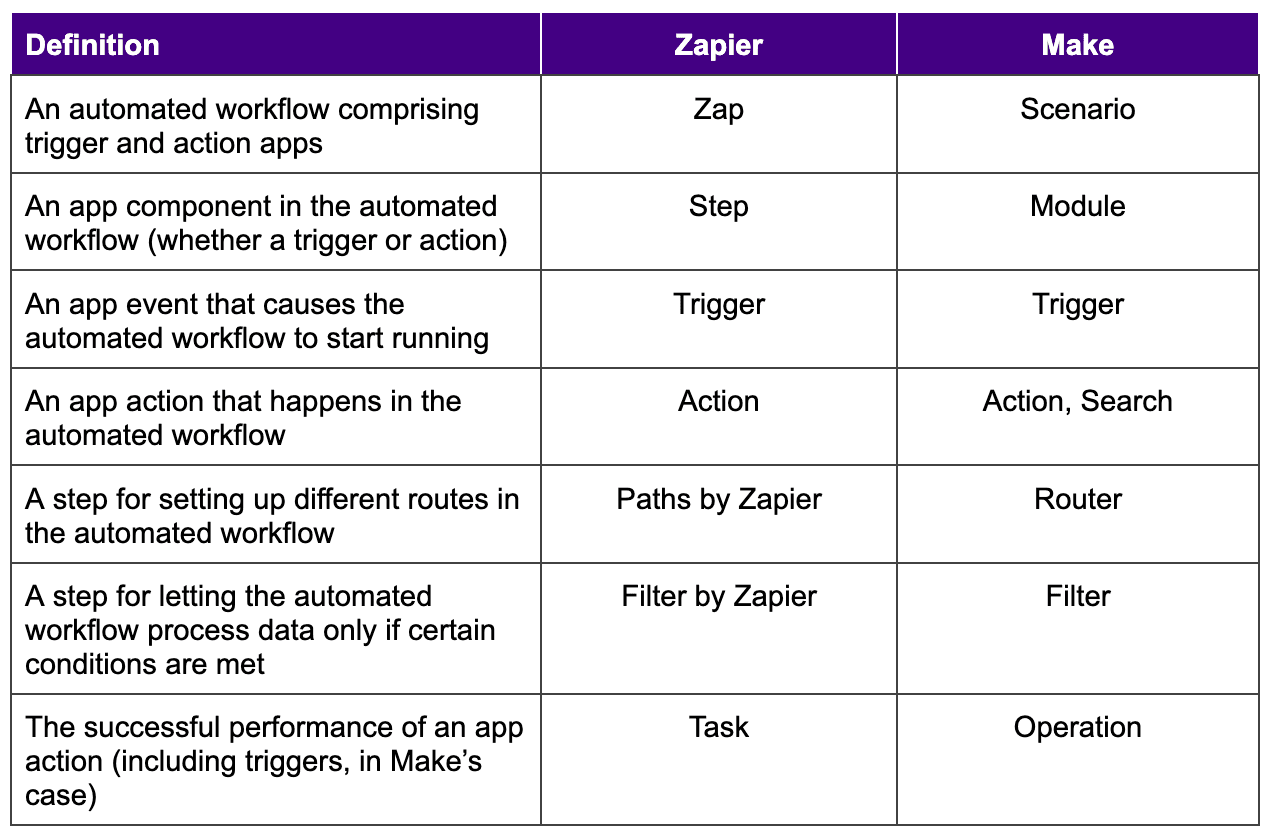
Make and Zapier use different terminology for certain features. In Make, "Zaps" become "scenarios," "steps" become "modules," and "paths" become "routes." Brush through Make's terms to understand the platform quicker.
Feel free to refer to our glossary for detailed explanations of each Make term.
Migrate your Zaps
Start new scenarios for each of your Zaps and recreate them in Make. For example, if you have a Zap for forwarding emails with certain keywords to another email address, you can recreate the equivalent logic directly in Make's Scenario Builder.
Save and test your scenarios to ensure they work, then schedule them to run at your preferred intervals.
The 7,900+ pre-built scenario templates cover many common use cases, so you may find ready-made starting points for workflows you've already built in Zapier.
Learn how to create your first Make scenario
Make your move from Zapier
Zapier gets automation off the ground. But for teams that want automation to do more than save a few clicks, it tends to run out of road.
Make is built for what comes next. Powerful platform that handles complex workflows, AI agents that actually work alongside your processes, and a visual environment where nothing is hidden, and nothing is hardcoded. Make gives you the tools to grow without switching platforms every time your needs outpace your tooling.
Over 500,000 automation visionaries have already made the switch. Join them by signing up for a free Make account and start building today.
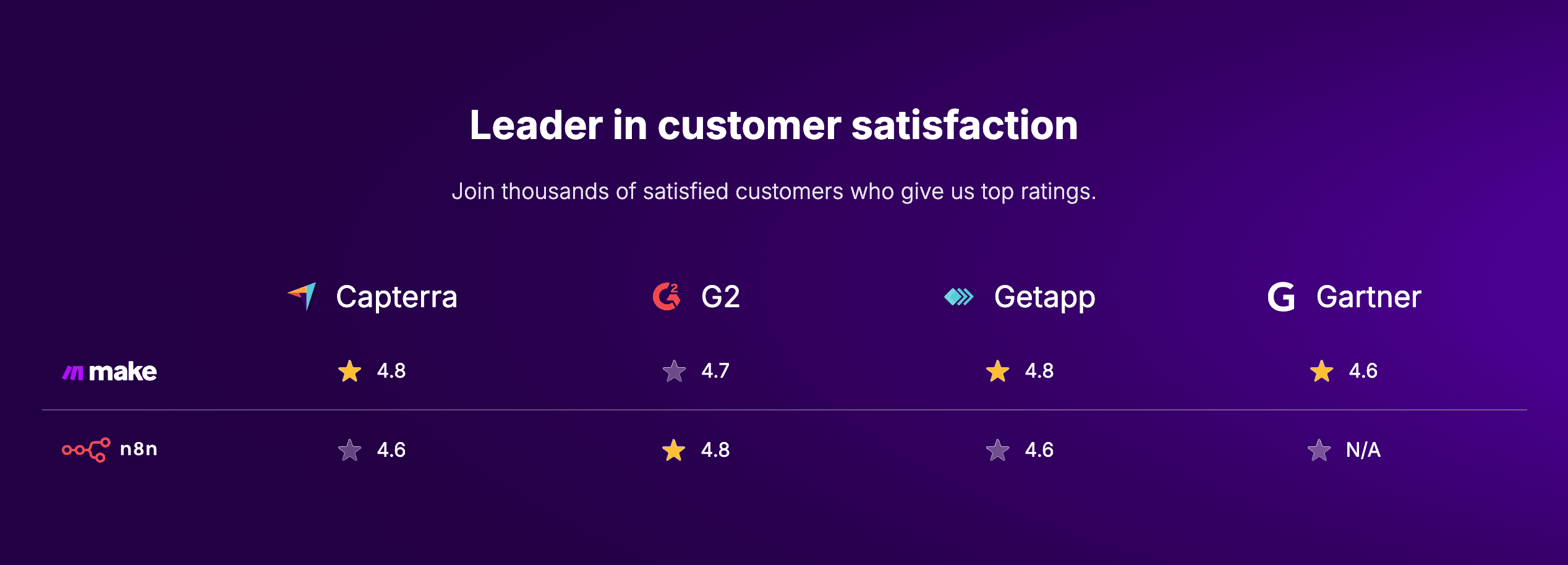
This post was last updated in April 2026.
FAQ
Is Make better than Zapier? It depends on what you need from automation. Zapier works well for simple, linear workflows. Make is built for teams that need more – complex logic, conditional routes, AI agents, and a visual canvas where the data flow is always visible. If you've hit Zapier's ceiling, Make is the natural next step.
What is the main difference between Make and Zapier? The biggest difference is how they handle complexity. Zapier uses a step-by-step, list-based editor suited to straightforward automations. Make uses a visual Scenario Builder where every module, route, and connection is visible on a canvas – giving teams a glass-box view into even the most complex logic. Make also supports unlimited modules per scenario and unlimited routes, while Zapier caps Zaps at 100 steps and 10 branches.
Is Make cheaper than Zapier? Yes, significantly. Make's Core plan starts at $9/month (annual billing) for 10,000 operations. Zapier's paid plans start at $19.99/month for 750 tasks. Make AI Agents and Make Grid are included in all paid plans. With Zapier, AI agent capabilities are sold separately – meaning a comparable setup can cost over six times more.
Which platform is more cost-effective for high-volume, multi-step workflows? Make, by a significant margin. Make's credit-based pricing means each module run typically consumes one credit, and the Core plan starts at $9/month for 10,000 credits. Zapier charges per task, with paid plans starting at $19.99/month for just 750 tasks. For complex, multi-step scenarios, the cost difference compounds fast. Make AI Agents and Make Grid are included in all Make paid plans; with Zapier, AI agent capabilities are sold separately, meaning a fully equipped setup can cost over six times more than Make's Core plan.
Does Make have more integrations than Zapier? Zapier supports 8,000+ apps, compared to Make's 3,000+ apps, from which 560 are AI apps. But Make generally offers roughly double the number of preset actions per app, meaning you can automate more within each integration without custom workarounds. Make's HTTP module also lets you connect to any app with an available API, even if Make doesn't officially support it.
Can I use AI agents in Make? Yes. Make AI Agents are available on all paid plans and run natively inside the Scenario Builder. You can give agents context by uploading files directly. There is no custom RAG setup required. Make's MCP Server also lets you turn your scenarios into callable tools for ChatGPT, Claude, Cursor, and other MCP-compatible AI.
How do I migrate from Zapier to Make? Start by familiarizing yourself with Make's terminology: Zaps become scenarios, steps become modules, and paths become routes. Then recreate your Zaps as new scenarios in Make's Scenario Builder. Make's 7,900+ scenario templates cover many common use cases, so you'll often find a ready-made starting point. Test and schedule your scenarios once they're set up.
Is Make suitable for enterprise teams? Yes. Make is SOC 2 Type II, SOC 3, and ISO 27001 certified, and GDPR compliant. Enterprise plans include SSO via OAuth2 or SAML2, role-based access controls, a 99.5% uptime SLA, on-premises agents, custom functions, audit logs, and 24/7 priority support with two-hour response SLAs.
What is Make Grid? Make Grid is a real-time visual orchestration map included in all Make paid plans. It automatically visualizes the relationships between your scenarios, AI agents, sub-scenarios, and data flows across your entire automation landscape – without any manual setup. Unlike Zapier Canvas, Make Grid reflects your live setup at all times.
Ready to make the automation revolution happen?