What is AI automation? A complete guide for 2026
Most teams use AI but stay stuck in pilots. Here's how AI automation turns those pilots into production systems.
AI automation is the use of artificial intelligence to execute business tasks that once needed human judgment, then chain those tasks into end-to-end processes that run on their own.
It matters in 2026 because 88% of businesses now use AI in at least one function, yet most are stuck in pilots.
This guide explains what AI automation is, how it works, where it delivers value, and how to build it in Make.
What is AI automation?
AI automation combines artificial intelligence with software automation to handle tasks that traditional, rule-based automation cannot.
Where classic automation follows a fixed "if this, then that" path, AI automation can interpret messy inputs, make decisions, generate content, and adapt when conditions change.
It runs the same processes you already automate, only with a layer of intelligence sitting between trigger and action.
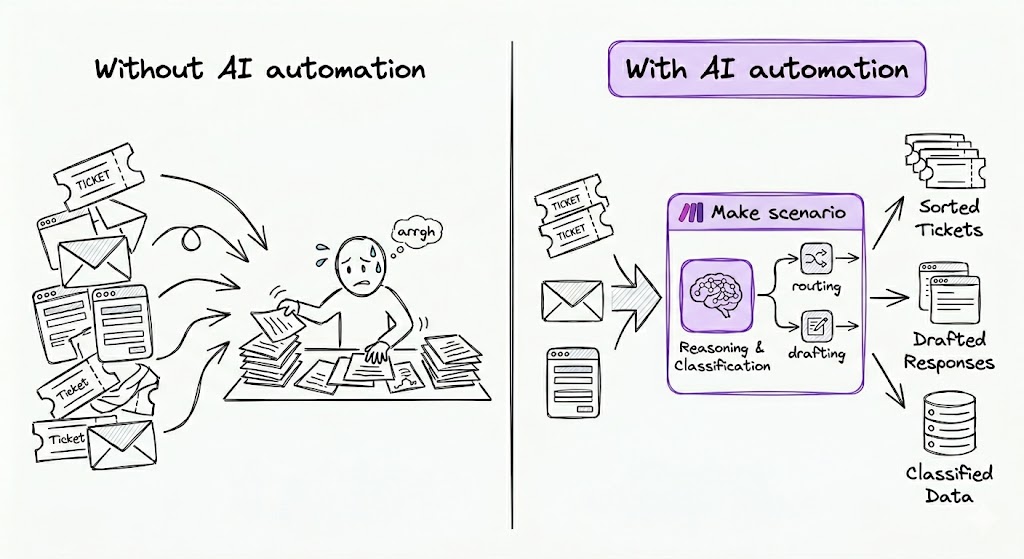
A practical example: a new support ticket arrives in Zendesk. Traditional automation can route it by keyword. AI automation does more:
- Reads the ticket and extracts the issue, account, and urgency
- Classifies the sentiment to flag frustrated customers for priority handling
- Drafts a reply in your brand voice using a model like Anthropic Claude or OpenAI
- Decides the next step: send the reply, escalate to a human, or trigger a refund workflow
The trigger is the same. The decisions in the middle are what's new.
This shift matters because most business processes aren't neat. They involve unstructured data, free-text inputs, and judgement calls that historically required a person.
AI automation closes that gap, which is why Gartner forecasts 40% of enterprise applications will include task-specific AI agents by the end of 2026, up from less than 5% in 2025.
How does AI automation differ from RPA, BPA, IA, and agentic automation?
AI automation sits inside a wider family of automation approaches.
The differences come down to two things: how much intelligence is involved, and how much autonomy the system has to act on its own.
The table below shows where each one fits.
Approach | What it does | Uses AI? | Best for |
Business process automation (BPA) | Automates end-to-end business processes across teams and tools | Optional | Invoicing, onboarding, approvals |
Robotic process automation (RPA) | Mimics human clicks and keystrokes inside existing software | No | Repetitive screen-based tasks in legacy apps |
Intelligent automation (IA) | RPA enhanced with AI for decisions and data handling | Yes | Document processing, claims handling |
AI automation | Connects apps via APIs and uses AI to interpret, decide, and generate | Yes | Modern API-first stacks, content, support, ops |
Agentic automation | AI agents that plan, choose tools, and act with minimal supervision | Yes | Multi-step workflows that need judgement at every turn |
For most teams in 2026, the practical choice is between AI automation and agentic automation.
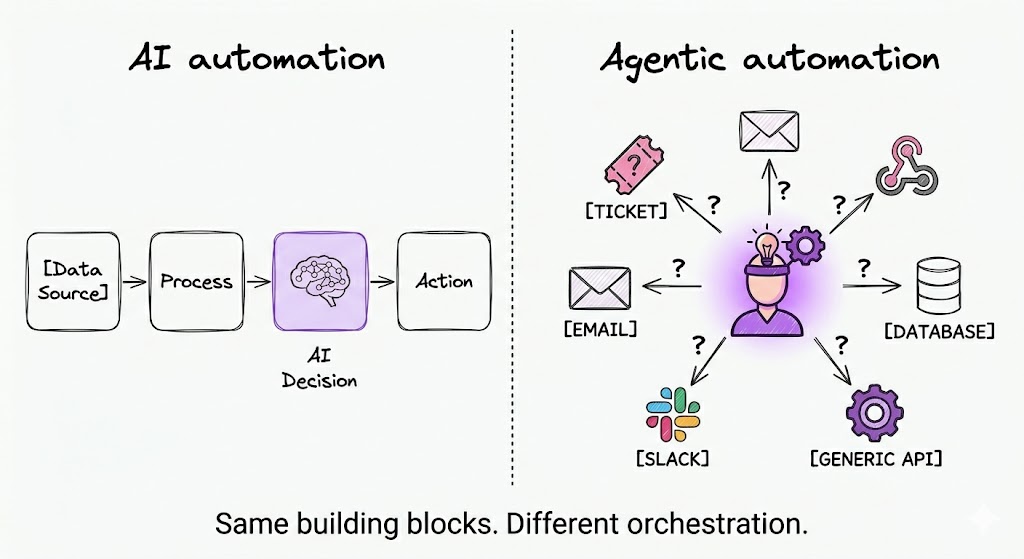
Both run on platforms like Make's visual automation platform. The difference is whether the AI executes your steps, or decides which steps to take.
How does AI automation work?
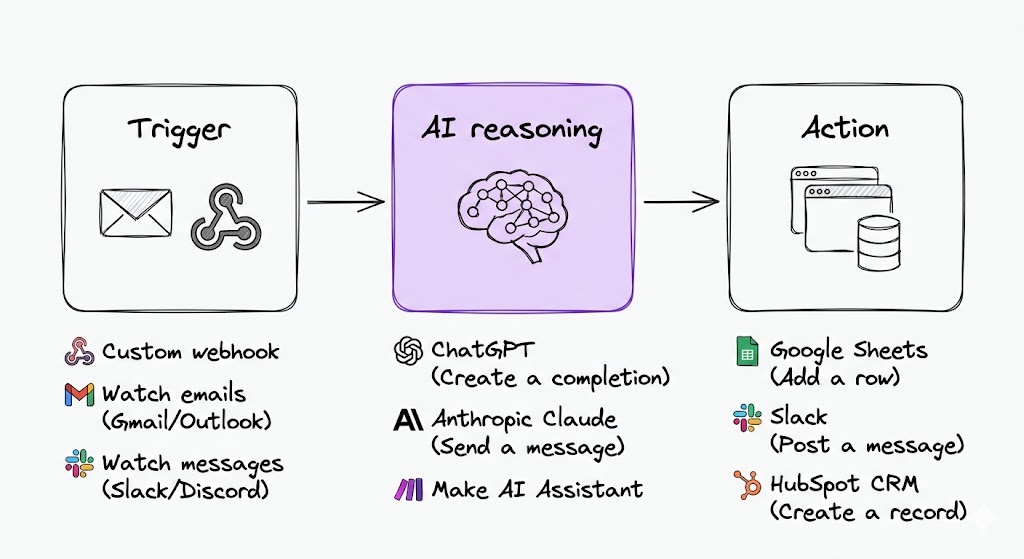
Every AI automation, from a one-step ticket classifier to a multi-app revenue scenario, follows the same three-layer pattern: trigger, AI reasoning, and action.
That pattern is the mental model to use when scoping any use case. Once you can name the trigger, the reasoning step, and the action, you can build it in a Make scenario.
The layers run in sequence, with each one passing structured data (a bundle) to the next.
- The trigger. What kicks the scenario off. Common Make triggers include Watch emails, Watch new submissions, and Webhooks > Custom webhook. Instant variants fire the moment an event happens; polling variants check on a schedule.
- The AI reasoning layer. Where the model interprets, decides, or generates. Typical modules include Anthropic Claude > Create a Prompt Completion and OpenAI > Create a Chat Completion.
- The action. What happens with the AI output. Examples: Slack > Create a Message, HubSpot > Update a Contact, Human in the Loop > Create a review request.
The power comes from chaining these layers across multiple apps in one scenario.
What are some real examples of AI automation?
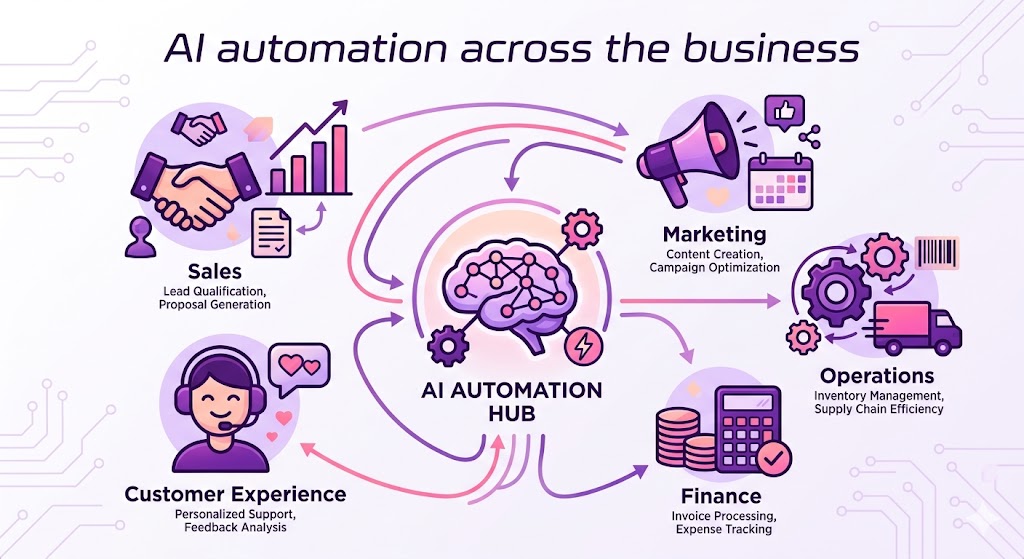
AI automation has moved from novelty to standard practice across business functions. The examples below show five common patterns, each one a buildable Make scenario.
For ready-made starting points, browse the Library of Agents.
Sales
AI automation enriches and routes inbound leads before a rep sees them, cutting response time and skipping manual research.
- Watch new submissions (Typeform) → Anthropic Claude classifies intent and urgency → HubSpot > Create a Contact with enriched fields → Slack > Create a Message to the right rep.
- Watch new deals (Salesforce) → OpenAI > Create a Chat Completion drafts a follow-up tuned to the deal stage → Gmail > Create a Draft for the rep to review.
Marketing
AI automation handles the content production and repurposing your channels demand, freeing the team for strategy and creative judgement.
- Watch new blog posts (WordPress) → Anthropic Claude generates LinkedIn, X, and newsletter versions → Buffer > Create a Post for each channel.
- Watch new events (Calendly customer interviews) → OpenAI > Create a Transcription → Notion > Create a Page with structured insights and quotes.
Operations
AI automation tackles the unstructured-data work that ops teams typically do by hand: categorising, escalating, and summarising.
- Watch new tickets (Zendesk) → Anthropic Claude classifies category and urgency → Router sends to the right queue → Slack > Create a Message notification.
- Watch emails with invoice attachments (Gmail) → OpenAI extracts vendor, amount, and due date → Google Sheets > Add a Row.
Finance
AI automation reads receipts, categorises expenses, and flags anomalies, work that previously needed a person to interpret each document.
- Watch emails for receipts → OpenAI extracts line items and categorises → Xero > Create a Bill.
- Watch events (Stripe charges) → Anthropic Claude flags anomalies against historical patterns → Slack > Create a Message to the finance lead.
Customer experience
AI automation handles tier-1 deflection and human handoff, augmenting reps rather than replacing them.
- Watch new conversations (Intercom) → Anthropic Claude drafts a reply from the knowledge base → Human in the Loop > Create a review request before send.
- Watch new reviews (G2) → OpenAI classifies sentiment → Jira Cloud Platform > Create an Issue for negative themes.
What are the benefits of AI automation?
The benefits of AI automation are measurable, but the data tells a sharper story than the hype: per McKinsey's 2025 State of AI survey, 88% of organisations use AI in at least one function, yet only around 6% qualify as high performers attributing meaningful EBIT impact to it.
The gap between the two is where the real benefit sits.
Four operational gains drive that value when AI automation is built well:
- Faster cycle times. Ticket triage, lead routing, and content drafting drop from days to minutes.
- Higher accuracy on unstructured work. AI classification handles free-text inputs that keyword rules miss.
- Scale without proportional headcount. One ops lead can run scenarios that previously needed a team.
- Cleaner data downstream. AI normalises messy inputs before they hit your CRM, finance system, or warehouse.
The capability gap between traditional and AI-driven approaches shows up clearly across the work most teams actually do:
Capability | Traditional automation | AI automation | Agentic automation |
Handles unstructured data | No | Yes | Yes |
Requires human decisions | Yes | Optional | Optional |
Adapts to new inputs | No | Partial | Yes |
How do you build an AI automation in Make?
Every production AI automation follows the same five steps, from picking the right process to monitoring it once live.
Step 1: How do you choose the right process?
Not every process should be AI-automated. The strongest candidates share three traits: they run often, they currently need a person to read free-text input, and the output is structured.
Qualify any process against these criteria:
- Runs at least 10 times per week
- Requires reading or interpreting unstructured input today
- Produces a structured output a downstream system can use
If two of the three are missing, automate it with rules first.
Step 2: How do you choose the right AI model?
There is no single best AI model. Match the model to the task type, and chain multiple models in one scenario when the work demands it.
Task type | Best-fit model | Example Make module |
Reasoning, classification | Anthropic Claude | Anthropic Claude > Create a Prompt Completion |
Text generation | OpenAI | OpenAI > Create a Chat Completion |
Voice and audio | ElevenLabs or Vapi | Vapi > Create a Call |
Step 3: How do you build the scenario?
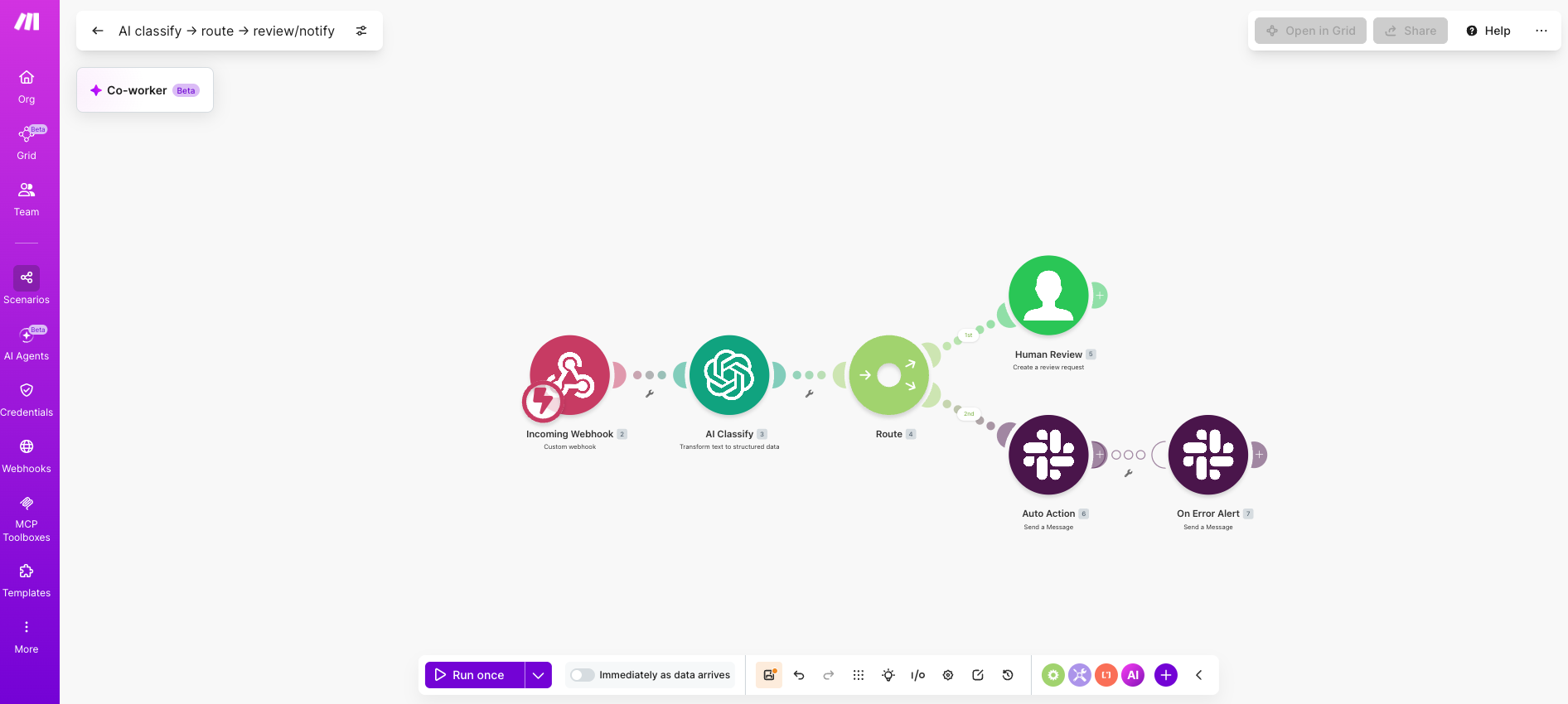
In Make you connect modules visually instead of writing API calls. The Scenario Builder shows every module's input and output, so you can see exactly what the AI receives.
- Add the trigger module, picking the instant variant where available.
- Add the AI module and map fields from the trigger.
- Add a Router if the AI output should branch.
- Add the action modules for each branch.
💡 Pro tip: Instant triggers (for example Watch issues - instant) outperform polling versions, which consume operations on every check.
Step 4: How do you add human oversight?
Any AI automation that takes external action (customer replies, public posts, payments) needs a review checkpoint.
The Human in the Loop > Create a review request module is built for this.
- Insert it between the AI output and the action module.
- Configure the reviewer in Slack or email.
- Let the approver edit the AI output before approving; only approved output continues.
Step 5: How do you test and monitor it?
Turn the scenario on in test mode, run a known input through, and inspect every bundle. Once live, monitor operations use and error rates.
- Test edge cases (empty inputs, long inputs, unexpected formats).
- Add an Error handler route to catch failures.
- Use Make's scenario history to spot drift over time.
💡 Pro tip: Add a Tools > Set variable module after every AI module to store raw output, then pull it into Google Sheets weekly as a free audit log.
What are the risks and limits of AI automation?
AI automation is powerful, but treating it as autopilot creates real failure modes. Three categories of risk matter: model quality, governance, and data security.
The answer to all three is the same set of controls: human oversight on high-stakes actions, audit trails on AI outputs, and visible logic at every step.
Make's visual Scenario Builder and the Human in the Loop module are designed for exactly this kind of review-and-approve pattern.
The risks below are real, but each has a known mitigation.
- Hallucination. AI generates confident but wrong outputs. Mitigation: a review step before any external action.
- Bias. Model output reflects training data. Mitigation: regular spot checks and diverse evaluators.
- Data leakage. Shadow AI use without governance carries real cost;IBM reports that high shadow AI use added USD 670,000 to the average breach. Mitigation: route sensitive payloads through approved models only.
- Drift. Model behaviour shifts silently when vendors update underlying models. Mitigation: version-pin where possible and log outputs.
- Cost surprises. Operations stack up at scale. Mitigation: set scenario limits and monitor usage weekly.
Which AI is best for automation?
The best AI for automation depends on the task.
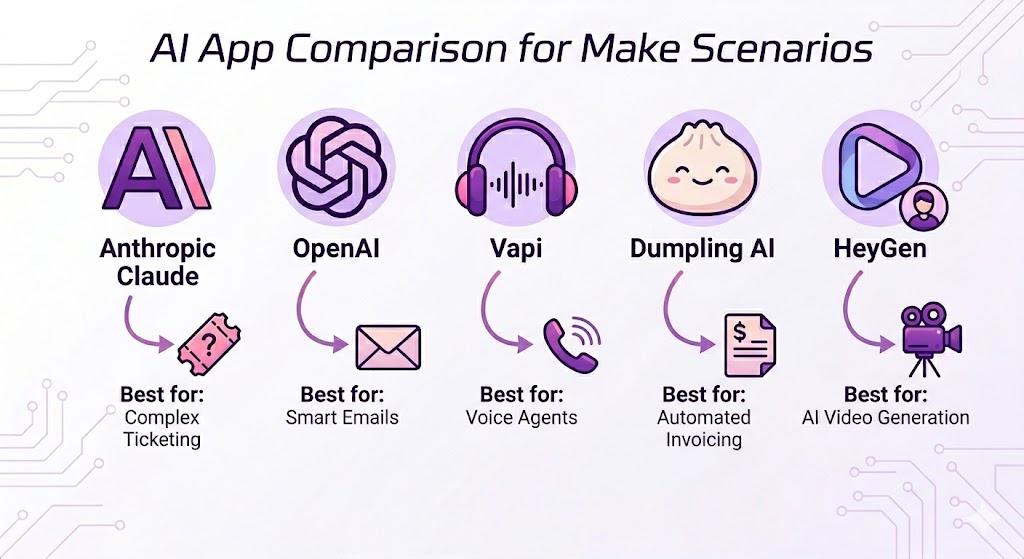
Make supports over 560 AI app integrations, and the most-used ones in scenarios cluster around four categories: reasoning, generation, voice, and data extraction.
The table below covers the leaders in each category, with one concrete use case for context.
AI app | Best for | Example use case |
Anthropic Claude | Long-context reasoning, classification, judgement calls | Triage 500-word support tickets |
OpenAI | Text and image generation, broad app coverage | Draft outbound sales emails |
Vapi | Voice agents, two-way phone conversations | Outbound lead qualification calls |
Dumpling AI | Web scraping, file extraction, PDF parsing | Pull line items from supplier invoices |
HeyGen | Talking-head video and translation | Personalised onboarding videos |
The strongest pattern is to chain two or three AI apps in one scenario.
Dumpling AI extracts an invoice, Anthropic Claude validates the line items, then a final action module writes the result to your accounting system.
To see the full set of options,browse AI integrations on Make.
What's next: agentic AI automation
Agentic AI automation is the next step beyond fixed-path AI automation.
Where AI automation runs a defined sequence with AI in one or more steps, an AI agent plans the sequence itself: it interprets the goal, chooses which tools to call, and acts on its own.
Agents need a visible, controllable execution layer to be safe at scale.
That is what Make's agentic automation capability and Make Grid provide: every decision, tool call, and output is inspectable inside the same visual canvas.
Three signs your team is ready to move from AI automation to agents:
- You have 10 or more production AI scenarios running reliably
- You need workflows that change their own steps based on context
- You want one agent to coordinate work across multiple tools
Where should you start?
AI automation is the bridge between rule-based automation and the agentic systems coming next.
The capability you can deploy today is concrete: one scenario that turns a messy input into a structured output, with a human checkpoint before it goes live.
Build that, monitor it for a month, and you have the foundation everything else extends from.
Get started free with Make, or talk to sales if you're evaluating for an enterprise rollout.
FAQs
Q1: What is the difference between AI and AI automation?
AI is the underlying capability: a model that can interpret, generate, or decide. AI automation is how you put that capability to work inside a business process. AI on its own is a tool. AI automation makes it a system that runs end to end.
Q2: Can AI automation replace employees?
In most teams, no. AI automation reliably handles repetitive, structured-output work and frees people for judgement-heavy tasks. The pattern that delivers most value is augmentation, not replacement: humans set the rules and own the exceptions, AI runs the volume.
Q3: How is AI automation different from agentic automation?
AI automation runs a fixed path with AI in one or more steps. Agentic automation gives the AI authority to choose the path itself, calling whichever tools it judges useful. Both run on Make. The right choice depends on how much autonomy your process needs.
Q4: Do I need to know how to code to build AI automation?
No. Make's visual Scenario Builder handles the API calls. You connect modules, map data fields, and configure the AI prompt. Coding is only needed for highly custom logic, and even then Tools > Make an API call modules cover most edge cases.
Q5: How much does AI automation cost on Make?
Make uses a credit-based pricing model, with a free tier and paid tiers that scale by credit volume. AI app costs (Anthropic, OpenAI, and others) are billed separately by the AI provider through your own API key, so you pay providers directly without markup.
Related blogs
Tool and strategies modern teams need to help their companies grow.

AI
What Is Security Automation? A Complete Guide for 2026
Security automation cuts response times from hours to minutes. Here is what it is, how it works, and where to start.

Raife Dowley
May 19, 2026
AI
AI agents vs ChatGPT: what's the difference in 2026?
Most teams use ChatGPT. Few use AI agents. Here is the difference and how to start automating with Make.
Raife Dowley
May 19, 2026