Feb 10, 2026 | 4 minutes
Influencer's guide: Building a resume screening AI agent in 20 minutes
Learn how to automatically extract candidate information from resumes in any format, organize work experience and certifications into structured data, and update your HR system. Cut hours of screening processes down to minutes.

HR teams spend an average of 23 hours screening resumes for a single hire. That's nearly three full workdays just sorting through CVs, extracting information, and organizing candidate data before anyone even gets to the actual evaluation.
What if that entire process could run automatically in the background while your team focuses on finding the right talent?
In this latest tutorial, Msquare Automation Solutions shows exactly how to build an intelligent automated resume screening system from scratch using Make's AI Content Extractor. In less than 20 minutes.
What is Make's AI Content Extractor?
Make's AI Content Extractor is a native feature that eliminates the need for third-party data extraction tools. It can pull structured information from documents, images, and even audio files – all without requiring additional subscriptions or complex integrations.
The feature handles:
Text extraction from PDFs and images (up to 2,000 pages and 500 MB)
Image descriptions and automatic tag generation
Object detection with precise location coordinates
Audio transcription and translation
For HR teams specifically, this means you can automatically extract candidate names, work experience, education history, certifications, and skills from any resume format – then feed that data directly into your existing workflows.
The problem: Manual resume screening impacts productivity
Before building their automated system, Msquare’s team faced the same challenges most HR departments deal with daily:
Resumes arrived via email and required manual data entry
Each application needed an individual review to extract basic information
Work experience, education, and certifications had to be copied into their CRM manually
The process was slow, repetitive, and prone to human error
The team needed a system that could intelligently read resumes, understand their content, and organize candidate information automatically – without requiring HR staff to touch each application.
Building the solution: Three core components
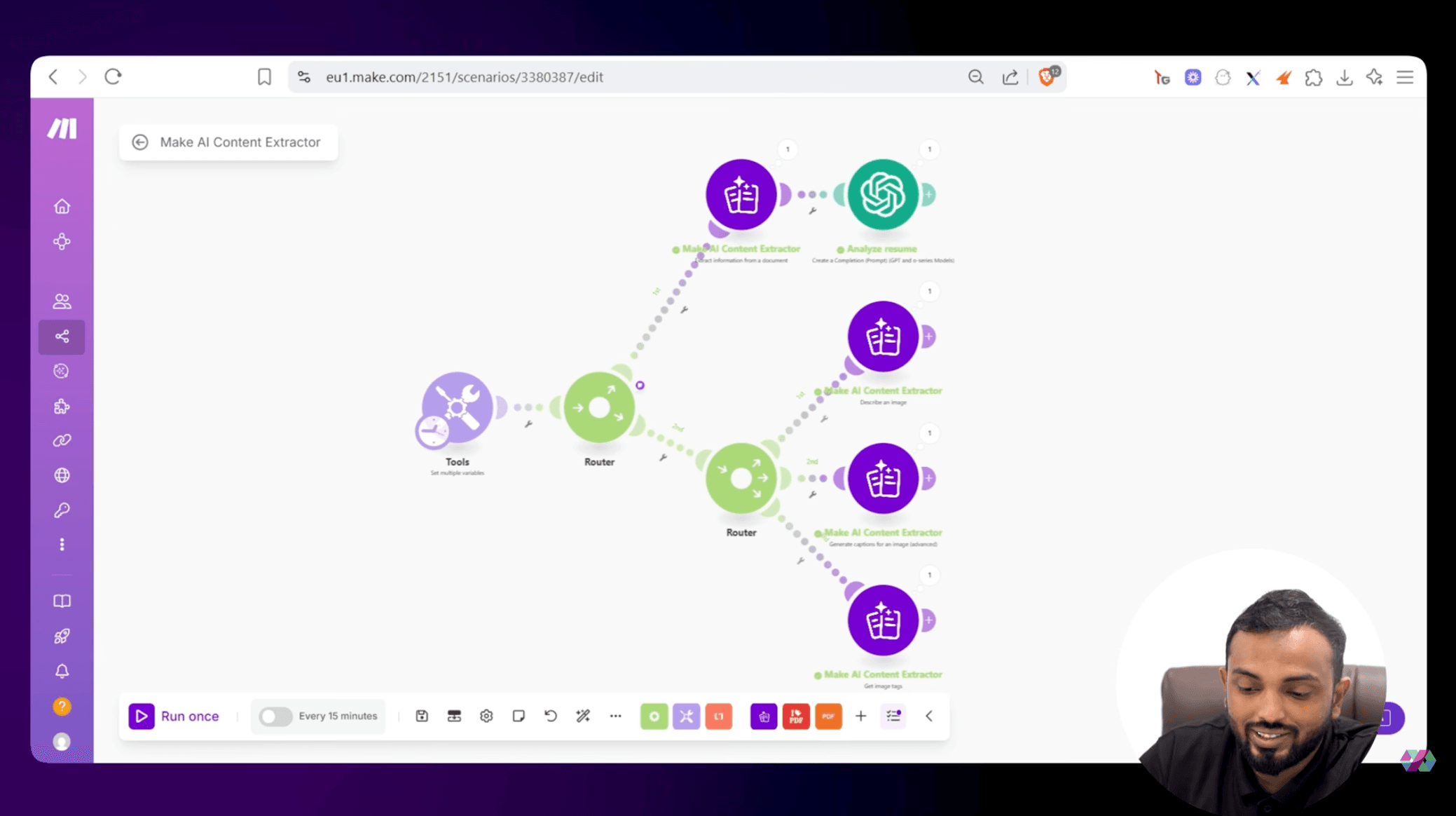
The resume screening system consists of three interconnected parts that work together seamlessly.
1. The submission form
Candidates fill out a simple form (built with Monday.com, though Google Forms or Typeform work equally well) where they submit:
Name and email
Resume (PDF upload)
Profile picture
When submitted, this creates a new item in Monday.com's candidate board, which triggers the automation.
2. The AI Content Extractor
This is where the magic happens. The system downloads the submitted resume and passes it through Make's AI Content Extractor, which reads the document and pulls out raw text, page by page, for multi-page resumes.
For resumes with multiple pages, the system also uses a Text Aggregator to combine all extracted content into a single stream before processing.
3. The OpenAI brain
The raw extracted text then flows into an OpenAI module, which acts as the "intelligence layer." Msquare provides it with specific instructions, such as:
"Please extract the following details from the attached resume: general information about the person, their certifications, and their experience."
The AI returns structured JSON data with:
Candidate name and contact information
Work experience (with company names, positions, and dates)
Education history (with institutions and degrees)
Certifications (with issuing organizations)
From chaos to structure in seconds
Once the AI processes the resume, the system automatically:
Sends a Slack notification to the HR team: "New talent hub sign up: [Name]"
Creates sub-items in Monday.com for each:
Work experience entry (including start date, end date, company name)
Education record (institution name, degree)
Certification (issuing organization)
This structure means HR staff can open a candidate's profile and immediately see organized, categorized information instead of digging through a PDF.
Beyond resumes: The full power of AI Content Extractor
While Msquare’s use case focuses on HR automation, the AI Content Extractor opens up possibilities across departments:
For image processing
Generate up to 10 captions for any image automatically
Extract tags for content organization (outdoor, grass, tree, person, etc.)
Detect objects with exact bounding box coordinates and confidence scores
Describe images in detail without needing OpenAI credits. For example:
"The image depicts a scene of a man standing alongside his dog on a grassy area beside a road. The man is dressed in a white tank top, khaki pants, and brown boots with a watch on his left wrist and a bracelet on his right wrist.”
For document processing
Extract data from invoices and receipts
Pull specific fields from contracts or forms
Process multi-page technical documents
Handle inconsistent formatting automatically
For audio files
Transcribe meetings or interviews
Translate audio content into different languages
Process voice memos for documentation
The versatility means you can build similar automation for invoice processing, contract management, customer onboarding, or any workflow involving unstructured data.
Getting started with your own AI agent
Msquare’s resume screener proves that intelligent automation isn't just for engineering teams anymore. With Make's visual interface and built-in AI capabilities, other teams can also build systems that think, adapt, and handle complexity.
Whether you're in HR, operations, finance, or customer success, this is an automation that transforms your everyday work.
Ready to make the automation revolution happen?