Aug 18, 2026 | 8 minutes
From incident to issue: connecting ServiceNow & GitHub: 2026
A practical guide to linking ServiceNow incidents and GitHub issues automatically, from native options to a no-code Make build.

Quick answer
A ServiceNow GitHub integration connects ServiceNow's incident and change management records with GitHub's issues, pull requests, and commits, so IT and engineering teams work from the same data instead of copying it between tools.
ServiceNow's IntegrationHub and Studio source control tool handles basic, one-way syncing.
For two-way sync across multiple repositories, you and your team can build it in Make instead.
ServiceNow's app needs the Enterprise plan; GitHub's 44 modules don't require any Make plan upgrade at all.
Introduction
Incident data lives in ServiceNow. Code lives in GitHub.
Without a connection between them, nobody owns the link, and a fix can ship without anyone recording which incident it closed.
Only 39% of organizations have full automated audit trails across their DevOps toolchain, according to Perforce's DevOps report.
That gap makes it expensive and inconsistent to trace a deployment back to the incident that caused it.
What does a ServiceNow GitHub integration actually connect?
Knowing what is actually moving between the two platforms matters more than the fact that they're connected.
Make's ServiceNow GitHub integration covers three pairings in particular.
Incidents and issues: a ServiceNow incident becomes a trackable GitHub issue, and status changes flow back the other way.
Change requests and deployments: an approved change can gate or trigger a GitHub Actions deployment.
Commits and releases: code changes get logged against the incident they fixed, building the audit trail most organizations are still missing.
None of this requires both teams to change how they work day to day.
Support stays in ServiceNow, developers stay in GitHub, and the connection does the copying for them.
How does ServiceNow's native GitHub integration work?
ServiceNow doesn't need a third-party tool to talk to GitHub.
Three native paths built into the platform cover most of what teams need before they look elsewhere.
DevOps Change Velocity's GitHub integration is the most capable of the three, adding GitHub Actions deployment gates to the change management process.
IntegrationHub's Flow Designer spoke and Studio's source control link cover narrower jobs.
Native capability | What it requires | Where it falls short |
IntegrationHub Flow Designer spoke | ServiceNow admin access, spoke activation | Mostly one way; GitHub side logic needs separate development work |
DevOps Change Velocity plus GitHub Actions gates | DevOps Change Velocity plugin, GitHub Actions workflow | Built for CI/CD gating, not general incident or issue sync |
Studio source control | Studio access, GitHub personal access token | Syncs custom app code only, not incidents or tickets |
None of the three need an on-premises MID Server, since GitHub's REST API is reachable over public HTTPS.
What are the best use cases for connecting ServiceNow and GitHub?
IT and engineering teams at growing companies use this for more than basic ticket-to-issue sync.
Here are five use cases that come up most often.
SLA escalation: a P1 incident that breaches its SLA threshold automatically creates a high-priority GitHub issue in the right repository.
Major incident response: an incident triggers issue creation and pulls recent commits and pull requests into the incident record for root-cause context.
Change approval gating: an approved ServiceNow change request triggers a GitHub Actions deployment instead of a manual sign-off from a release manager.
Security patch handoff: a vulnerability incident becomes a labeled, severity-tagged GitHub issue as soon as it's logged.
Compliance audit trail: every incident-to-commit link is stored automatically, so audits can trace which change fixed a given problem.
Most of these use cases follow the same logic: a ServiceNow record's priority or category decides what happens on the GitHub side.
The build below sets that up step by step.
How do you connect ServiceNow and GitHub in Make?
This scenario turns a new ServiceNow incident into a GitHub issue in five steps.
Step 1: Connect your ServiceNow and GitHub accounts to Make
Create your ServiceNow connection using your instance URL and credentials, which requires Make's Enterprise plan.
Create the GitHub connection with a personal access token that covers the repositories you want to automate, plus permission to manage webhooks, since triggers like Watch Issues rely on them.
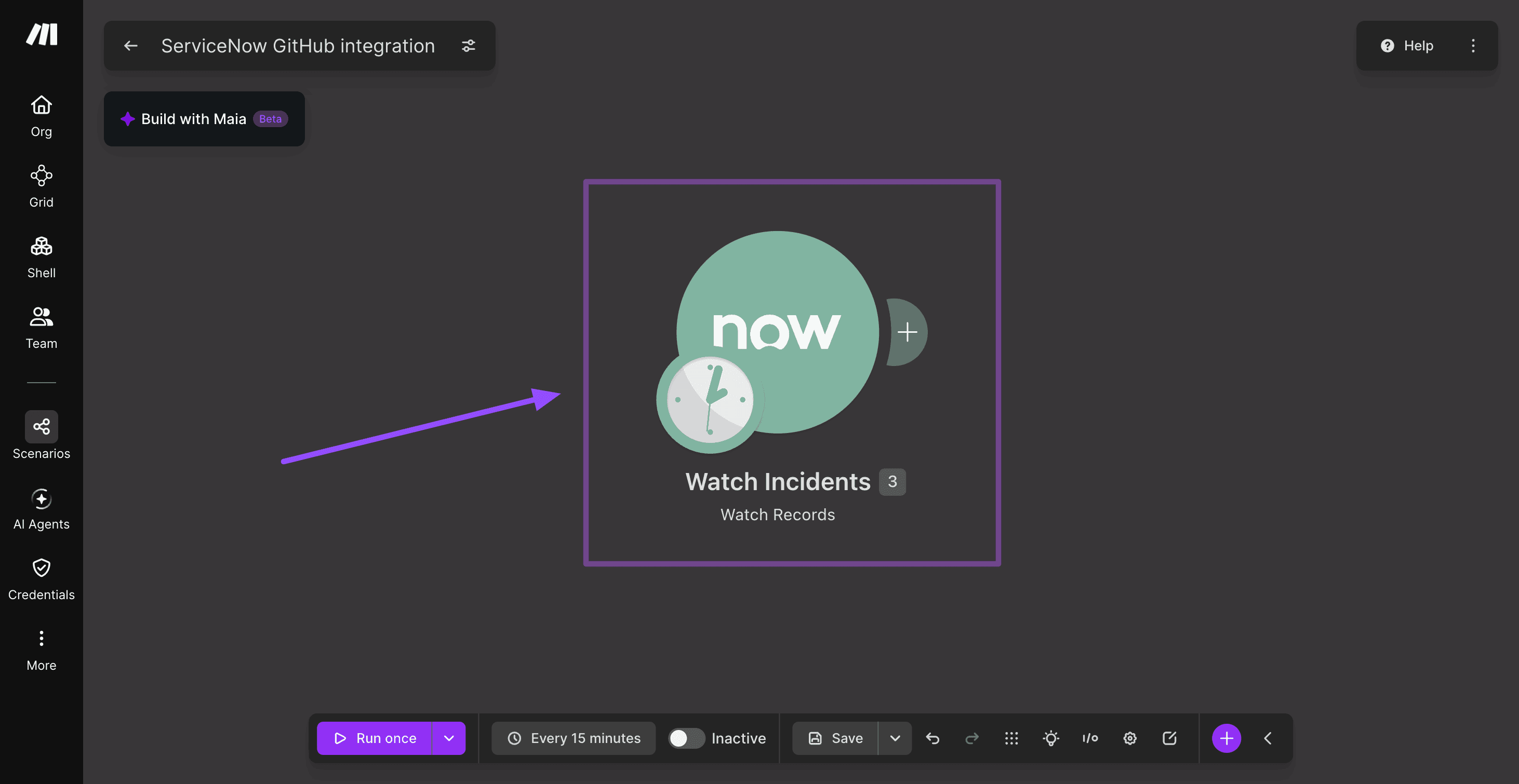
Step 2: Trigger the scenario when a new incident is created
Add ServiceNow's Watch Records trigger and point it at the Incident table.
Set it to watch for newly created records rather than updates, so each incident only creates one issue.
Step 3: How do you create the GitHub issue from the incident?
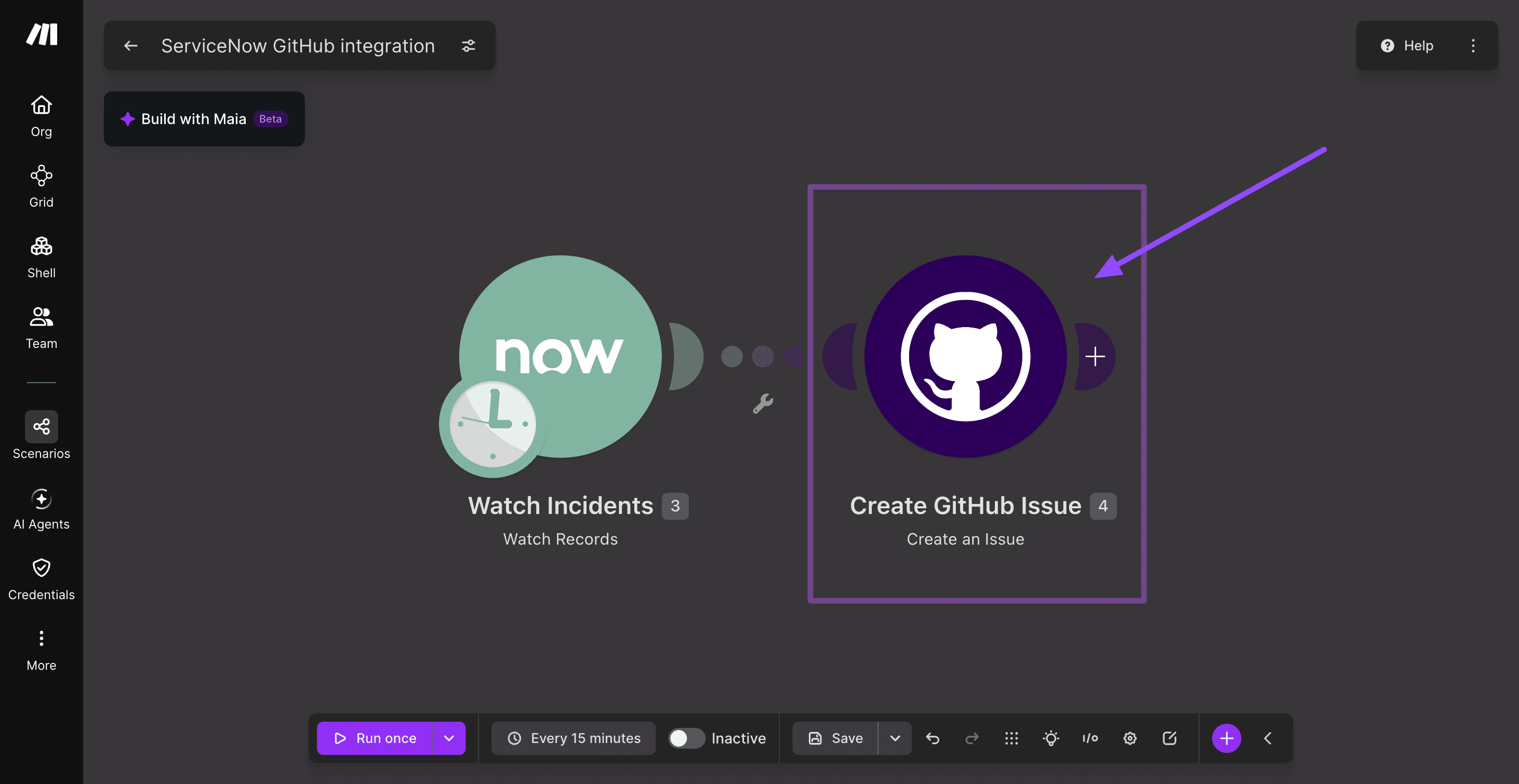
Add GitHub's Create an Issue action directly after Watch Records, so the two modules are connected.
Map the issue title from the incident's short description, and map the body from the incident number and description, with labels from the incident category.
Step 4: How do you filter for the incidents that should become GitHub issues?
Now that Watch Records and Create an Issue are connected, add a Filter on the line between them.

A condition such as priority is 1 (Critical) or 2 (High) keeps low-priority noise out of GitHub, per Make's guide.

Step 5: How do you sync the GitHub issue status back to ServiceNow?
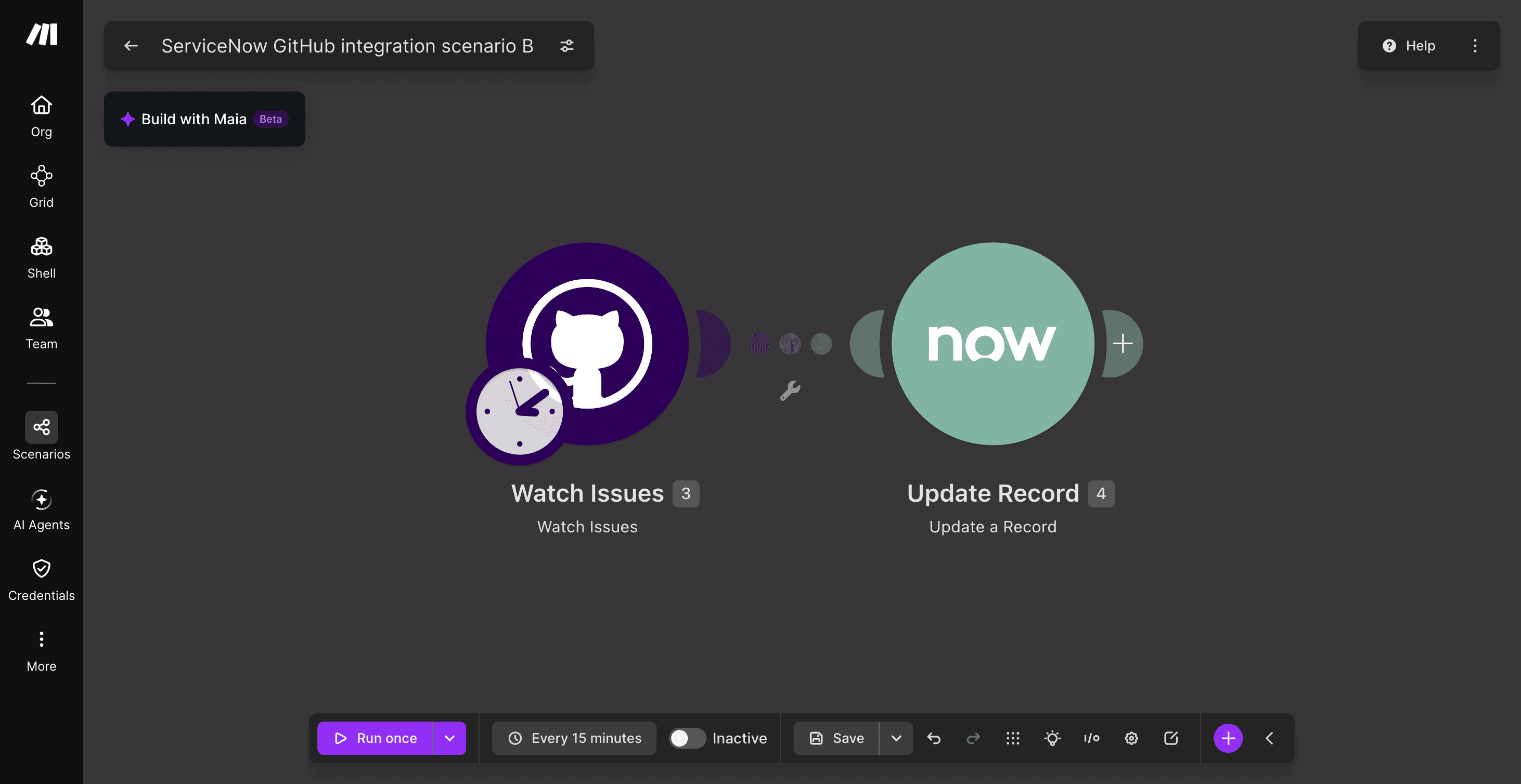
Build a second scenario using GitHub's Watch Issues trigger and ServiceNow's Update a Record action, matched on the incident number stored in the issue body.
This closes the loop, so support teams see progress without leaving ServiceNow.
For multi-repository setups, insert a Router between the trigger and the action and filter each route by category, per Make's .

What plan do you need for a ServiceNow GitHub integration in Make?
The two apps sit on different tiers.
ServiceNow is an Enterprise-only app integration in Make, and GitHub carries no plan restriction at all.
App or tool | Plan required in Make | Notes |
ServiceNow | Enterprise | Enterprise-only app; no workaround on lower tiers |
GitHub | Free and up | No plan restriction |
Router and Filter | Free and up | Built-in Make tools, no extra cost |
Take a look at Make's pricing page for what else the Enterprise plan unlocks beyond the ServiceNow app.
Native integration, custom API, a sync tool, or Make: how do you choose?
Each approach fits a different team rather than one universal best answer. None of them make the others wrong.
Native ServiceNow IntegrationHub: best if you're staying entirely inside ServiceNow with a mostly one-way sync and in-house Flow Designer skills.
Custom API integration: best with dedicated developer resources and highly specific logic; Make's guide to API integration covers what that build actually involves.
Dedicated bidirectional sync tools, such as Exalate or OpsHub: best when ServiceNow-GitHub field mapping is the whole job, with deep conditional logic on both sides.
Make: best when the ServiceNow-GitHub sync is one piece of a bigger scenario, since the same flow can also post to Slack or Teams, or log to a Data Store, without adding another point solution.
For most growing IT and engineering teams, that's what tips the decision: the integration is rarely the only thing that needs to happen when an incident comes in.
Where do you go from here?
Start with whichever path fits your team today. If IntegrationHub already covers your use case, stick with it.
If you need two-way sync, multi-repository routing, or a scenario that touches more than these two apps, build it in Make instead.
Get started today with Make and connect GitHub, and talk to sales about adding ServiceNow's Enterprise app.
Make's templates library is a reasonable place to start rather than building from a blank canvas.
Frequently asked questions
Q1: Does ServiceNow have a native GitHub integration?
Yes. IntegrationHub, DevOps Change Velocity, and Studio source control all connect the two without a third-party tool, though each handles a narrower job than a full two-way sync.
Q2: What does DevOps Change Velocity's GitHub integration do?
It adds GitHub Actions deployment gates to change management, so a deployment waits on an approved change record. It's built for CI/CD gating, not general incident-to-issue sync.
Q3: Can ServiceNow incidents sync to GitHub issues automatically?
Yes, using a Make scenario with ServiceNow's Watch Records trigger and GitHub's Create an Issue module, filtered to the incidents you want to track. The same setup can sync updates back.
Q4: Do you need a MID Server to connect ServiceNow and GitHub?
No. GitHub's API is reachable over public HTTPS, so the connection doesn't need an on-premises MID Server the way some internal ServiceNow integrations do.
Q5: What Make plan do you need to connect ServiceNow and GitHub?
ServiceNow is an Enterprise-only app in Make. GitHub carries no plan restriction, so ServiceNow access is always the limiting factor.
Q6: Can one Make scenario update GitHub and other tools at the same time?
Yes. The same scenario that creates a GitHub issue from a ServiceNow incident can also post to Slack or Teams, or log the event to a Data Store.
Ready to make the automation revolution happen?