Jul 20, 2026 | 8 minutes
Jira ServiceNow integration: A practical setup guide for 2026
Build a Jira ServiceNow integration in Make with step-by-step instructions, bidirectional sync, field mapping and testing tips for ITSM teams.
Make facilitates a no-code, visual integration between Jira and ServiceNow.
This integration provides full visibility into field mappings and synchronization steps.
A Make scenario is an automated workflow that connects applications and services, moving data and triggering actions.
This bidirectional scenario aligns incidents, problems, and development tickets without manual data transfer.
For example, a mid-market SaaS company's service desk logs an incident in ServiceNow while engineering tracks the fix in Jira; without sync, the incident ages past SLA while the Jira ticket closes silently, and no one notices until a customer escalates.
Per the ITSM software market report, AI and automation integration in ITSM software has boosted incident management efficiency by 30%, with at least 60% of enterprises using cloud platforms for IT service management.
See also our Jira Github integration guide for more enterprise integration guides.
What you need before connecting Jira and ServiceNow
Before building the Jira ServiceNow integration in Make, gather the access, credentials, and field mappings the scenario will need.
Both platforms expose REST APIs, but each requires specific permissions and a stable connection from Make.
Confirm these items with your ITSM owner before opening the Scenario Builder, since missing scopes cause most failed first runs.
Review the ServiceNow integration page to verify supported triggers and actions for your instance.
An active Make account on an Enterprise plan that allows scheduled scenario runs and sufficient operation volume for your ticket throughput.
Jira admin access to generate an API token, configure webhooks, and map project, issue type, and status fields for the sync.
ServiceNow API credentials with a dedicated integration user, table-level read and write permissions, and a documented list of custom fields to map.
Why manual Jira and ServiceNow handoffs break ITSM
Manual Jira and ServiceNow handoffs disrupt ITSM operations. These processes require human intervention to copy ticket data between two distinct systems of record.
This can result in duplicate tickets, missed updates, and SLA breaches. Such issues erode trust between service desk and engineering teams.
ServiceNow typically owns the incident, request, and change records for the business, while Jira owns the engineering backlog where bug fixes and feature work actually happen.
When an agent files an incident in ServiceNow and then re-keys it as a Jira issue, status changes drift apart within hours.
Engineers close a Jira issue without notifying ServiceNow, so the originating incident keeps aging against its SLA.
Priority fields, custom categories, and resolution codes rarely map cleanly, so reporting becomes guesswork. Comment threads fork, attachments get lost, and audit trails fragment.
Teams patch this with shared spreadsheets, weekly reconciliation meetings, or brittle native plugins.
A workflow automation approach replaces the re-keying with a governed scenario that keeps both systems aligned.
Workflow diagram showing Jira issues syncing through a Make scenario into ServiceNow tickets bidirectionally
The Make scenario that syncs Jira and ServiceNow
The Make scenario that syncs Jira and ServiceNow uses a dual webhook trigger architecture with conditional routing to keep incidents and issues aligned across both platforms in near real time.
The pattern centers on two parallel flows joined by a shared correlation ID stored in a custom field, so each ticket knows its counterpart and bidirectional sync runs without creating duplicates.
The first flow starts with a ServiceNow - Watch Records module or an inbound webhook trigger from a ServiceNow business rule.
A Router splits traffic into create and update branches, then a Jira Cloud - Create an Issue or Jira Cloud - Update an Issue module writes the payload using field mapping defined in a Set Variable step.
The mirror flow uses Jira Cloud - Watch Issues feeding ServiceNow - Create a Record or ServiceNow - Update a Record.
A Data Store tracks correlation IDs and last-modified timestamps to suppress echo loops, the classic failure mode in bidirectional sync.
For non-native endpoints or custom ServiceNow tables, an HTTP - Make a Request module can connect any API ServiceNow exposes.
Status transitions, comments, attachments, and priority each get their own route, so a comment update never triggers a full record rewrite.
The result is a practical, auditable scenario you can extend.
This sync runs on deterministic, rule-based logic: the Router and correlation ID drive matching, not AI.
AI only appears later as an optional enrichment layer, never inside this base record-matching flow.
How to build the Jira ServiceNow integration in Make
Building the Jira ServiceNow integration in Make takes seven concrete steps inside the Scenario Builder: trigger configuration, field mapping, deduplication, ServiceNow creation, status sync back, error routing, and scheduling.
Each step adds one module or route to the scenario, and the order matters because downstream mappings depend on upstream bundles.
The same pattern powers cross-system syncs like the HubSpot NetSuite integration, so the structure transfers well.
Step 1: Configure the Jira trigger
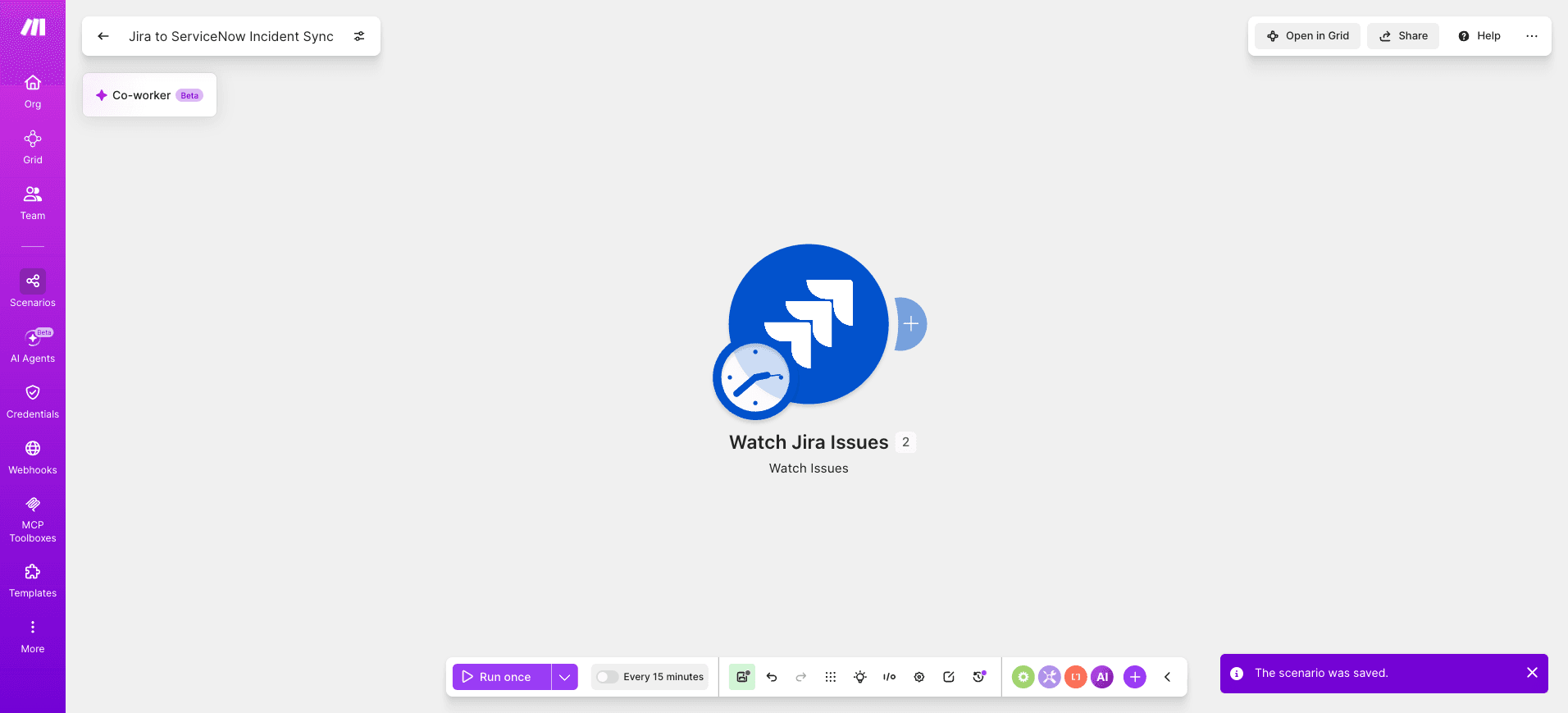
Add Jira Cloud - Watch Issues as the first module.
Authenticate with a dedicated service account and select the support project that should sync to ServiceNow.
Set Issue Type to Incident and Watch for Created or updated issues.
Cap Limit at 10 per cycle to keep operation usage predictable.
Map Issue Key, Summary, Description, Priority, Status, Reporter Email into scenario variables.
Step 2: Look up existing ServiceNow records
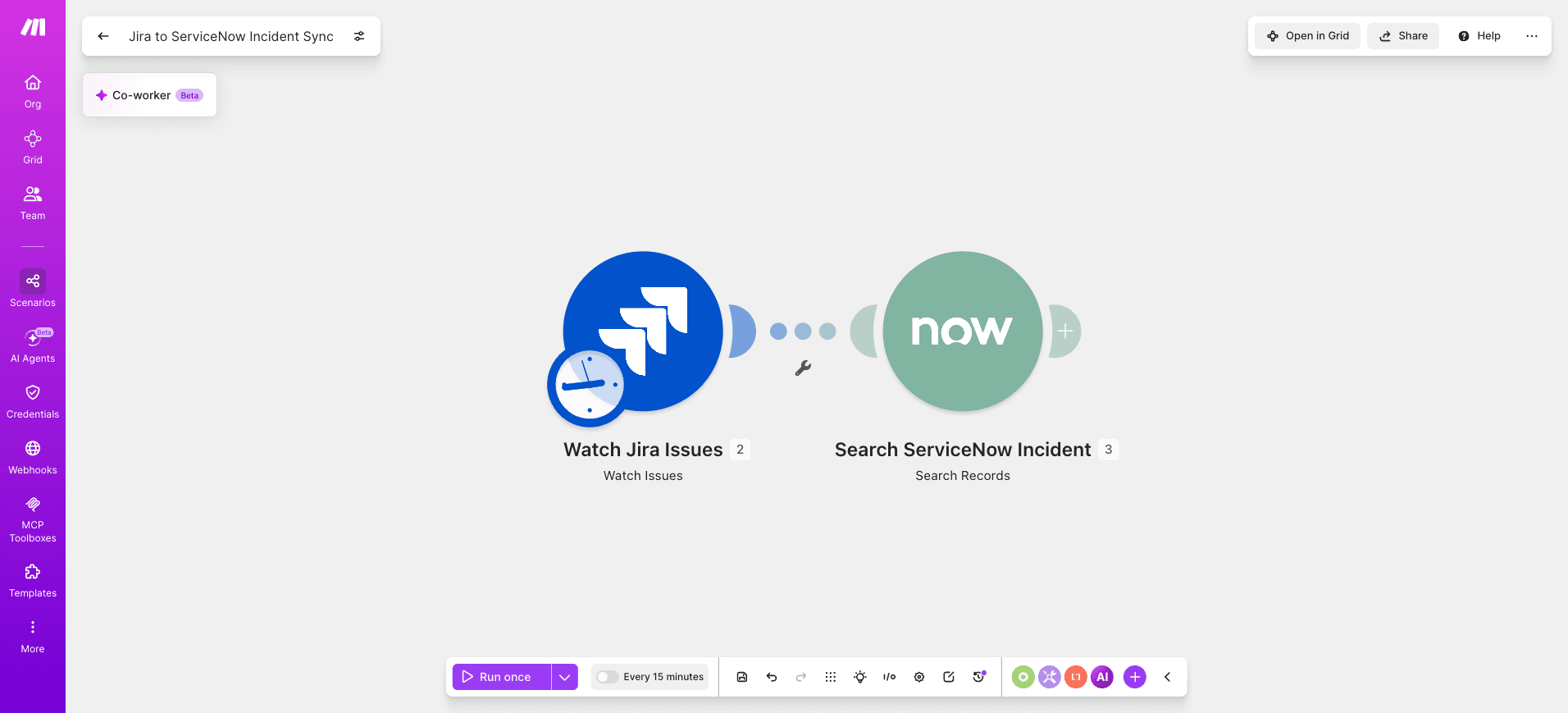
Add ServiceNow - Search Records to check whether the incoming Jira issue already exists in the incident table.
Query by a custom correlation field (for example, u_jira_issue_key) so the scenario can decide whether to create or update.
Step 3: Cache mappings with a data store
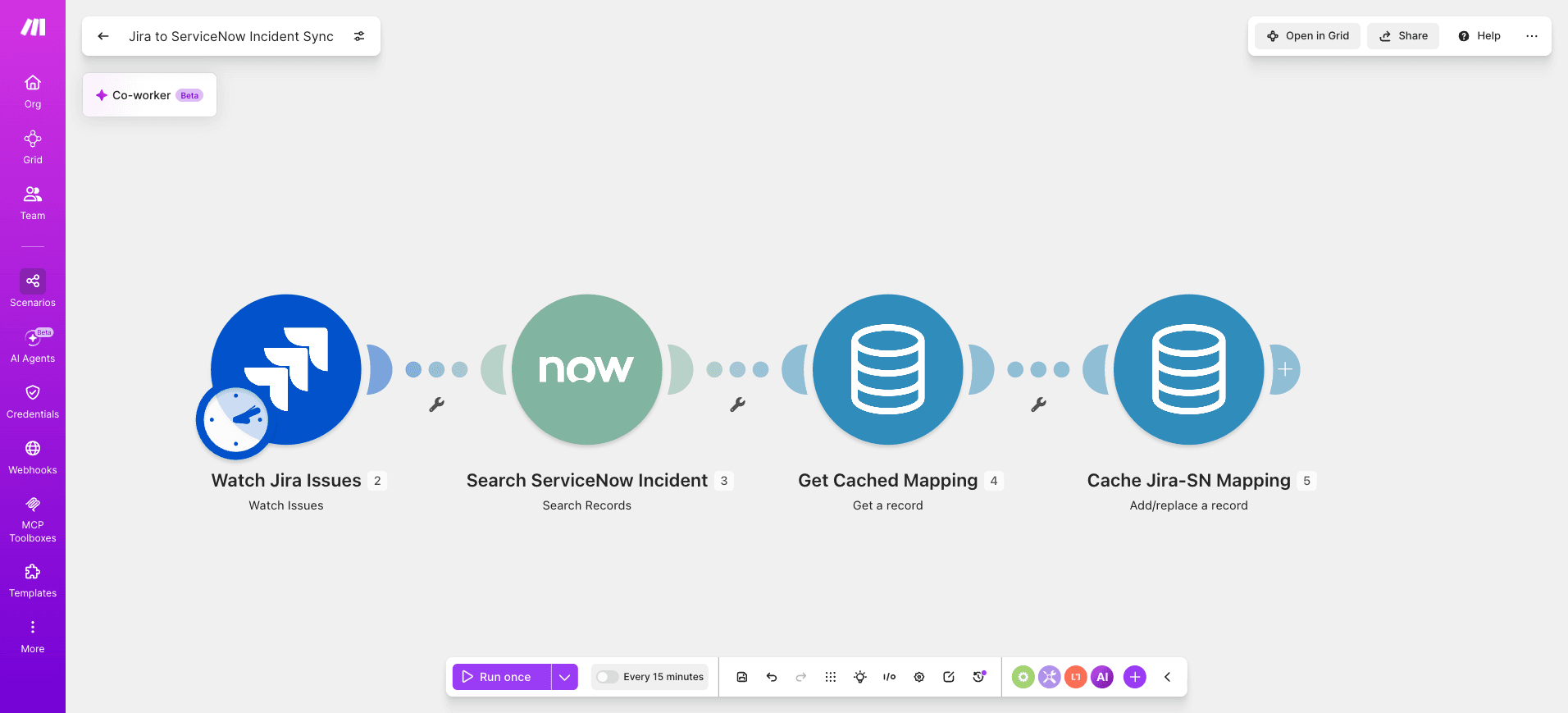
Insert a Data Store - Get a Record module keyed on the Jira issue key.
If the record exists, the cached ServiceNow sys_id flows downstream.
If not, the scenario creates one and writes the mapping back with Data Store - Add/Replace a Record.
PRO TIP: Use Make's data store to cache Jira-ServiceNow ID mappings keyed on jiraIssueKey, with sys_id as the value. On retries after a 5xx, the scenario reads the cache first and skips ServiceNow - Create a Record, avoiding duplicate incidents that otherwise appear when the run resumes mid-flight.
Step 4: Route create versus update
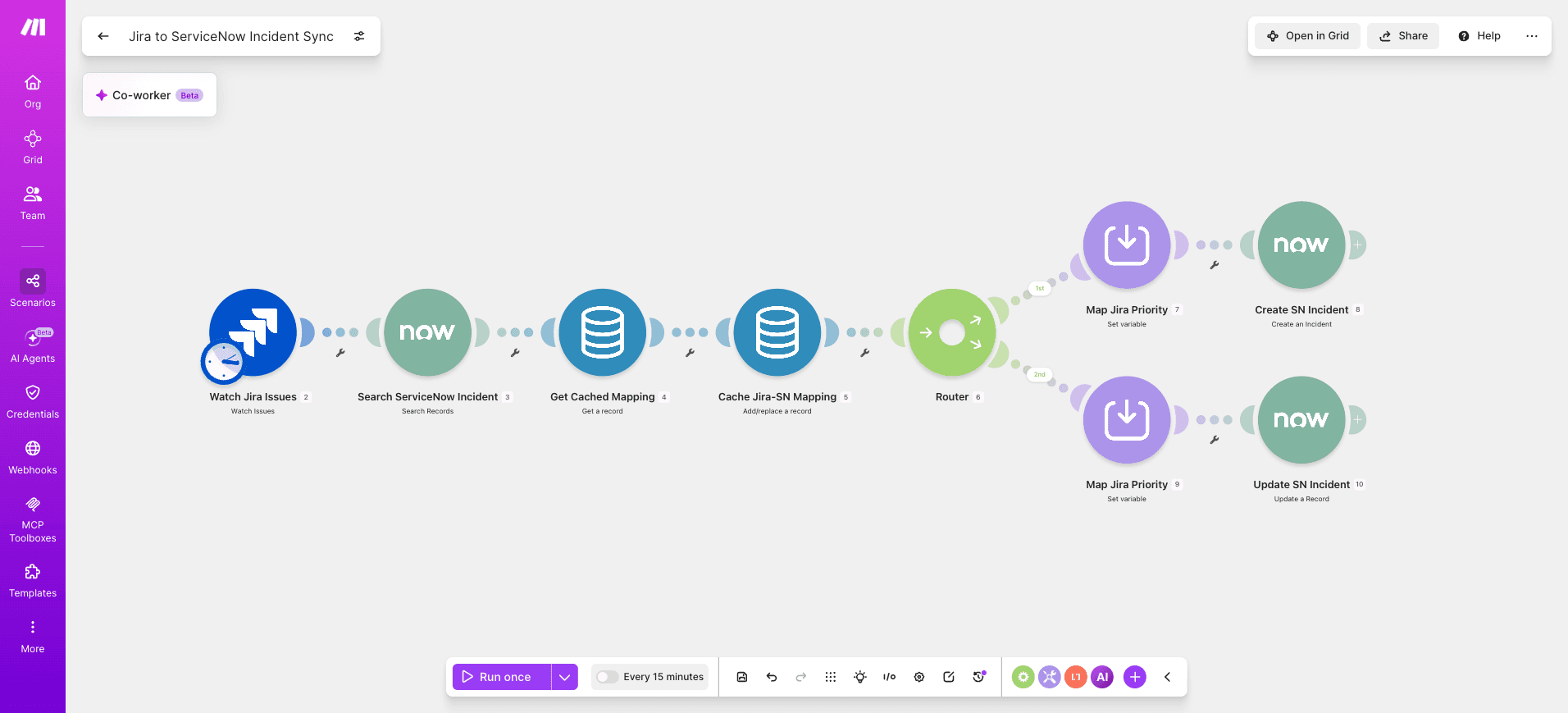
Add a Router with two routes. Route A runs ServiceNow - Create a Record when no sys_id exists.
Route B runs ServiceNow - Update a Record when the data store returns a match. Map Priority through a Set Variable module that translates Jira P1 to ServiceNow priority 1.
Step 5: Sync status back to Jira
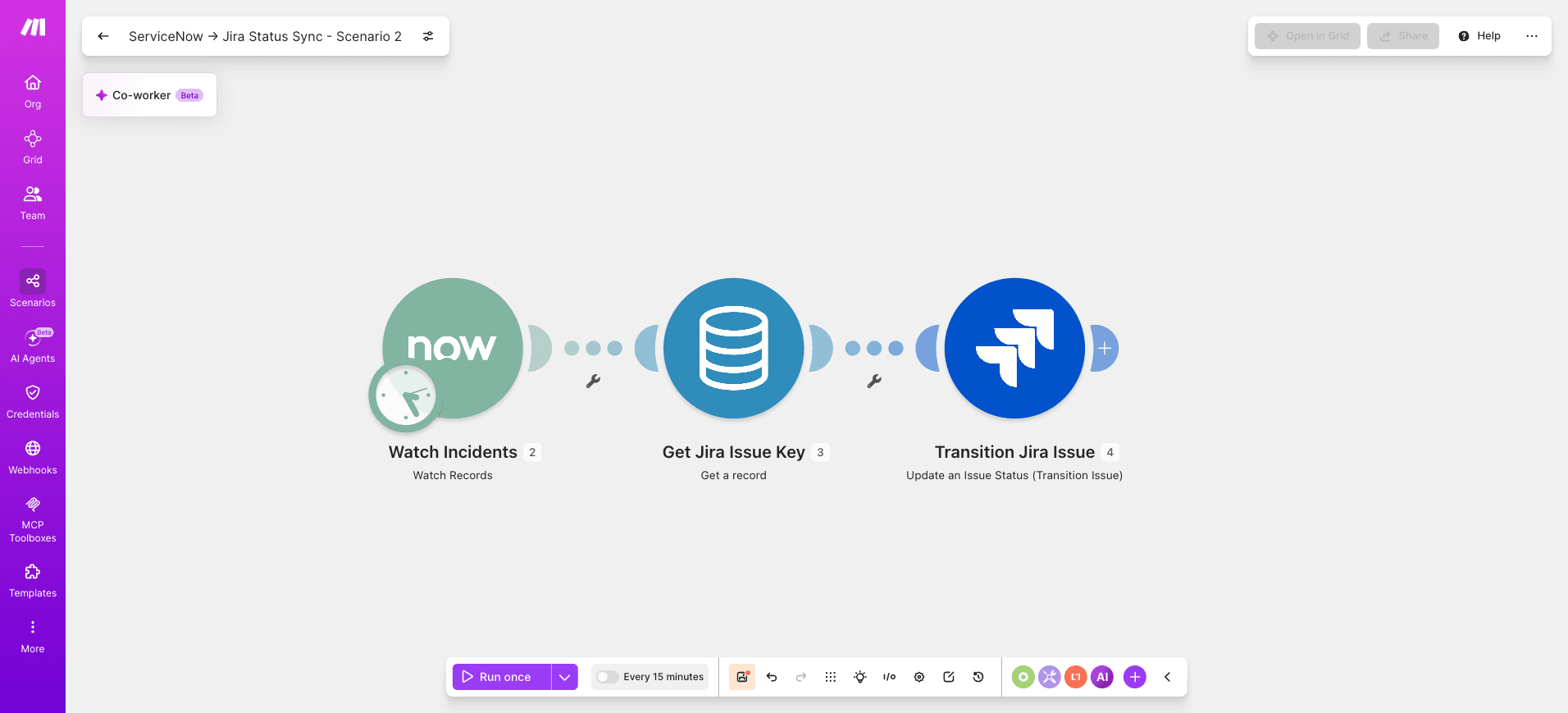
Add ServiceNow - Search Records in a sibling scenario that listens for incident state changes, then calls Jira Cloud - Update an Issue to transition the matching ticket.
The same data store keeps both directions consistent.
Step 6: Add error handling routes
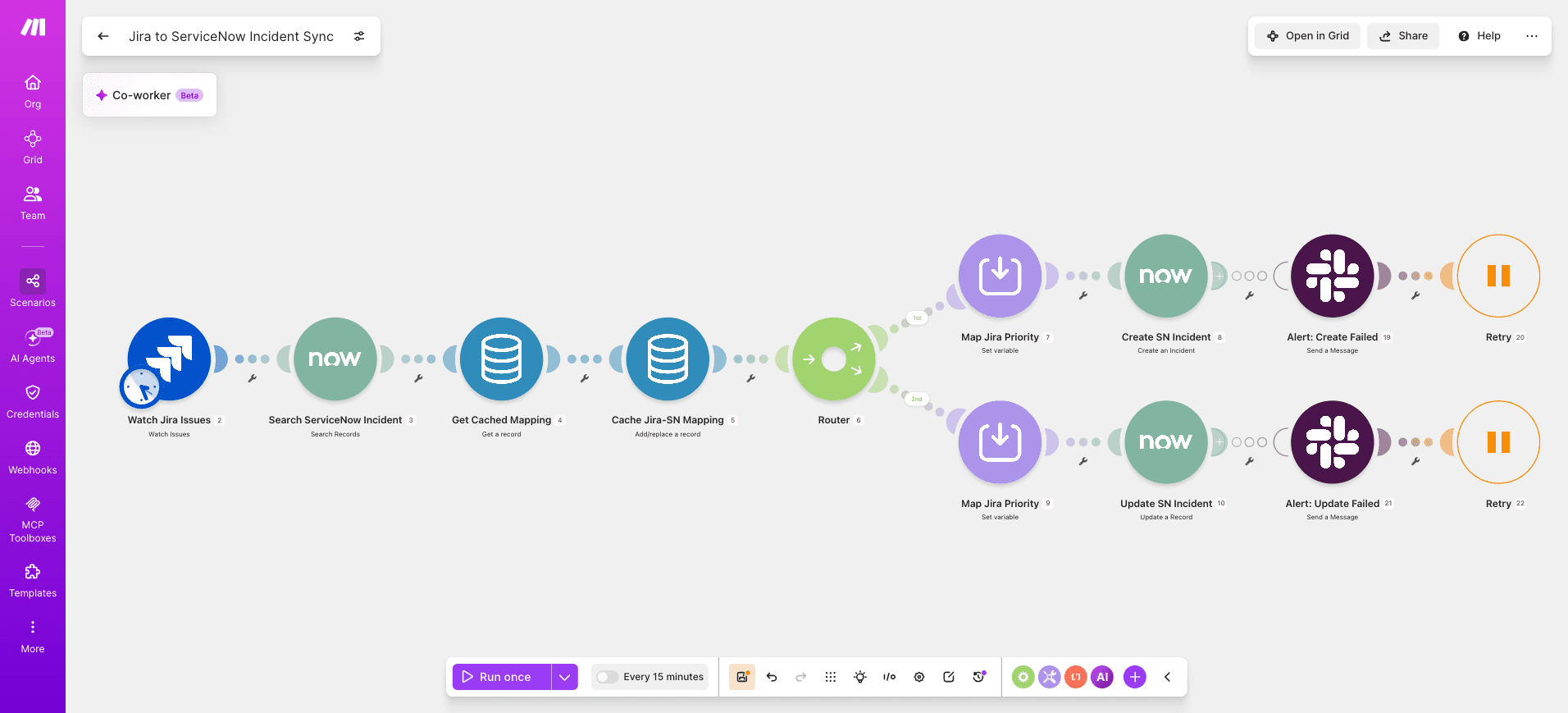
In both scenarios, right-click each ServiceNow module and attach a Break error handler with automatic retries on connection errors.
Add a fallback route that posts failures to a Slack channel using Slack - Create a Message.
For LLM-assisted summarization of error patterns, this LLM integration tutorial covers the prompt structure.
PRO TIP: Set the Break handler to store incomplete executions and retry every 15 minutes for up to 3 attempts. Pair it with a Filter checking the error code; 429 rate limits get longer backoff while 401 errors route immediately to an alert path.
Step 7: Schedule and activate
Set the scenario to run every 15 minutes during business hours and hourly overnight.
Enable sequential processing so bundles from the same Jira issue cannot race.
How to test and troubleshoot the integration
Test the Jira ServiceNow integration by running the scenario in debug mode with a single seeded ticket on each side, then verifying that field mappings, attachments, and status transitions land correctly.
Open the Scenario Builder, click "Run once", then create a test incident in ServiceNow and a matching issue in Jira.
Inspect each bundle output, confirm the external ID mapping table updates, and check that the Router sends each record down the correct route.
Treat the first ten operations as your validation set before scheduling.
For teams scaling validation across many integrations, documentation automation patterns can capture test results as living runbooks.
Common errors and the fixes that resolve them:
Duplicate tickets created: the external ID lookup in Data Store - Search Records returned empty; widen the search filter and confirm the key column is indexed.
401 from ServiceNow: refresh the OAuth connection and verify the integration user retains itil and rest_api_explorer roles.
Custom field null: map sys_id values, not display labels, inside the Jira Cloud - Update an Issue.
Loop firing twice: add a "modified by integration user" filter before the trigger.
Before and after comparison showing manual versus automated Jira ServiceNow ticket sync outcomes and handoff speed
Outcomes you can expect from automated ticket sync
Automated Jira ServiceNow ticket synchronization built in Make can reduce sync times, minimize missed tickets, and cut down on manual reconciliation work for ITSM teams.
When the scenario runs on a tight polling interval, incidents raised in ServiceNow appear in Jira within the next operation cycle, so engineering picks up work without waiting for a manual handoff from the service desk.
Teams that move ticket reconciliation into a Make scenario typically report fewer duplicate records, cleaner audit trails, and faster first-response SLAs because the ServiceNow - Watch Records and Jira Cloud - Create an Issue remove repetitive copy and paste.
The Bolt automation results illustrate how eliminating manual follow-ups frees support capacity for higher-value triage and root-cause work.
Variations and next steps for ITSM workflows
The core Jira ServiceNow sync scenario is a foundation you can extend across incident management, change control, and asset tracking.
Once the base bidirectional flow runs cleanly, extend it with routing logic and cross-team notifications.
The table below maps practical variations onto Make patterns, each one reusing the same connection credentials and webhook structure you already configured.
Use case | Approach | Difficulty |
Major incident escalation | Add a Router with priority filters, then fan out to Slack - Create a Message and PagerDuty | Low |
AI-powered ticket triage | Insert OpenAI - Generate a Completion to classify descriptions before routing, or build AI agents that decide assignment groups. AI agents are autonomous programs that perform tasks, make decisions, and act on context without step-by-step instructions for every scenario. | Medium |
Change request approvals | Use a Router with a Filter on change type and gate ServiceNow updates behind Jira approval transitions | Medium |
CMDB asset sync | Schedule a nightly scenario pulling ServiceNow CMDB records into Jira Assets via HTTP - Make a Request | High |
Agentic resolution suggestions | Pair the sync with Make AI Agents that draft resolution notes from historical tickets | High |
What should you build next?
A Jira ServiceNow integration in Make can synchronize ticket flows between previously siloed ITSM systems, aligning incidents, changes, and requests without manual data transfer.
The scenario you built uses Jira Cloud - Watch Issues, ServiceNow - Search Records and a Router to keep records in lockstep, with deduplication and error handling that hold up in regulated environments.
Start with one ticket type, confirm the field mappings, then widen the scenario to incidents, problems and changes as confidence grows.
Treat the build as a living asset: review run logs weekly, tune filters and add routes as your ITSM workflows mature.
Ready to wire Jira to ServiceNow? Get started for free.
Frequently asked questions
Q1: Can Make sync Jira and ServiceNow bidirectionally without duplicates?
Yes. A Make scenario uses a dedupe key (external ID stored on both sides) plus a Router that checks for an existing record before creating one. Each operation updates the matched record, so bidirectional sync stays clean across both systems.
Q2: How does Make handle ServiceNow custom fields when syncing to Jira?
The ServiceNow - Get a Record module returns custom fields as part of its bundle. Map them to Jira custom field IDs inside Jira Cloud - Update an Issue, using a Set Variable step for any value transformations or picklist conversions.
Q3: Is a Jira ServiceNow integration with Make secure for regulated industries?
Make supports OAuth, scoped API tokens, encrypted connection storage, and EU data residency. For regulated workloads, restrict the service account permissions, log every operation, and pair the scenario with your existing SIEM through a webhook for audit traceability.
Q4: How often does the scenario poll for new tickets?
Scheduling is configurable. Polling triggers like Jira Cloud - Watch Issues can run as frequently as every minute on paid plans, or you can switch to instant webhooks for near real time sync when ServiceNow business rules push updates outbound.
Q5: What happens if ServiceNow or Jira is temporarily unavailable?
Make retries failed operation calls automatically and routes persistent errors to the incomplete executions queue. Enable error handlers with Break directives so the scenario resumes from the failed bundle once the target system recovers, preventing data loss or partial syncs.
Ready to make the automation revolution happen?