Jul 30, 2026 | 8 minutes
How to connect ServiceNow & Microsoft Teams with Make
A practical, step-by-step guide to linking ServiceNow tickets with Microsoft Teams chats, and building your own custom connection using Make.
📌 Quick answer
ServiceNow Teams integration connects ServiceNow’s IT service management platform with Microsoft Teams, so employees can raise, track, and approve requests without leaving chat.
The native route uses ServiceNow’s Microsoft Teams app, plus ITSM or HRSD licensing and an Azure AD app registration.
Make offers a no-code alternative: trigger on new or updated ServiceNow records and post them to a Teams channel, combined with any of Make’s other 3,000+ apps in one scenario.
Introduction
A ServiceNow Teams integration usually starts with a familiar problem.
A ticket opens in ServiceNow, then the real conversation about it happens over in Microsoft Teams.
That gap is expensive. Employees lose an average of 3 hours and 18 minutes of productive time per IT incident, according to HappySignals’ Global IT Experience Benchmark 2026.
Reassignments make it worse, with 13.3% of tickets bouncing between people before anyone resolves them.
This guide covers both ways to close that gap: ServiceNow’s native Microsoft Teams app, and building a custom connection with Make, so IT admins and service desk leads can compare them side by side.
What is a ServiceNow Teams integration?
A ServiceNow Teams integration links ServiceNow, the IT service management platform behind incidents, requests, change, and HR service delivery, with Microsoft Teams, the chat app most employees already keep open all day.
Instead of switching tools, employees see ServiceNow records, notifications, and approvals appear directly inside a Teams channel or chat.
There are two ways to build this. The first is ServiceNow’s own native Microsoft Teams app and Virtual Agent.
The second is a no-code automation layer like Make, which watches ServiceNow for changes and posts them into Teams, or the reverse, without requiring ServiceNow’s Pro-tier licensing.
IT service desks use this most often, but HR shared services and facilities teams run the same pattern on their own ServiceNow tables.
Both routes solve the same problem: work that starts in one system shouldn’t need a second login to finish.
Why connect ServiceNow and Microsoft Teams?
Connecting the two means fewer app switches, faster approvals, and a more consistent service experience across departments, exactly the case for a ServiceNow Teams integration in the first place.
Requests, incident updates, and approvals show up where employees already talk, instead of sitting unread in a separate portal.
Take a laptop request stuck in an approval queue as an example. With the integration in place, the approving manager gets the request as a Teams message and clicks approve without ever opening ServiceNow.
Conversational ticketing and self-service cut down on routine tickets reaching a human agent.
IT, HR, and facilities service desks all follow the same consistent process, whether the company has fifty employees or five thousand.
Employees get updates in real time instead of checking a portal for status changes.
Managers approve or reject requests from inside a conversation they are already having.
Make’s IT automation solutions cover this same pattern across ticketing, monitoring, and provisioning, not just Teams notifications.
What do you need to integrate ServiceNow with Teams?
The two paths have different requirements, and it is worth comparing them before you pick one.
Requirement | Native ServiceNow app | Make |
ServiceNow edition | ITSM or HRSD Standard for core notifications, Pro for Virtual Agent | Any edition with API access; the ServiceNow app in Make needs an Enterprise plan |
Microsoft 365 | Active tenant with Teams enabled | Same, plus a Make account and no developer resources |
Setup effort | Azure AD app registration, ServiceNow plugin install | Connect two apps inside one scenario, no Azure app registration required |
ServiceNow also requires at least the IntegrationHub Starter subscription for the native app to function, on top of whichever ITSM or HRSD tier you are on.
Worth flagging directly: the ServiceNow app in Make is Enterprise-plan only, while the Microsoft Teams app in Make works on every plan.
How do you set up the native ServiceNow for Microsoft Teams app?
Setting up the native integration means working through ServiceNow’s own plugin and Azure AD registration process.
Install the “IT Service Management integration with Microsoft 365” plugin, or the HRSD equivalent, from the ServiceNow Store.
Register an app in Azure AD to generate a client ID and secret.
Configure the connection in ServiceNow using those credentials.
Add the ServiceNow app to the relevant Microsoft Teams channels through the Teams Admin Center.
Install “Conversational Integration with Microsoft Teams” and enable Virtual Agent if you are on ITSM or HRSD Pro, which lets employees resolve routine requests like password resets without waiting for an agent.
Test the connection with a sample incident or request before rolling it out to a full department.
Once it is live, employees can chat with Virtual Agent, raise requests by topic, and approve changes with a single click, all inside Teams.
What are the limits of the native integration?
The native app is the deepest embedded chat experience available, but it comes with real constraints.
Virtual Agent and adaptive-card approvals both require ITSM or HRSD Pro, which not every organization has budgeted for.
The integration is also fixed to ServiceNow and Teams alone, so notifying Slack, logging to a spreadsheet, or creating a task somewhere else means building a second, separate integration.
Take a P1 incident that also needs to page an on-call engineer through a different tool. The native app has no way to do that in the same flow.
Custom routing and filtering logic is limited too, unless someone on your team is comfortable writing Business Rules or Flow Designer scripts.
None of that is a knock on ServiceNow.
It simply was not built to be a general-purpose automation layer across every app a company runs, unlike Make’s own approach to scaling automation without losing structure as needs grow.
How do you connect ServiceNow and Microsoft Teams with Make?
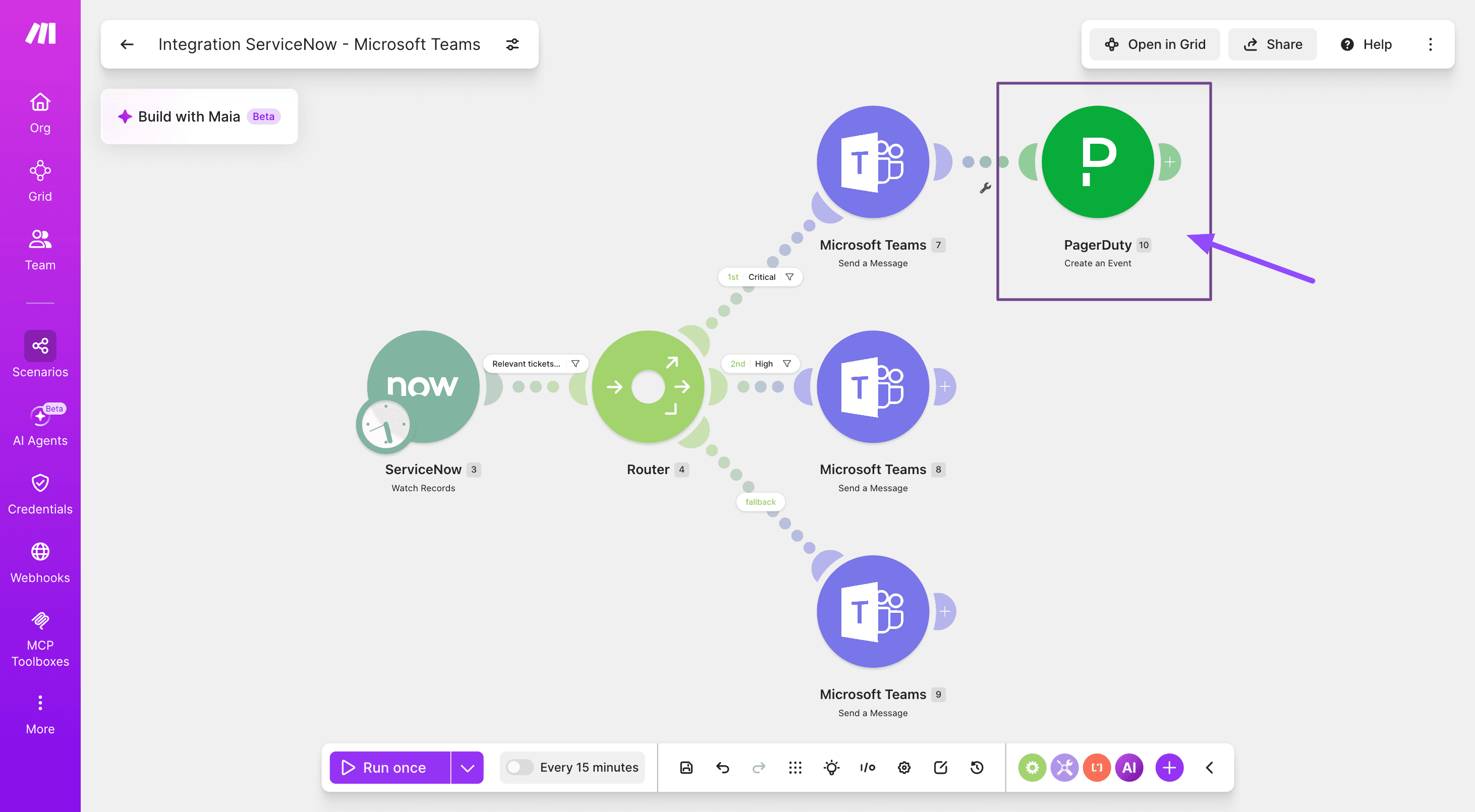
Building your own ServiceNow Teams integration in Make takes seven steps, and none of them require writing code.
Step 1: How do you connect your ServiceNow account?
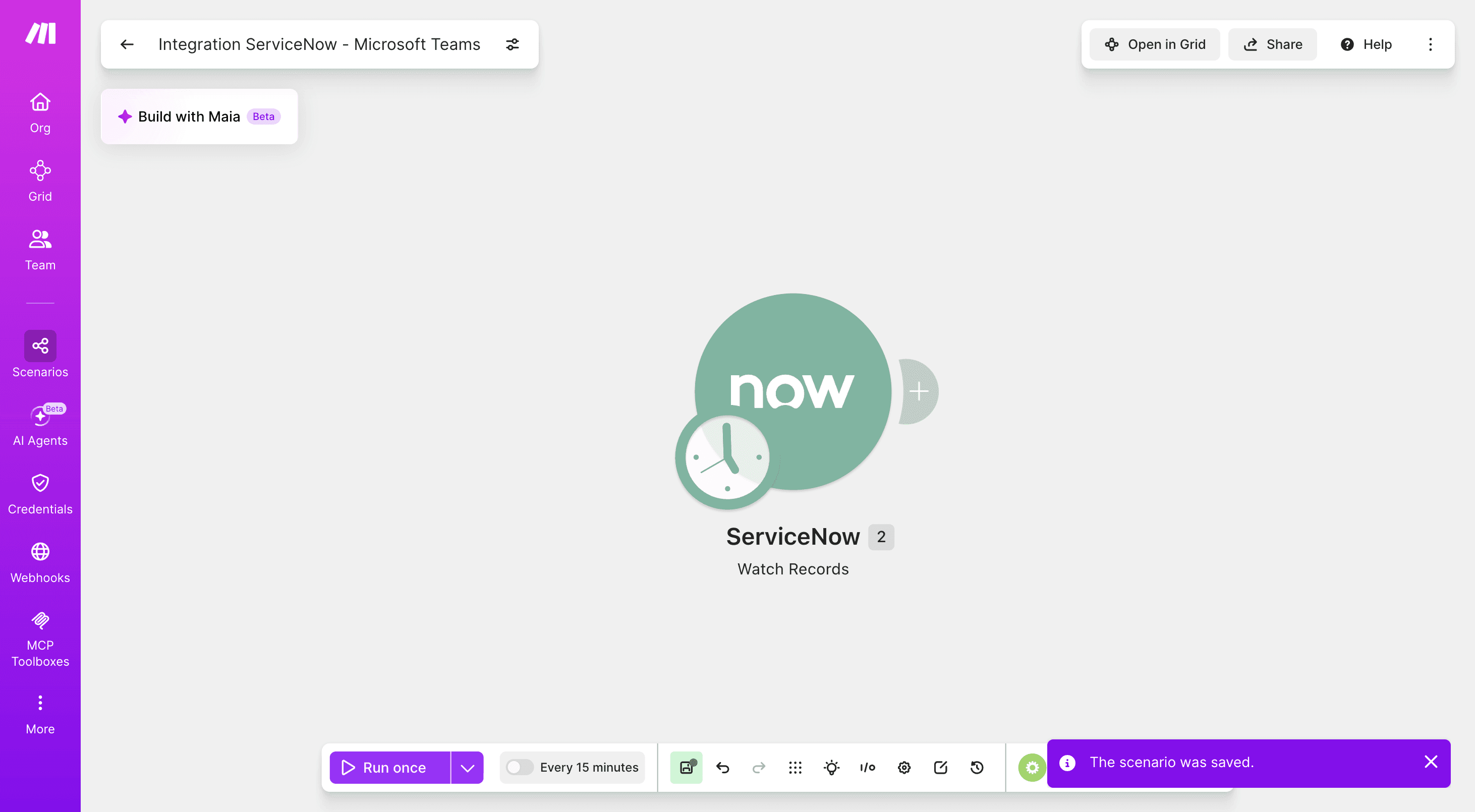
Add a ServiceNow Watch Records module as the trigger, set the table to “incident,” and authenticate with OAuth 2.0.
Step 2: How do you route incidents by severity?
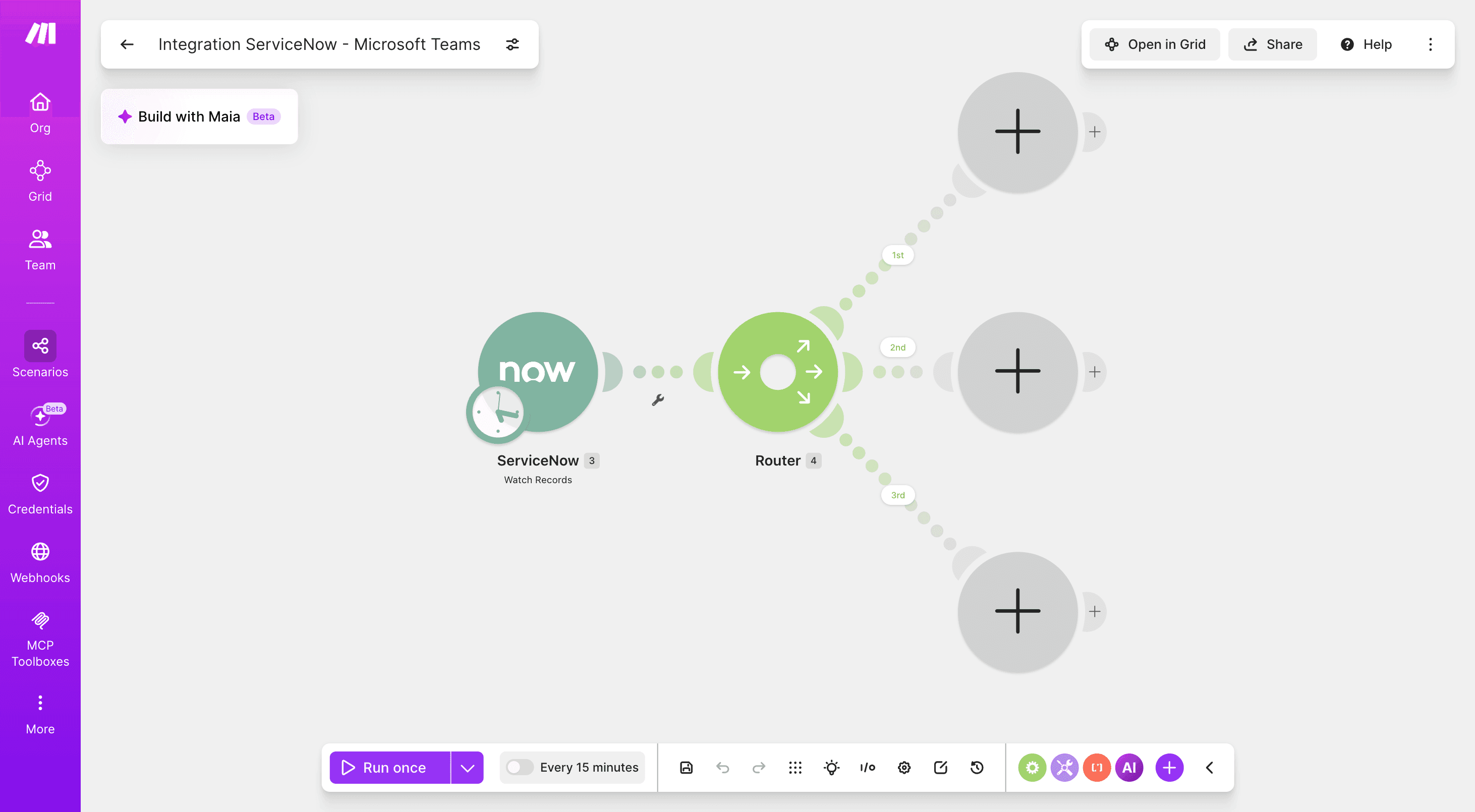
Add a Router to branch by severity or department, so a P1 incident and a routine request land in different Teams channels.
Step 3: How do you filter for the records that matter?
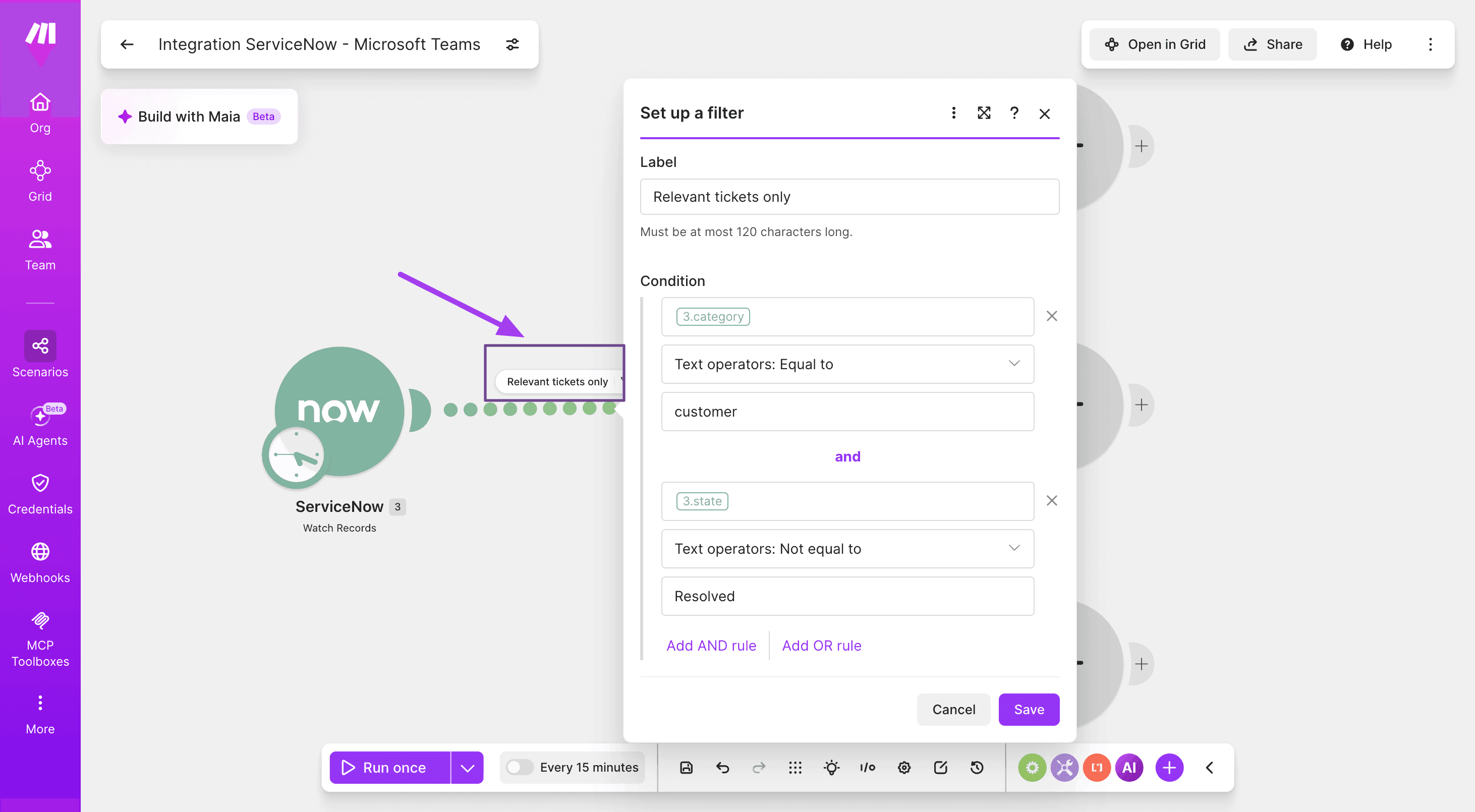
Add a Filter after the trigger so only relevant incidents pass through, for example category equal to customer and state not equal to resolved.
Step 4: How do you post updates to Microsoft Teams?
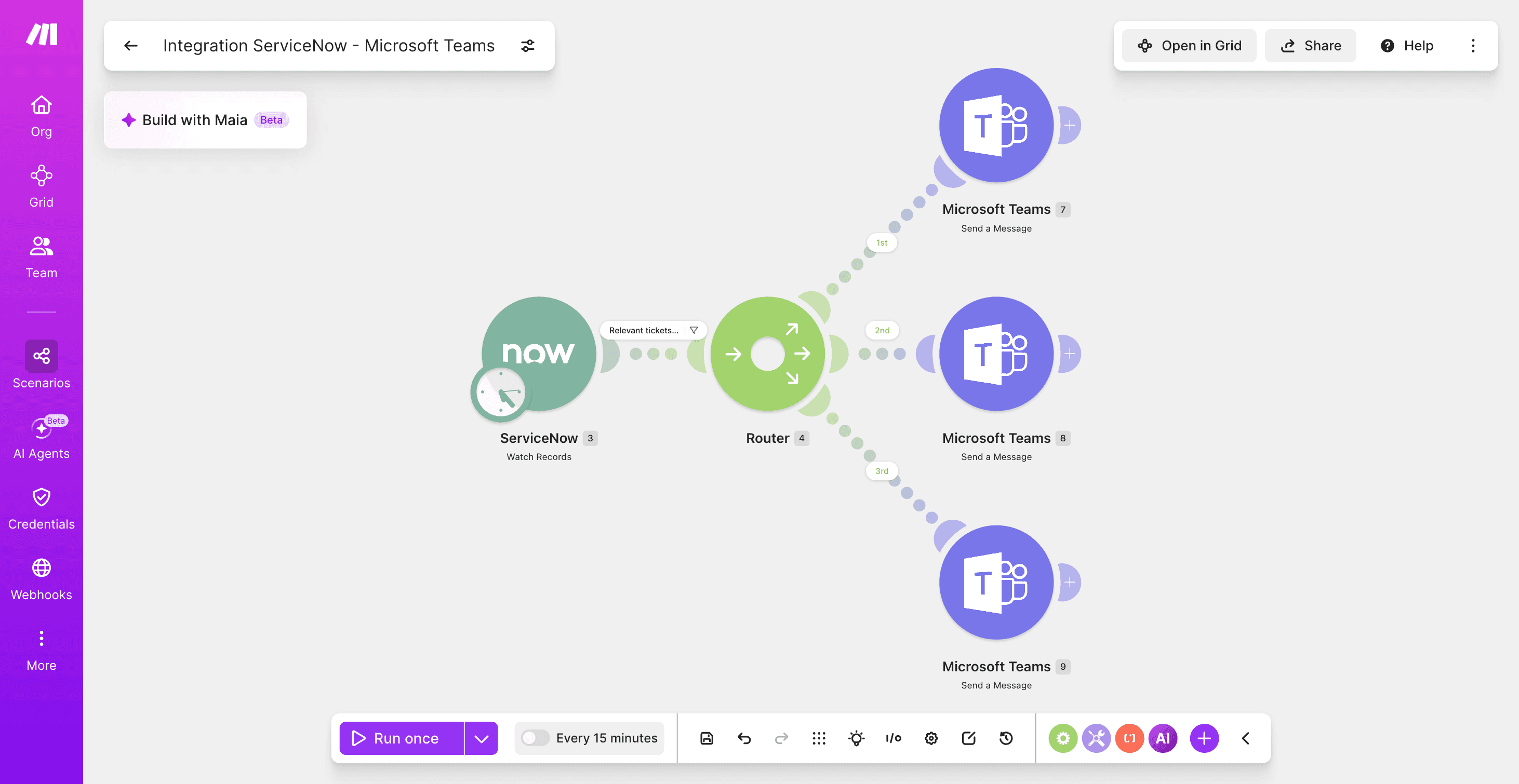
Add a Microsoft Teams Send a Message module and map ServiceNow fields like number, short description, and priority into the message.
Test this step with one real incident first, since field names in ServiceNow’s API rarely match the labels shown in its interface.
Step 5: How do you reverse the flow to create tickets from Teams?
Create a new scenario and use Microsoft Teams Watch Messages as the trigger and a ServiceNow Create an Incident module to log a ticket directly from a message.
Step 6: How do you extend beyond two apps?
Add a third app to the same scenario, such as PagerDuty for on-call escalation, something the native ServiceNow-Teams app cannot do in one flow. Keep an eye on operations while you build, since every module run counts against your plan’s monthly allowance.
Step 7: How do you test and activate the scenario?
Run the scenario once against a real record, check the execution history for each module, then turn the scenario on.
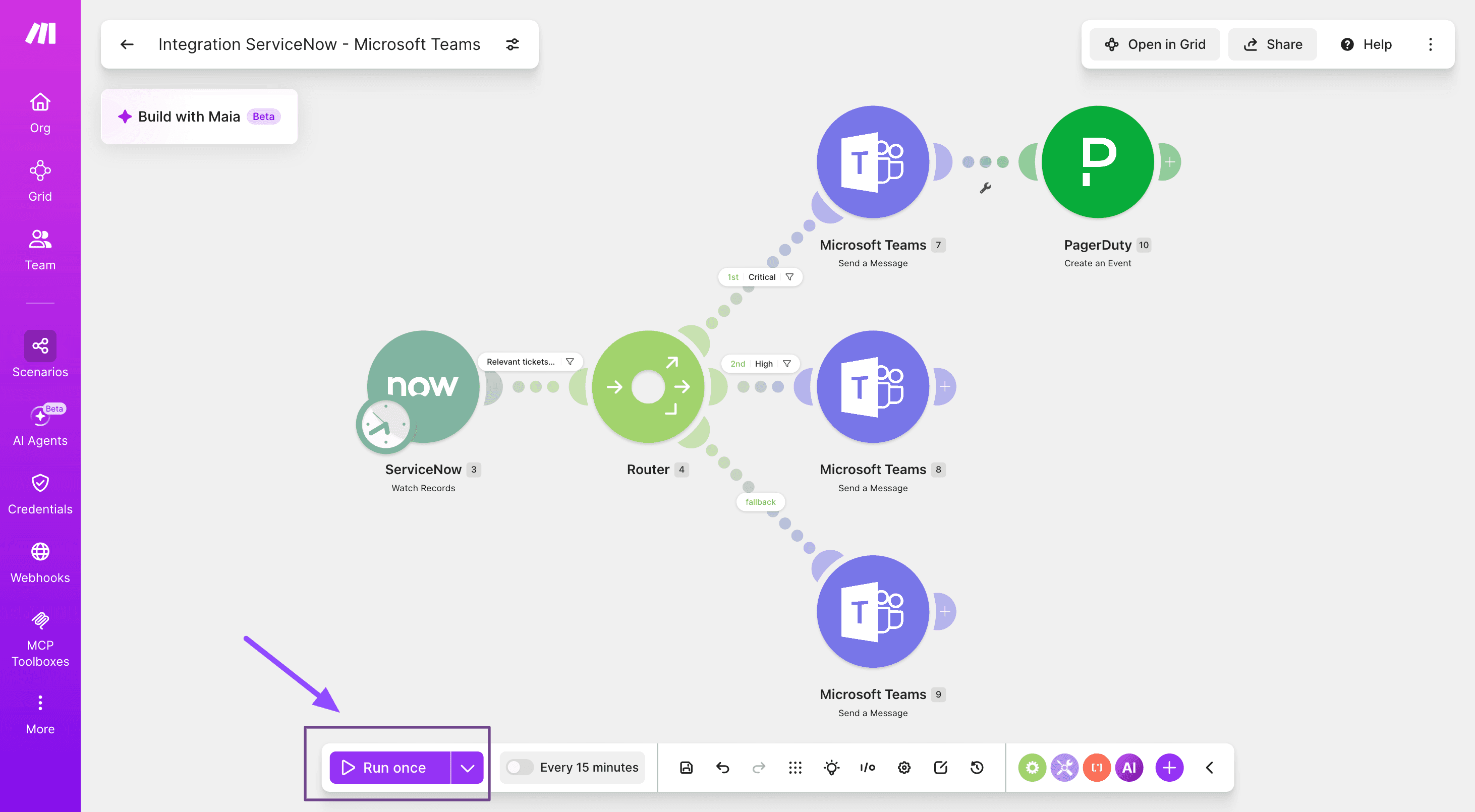
This same watch, filter, route, and act pattern shows up across Make’s Router documentation and other ServiceNow guides, since the underlying connection logic barely changes between apps.
What are the best ServiceNow Teams use cases in Make?
Once the basic scenario works, the same building blocks cover most enterprise service desk scenarios, which is where a ServiceNow Teams integration built in Make tends to pay off the most.
Use case | Trigger | Action |
SLA breach escalation | ServiceNow Watch Records (SLA field) | Teams Send a Message plus PagerDuty Create an Event |
Major incident war room | ServiceNow Watch Records (P1 incident) | Teams Create a Channel plus Send a Message |
Change approval routing | ServiceNow Watch Records (change request) | Teams Send a Message with a Router for approve or reject paths |
HR onboarding welcome thread | ServiceNow Watch Records (HRSD case) | Teams Reply to a Channel Message |
Cross-department ticket handoff | ServiceNow Watch Records | Google Sheets Add a Row |
Each of these swaps out a single module while keeping the same trigger, filter, and action shape from the previous section, whether the team running it has five agents or five hundred.
How do you keep a ServiceNow Teams integration secure?
Role-based access matters on both sides of the connection.
Make connections inherit the permission scope of whichever account authenticates them, so a dedicated integration user is worth setting up on the ServiceNow side.
Match ServiceNow user records to Azure AD and Teams identities by email, or approvals and notifications can fail to reach the right person.
Every module run in Make also leaves an entry in the execution history, which doubles as an audit trail if a compliance team ever needs to see what fired and when, a pattern covered in more detail in Make’s guide to security automation.
Make itself is SOC 2 Type II certified and GDPR compliant, with encryption, single sign-on, and role-based access controls built into every plan.
How do you troubleshoot common ServiceNow Teams integration issues?
Most integration problems trace back to one of four causes.
Symptom | Likely cause | Fix |
Notifications not arriving | Channel ID mismatch or the app was never added to that channel | Recheck the channel mapping |
Approvals fail from Teams | Email or UPN mismatch between ServiceNow and Azure AD | Align the user records |
Make scenario errors on the ServiceNow module | Plan does not include the ServiceNow app | Confirm the Enterprise plan |
Virtual Agent not responding | Topic not configured for that Teams channel | Review the Virtual Agent Designer topic settings |
Most of these show up the first time a scenario runs against real data, which is exactly why testing with one live record before activating is worth the extra few minutes.
Make’s ServiceNow Salesforce how-to guide walks through the same field-name and filter mistakes, since both integrations share a connection pattern.
What’s your next step with ServiceNow and Teams?
The native app and Make solve different problems, not competing ones.
Reach for ServiceNow’s own Microsoft Teams app when you need Virtual Agent embedded directly in chat and you are already on ITSM or HRSD Pro.
Reach for Make when you want notifications running today without a Pro-tier upgrade, or when the workflow needs to touch more than just these two apps.
The fastest way to see the difference is to build the seven-step scenario from earlier this afternoon, starting with a single Watch Records trigger.
From there, the same canvas can grow into something more advanced, like an AI agent that drafts a postmortem the moment an incident closes, without anyone writing the report by hand.
Either way, the goal stays the same: employees get their answer in the app they are already using, instead of a second one they have to remember to check. Get started with Make today and build your first integration.
Frequently asked questions
Does ServiceNow integrate with Microsoft Teams? Yes, through ServiceNow’s own Microsoft Teams app and Virtual Agent, or through a no-code platform like Make.
Is ServiceNow for Microsoft Teams free? No, the native app needs ITSM or HRSD Standard or Pro plus a Microsoft 365 tenant with Teams, and the Make route needs a Make Enterprise plan for the ServiceNow app.
Do you need ServiceNow ITSM Pro for the native Teams integration? Only for Virtual Agent and advanced chat; core notifications and requests work on ITSM or HRSD Standard.
Can you connect ServiceNow and Microsoft Teams without the native app? Yes, Make can watch ServiceNow records and post to Teams, or the reverse, without installing the ServiceNow Teams app at all.
Is a ServiceNow Teams integration secure for enterprise use? Yes, as long as role-based access and identity matching are configured correctly on both platforms.
What happens if a user’s email doesn’t match between ServiceNow and Microsoft Teams? Notifications, approvals, and Virtual Agent interactions can fail to reach the right person, so align the UPN or email in both systems.
Ready to make the automation revolution happen?