Claude MCP explained: How the model context protocol works
A hands-on look at the protocol that turns Claude from a chatbot into an agent acting across your entire stack.
Claude MCP gives Claude one standard way to connect to your tools, files, and data, instead of a custom setup for every single one. It’s what lets Claude move from just answering questions to actually taking action across the tools you use.
Before Anthropic introduced this Model Context Protocol in November 2024, connecting an AI assistant to a new tool meant bespoke integration code each time. MCP replaces that one-off work with a single open protocol any compatible AI application and tool can speak.
The result is an ecosystem that's grown fast, covering everything from local files to full business platforms like Make.
This guide covers what Claude MCP is, how it works, which servers are worth connecting, and where it needs careful governance.
- Claude MCP is Anthropic's open standard, introduced in November 2024 and now stewarded by the Linux Foundation, for connecting Claude to tools, data, and systems.
- It runs on a host, client, and server model, so you don't hand-write a new integration for every tool.
- Claude Desktop, Claude Code, Claude.ai, and Cowork all support it, and more than 10,000 public MCP servers already exist.
- It isn't risk-free: prompt injection and credential handling both need active governance.
- Make has its own MCP server, plus scoped "MCP Toolboxes" for safer access, letting Claude run, manage, and even build Make scenarios directly.
What is Claude MCP?
Claude MCP, short for Model Context Protocol, is an open standard Anthropic introduced on November 25, 2024, for connecting Claude to external tools, data, and systems through one consistent interface.
Anthropic donated it to the Linux Foundation's new Agentic AI Foundation on December 9, 2025, so it's now steered as a vendor-neutral, community project.
Before MCP, connecting Claude to a new tool meant writing custom API integration code for that tool alone.
MCP replaces that bespoke work with a single protocol any compliant AI application and any compliant server can speak.
An MCP server can expose three things to Claude, and understanding all three makes the rest of this guide easier to follow.
- Tools: actions Claude can run, like searching a database or sending a message.
- Resources: data or files the server shares for Claude to read, such as documents or images.
- Prompts: reusable templates or workflows the server offers.
For more on how these fit together, see Make's own introduction to MCP.
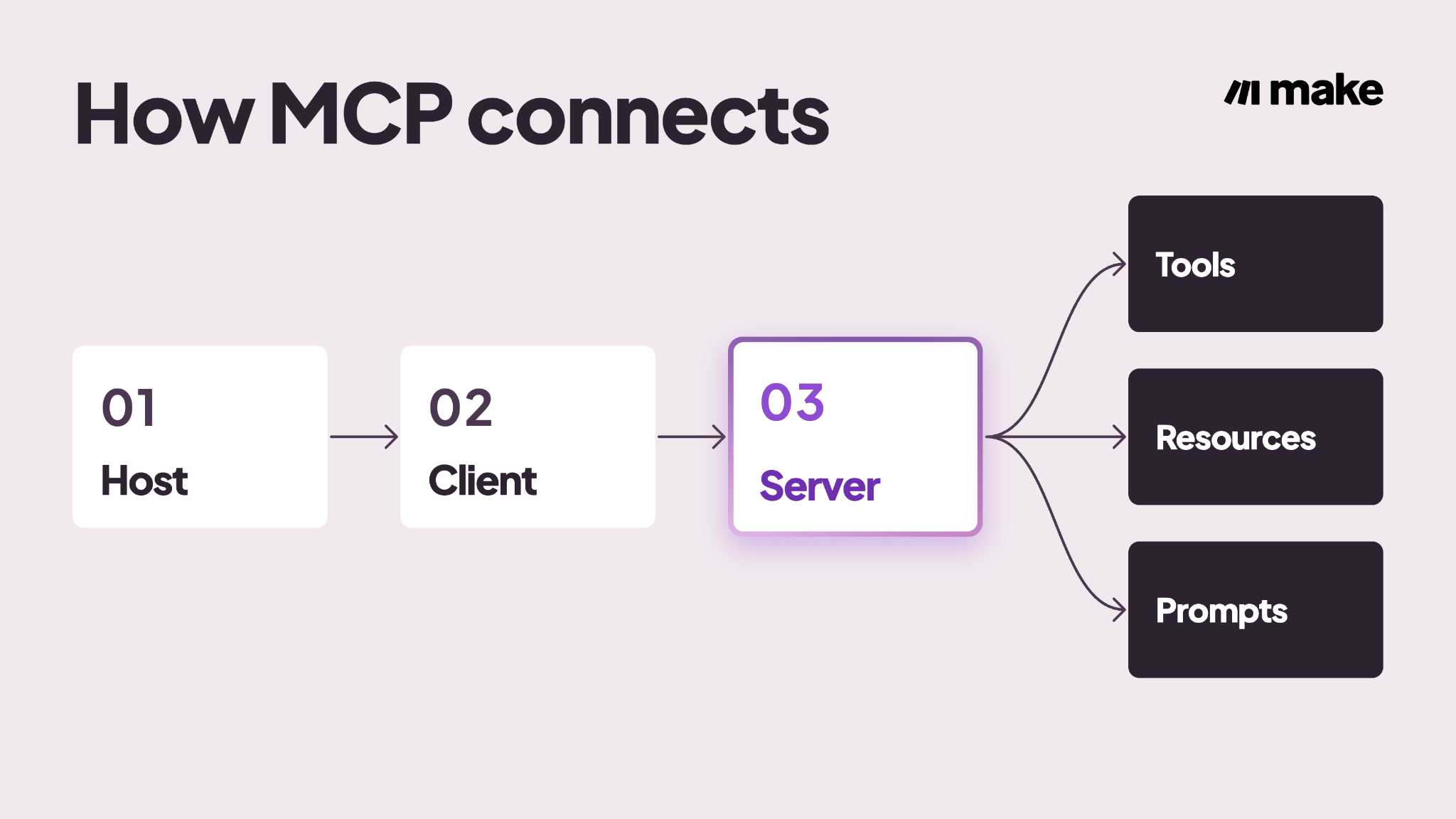
The MCP host
The host is the application you use, such as Claude.ai, Claude Desktop, or Claude Code. It launches and manages one or more MCP clients, and it's where permission prompts appear before a tool runs.
The MCP client
Inside the host, a client shares MCP with a given server, handling the introduction and message exchange. A single host can run several clients at once, one per connected server, such as one for Make and one for GitHub.
The MCP server
The server exposes tools, resources, and prompts back to the client. It can run locally, like a filesystem server, or remotely, like "Make MCP server" exposing your Make scenarios as callable tools.
How does Claude MCP work?
Here’s what happens when Claude uses a tool: a loop of discovery, selection, execution, and response.
Underneath, these messages are exchanged using JSON-RPC, a simple, structured format that lets one program call a function on another.
It is actively reasoning, picking a tool, and carrying out an action, which is what people mean by calling Claude an agent instead of a chatbot.
That loop is what turns a chat into a piece of AI automation rather than just a conversation.
Step 1: The host launches or connects to a client
A local server runs as a background process; the host launches itself using a method called stdio (standard input/output), the basic channels a program uses to send and receive data directly, without a network connection.
A remote server, like Make's hosted MCP server, is already running, so the client just connects to it over Streamable HTTP.
Step 2: The client discovers available tools
Once connected, the client asks the server to list what it can do, and specific, well-written descriptions, which Make's own documentation recommends, help Claude pick the right tool reliably.
- Name: a short label identifying the tool
- Description: a plain-language explanation of what it does and when to use it
- Input schema: the exact structure of data the tool expects to receive
Step 3: Claude selects and calls the right tool
Based on the tool descriptions it received, Claude decides which one fits and calls it with the right parameters.
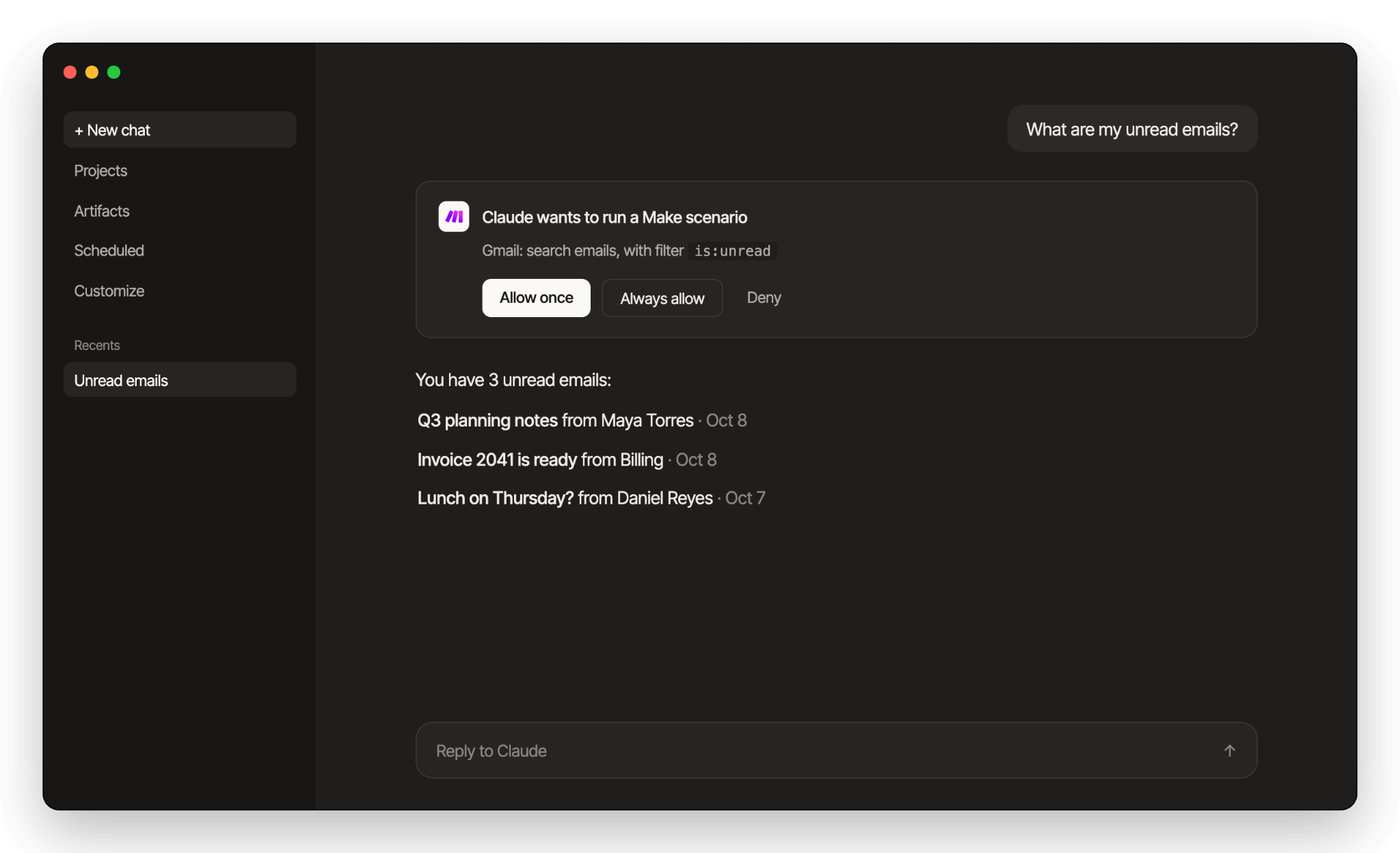
A question phrased, "what are my unread emails today?", would match a Gmail search tool, for example.
Most hosts pause here to ask you to approve the call before it runs, which we'll revisit in the security section.
Step 4: The server executes and returns results
The server carries out the action and returns structured output through the client, which Claude turns into a natural-language answer.
Some servers, including Make's, return an execution ID for long-running tasks so the client can check back instead of timing out.
What are the benefits of Claude MCP for engineering and IT teams?
For teams actually deciding whether to invest in MCP, the mechanics above translate into five concrete advantages worth considering before you connect your first server.
Build once, reuse everywhere
A single MCP server works across every compatible client, so the same connection to your automation platform serves Claude, ChatGPT, Cursor and others, instead of one bespoke integration per tool per product.
Faster time-to-connect
Because tool discovery happens automatically, per Step 2 above, there's no need to read a full API reference before using a new tool.
A consistent auth model
Instead of every integration inventing its own credential handling, MCP servers typically authenticate through OAuth or a scoped token, which is a familiar pattern to secure and audit, not a different one for every tool.
Less glue code to maintain
Fewer custom integrations means less code your team has to patch and keep working when an API changes upstream, and less technical debt sitting in your stack.
Real-time access to live systems
Claude's training data has a cutoff, but a connected MCP server doesn't. It can pull your current inventory count or this morning's support tickets, not just what Claude learned during training.
Here's a quick recap of each benefit and what it actually buys your team:
Popular Claude MCP use cases and servers
The categories below cover what's actually connected to Claude right now, drawn from Anthropic's original reference servers plus the platforms teams ask about most.
Between developer tools, live data, and full business platforms, there's likely already a server for whatever you're trying to connect.
The scale is already substantial: Anthropic reported more than 10,000 active public MCP servers as of December 2025, alongside 97 million monthly SDK downloads, with ChatGPT, Cursor, Gemini, and Microsoft Copilot all supporting the same protocol.
Filesystem access
A filesystem server lets Claude read, write, and organize local files inside a project folder. It was one of Anthropic's original reference servers.
Developer tools
GitHub servers let Claude read and act on issues and pull requests, while Postgres and SQLite servers let it query a live database directly, saving a developer from copying data by hand.
Web search
A web search server, such as one built on Brave Search, gives Claude current results beyond its training cutoff, which matters for anything time-sensitive.
Team apps
Slack and Google Drive were two of Anthropic's original reference servers, letting Claude read messages and shared docs your team already works in.
That's the shape of a lot of real deployments, like a customer support agent that reads a live FAQ and replies to questions directly.
Automation platforms
Make MCP server lets Claude run and manage your Make scenarios, turning workflows you've already built into callable tools.
We'll cover exactly how that works, alongside Make's own AI Agents, later in this guide.
Build your own with Make Skills
If you'd rather have Claude build new Make scenarios instead of just calling existing ones, Make Skills for Claude gives Claude more than 100 MCP tools for exactly that.
Install it as a Claude Code plugin, or just upload the skill files directly in Claude Chat or Cowork
The table below maps each server type to what it actually gives Claude access to:
How to connect Claude to Make’s MCP server?
Once you know what you want to connect, turning it on takes a few minutes. The walkthrough below mirrors Make’s own get-started guide: build a Gmail scenario from scratch, then connect it to Claude.
What you need:
- An active Make account, on any plan; running a scenario as a tool works even on the free plan.
- A Gmail connection, either already set up in Make or ready to create during the first step.
- A Claude account with access to Connectors, or Claude Code installed in your terminal if you’d rather use that route.
Step 1: Build the Make scenario
Start in Make by building the scenario you want Claude to call.
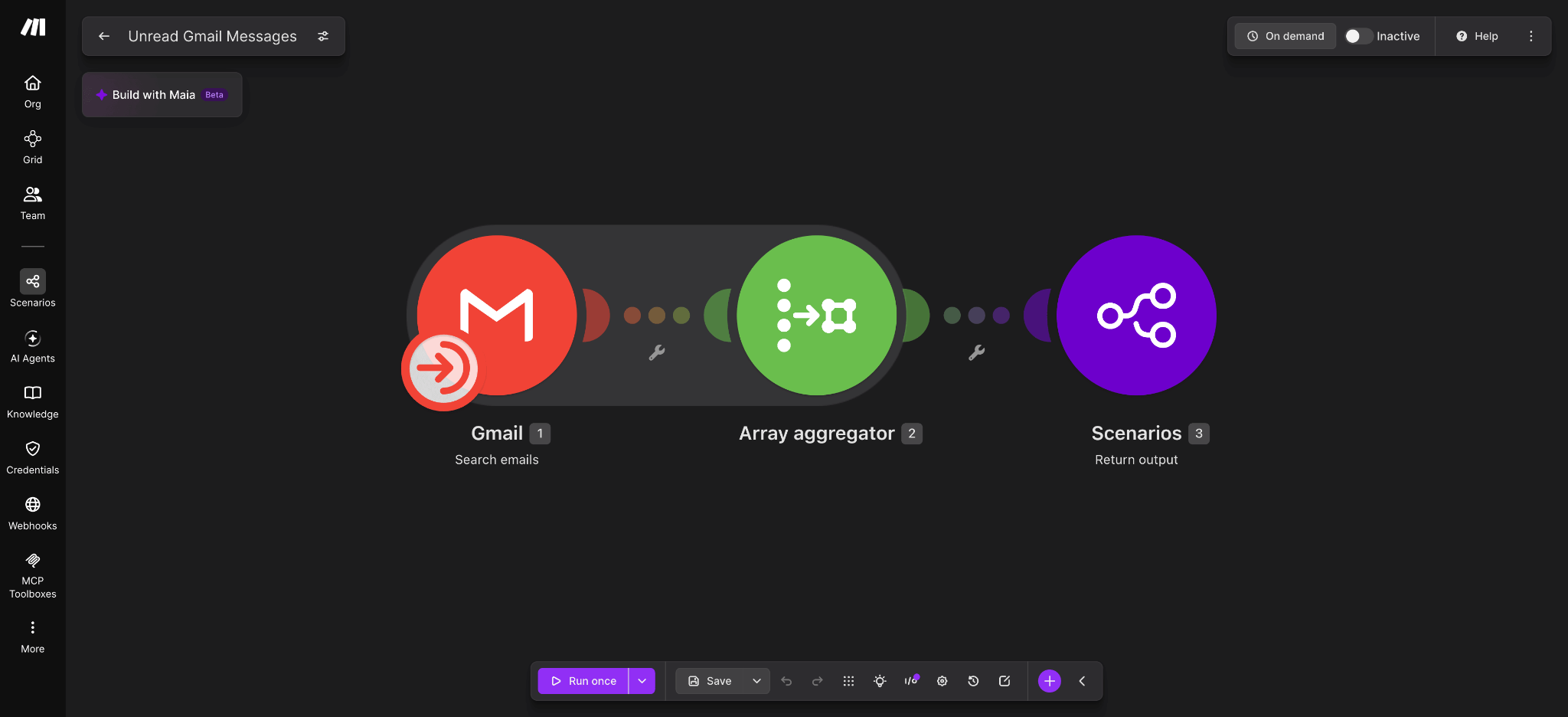
- Add a Gmail > Search emails module with a filter of is:unread, so it returns every unread message.
- Add an Array aggregator and select the fields to bundle together: Date, Subject, From (email), and Snippet. Add the message body too if you want Claude to read full emails, not just snippets.
- Add a Scenarios > Return output module and map the aggregated array to it; see Make’s guide to scenario inputs and outputs if you want more detail on how this data is defined.
- Write a clear scenario description, such as “Returns unread Gmail messages with sender, subject, date, and a snippet,” so Claude knows when to use it.
- Set the scenario active with On demand scheduling. This is what exposes it as a usable tool at all.
Step 2: Connect Claude to Make’s MCP server
How you connect depends on whether you’re using Claude’s built-in connector or Claude Code.
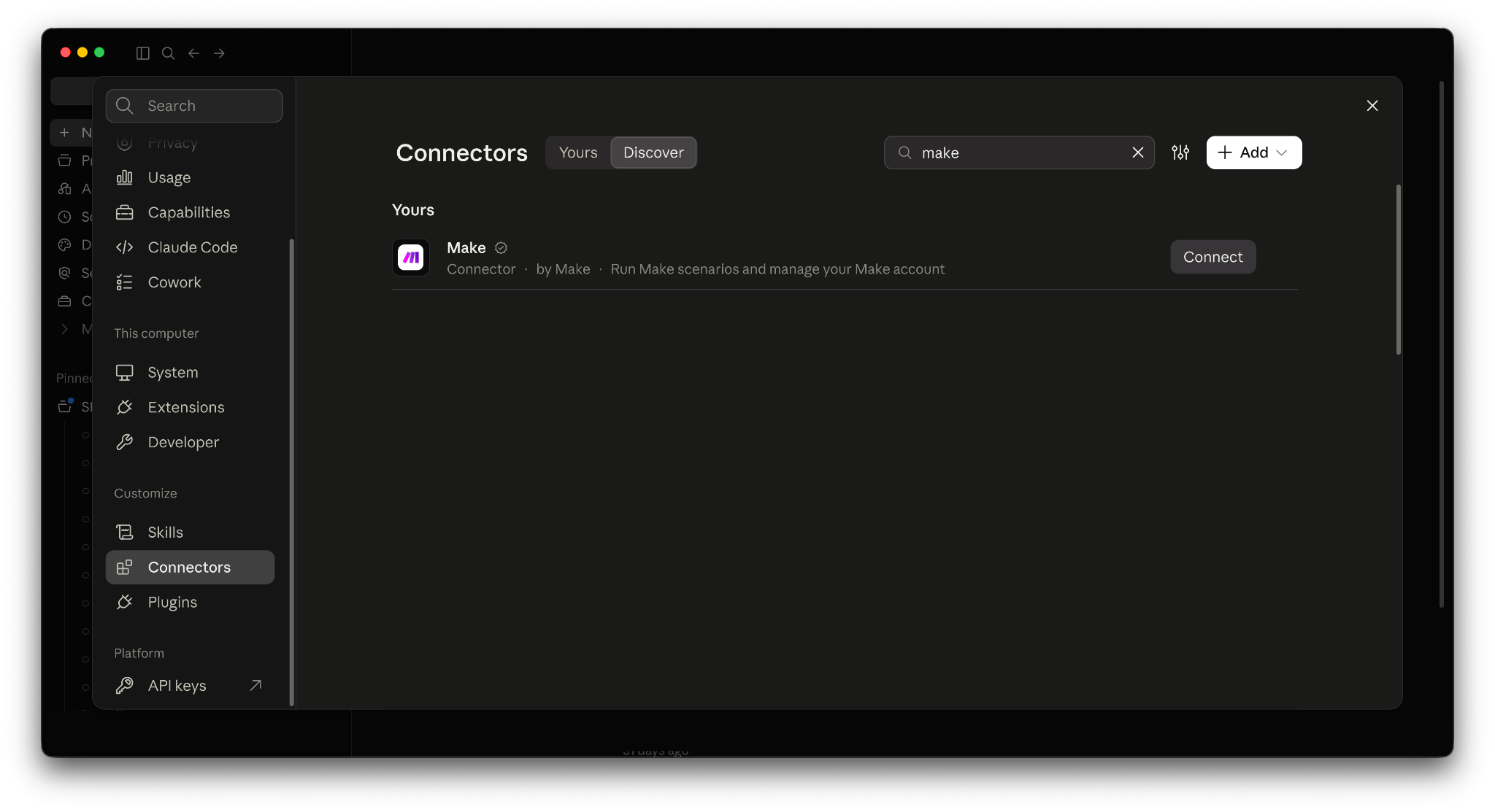
- In Claude (web, Desktop, or Cowork): go to Settings, open Connectors, select Browse connectors, find Make, and authorize it, choosing your organization and scopes, per Make’s guide to connecting Claude. Scenario-run access works on any Make plan; management scopes require a paid Make plan.
- In Claude Code: run the claude mcp add command with Make’s hosted endpoint, following Make’s Claude Code connection guide. Claude Code itself needs Node.js to install, separate from the Make connection.
Step 3: Confirm the connector and scenario tool are available
Before testing anything, check that Claude can actually see the tool you just built.
- In Claude’s Connectors panel, confirm Make shows as connected, then open its settings to see your scenario listed as an available tool, using the description you wrote.
- In Claude Code, run /mcp to list connected servers and confirm Make appears with the scenario included.
Step 4: Test it
With the connection confirmed, ask Claude to actually use it.
- Ask “What are my unread emails?”, which matches the is:unread filter exactly.
- Approve the permission prompt when Claude asks to run the scenario.
- Claude gets back the Date, Subject, From, and Snippet for each unread message, and uses them to answer in plain language.
Claude MCP vs. API: what's the difference?
Once you've connected a server, it's fair to ask whether any of this is really different from calling an API. It is, and the difference comes down to who's expected to already know what to do.
A traditional API assumes a developer has already read the documentation and written code for one specific endpoint. MCP assumes nobody has done that work yet: the server describes its own tools at runtime, and Claude works out which one fits the request in front of it.
If you want a refresher on the basics, this quick guide to APIs is a good place to start.
That said, MCP doesn’t replace APIs. Most MCP servers still call a regular API under the hood.
What MCP replaces is the custom code a developer used to write by hand to translate an AI assistant’s request into that specific API’s format. The API itself stays exactly as it was.
The table below lays out the practical differences side by side:
Because MCP servers still work with real systems and real credentials, all of this convenience raises a governance question worth taking seriously.
What are the security risks of Claude MCP?
MCP is genuinely useful, but it’s also young infrastructure. The four risks below are common and manageable with the right habits.
That immaturity is measurable: Trend Micro’s May 2026 analysis of more than 19,000 open-source MCP server repositories estimated that 3% to 9% contain exploitable vulnerabilities.
The practices below are what keep a given connection out of that group.
That’s typical for a new protocol, and it’s exactly why it’s worth building the practices below in from the start.
Prompt injection from untrusted content
If Claude reads a document or webpage with hidden instructions, those instructions can manipulate a tool call. Treat anything Claude reads through a tool as untrusted input, never as a command to follow.
In practice, that means reviewing a tool call before approving it, especially one triggered by content from outside your own systems. It also means keeping write access scoped so even a manipulated call has limited reach.
Long-lived, unrotated credentials
Many MCP servers default to storing API keys or tokens indefinitely rather than rotating them. A credential that never expires is a risk that never expires either, so rotate keys on a schedule.
Unvetted community servers
Not every published MCP server has been through a security review before it's shared. Installing one you haven't vetted means trusting code nobody has checked, so stick to official or well-reviewed servers.
Overly broad scopes
A server granted full read-and-write access can do far more than any single task requires.
Grant only the least privilege a task needs, and connect through a scoped, read-only tool set where available, such as we describe in Make's guide to connecting a scoped toolbox to Claude Desktop.
Here's each risk paired with the mitigation that addresses it directly:
How does Make's MCP server extend Claude?
Everything above applies to any MCP server, but it's worth seeing a specific end-to-end implementation.
Make offers two ways to connect, each suited to a different level of control, and an AI agent here means a system that reasons about a request, chooses an action, and carries it out across connected tools.
- Make MCP server gives broad access: it can run and manage scenarios, connections, webhooks, and data stores account-wide, and it's quick to set up since there's no scoping step.
- MCP Toolboxes are a scoped alternative: choose a specific set of scenarios to expose, mark each read-only or read-write, and generate separate keys to share. See Make's guide to MCP toolboxes for the setup.
- On the free plan, you can run active scenarios; paid plans add management scopes that let a client also view and modify scenarios, connections, teams, and organizations.
- Make's own team is candid that MCP isn't always the best route: it earns its keep via a Make AI Agent, or when there's no native Make app yet. For a simple one-off connection, the native app is usually still simpler.
- If you want Claude to build new scenarios rather than call existing ones, Make Skills for Claude, covered earlier, handles that from Claude Code.
Everything above assumes Make is already your automation platform.
If you’re still deciding whether Make or Zapier is the better fit before connecting either one to Claude, see how Make compares to Zapier.
The table below summarizes when to reach for each Make MCP option.
Where will you connect Claude next?
You now know what Claude MCP actually is, how the request-and-response loop works, where it genuinely helps, and where it needs real governance.
The next step is simply to try it: pick one server from the list above and connect it today.
If you want a guided starting point, revisit the Gmail example from the setup section and get that single tool working first. Once it's running, we recommend building your first Make AI Agent from scratch.
From there, the next question is which of your tools you connect next.
Frequently asked questions
1. Is Claude MCP free to use in Make?
Yes, on Make’s side: running a scenario as an MCP tool works on Make’s Free plan. Management scopes, which let a client also view and modify scenarios, connections, teams, or organizations, need a paid Make plan.
On Claude’s side, connecting to an MCP server uses Claude’s Connectors feature. If you want admin level controls that dictate which connectors your organization allows, you will need a Claude Team or Enterprise level plan.
2. What's the difference between MCP and a Claude connector?
A connector is Claude's name for a managed MCP server connection. MCP is the underlying protocol that makes it possible.
3. Does Claude MCP work with Claude Code, not just Claude Desktop?
Yes, via the claude mcp add command. Claude Code can even import servers already configured in Claude Desktop. Both surfaces use the same protocol.
4. Can I build my own MCP server?
Yes, via Anthropic's open-source SDKs (software development kits) and reference server repository. If you're building on Make specifically, Make Skills for Claude offers a more guided path.
5. Is MCP only for developers?
No, connecting an already-built server takes no code at all. Building a brand-new server from scratch is the part that requires development work.
Related blogs
Tool and strategies modern teams need to help their companies grow.
AI
Claude API: How to get an API key and start using it

Siew Ann Tan
March 7, 2025
Inside Make
MCP Client: What It Is & How to Set One Up (2026 Guide)
MCP client lets your Make scenarios trigger external tools hosted anywhere, securely and visually, without writing a line of code.

Patrik Simek
July 16, 2025
AI
MCP vs API: what's the difference, and which one do you need in 2026?
AI agents need tools, as well as data. Here's how MCP and APIs each provide them, and how Make uses both.

Raife Dowley
September 4, 2026