Document process automation: what it is, and why extraction is only half the job
Most document tools stop at reading the file. This guide covers the full pipeline, including where documents actually get stuck afterward.

When an invoice or a contract lands in your inbox, someone still has to open it, read it, and type the details into your accounting software or a spreadsheet by hand. Document process automation is meant to remove that step.
Most extraction tools handle the reading part well, but what happens after, getting the data into the right system and keeping track of it, is usually left to you.
This guide covers what document process automation is, how it works, and what happens to a document once its data has been pulled out.
Key takeaways
- Document process automation uses software, usually with AI built in, to read a business document, pull out the important fields, check them, and send the result to the right system, without anyone typing it in by hand.
- Optical character recognition (OCR) converts a document image into readable text. Intelligent document processing (IDP) adds AI on top of that, so the system can also tell what type of document it's looking at.
- The biggest bottleneck is flowing the verified data into the right system and keeping it visible to whoever needs to track it.
- Common use cases include invoice processing, contract review, employee onboarding paperwork, and insurance claims intake.
- A 2025 survey found that manual data entry costs American companies an average of $28,500 per employee every year, and that cost grows as a document has to pass through more departments.
What is document process automation?
Document process automation is software, usually with AI built in, that reads a business document, pulls out the information that matters, checks it against your records, and sends it to the system where it needs to end up.
OCR, IDP, RPA, and document generation often get talked about as if they're competing products, but they're not all alternatives to each other. OCR is the base layer: software that turns an image of a document into readable text.
Most modern document automation tools use OCR as one step, then add AI on top to determine what type of document it is and which fields matter; that combination is what people mean by IDP.
RPA takes a different approach entirely, automating by repeating the clicks and keystrokes a person would otherwise make, rather than reading and understanding the document itself.
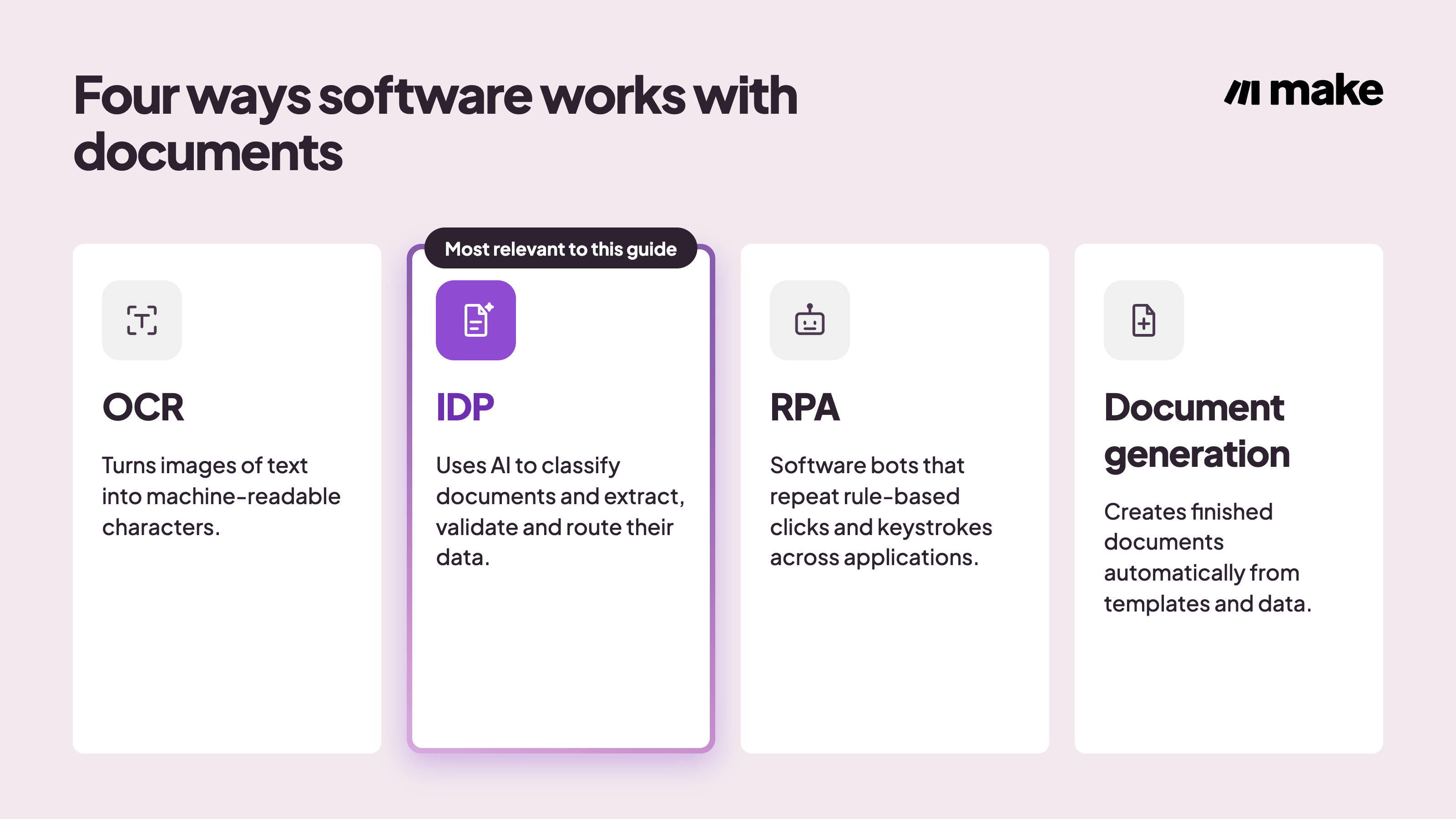
Document generation is different again: it creates new documents rather than processing ones that already exist.
Term | What it does |
Optical character recognition (OCR) | Converts the image of a document into machine-readable text |
Intelligent document processing (IDP) | Uses OCR to read the text, then adds AI to identify the document type and which fields matter |
Robotic process automation (RPA) | Automates by repeating a fixed sequence of clicks or keystrokes, without reading or understanding the document's content |
Document generation | Creates new documents, like an invoice or contract draft, from templates and data; the opposite of processing a document that already exists |
The practical choice is between a modern IDP-based tool and an older RPA-based one, since those two solve the reading problem in very different ways.
OCR isn't a separate purchase decision on its own; it's already part of any IDP tool worth using.
Most companies selling document automation tools, including AI-based ones like the DocsParse integration, focus on reading the document accurately: identifying what it is and pulling out the right fields.
What happens to that data afterward is where this guide picks up.
What are the benefits of document process automation?
Manual document handling has a cost that rarely gets measured: the time spent typing details by hand, catching mistakes, and chasing approvals that are stuck in someone's inbox.
A 2025 survey of 500 U.S. professionals by Parseur and QuestionPro found that manual data entry costs the average company $28,500 per employee every year.
That cost gets bigger as a company grows. More departments means more types of documents, and more types of documents means more chances for something to go wrong. In practice, the cost shows up in a few specific ways:
- Rework: when a person has to catch and fix a bad extraction before the document can move on.
- Approval delays: when an invoice or contract sits in an email or shared drive that nobody is actively checking.
- Lost visibility: when nobody can say where a document actually is once it leaves the tool that reads it.
- Audit prep: when a team has to piece together who worked with a document and when, manually.
Audit prep is where these bottlenecks turn into a real compliance risk. At companies with 200 or more employees, an auditor usually doesn't ask how fast an invoice or contract moved; they ask whose hands it passed through, when, and what happened to it afterward, and a manual process often can't answer that with any confidence.
Answering that reliably means letting a document's data move between systems on its own once it's been read, since each automatic step gets logged, which is the trail a manual handoff doesn't leave. For that, the platform doing the moving has to be trusted.
That's why security has to be built into the automation layer itself, not added on afterward: data encryption, single sign-on, and role-based access are worth checking before picking a tool. Make, for example, treats enterprise-grade security as a default rather than an add-on.
Put the audit trail and the security together, and the real benefit looks nothing like what most articles describe.
They tend to frame document automation purely as typing speed: fewer keystrokes, fewer mistakes, a shorter backlog.
For a large company with many employees, the bigger payoff is what happens after a document has been read: the data securely lands in the right system on its own, triggers the right approval, and stays visible to whoever needs to check on it.
How does document process automation work?
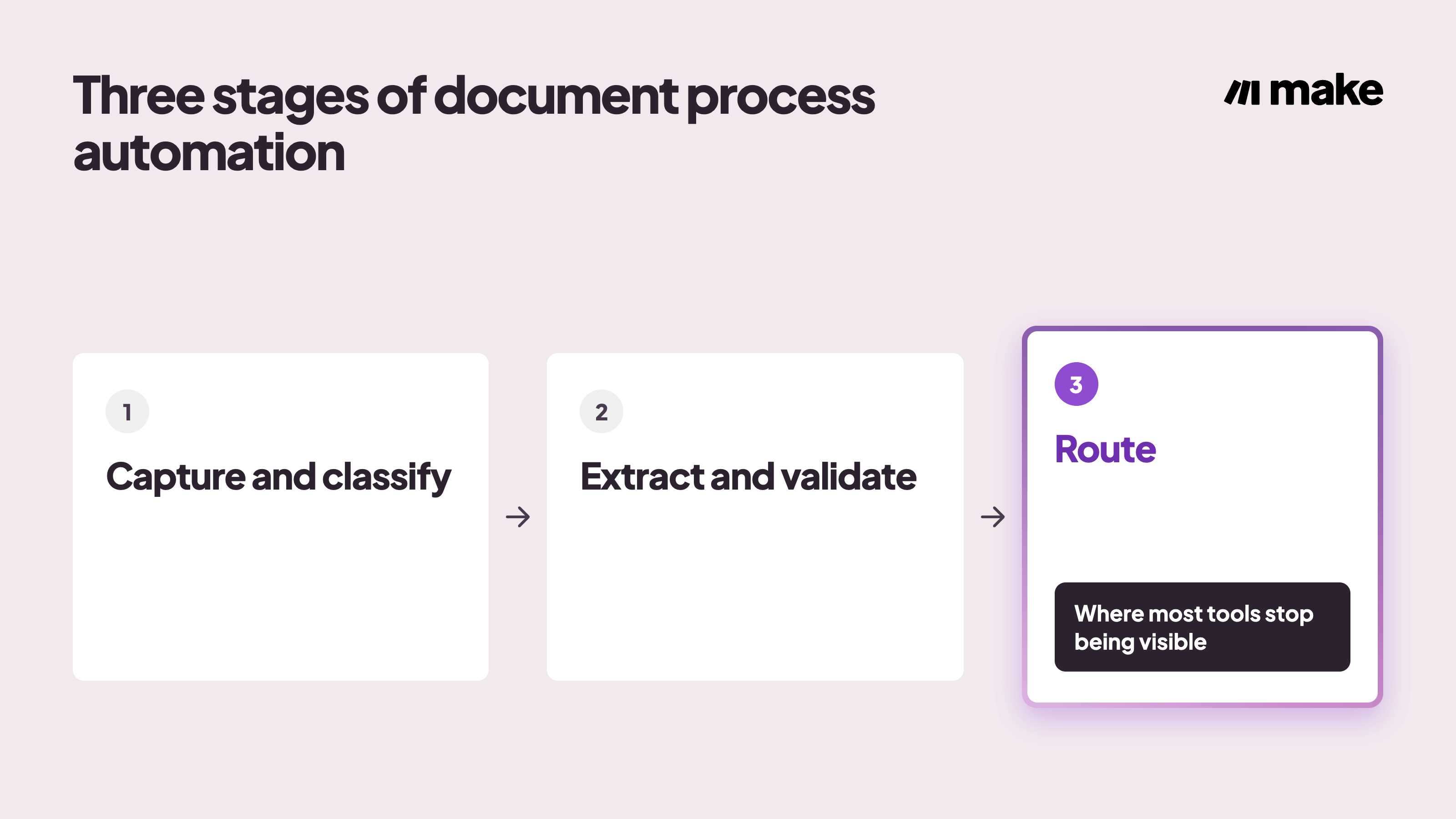
Most document automation platforms, including AI-powered ones like Make, handle a document through the same three stages: capture it, pull out and check the data, then send that data to where it needs to go.
Step 1: Capture and classify the document
A document enters the system through an upload, an email attachment, a scanned file, or a webhook from another app. Once it arrives, the system sorts it by type, such as an invoice, a contract, a claim form, or an onboarding document, since the next steps depend on knowing what kind of document is in front of it.
Step 2: Extract and validate the data
Modern extraction uses AI to make a judgment call about what it's reading, rather than matching it against a fixed template.
That flexibility, the same kind behind nondeterministic automation, is what lets it keep working when a document's layout changes.
The extracted values then get checked against a system of record to confirm they're accurate and expected, for example, matching a purchase order number against the purchasing system to catch a bad extraction or a charge that doesn't match what was actually ordered.
Step 3: Route the result
Once the data is checked, it has to land somewhere and it often triggers the next action: an approval request, an entry in an accounting system, or a folder in a document management tool.
Most OCR and IDP vendors write in detail about the reading part and barely explain what's supposed to happen to the data next.
Stage | What happens | Where it typically stalls |
Capture and classify | A document arrives and gets sorted by type | Unusual formats or channels the system was not set up to watch |
Extract and validate | Fields are pulled out and checked against a system of record | Low-confidence extractions that need a person to confirm |
Route | Checked data moves to its destination and triggers the next action | No connection between the extraction tool and the destination system |
Most teams don't build this pipeline from a blank canvas either. Starting from a finance automation template and adjusting the fields is usually faster than mapping every stage from scratch.
Document process automation examples
The same capture-extract-route pattern applies across very different documents. These five examples walk you through what it looks like for an invoice, a contract, onboarding paperwork, a claim, and a regulatory filing.
Invoice processing
An invoice arrives by email or upload, and the system extracts the vendor name, amount, and purchase order number.
That data gets matched against the original purchase order, and the invoice routes to the budget owner for approval only when the numbers don't agree, so the accounts payable team only sees the invoices that actually need attention.
Make's invoice automation workflows follow this same pattern.
Contract review
A signed contract lands in a shared drive, and key terms such as the renewal date and contract value get pulled out automatically.
Those terms populate a legal or CRM tracker, and a reminder fires a set number of days before the renewal date, so nobody has to remember to check a folder of PDFs every quarter.
Employee onboarding paperwork
A new hire submits identification and tax forms through a portal, and the system extracts and checks the required fields.
Once checked, the data files into the HRIS, and IT and payroll are notified that a new record is ready. This is the same handoff Make's employee onboarding automations are built to close.
Insurance claims intake
A claim form and its supporting documents arrive together. The system classifies each file and extracts the policy number and claim details.
The claim then gets checked against the policyholder's data before routing to the right adjuster, cutting the time between intake and a person looking at the case.
Compliance and regulatory reporting
Incoming regulatory forms get classified and archived automatically, with every extracted field logged alongside the original file.
When an audit request comes in, the team can produce a full trail instead of reconstructing one from memory, the same principle behind how Make AI Agents helped Celonis cut its own expense-auditing costs.
Lined up side by side, the trigger and destination for each document type follow the same basic pattern, just with different starting points and endpoints.
Document type | Trigger | Where it routes |
Invoice | Arrives by email or upload | Budget owner, only if it doesn't match the purchase order |
Contract | Signed copy lands in a shared drive | Legal or CRM tracker, with a renewal reminder |
Onboarding paperwork | New hire submits ID and tax forms | HRIS, then IT and payroll |
Insurance claim | Claim form and supporting documents arrive | The right adjuster, after a policy check |
Regulatory filing | Form received and classified | Archive, with a full audit trail |
Every one of these examples depends on the same thing: accurate extraction, and a clear place for the result to go.
That second part is where Make fits in.
How Make helps with document process automation
Make doesn't replace whatever tool already reads your documents well; it's the layer that connects that tool to everything downstream.
A typical setup connects the following pieces into one scenario:
- A trigger, such as a new file appearing in a watched inbox or folder.
- A Router that branches the flow based on document type, sending an invoice one way and a contract another.
- An Iterator that splits a batch of documents, or a multi-page file, into individual items so each one gets processed on its own, one at a time.
- An AI agent that reads and structures unstructured text when a fixed template can't keep up.
- A connection out to the destination app: an accounting system, a CRM, or a document store.
Besides the scenario builder, how these components work together is visible on Make Grid, an automatically generated visual map where you can see how all your scenarios work together. Thanks to Make Grid, a stalled approval or a missing connection shows up as a visible issue instead of becoming a problem someone discovers by accident a week later.
That's the difference between a glass box automation you can see into and a black box process you have to take on faith.
Make's finance apps connect the same way across accounting, payments, and HR tools, so extraction is never the last step in the chain.
Where does your next document actually need to go?
The extraction technology behind document process automation has gotten good enough that accurate extraction alone is no longer the differentiator.
Before adding another OCR or IDP tool, map where your documents actually go once the data has been read: which system they land in, who approves them, and whether that path is something your team can see.
Make's “automate finance workflows” overview is a reasonable place to start that map, since it lays out where documents like invoices and contracts typically connect to the rest of the stack.
If you already have a tool that reads your documents well, the next step is connecting it to the rest of your stack so nothing gets stuck in an inbox waiting for someone to notice.
Frequently asked questions
Q1: What types of documents can be automated?
Most business documents with a repeatable structure can be automated, including invoices, contracts, statements, reports, forms, and onboarding paperwork.
Q2: How does document automation improve compliance?
It standardizes how documents are handled and keeps a record of every extraction and approval, which is the trail auditors look for.
Q3: What's the difference between OCR and intelligent document processing?
OCR converts an image into text. Intelligent document processing adds AI on top of that to identify the document type and the fields that matter.
Q4: Do you need a high volume of documents to see a return?
No. Even a few hundred documents a month can justify automation once you count the time spent on approvals, corrections, and tracking down where a document actually is.
Q5: How long does it typically take to see results?
Most teams see a difference within a few weeks. Connecting an existing extraction tool to the right downstream system is typically a short setup project, and once that connection exists, every document that comes through it benefits right away.
Related blogs
Tool and strategies modern teams need to help their companies grow.
AI
7 AI automation examples you can build in Make (2026)
Seven real AI automation examples, each paired with a Make scenario template so you can clone the exact module chain instantly.

Raife Dowley
September 24, 2026
AI
How to build Make automations and AI agents in ChatGPT
Describe repeatable work in ChatGPT and create Make automations and AI agents that keep running, whether or not ChatGPT is open.

Valery Mezencev
September 16, 2026
AI
5 best AI automation tools for teams in 2026: Full breakdown
A hands-on comparison of five leading AI automation platforms, covering features, pricing, and the best fit for your team's workflows.
Raife Dowley
August 4, 2026