May 19, 2026 | 10 minutes
What Is Security Automation? A Complete Guide for 2026
Security automation cuts response times from hours to minutes. Here is what it is, how it works, and where to start.
Your security team is triaging hundreds of alerts a day. Most is noise. The real threats sit in a queue while analysts work through the backlog manually.
By the time someone investigates, the window to contain the damage has already closed.
Security automation fixes this. It executes threat detection and response without manual intervention: filtering alert noise, isolating compromised systems, and escalating only the incidents that need human judgment.
This guide covers what security automation is, how detection and response works, the measurable benefits organizations see, real-world applications across industries, and how to get started.
What exactly is security automation?
Security automation executes security tasks without human intervention: threat detection, incident response, policy enforcement, compliance logging.
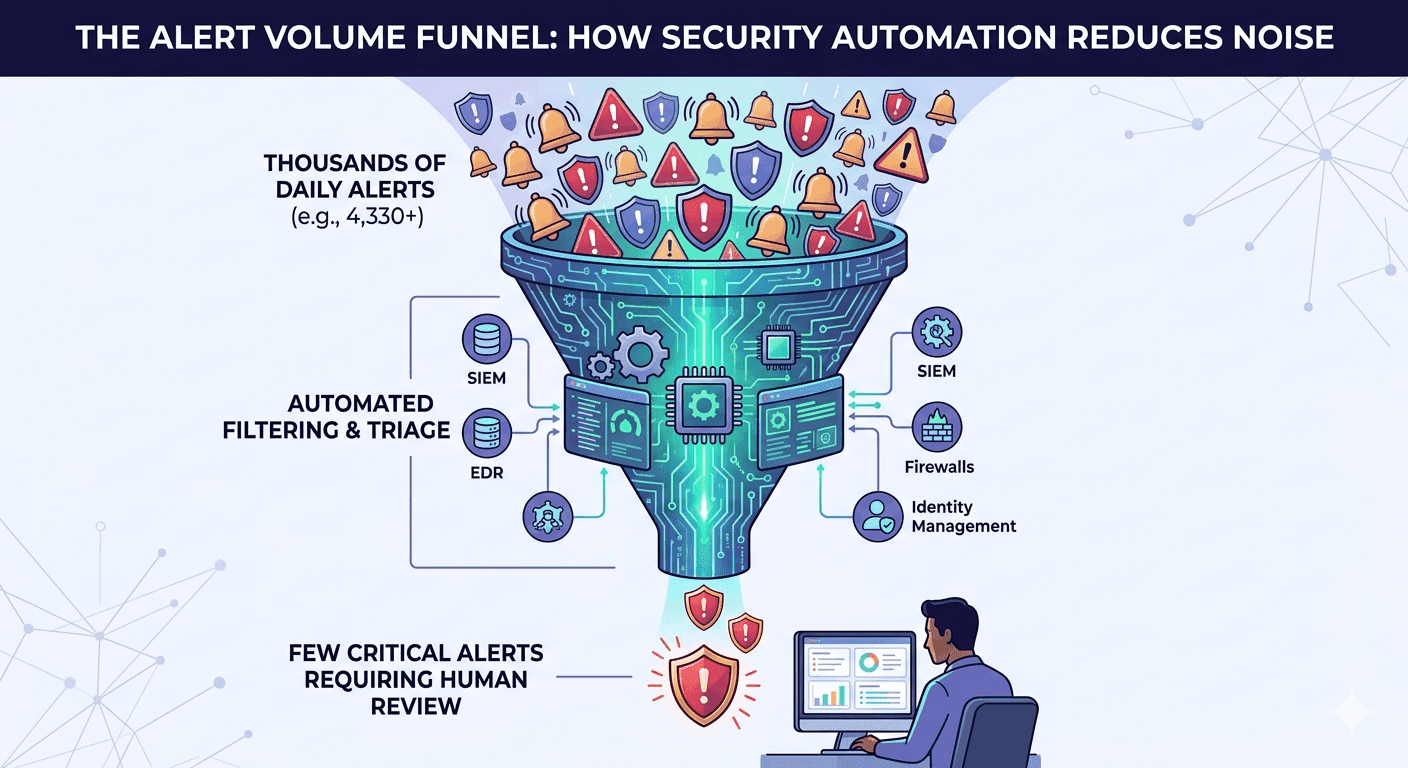
It connects your security tools (SIEM, EDR, firewalls, identity management) into coordinated workflows that monitor systems, analyse events, and respond to threats automatically.
Here's the problem it solves. According to , enterprises receive an average of 4,330 security alerts per day, yet only 37% are ever investigated. Most are false positives or low-risk events that don't need human attention.
Security automation filters this noise, handles routine responses automatically, and escalates genuine threats to your analysts.
IT security teams, compliance officers, and operations managers use security automation, particularly in organisations with 50 to 500 employees where security demands scale faster than headcount.
Task type | Manual process | Automated process |
Alert triage | Analyst manually reviews thousands of daily alerts | System filters to only those requiring human review |
Threat response | Analyst investigates, then responds (2 to 4 hours) | Automated investigation and response (2 to 15 minutes) |
Compliance logging | Manual documentation of security actions | Automatic audit trails for every detection and response |
Policy enforcement | Inconsistent application across systems | Uniform policy execution across entire infrastructure |
These are businesses handling sensitive customer data, managing complex infrastructure, or meeting regulatory requirements like SOC 2, HIPAA, or GDPR.
They need enterprise-grade protection without enterprise-sized teams.
How does security automation work?
Security automation monitors your systems, analyzes events, and executes responses through connected workflows.
Here's how the process works from threat detection to resolution.
Each step happens automatically, typically within seconds or minutes depending on threat complexity.
The five-step process:
Continuous monitoring collects security data
Event correlation identifies patterns across data sources
Automated analysis scores threat severity
Orchestrated response executes containment actions
Human escalation routes confirmed threats to analysts
Step 1: Continuous monitoring collects security data
Your security tools run constantly, collecting data from every system: login attempts, network connections, file modifications, API calls, email traffic, and endpoint activity.
EDR agents track activity on individual devices.
Firewalls log network traffic patterns. SIEM platforms aggregate logs from applications and infrastructure. Identity management systems record authentication events.
This creates a continuous stream of security data flowing into your automation platform.
Step 2: Event correlation identifies patterns across data sources
The system correlates data across multiple sources to identify suspicious patterns. A single failed login isn't concerning.
Five failed logins from the same IP address, followed by a successful login and an unusual data download, indicates account compromise.
The correlation engine connects these separate events into a coherent threat narrative, comparing current activity against baseline behavior, known attack patterns, and threat intelligence feeds.
Step 3: Automated analysis scores threat severity
The system analyzes correlated events using predefined rules and machine learning models, then assigns a threat score based on:
User behavior deviation from baseline patterns
Known malicious indicators (IPs, domains, file hashes)
Data sensitivity and system criticality
Attack technique patterns matching known threats
Geographic and temporal anomalies
A suspicious login from a new location might score low if the user travels frequently.
That same login combined with data exfiltration attempts scores high. This threat scoring determines what happens next.
Step 4: Orchestrated response executes containment actions
Based on threat scores, security automation executes response playbooks. For confirmed threats, the system:
Isolates compromised endpoints from the network
Terminates suspicious user sessions
Blocks malicious IP addresses at the firewall
Disables compromised accounts
Collects forensic evidence (memory dumps, network captures, file hashes)
Triggers incident response workflows
Platforms like Make connect security tools via APIs to execute these response workflows across your entire security stack.
Each action follows your predefined logic: if threat score exceeds X, execute actions Y and Z.
Make's covers system monitoring through to incident response, without requiring any coding.
Step 5: Human escalation routes confirmed threats to analysts
High-confidence threats escalate to security analysts with complete context: what happened, which systems were affected, what automated actions were taken, and what evidence was collected.
The analyst receives a case file, not a raw alert. They review the automation's decisions, take additional manual actions, or approve further automated responses.
Low-severity events get logged without escalation. The system learns from analyst feedback to improve future threat scoring.
This entire process runs 24/7 across your infrastructure.
The same workflow that would take an analyst 2 to 4 hours to complete manually executes in 2 to 15 minutes automatically.
Why does security automation matter?
Security automation delivers measurable financial and operational impact. Here is what the data shows across four core benefit areas.
For a deeper look at how automation connects across your IT and security stack, explore Make's IT automation solution page.
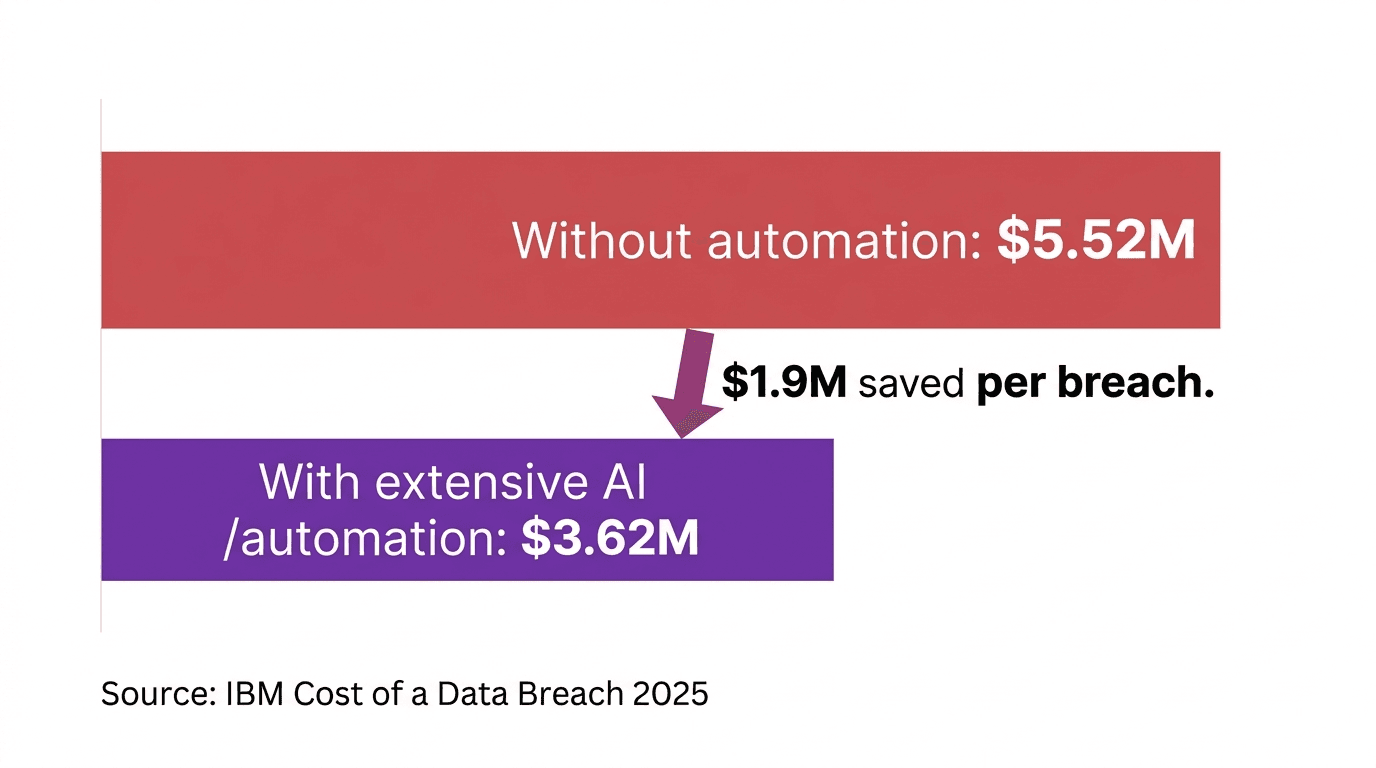
According to the , organizations using AI and automation extensively saved nearly $1.9 million per breach compared to those without, spending $3.62 million versus $5.52 million.
The global average breach cost stands at $4.44 million, making faster detection and containment a direct financial priority.
Beyond cost reduction, security automation scales threat response without proportional headcount, enforces consistent policy across every system, and frees analysts to focus on work that genuinely requires human judgment.
Does security automation reduce breach costs?
The financial case for security automation is clear.
Organizations using AI and automation extensively spend less money per breach on average, compared to those without according to current .
With the global average breach cost sitting at $4.44 million, faster containment is a direct financial lever, not a nice-to-have. As alert volumes grow, automation also removes the need to scale analyst headcount proportionally.
The same that handle today's alert load continue executing at scale without additional resource cost.
Can security automation scale without adding headcount?
The same scenarios that handle 1,000 alerts per day handle 10,000 without any additional analysts.
As your infrastructure expands, automated scenarios adapt through rather than manual reconfiguration: when a new endpoint detection system or SIEM joins your stack, it slots into existing scenarios without rebuilding from scratch.
According to from Gartner Security & Risk 2025, automatic alert triage is already reducing analyst workload significantly, with SOC teams increasingly relying on automation to absorb volume growth that headcount alone could never match.
Does security automation improve accuracy and consistency?
Manual triage across thousands of daily alerts introduces inconsistency. One analyst escalates an event; another dismisses the same pattern.
Automated workflows apply identical logic to every event without exception, and every response creates an automatic audit trail rather than relying on manual documentation.
Teams building scenarios on platforms that carry , including SOC 2 Type II certification, get compliance-ready responses built into the infrastructure from day one.
The accuracy gains compound across four specific areas:
False positives reduce by up to 80% through automated event correlation
Every response follows documented playbooks, meeting SOC 2 and HIPAA audit requirements automatically
Uniform policy enforcement applies across your entire infrastructure, not just the systems an analyst happened to review
A complete audit trail is created for every action taken, with no manual logging required
Aligning these playbooks with the gives teams a recognised structure for defining what correct automated behaviour looks like across the five core functions: identify, protect, detect, respond, and recover.
What is the tradeoff?
Security automation requires upfront investment that many teams underestimate. Initial setup demands playbook configuration, and those playbooks need ongoing maintenance as your threat landscape evolves.
According to , most SOC teams run lean, which makes getting the foundations right before expanding critical.
The practical rule: start with high-volume, low-complexity tasks such as failed login handling and IP blocking. If a task requires analyst judgment more than 30% of the time, it is not ready to automate.
Follow these and expand only after your first scenarios are stable and measurable.
Where is security automation used in practice?
Security automation solves distinct problems across industries. These two examples show what implementation looks like in practice.
For a broader view of how automation applies across business functions, explore Make's .
The global security automation market is projected to reach $22.92 billion by 2030, reflecting accelerating across every major sector.
Financial services teams
Financial services security teams face an acute version of the alert volume problem. Regulatory obligations mean every missed threat carries not just operational risk but direct financial exposure.
Average breach costs in the sector reached $5.56 million in 2025, well above the global average of $4.44 million, according to current data from IBM's 2025 report.
Stage | Without automation | With automation |
Alert triage | Analysts manually sort thousands of daily events | ML-driven classification filters noise before analyst review |
Compliance checks | Manual review against PCI-DSS and SOC 2 controls | Built-in automated checks run on every response |
False positive rate | High; consumes significant analyst hours | Reduced by up to 80% through automated correlation |
Breach containment | Delayed by manual investigation queues | Faster containment directly limits financial exposure |
SaaS companies automating SOC 2 compliance
SaaS infrastructure changes daily: new IAM roles, modified security groups, updated container images.
Manual compliance monitoring cannot keep pace with an environment that shifts this frequently. When a misconfiguration occurs, such as a storage bucket becoming publicly accessible, automated scenarios catch it within minutes rather than weeks.
Platforms like Make connect SIEM systems, IAM tools, and Slack into a single coordinated incident response scenario, so the right people are notified and remediation triggers without manual intervention.
The outcomes teams report when moving from manual to automated compliance monitoring:
Misconfigurations detected within minutes rather than days or weeks
Automated evidence collection replaces manual screenshot gathering across tools
Audit preparation time compresses significantly as evidence is captured continuously throughout the year
Compliance readiness is maintained year-round rather than scrambled for at audit time
How does Make support security automation?
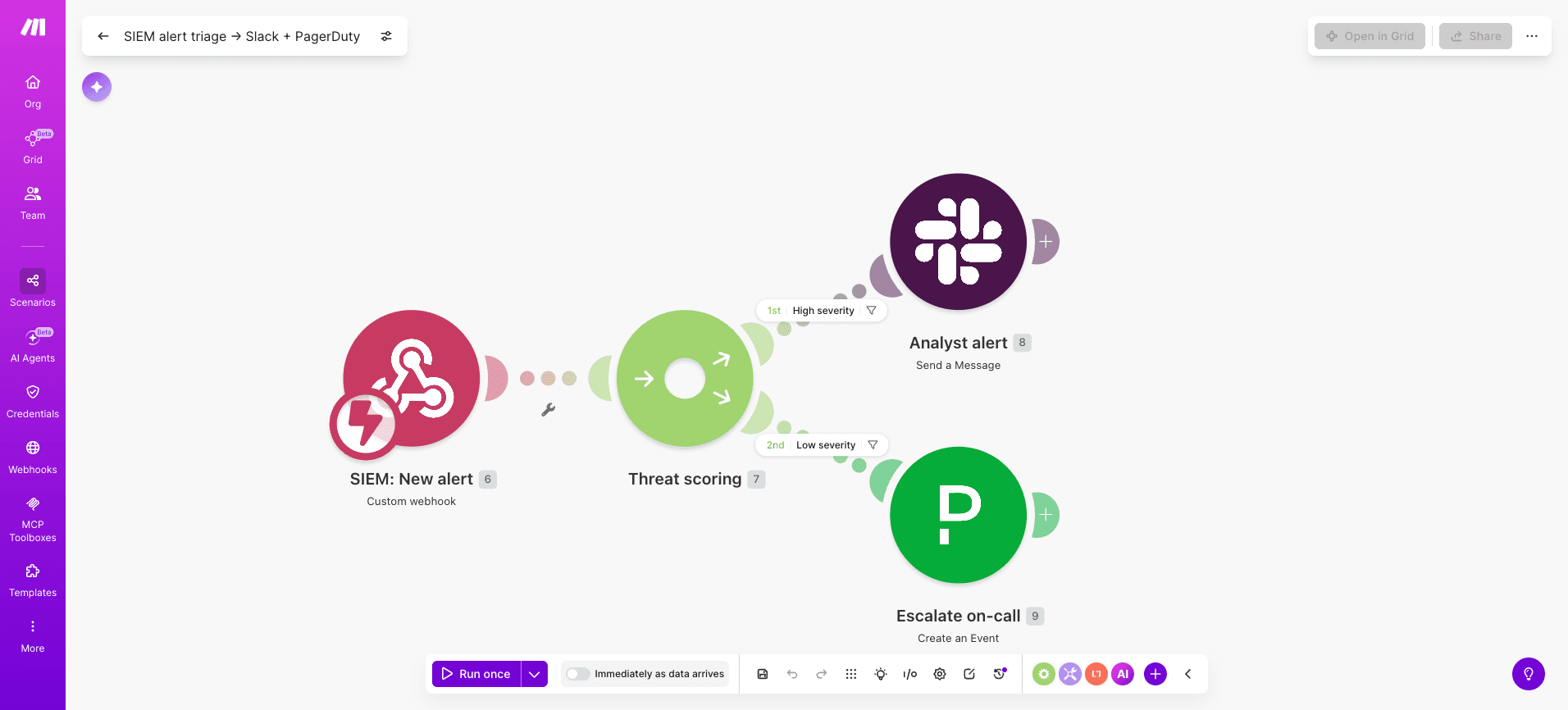
Make connects SIEM platforms, EDR tools, identity management systems, and communication tools via API into a single automated scenario.
When a threat is detected, a monitoring trigger fires a module, correlation logic routes the event based on severity, response actions execute across connected tools, and confirmed threats escalate to analysts with full context already assembled.
The visual scenario builder lets security analysts build and modify these scenarios without developer support, and when a new security tool joins your stack it connects through Make's API modules rather than requiring manual reconfiguration.
Teams managing multiple security scenarios across their stack can use Make's IT automation capabilities in Make Grid to maintain a real-time visual map of every scenario, dependency, and data flow, so nothing operates invisibly.
Key security use cases Make handles out of the box:
Automated alert triage and escalation via PagerDuty and Slack
Compliance logging for SOC 2 and HIPAA audit requirements
Incident response coordination across security tools
Threat enrichment using external intelligence feeds
Start automating your security operations
Security automation transforms threat response from hours to minutes by executing detection and response scenarios without manual intervention.
The financial case is clear: organizations using AI and automation extensively spend less per breach than those without, while scaling threat response without adding headcount.
The operational case is equally strong: analysts stop triaging noise and start doing the work that actually requires human judgment.
Start by documenting your three most time-consuming security tasks.
Start building for free with Make's pre-built security scenarios and have your first automated threat response running today.
FAQs
1. What is the meaning of security automation? Security automation is software that handles routine security tasks, such as detecting threats, blocking attacks, and collecting evidence, automatically, so analysts can focus on complex problems.
2. What is an example of security automation? A common example: a failed login alert triggers an automated scenario that checks the IP against threat feeds, blocks it if malicious, and notifies the analyst, all without manual intervention.
3. How much does security automation cost to implement? Costs vary significantly based on tool choice, alert volume, and implementation complexity. Most platforms offer tiered pricing; the best starting point is to scope your use case before evaluating vendors.
4. Do I need technical expertise to implement security automation? You need comfort with workflow logic and API concepts, but not software development skills. Make's visual scenario builder lets security analysts build and modify scenarios without writing code.
5. What is the difference between security automation and SOAR? SOAR is a purpose-built category of security automation platform. Security automation is the broader concept and includes general platforms like Make, which offer wider integration across your entire tech stack.
6. How does Make handle security automation? Make connects your SIEM, EDR, identity management, and communication tools into automated scenarios via API. Pre-built templates cover alert triage, compliance logging, and incident escalation without coding required.
Ready to make the automation revolution happen?