What is an agentic loop? (and how to build one) in 2026
The agentic loop is the heartbeat of every AI agent. Here's what it is, how it works, and how to build one.
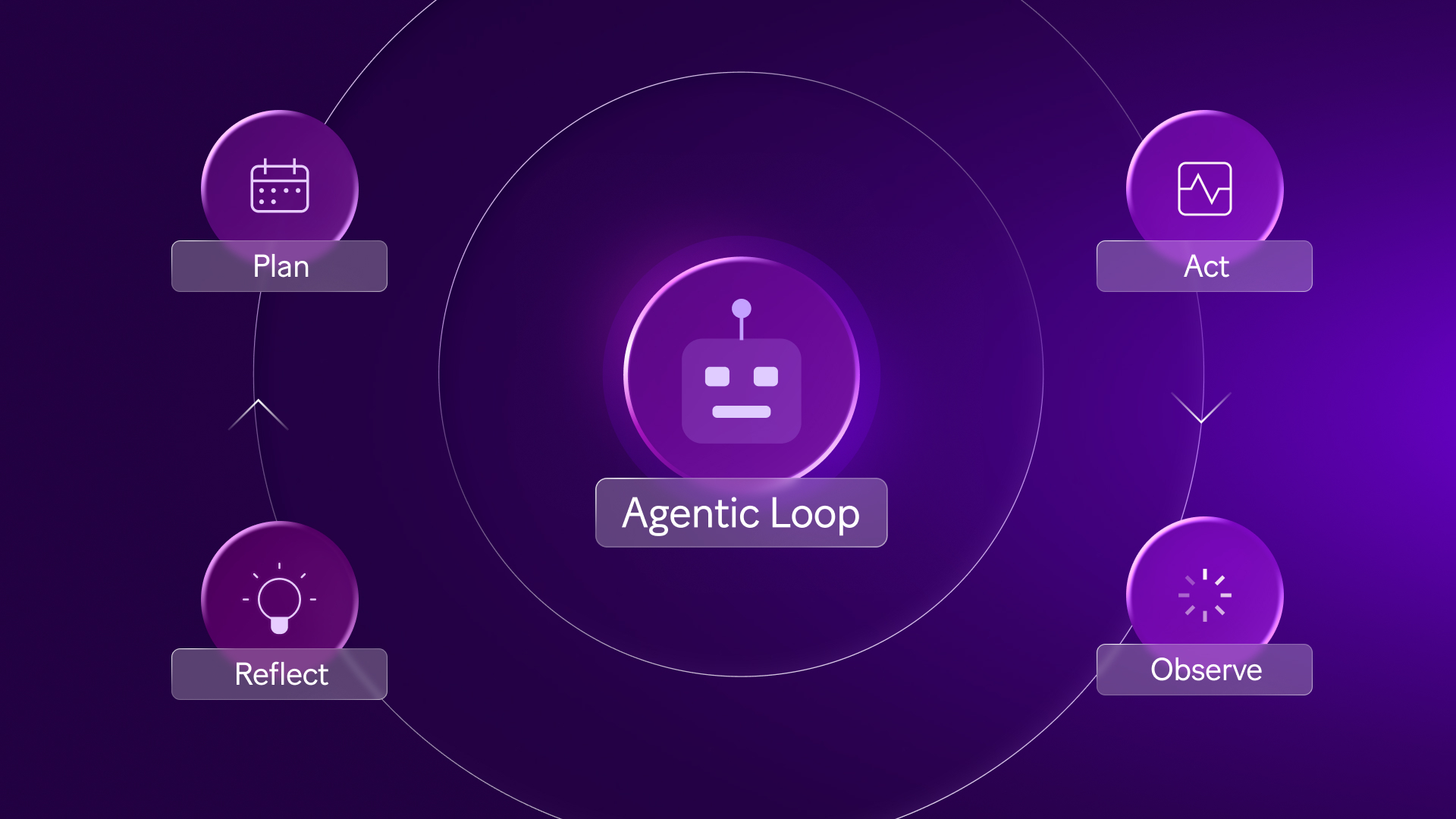
An agentic loop is the execution cycle that separates an AI agent from a chatbot. Where a chatbot responds once and stops, an agent repeats: perceive, reason, act, observe, and loop back until the task is done.
According to McKinsey's report on the state of AI, 62% of organizations are already experimenting with AI agents, yet most are still in the early stages of building them reliably. The loop is where that reliability is won or lost.
This article covers the four stages of the agentic loop, where it breaks down without proper guardrails, and how to build one inside Make using Make AI Agents, without writing a line of code.
What is an agentic loop?
The agentic loop is an architecture pattern, not a product feature. It is the repeating execution cycle that runs inside any AI agent, on any platform.
How does an agentic loop differ from standard automation?
A deterministic scenario follows a path defined at build time. Every condition and action is scripted before the first bundle flows through.
The agentic loop works differently: the agent decides its next action based on what it observes, not on rules written in advance.
Dimension | Traditional automation | Agentic loop |
Path | Fixed, predefined | Decided at runtime |
Failure handling | Stops or errors out | Re-reasons and retries |
Best suited for | Rule-bound, predictable tasks | Open-ended, multi-step tasks |
Both patterns can coexist in one Make scenario.
A Router module sends bundles to a deterministic route for structured tasks and to an agent module where judgment is needed.
What are the four stages of an agentic loop?
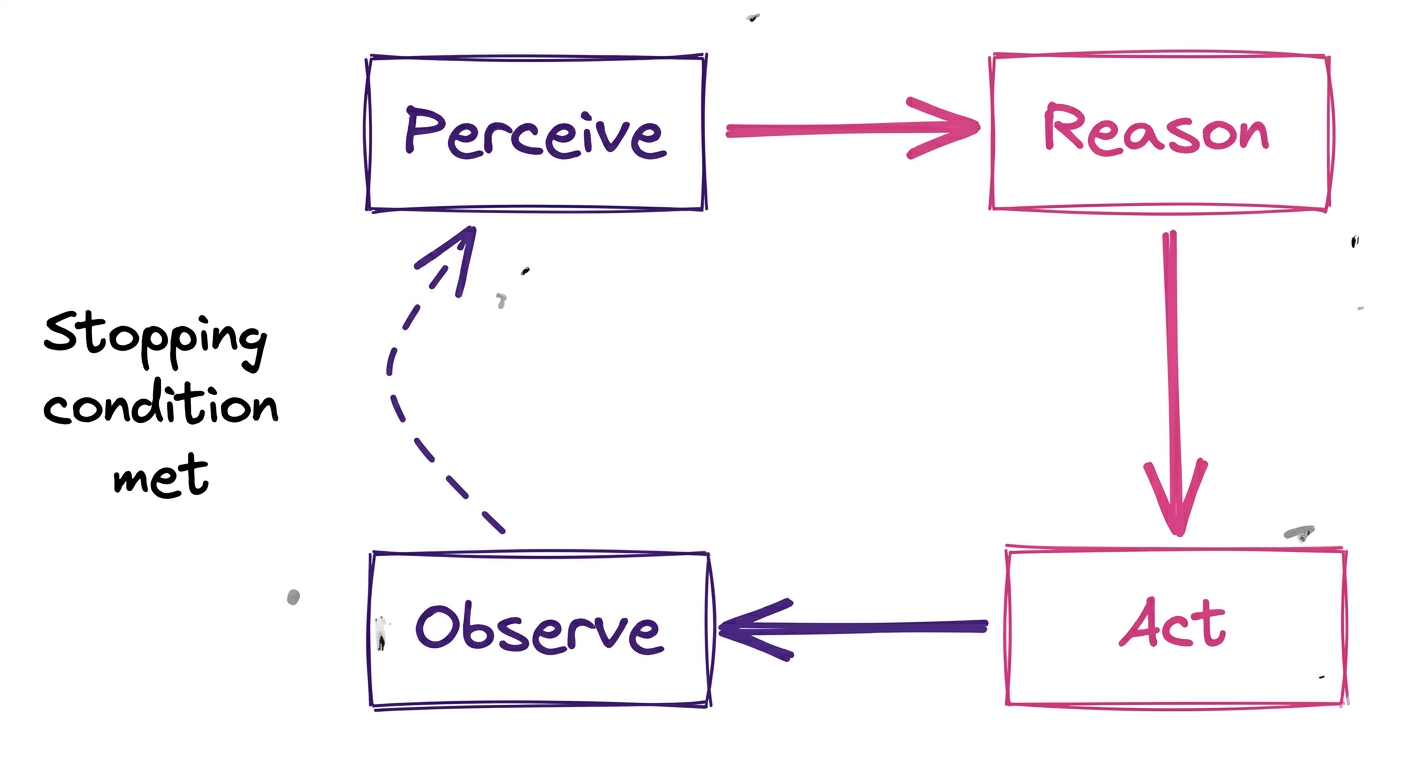
All agentic loops share the same four-stage cycle.
- Perceive: reads input, whether a user message, API response, or file state
- Reason: an LLM processes the goal and current context to choose the next action
- Act: calls a tool, writes to a system, or triggers a sub-scenario
- Observe: evaluates the result and feeds it into the next iteration
For context on where agentic automation fits within broader process design, see Make's guide to agentic process automation.
Why does the agentic loop matter for operations and revenue teams?
Rule-based automation is built for predictability. The moment a process branches on something it was never taught to handle, it stops or errors out.
The agentic loop fills that gap: it reasons through what it finds, adapts, and keeps going.
What kinds of tasks does the loop unlock?
The loop adds the most value where the right next step cannot be known until the previous step completes.
Task type | Example | Why the loop wins |
Multi-source research | Enriching an inbound lead across three databases | Each result shapes the next query |
Conditional triage | Classifying support tickets with ambiguous context | Re-reasons when confidence is low |
Document review | Invoice validation with unexpected line items | Flags and re-examines rather than failing |
Iterative drafting | Personalised outreach adjusted by persona | Evaluates output quality before sending |
Where does the loop break down?
Autonomy without guardrails is a liability. Four failure modes appear consistently in production deployments.
- Runaway iteration: no stopping condition means the loop runs indefinitely, draining operations
- Tool cost blowup: uncapped loops accumulate operations fast across every iteration
- Hallucinated tool selection: vague tool descriptions cause the agent to pick the wrong tool
- Context overflow: long loops accumulate so much history that reasoning quality degrades
For teams weighing agents against simpler AI automation, Make's guide to AI agents vs ChatGPT covers where each approach fits.
How does an agentic loop work in Make?
Make externalizes the loop as a visual scenario.
Every iteration the agent runs appears as a traceable step in the Scenario Builder, so every tool call and decision is auditable without querying external logs.
Step 1: How do you configure the agent module?
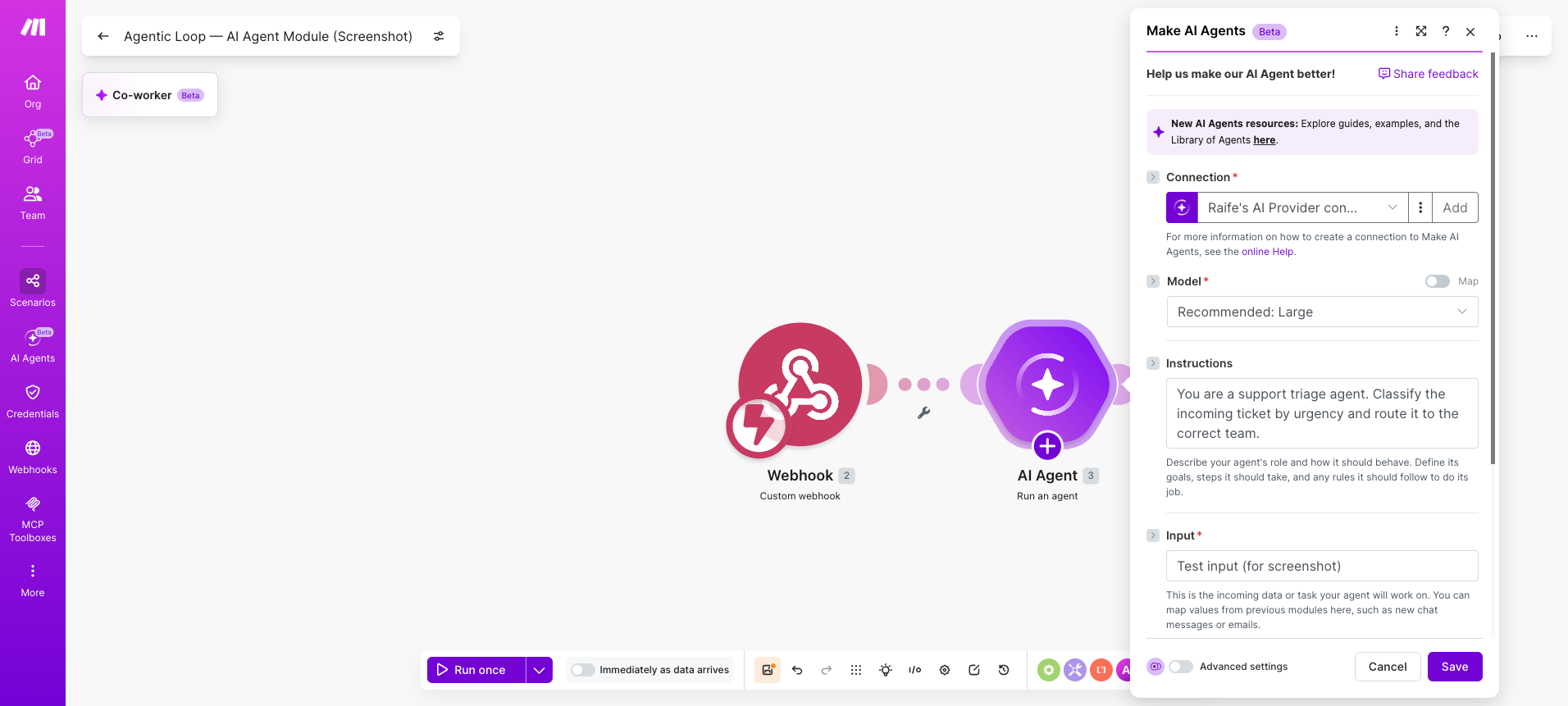
The Make AI Agents (New) module is added to a scenario like any other module in the Scenario Builder.
The system prompt is where the agent's goal and constraints live; it is the closest equivalent to a job description.
- Open the Scenario Builder and add the Make AI Agents (New) module to the canvas
- Select an AI provider: OpenAI, Anthropic Claude, or a custom connection on paid plans
- Write the system prompt: define the agent's role, goal, and constraints, including tone, scope, and escalation rules
- Set a max-iterations cap to prevent runaway loops
Vague prompts produce vague behavior. The system prompt is worth spending time on before adding any tools.
💡 PRO TIP: Use a Text aggregator module before Make AI Agents (New) to pre-structure long inputs as JSON. This reduces token consumption per iteration and keeps the reasoning layer focused on the goal rather than parsing raw text.
Step 2: How do you give the agent tools to act with?
In Make, tools are scenarios. Each scenario the agent can call represents one discrete action.
The agent reads the tool's name and description to decide when to use it, so precision here directly affects reasoning accuracy.
- Build a separate scenario for each tool action, for example a Webhooks > Custom webhook scenario that updates a CRM record
- In Make AI Agents (New), attach each tool scenario with a specific, unambiguous name such as "Update HubSpot contact" rather than "CRM action"
- Write a one-sentence description per tool; this is what the agent reads to decide which tool to call
- Attach knowledge files for any reference material the agent needs to reason against, such as pricing sheets or routing rules
Keep one operation per tool scenario.
Bundling multiple actions into one tool makes the agent's reasoning harder to observe and debug.
Step 3: How do you set stopping conditions?
A loop without an exit is an operational liability. Every production agent needs at least two stopping conditions configured before it runs.
- Task complete: the agent returns a structured final output and the loop ends naturally
- Max iterations: set a hard cap in Make AI Agents (New) settings; 10 is a reliable starting point for most business tasks
- Human review trigger: connect a Human in the Loop > Create a review request module on a conditional route when agent confidence falls below a defined threshold
- Error fallback: add a Router module after the agent to catch failed outputs and send a Slack > Create a Message alert
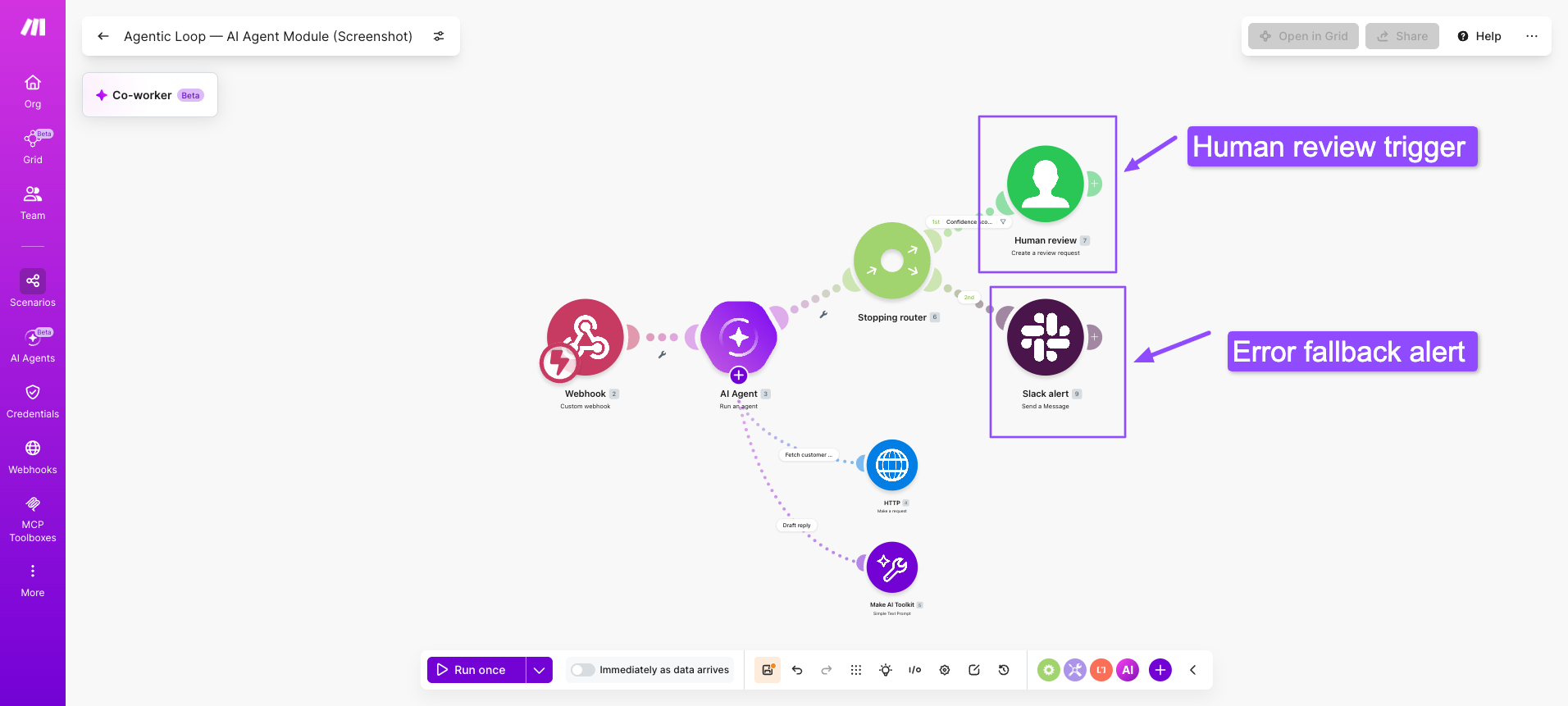
💡 PRO TIP: Build a dedicated monitor scenario triggered by a Webhooks > Custom webhook on your agent's error route. Log the agent's last five tool calls and final output to Google Sheets > Add a Row. A week of that data shows exactly where your loop breaks and what to tighten first.
Step 4: How do you run and observe the loop in action?
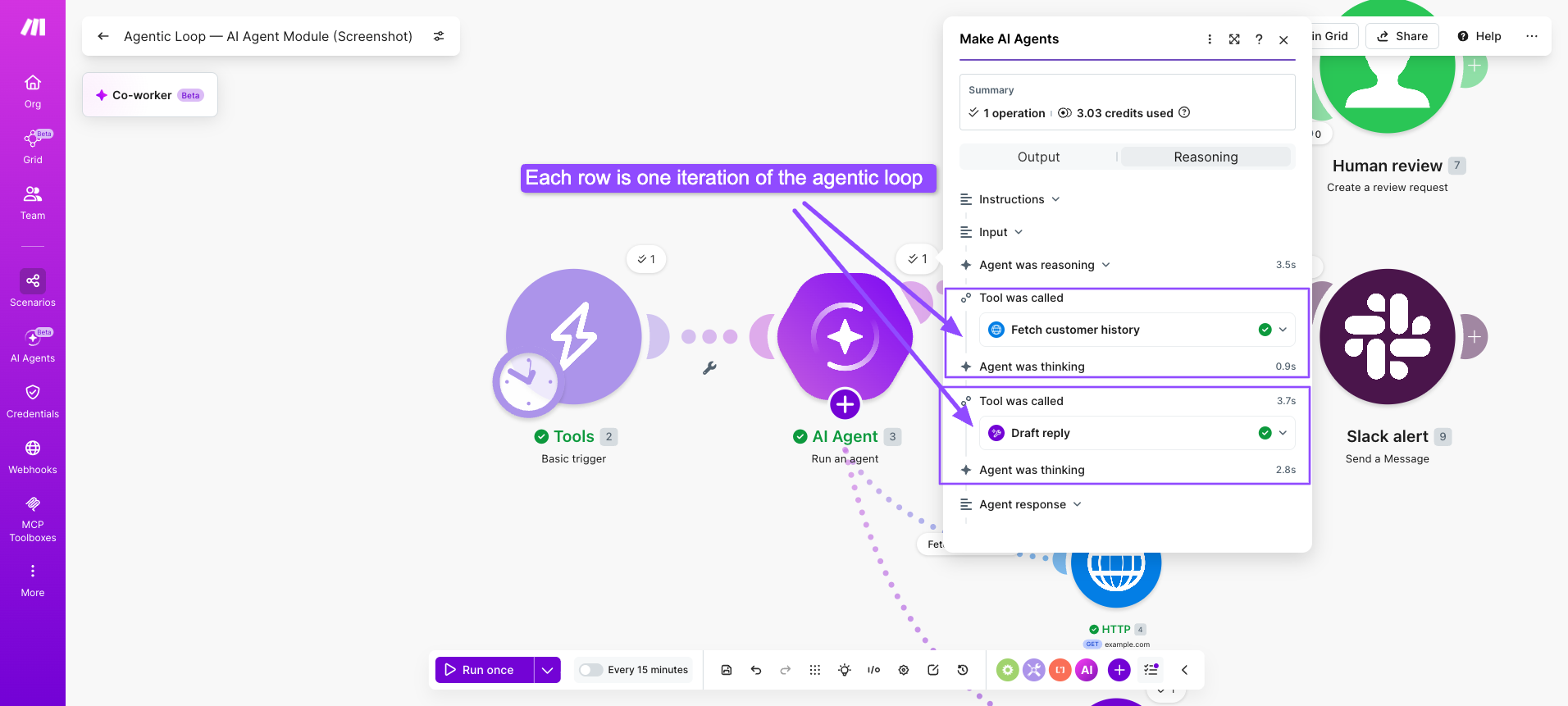
Run the scenario once and review the execution trace before scheduling it.
The reasoning panel, released with the February 2026 Make AI Agents (New) update, surfaces tool call decisions alongside each iteration so operators can verify the agent reasoned correctly, not just that it returned output.
Check these four things across the first 10 runs:
- Did the agent call the right tool in the right order?
- Did the loop stop at the expected iteration, or did it overshoot?
- Did the final output bundle match the expected schema?
- Were any tool calls made that should have been blocked?
A rising iteration count on the same task type signals prompt drift or a tool description that has grown ambiguous.
For full setup documentation, see the Make AI Agents (New) introduction in the help center.
Common use cases and real-world examples
The agentic loop adds the most value where the right next step cannot be known until the previous step completes. The examples below are patterns already running in production scenarios on Make.
Which teams are deploying agentic loops today?
Team | Use case | What makes it agentic |
Revenue ops | Lead enrichment across multiple databases | Each enrichment result determines the next query |
Customer support | Ticket triage and routing with escalation logic | Low-confidence classifications trigger a human review loop |
Finance | Invoice exception handling | Unexpected line items trigger re-verification before approval |
Marketing | Personalised outreach sequencing | Agent adjusts message tone based on prior engagement data |
Engineering | Incident detection and first-response drafting | Agent queries logs, classifies severity, and pages the right team |
What does a simple agentic loop look like end to end?
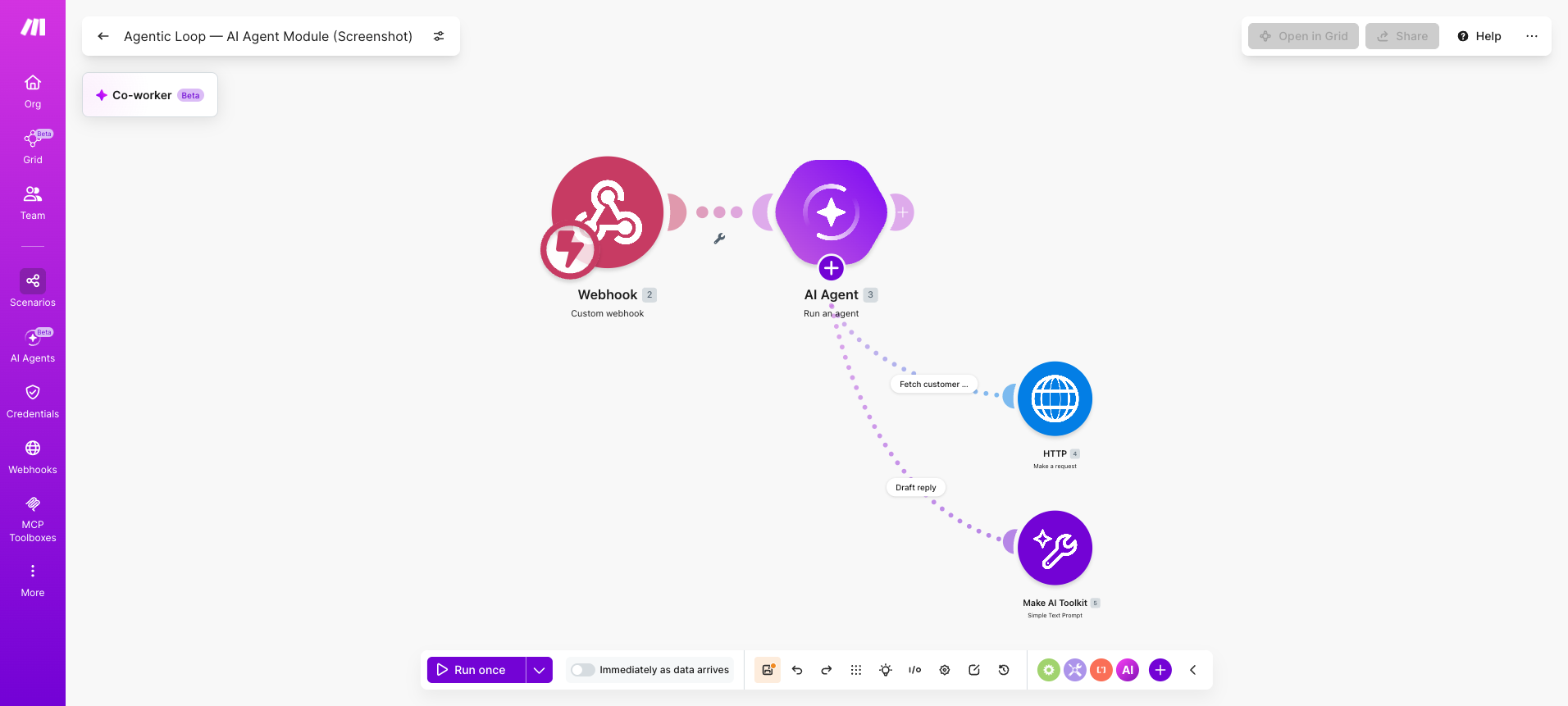
A concrete example at module level makes the architecture tangible. This is a support triage agent built entirely inside Make.
- Webhooks > Custom webhook receives an inbound support ticket
- Make AI Agents (New) reads the ticket, classifies intent, and decides which tool to call
- Agent calls a "Fetch customer history" tool scenario using HTTP > Make a request to the CRM API
- Agent observes the result and reasons: enough context to draft a reply, or does this need escalation?
- If confident: agent calls a "Draft reply" tool using Anthropic Claude > Create a Message and returns the output
- If not confident: Human in the Loop > Create a review request fires before any reply is sent
Browse ready-made agent examples in the Make AI Agents help center.
How to choose when to use an agentic loop
Not every task belongs inside an agentic loop. For processes that are linear and predictable, a deterministic scenario with a Router is faster, cheaper, and easier to maintain. The loop earns its place only where a rule cannot capture the decision.
Dimension | Use deterministic scenario | Use agentic loop |
Task structure | Fixed, rule-bound steps | Open-ended, context-dependent |
Failure tolerance | Low; must be correct every time | Higher; loop recovers and re-reasons |
Operations cost | Predictable, lower per run | Variable; rises with iteration count |
Observability needed | Standard execution log | Reasoning panel and iteration tracing |
Team readiness | Any Make user | Operators comfortable with prompt engineering |
The cost row deserves attention. Every iteration of an agentic loop consumes operations.
An uncapped agent running 20 iterations on a task that needed five is not just slow; it is expensive. Set the max-iterations cap before the first production run and monitor actual counts in your execution history to calibrate it.
When in doubt, start with a deterministic scenario and add a Make AI Agents (New) module at the single step where a rule runs out.
That hybrid pattern is where most teams find their first reliable agentic loop, and it keeps the rest of the scenario fast, predictable, and auditable.
For teams ready to scale beyond a single agent, Make's guide to the agentic operating system covers how multiple agents are coordinated across an entire stack.
What should you build next?
You understand the loop. Now find one process where human judgment fills the gap that rules cannot.
Replace that step with a Make AI Agents (New) module, attach your tool scenarios, set a stopping condition, and run it.
That first working loop is the foundation everything else builds on.
Sign up for Make for free and starting building today.
Frequently asked questions
Q1: What is an agentic loop? An agentic loop is the repeating cycle that powers autonomous AI agents: perceive, reason, act, and observe. Each iteration brings the agent closer to its goal. The loop continues until a stopping condition is met, such as task completion or a maximum iteration count.
Q2: What are the essential components of an agentic loop? The four components are perception (reading inputs), reasoning (an LLM deciding the next action), action (calling a tool or writing to a system), and observation (evaluating the result). Stopping conditions, tool descriptions, and a system prompt are the three configuration elements every loop also requires.
Q3: What is a loop in AI? In AI, a loop is a repeating execution cycle where the system takes an action, observes the outcome, and uses that outcome to decide its next action. An agentic loop applies this pattern to goal-directed tasks, running until the task is complete or a defined limit is reached.
Q4: What is the agent loop lifecycle? The agent loop lifecycle covers four stages: perceive, reason, act, and observe. Each stage feeds into the next. The lifecycle ends when a stopping condition is met: the task is done, the iteration cap is hit, or a human review step is triggered.
Q5: Can an agentic loop run forever? Yes, if no stopping condition is configured. Without a max-iterations cap or task-complete signal, the loop continues indefinitely, consuming operations and potentially producing unintended outputs. Always set at least two stopping conditions before running an agent in production.
Related blogs
Tool and strategies modern teams need to help their companies grow.
AI
The 7 best AI agents for customer support in 2026
From no-code ticket triage to multi-system resolution workflows, these are the AI agents worth deploying in 2026.

Raife Dowley
May 29, 2026
AI
What Is an Agentic Operating System? 2026 Guide
What an agentic operating system actually is, the six layers it runs on, and where it beats traditional automation platforms.
Raife Dowley
May 22, 2026
AI
AI agents vs ChatGPT: what's the difference in 2026?
Most teams use ChatGPT. Few use AI agents. Here is the difference and how to start automating with Make.
Raife Dowley
May 19, 2026