May 22, 2026 | 6 minutes
What Is an Agentic Operating System? 2026 Guide
What an agentic operating system actually is, the six layers it runs on, and where it beats traditional automation platforms.
Most teams in 2026 have the same AI problem: assistants that draft work but cannot finish it.
An agentic operating system is the coordination layer that fixes this, giving multiple AI agents memory, tool access, decision logic, and oversight so they can complete multi-step work across real systems.
Gartner forecasts 40% of enterprise applications will integrate task-specific AI agents by the end of 2026, up from less than 5% today.
This article covers what an agentic OS is, the layers it depends on, how it differs from automation and single agents, and what to evaluate before you commit.
What you need to know before reading
Three terms get conflated constantly in agentic AI conversations, and the architecture section won't make sense until they're separated.
What counts as an "agent" in 2026?
Gartner's three-tier taxonomy splits the field into chatbots, simple agents, and advanced agents, and most products marketed as agents today fall into the first two tiers.
The firm calls this : rebranding chatbots, RPA, or assistants as agents without adding real autonomy.
The working definition for this article is tighter.
An agent:
Perceives state from the systems it operates on
Decides what to do next within defined guardrails
Acts on real systems, not just on a conversation
What an agentic OS is not
The confusion is usually with one of three adjacent things, and the differences matter when you're scoping a build or options.
An agentic OS is a layer, not a product you install.
Platforms like Make supply this layer for the majority of teams that won't build the coordination glue from scratch.
Why is the term "operating system" being used at all?
The OS metaphor stuck because the problem looks identical. What an OS does for hardware, an agentic OS does for AI agents.
The five things a traditional OS does
Every enterprise era has had an invisible coordination layer: Windows for desktops, Linux for servers, Kubernetes for containers. Each handled the same five jobs, and an agentic OS maps cleanly onto them.
Resource management: which agent gets which API quota, model tokens, or compute budget
Process scheduling: which agent runs when, on what trigger, in what order
Memory: shared state across agents, sessions, and runs
I/O between programs: standard interfaces between agents, tools, and external systems
Permissions: what each agent is allowed to read, write, or act on
Why this metaphor matters in practice
The metaphor forces the right questions: who has access to what, what state persists, who acts on whose behalf.
Without that framing, teams build agents in isolation and end up in the MIT NANDA finding that 95% of enterprise GenAI pilots showed little to no measurable P&L impact, with the cause traced to a learning and integration gap, not model quality.
Three questions every deployment has to answer:
Where does state live, and who can read it?
What permissions does each agent need?
How do you see what the agent did, and why?
💡 Pro tip: The most overlooked layer when mapping the OS metaphor to your own stack is event scheduling. Agents that only act on user prompts are not running on an OS, they are running on a button. The trigger layer (polling vs. webhook vs. scheduled) determines whether you actually have an agentic system or a glorified chat interface.
How does an agentic operating system actually work?
The six layers below show up in every credible agentic OS architecture, regardless of vendor. The names vary, the layers do not.
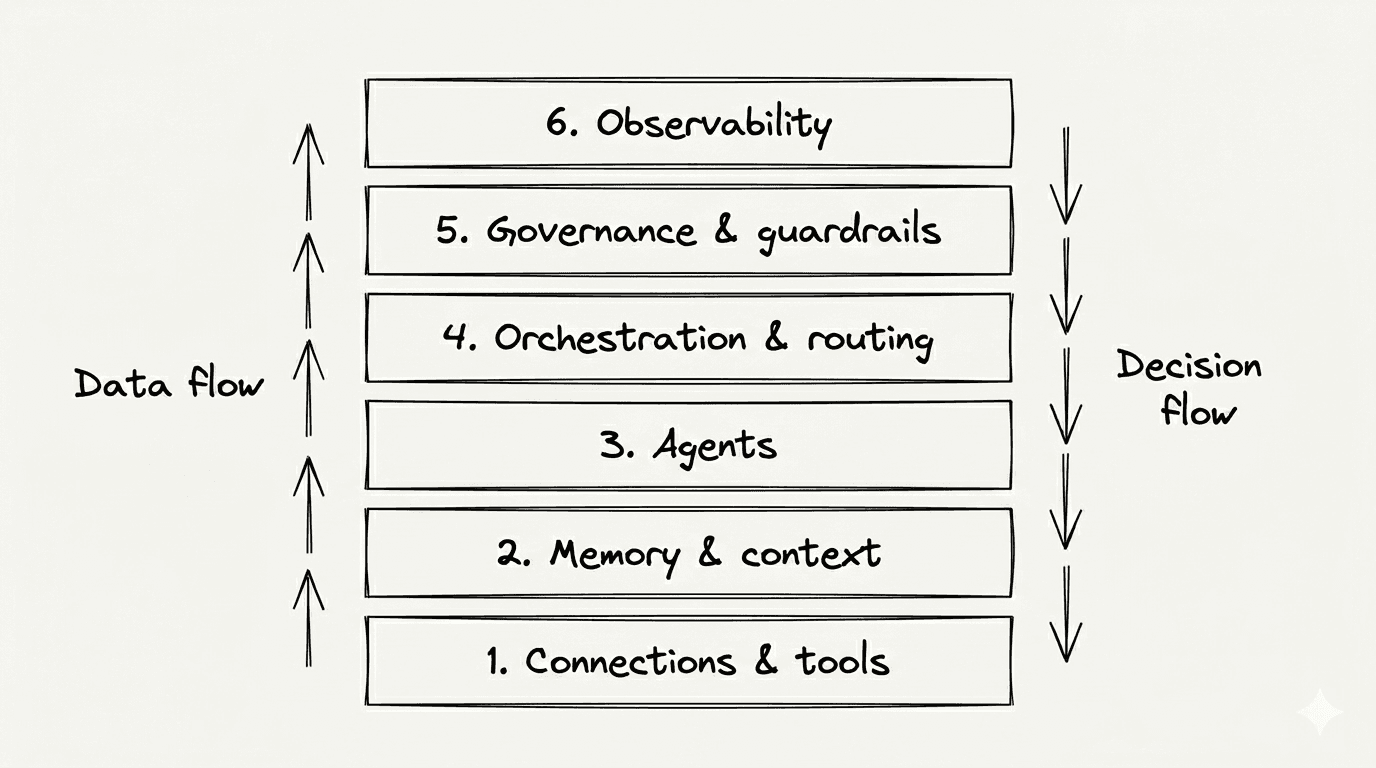
Layer 1 - connections and tool access
Agents are only as capable as the systems they can act on.
This layer exposes apps, APIs, and databases through a standard interface so an agent can read state and write actions without bespoke glue code.
Four patterns dominate in 2026:
MCP (Model Context Protocol): the emerging standard for agent-to-tool communication
A2A (Agent-to-Agent): protocols for agents calling other agents as tools
REST and webhook bridges: the traditional API layer, still doing most of the work
Native app modules: pre-built connectors that hide the API entirely
Make handles this layer with the MCP server and client modules, plus a 3,000+ app library accessible inside the Scenario Builder.
The bidirectional setup matters: scenarios can be exposed as tools to external agents, and agents inside Make can call external MCP tools.
Layer 2 - memory and shared context
The difference between an agent that forgets every Tuesday and one that runs a process is a persistent state.
This layer holds what the agent knows across runs, sessions, and other agents.
Context type | What it holds |
Ephemeral | Variables and outputs from a single run |
Session | State across one multi-step workflow |
Shared | Organization-wide policies, SOPs, brand rules |
The tradeoff is concrete: more context costs more credits and tokens per run, while under-providing context produces hallucinations and silent errors.
The right answer is layer-specific, not maximalist.
Layer 3 - the agents themselves
Each agent has an identity (who it is), a goal (what it is trying to accomplish), a tool set (what it can call), and a model choice (which LLM does the reasoning).
Most vendor competition happens at this layer.
Three things get conflated and shouldn't be:
System prompt: the instructions the model receives every run
Identity: the agent's persistent role and permissions across runs
Role: what work the agent owns in the broader system
Make AI Agents lets you pick a model per agent across OpenAI, Anthropic Claude, Google Gemini, and Make's own provider, so the choice can match the task rather than the vendor.
Layer 4 - orchestration and routing
This is the part that earns the OS label: deciding which agent handles which task, when to escalate, when to retry, when to hand off.
Four routing patterns show up in production:
Deterministic routing: explicit rules and filters decide the path
Probabilistic routing: an LLM decides the path based on input
Human-in-the-loop checkpoints: approval gates before high-risk actions
Error escalation: failed runs route to a human or a fallback agent
Three orchestration models dominate today:
Orchestration model | Where it fits |
Central orchestrator | One lead agent delegates to specialists |
Peer-to-peer | Agents call each other as tools |
Hybrid | Deterministic rules wrap probabilistic decisions |
In Make, the Scenario Builder is the visual orchestration layer, with the Router module handling deterministic branching alongside an agent's probabilistic decisions.
💡 Pro tip: Most multi-agent system failures trace back to giving one super-agent too many tools instead of decomposing into specialists behind a router. makes the case that clear tool scoping and division of labor matter more than tool quantity. If your one agent has access to 20 tools, you do not have an agent problem, you have an architecture problem.
Layer 5 - Governance, guardrails, and audit
Governance is not a feature you bolt on after the pilot ships. Gartner's projection that over 40% of agentic AI projects will be canceled by end of 2027 traces to escalating costs, unclear business value, and inadequate risk controls.
These problems are baked in when audit and approval are treated as afterthoughts.
Four governance controls every agentic OS needs:
Identity and permissions: what each agent is allowed to read and write
Action approval thresholds: human sign-off before high-risk or irreversible actions
Output validation: schema checks and quality gates on agent outputs
Audit trail and explainability: a readable record of what the agent decided and why
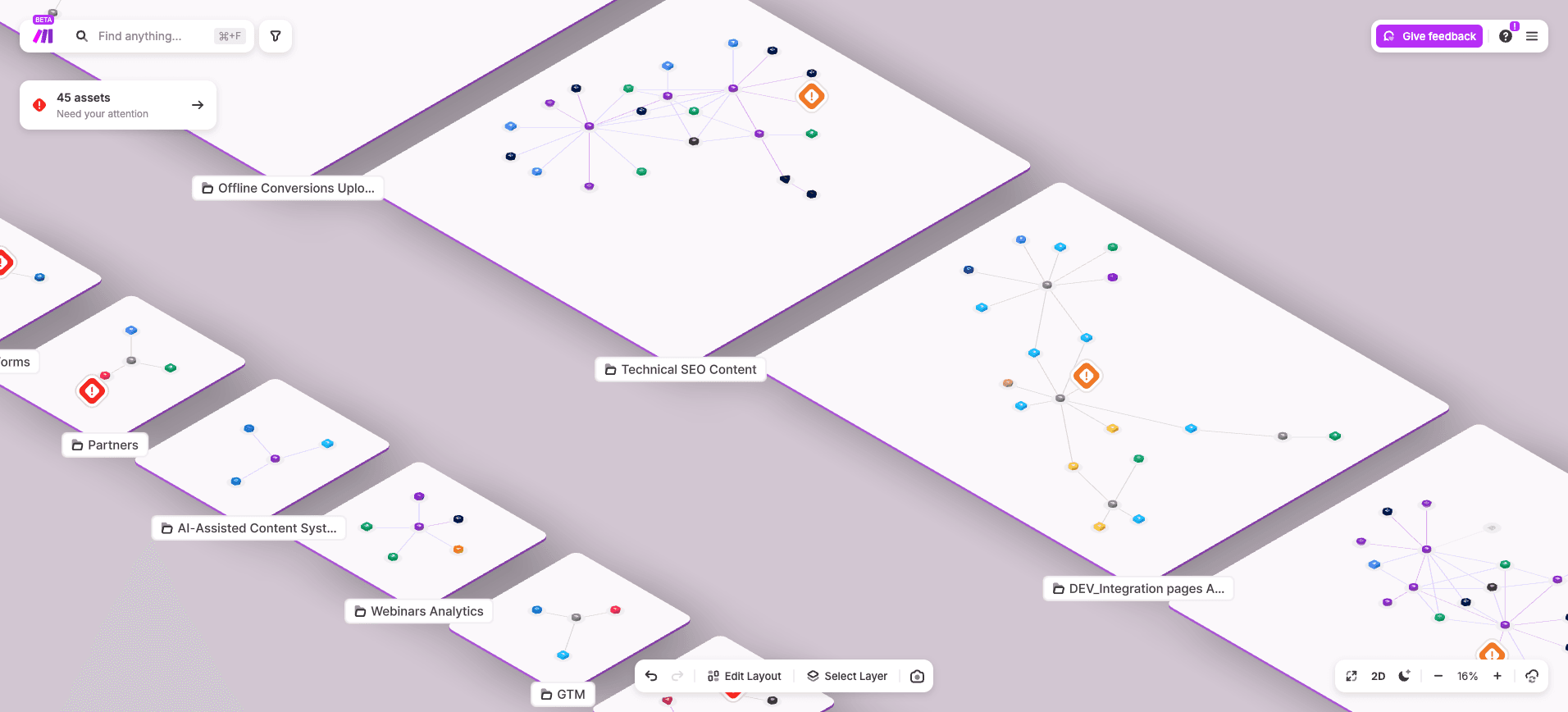
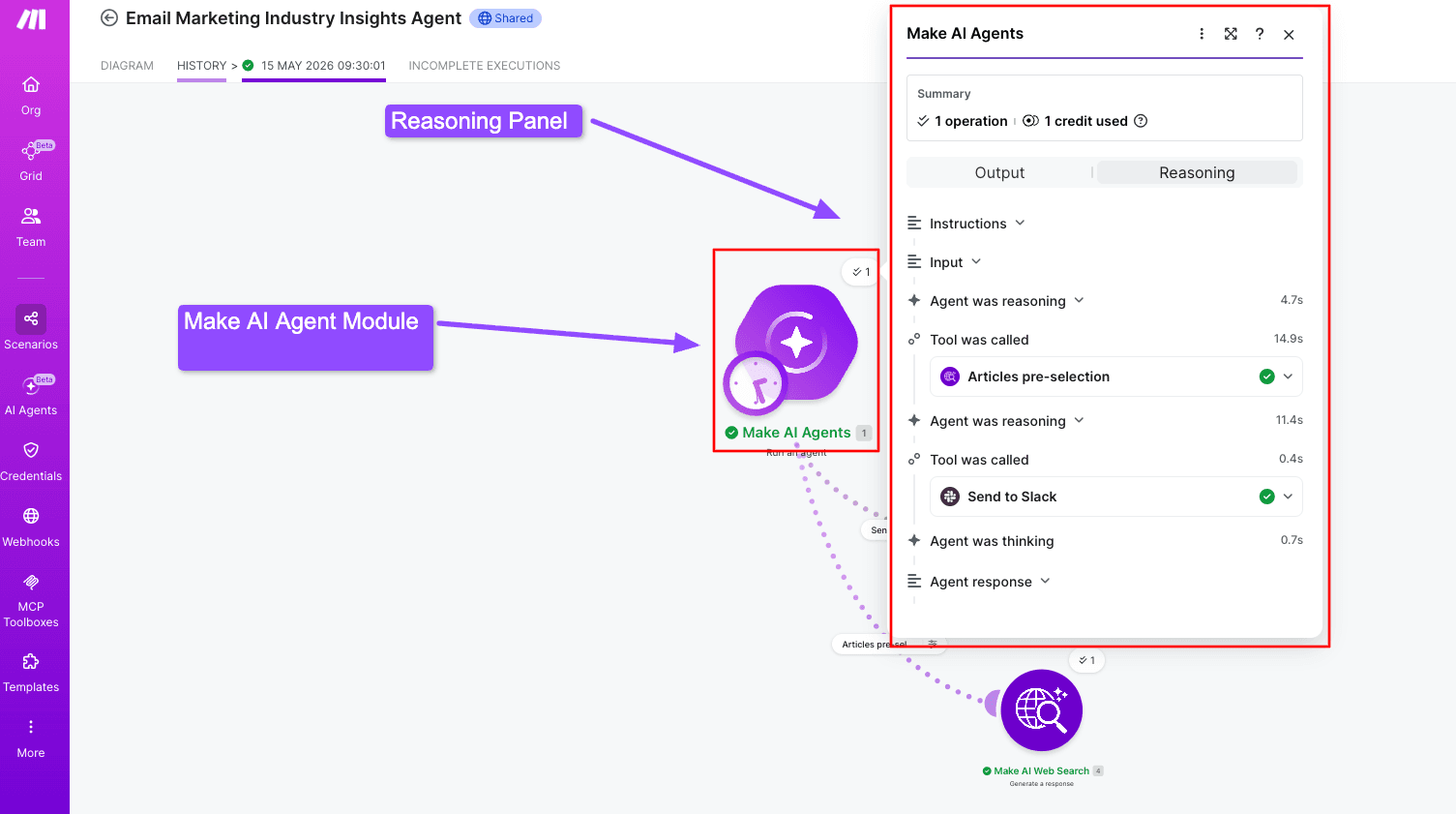
Make's reasoning panel, role-based access on paid plans, and Make Grid for landscape-level visibility cover all four in the visual layer rather than the code.
Layer 6 - Observability and continuous improvement
You cannot improve what you cannot see. This is the layer most teams skip and regret.
Three things to instrument from day one:
Execution logs: every agent decision, tool call, and output
Cost monitoring: credits, tokens, and API calls per agent and per scenario
Drift detection: when agent behavior or output quality changes over time
Make Grid provides the operational map across the full automation landscape, showing scenarios, agents, dependencies, and consumption in one canvas.
Without it, the failure modes from Layers 4 and 5 stay invisible until they hit a customer or a credit cap.
How is this different from automation, RPA, and single AI agents?
An agentic OS gets confused with three adjacent categories: RPA, traditional automation, and single AI agents.
Here is how they actually differ, and where the lines blur in practice.
Side-by-side comparison
The five capabilities below are where the differences show up in production.
Capability | RPA | Traditional automation | Single AI agent | Agentic OS |
Trigger model | UI events | Webhook/schedule | User prompt | Continuous + event |
Decision logic | Fixed scripts | Rules + filters | Per-prompt reasoning | Multi-agent reasoning + rules |
State across sessions | None | None | Limited | Persistent + shared |
Error recovery | Manual | Rule-based | Often fails silently | Self-route, escalate, audit |
Best fit | Legacy UI scraping | Predictable flows | Single contained tasks | Multi-step cross-system work |
The pattern is consistent: each row to the right adds reasoning, state, or recovery the row to its left cannot do on its own.
Where the lines actually blur
In production, most deployments combine deterministic automation with agent decisioning. Make calls this and frames it as a spectrum, not a binary.
The practical implication: teams should not throw out their existing automation to go agentic.
Layer agents on top of the scenarios already running, starting at the steps where reasoning or exception handling adds the most value.
Evaluation and risks: what can go wrong with an agentic operating system?
Before adopting one, here is the short list of failure modes showing up in real 2026 deployments.
What are the failure patterns that show up most often
These are not theoretical. They are documented in MIT NANDA and Gartner 2026 research on enterprise agent deployments.
Governance added late: the pilot works in a sandbox, then collapses the moment audit, approval, and access reviews enter the picture. Bolted-on governance never matches designed-in governance.
Tool sprawl: one agent inherits a growing tool list until reasoning quality drops. The fix is decomposition into specialists behind a router, not a bigger context window.
Cost blowup: agents loop without spend caps, retry forever on one failure, or call expensive models for trivial work. No kill switch, no budget alert, no observability.
Questions to ask before you commit to a platform
Five questions worth answering before signing a contract:
Can you see every agent decision?
Can you set spend caps per agent and per scenario?
Can a human approve before the agent acts on high-risk steps?
Can you swap models without rebuilding the agent?
Does the vendor expose audit logs in your format?
For teams whose needs stop at the first two, most platforms work.
For teams with the last three on the list, Make's and visible reasoning panel inside the Scenario Builder are worth a closer look.
Variations and where this is going next
The agentic OS category will fragment by deployment pattern.
Three are emerging now, and the right choice depends on whether you are building, embedding, or governing.
Pattern | Where it fits | Tradeoff |
Build-your-own on a visual platform | Operators who need full visibility and custom scenarios across many apps | Higher upfront design effort, lower long-term lock-in |
Embedded vendor agents (Slack, Fiserv agentOS, ServiceNow) | Teams already standardized on one system of record | Fast deploy, limited cross-system reach |
Custom code orchestration (LangGraph, custom MCP) | Engineering-heavy teams with unusual requirements | Maximum flexibility, full ownership of maintenance |
The unified next step for most readers: start with the layer you are weakest on (usually orchestration and observability), not the one that is loudest in vendor marketing.
Make's lays out the visual-first version of this approach.
So what should you do next?
An agentic operating system is a coordination layer, not a product you install.
Most teams in 2026 are already at Layer 1 (connections) and Layer 3 (agents), with Layers 4 through 6 missing or improvised. That gap is where pilots stall.
The concrete next step: audit your own stack against the six layers and find the weakest one.
For most teams it is orchestration or observability. You have agents and tools, but no visible map of what decides what, and no record of what happened.
Make is the visual platform where all six layers sit in one operator's reach: Scenario Builder for orchestration, Make AI Agents for reasoning, Make Grid for observability, MCP server and MCP client for tool access.
No coordination glue to write from scratch. You can sign up for Make free to start mapping the gaps
Frequently asked questions
Q1: What is an agentic operating system?
A coordination layer that manages multiple AI agents, giving them memory, tool access, decision logic, and oversight so they complete multi-step work across real systems. It is an architectural pattern you assemble from a platform, not a single product you install.
Q2: What is an example of an agentic system?
A procurement agent that reads a vendor request, checks budget in the ERP, drafts a purchase order, routes it for human approval, and logs the outcome. A single chatbot replying to questions is not one. Multi-step action against real systems is.
Q3: Is Windows an agentic OS?
Not in the sense used in enterprise architecture. Windows is a traditional desktop OS that runs applications reactively. Microsoft is adding agentic features, but the agentic OS pattern referenced here is a coordination layer for AI agents and business systems, not a desktop platform.
Q4: What is the difference between an agentic OS and workflow automation?
Workflow automation runs deterministic, predefined flows. An agentic OS routes around exceptions, makes context-aware decisions, and holds state across runs. Automation handles the predictable path. The agentic OS handles the path that depends on what an agent reasons through at runtime.
Q5: How much does an agentic OS cost to run?
Cost is driven by three things: agent reasoning calls (LLM tokens), tool executions (credits or API calls), and storage of memory and context. On Make, this maps to credit consumption plus the model provider's per-token rate. Spend caps and routing efficiency matter more than plan tier.
Ready to make the automation revolution happen?