How to build an LLM integration: 2026 guide
A scenario-level walkthrough of connecting an LLM to your business systems with routing, validation, and operational guardrails.
A working prompt in a chat window is not LLM integration. Integration is the model reading from one system, deciding, and writing to another, on a schedule, without a human in the loop.
This article shows engineering, ops, and RevOps leads how to build a production-grade LLM integration in a Make scenario: classify, validate, route.
The walkthrough uses the Make AI Toolkit (built-in provider, no API key, every plan) so you can ship the pattern today, then swap in native OpenAI, Anthropic Claude, or Azure OpenAI modules when you have your own keys.
Gartner forecasts that 40% of enterprise applications will embed task-specific AI agents by end of 2026, up from under 5% today.
What do you need before integrating an LLM?
Before opening the Scenario Builder, three things determine whether your LLM integration ships or stalls in pilot: the right provider path, the right access, and a clear data shape.
Which LLM provider and model fits the job?
The fastest path is Make AI Toolkit, which runs on Make's built-in AI provider. No API key, no billing relationship with a model vendor, available on every plan. The walkthrough in Section IV uses this path.
Reach for a native provider module when you need something the built-in provider doesn't cover:
- OpenAI — widest range of modalities (text, image, audio, embeddings) and strict JSON-mode outputs.
- Anthropic Claude — long-context reasoning and tool use for agent-style workflows.
- Azure OpenAI — same OpenAI models, but with the data-residency and compliance posture some teams require.
Three criteria decide which path fits a given scenario:
Criterion | What it means | What to pick |
Latency tolerance | How fast the response must come back | Smaller, faster model for live chat; slower, smarter model for batch |
Output structure | Whether downstream modules need strict JSON | JSON for classification and extraction; free-form for drafting |
Monthly token volume | Inputs plus outputs across every run (a token is ~¾ of a word) | Premium model on low volume; cheaper model on high volume |
What access do you need in place?
You also need three things in place before you build:
- An API key from your chosen provider
- A Make account (free works for this build; Core plan or above for production volume)
- Write-permission on the destination system (CRM, Slack, database)
Finally, define your data shape up front.
This article covers three input types: email body, webhook JSON, and Google Sheets row. An LLM that returns prose where you expected JSON breaks every module after it.
What data shape are you working with?
Define it up front. This article covers three input types: email body, webhook JSON, and Google Sheets row.
An LLM that returns prose where you expected JSON breaks every module after it.
How does an LLM integration work in Make?
Make turns the LLM into one module in a sequence, surrounded by retrieval, validation, and routing logic you can audit on every run.
What is a scenario doing when it calls an LLM?
A trigger module fires a bundle: a new email, a webhook payload, a new sheet row.
A retrieval module enriches that bundle with context from your systems before anything reaches the model.
The Anthropic Claude > Create a Prompt or OpenAI > Create a Chat Completion module then passes the enriched bundle as structured input, and downstream modules act on the parsed response.
That sequence is the difference between asking a chatbot a question and operationalizing a model inside a business process.
The four roles in order are:
- Trigger → Retrieve → Reason → Act
How is this different from a direct API call?
Writing direct API calls to OpenAI or Anthropic Claude gives full control, but every retry, schema check, secret rotation, and routing branch becomes code your team maintains.
For teams whose needs stop at a single linear API call, a script is a solid baseline.
For teams whose requirements have outgrown it, Make handles those layers as native modules.
Dimension | Direct API call | Make scenario |
Retry on rate limit | Custom code | Built-in exponential backoff |
Schema validation | Custom code | Filter + Text Parser modules |
Multi-system routing | Custom code | Router with fallback route |
Audit of each run | Custom logging stack | Per-bundle execution log |
How do you build an LLM integration scenario in Make?
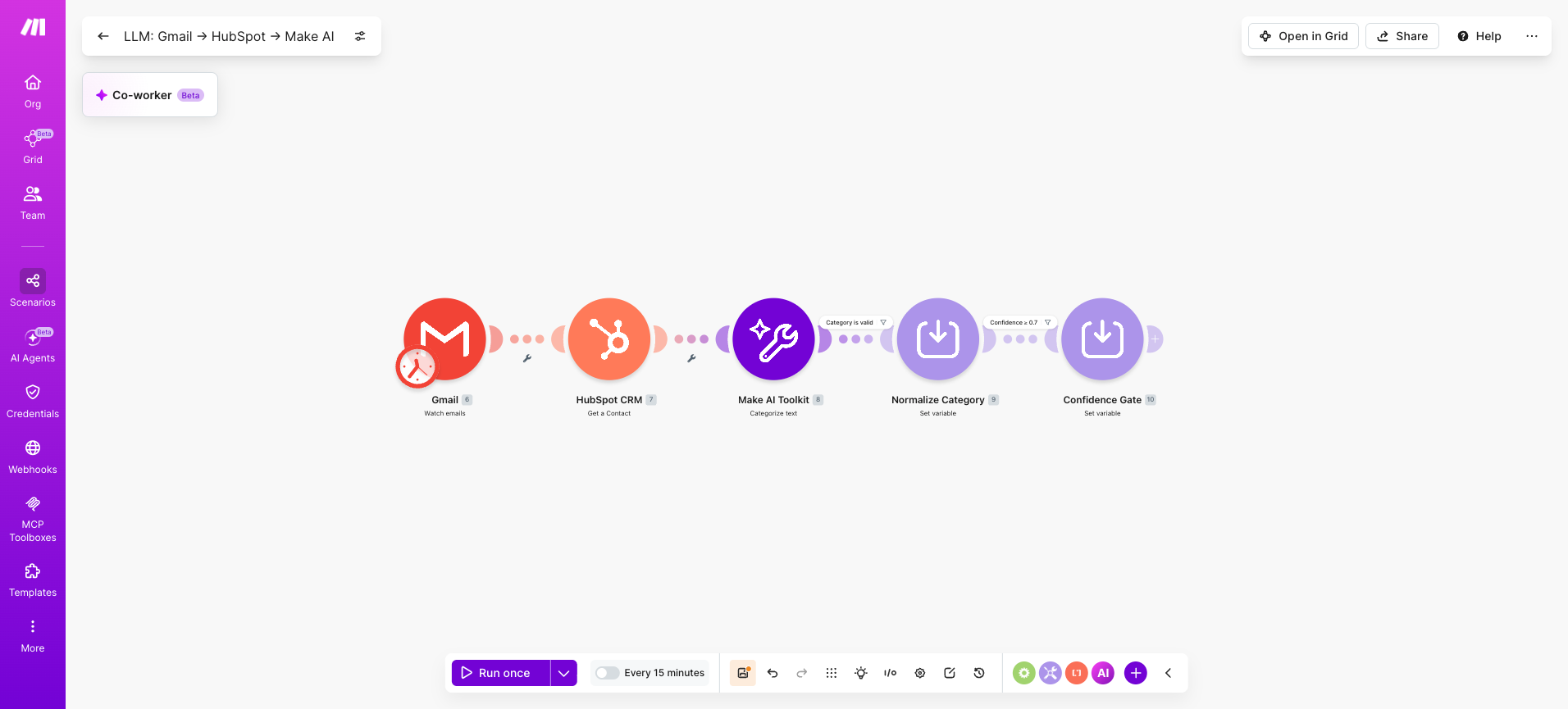
This example build classifies inbound support emails using the Make AI Toolkit, validates the output, and routes by category in five simple steps.
Step 1: How do you connect your LLM provider to Make?
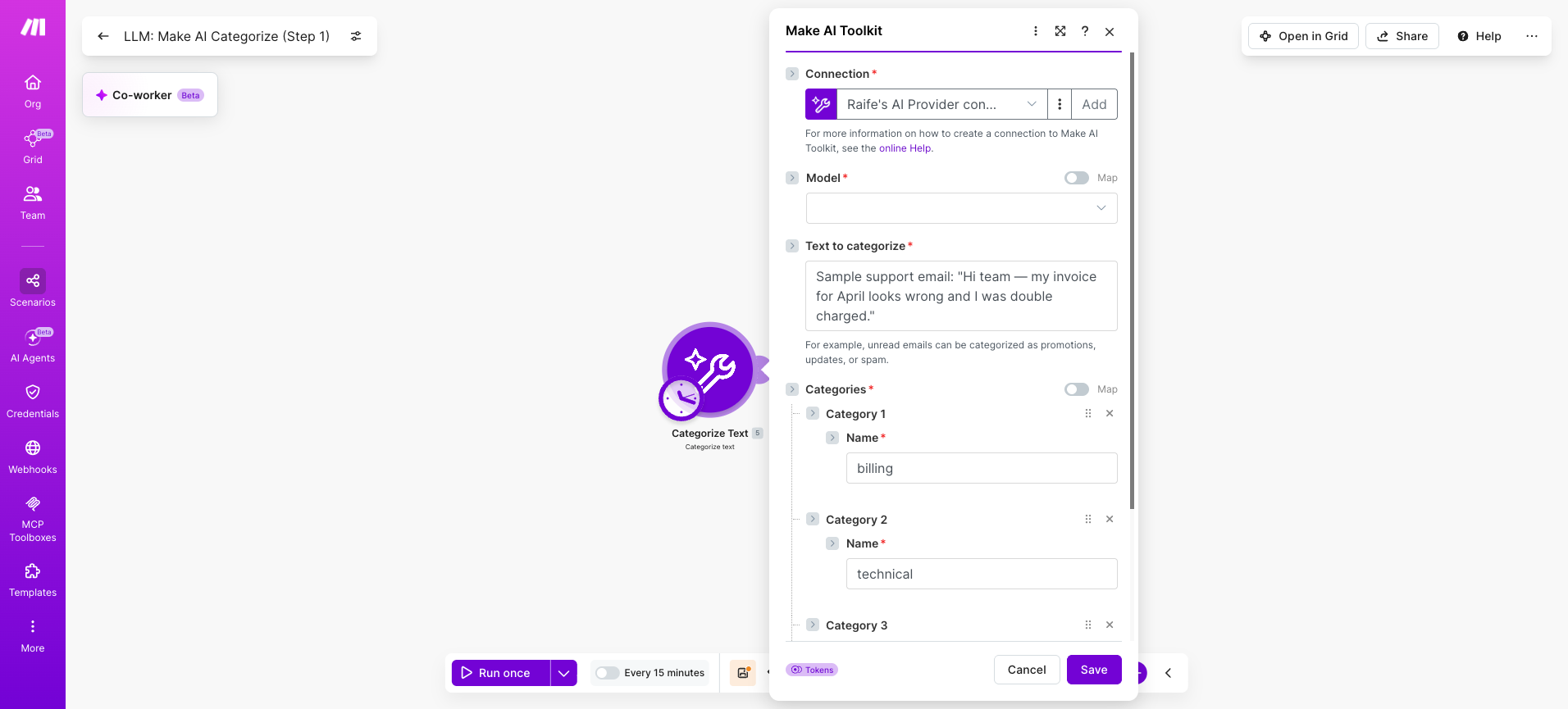
Open Make and add the Make AI Toolkit > Categorize Text module to a blank scenario. Click Add a connection and select Make's built-in AI provider.
No external API key required, and it works on all plans.
Make also supports native modules for Anthropic Claude, OpenAI, Azure OpenAI, and other providers if you have your own API keys, but Make's built-in provider is the fastest path to a working build.
Three connection settings that matter:
- Connection name: label by environment, not by app
- AI provider: Make's built-in provider unless you have a custom API key
- Model: inherited from Make's provider, no manual selection needed
💡 PRO TIP: Name connections make-ai-prod and make-ai-staging. When you clone a scenario for testing, swap connections instead of editing settings to prevent staging runs consuming production credits.
Step 2: How do you structure the trigger and retrieval modules?
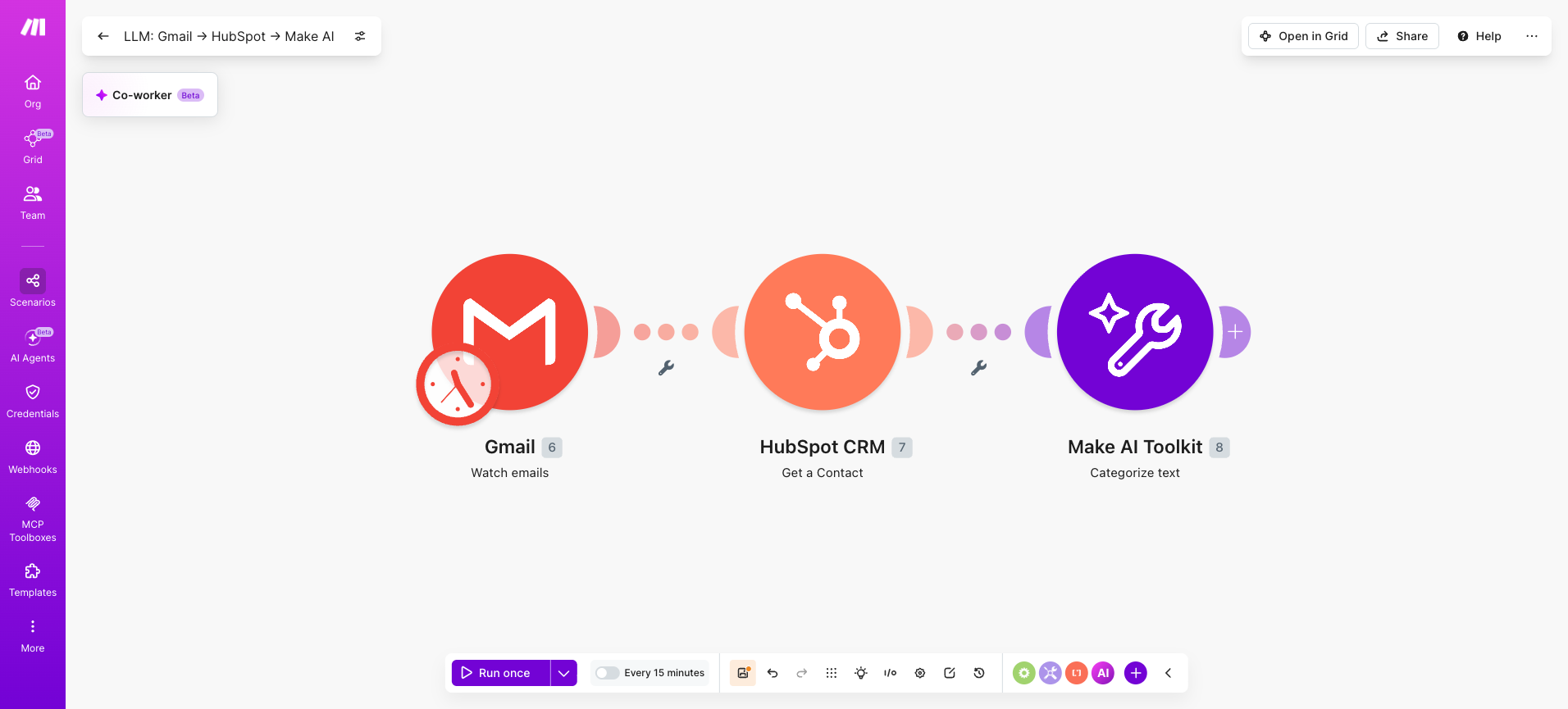
Your trigger choice sets the credit ceiling for the scenario. Gmail > Watch Emails polls on a schedule, consuming credits whether or not new emails arrived.
Webhooks > Custom Webhook fires only when data arrives, making it the lower-cost default. Three trigger patterns this scenario supports:
- Gmail > Watch Emails for teams routing support through Gmail
- Webhooks > Custom Webhook for instant triggers from a help desk
- Google Sheets > Watch Rows for batch processing from a spreadsheet
Add a HubSpot CRM > Get a Contact module between the trigger and the AI module to attach prior customer data to the input.
How you structure agent workflow memory at this stage determines the quality of every downstream decision.
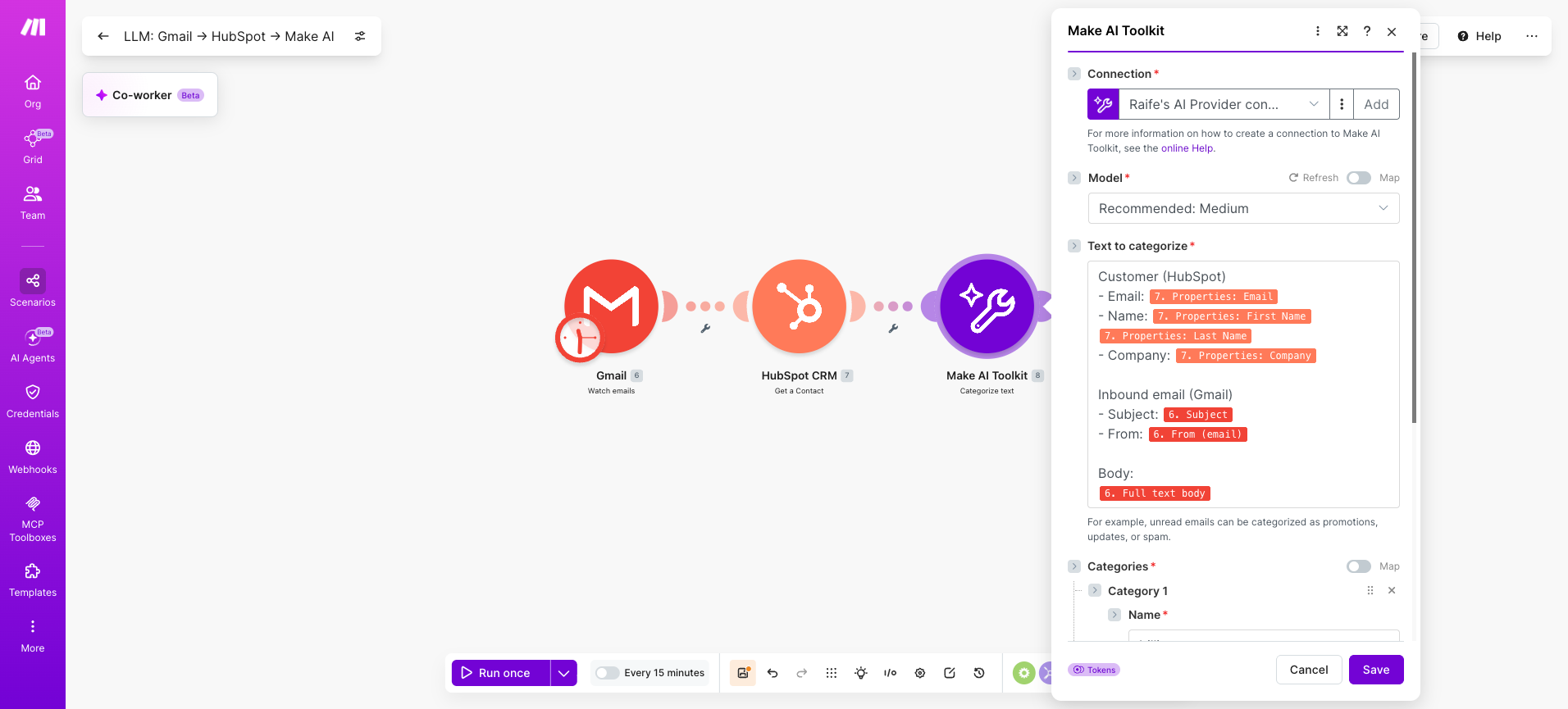
Map retrieved fields into the AI module separately, not as one concatenated blob.
Step 3: How do you configure the LLM module and prompt?
Use Make AI Toolkit > Categorize Text for classification tasks like routing tickets by topic.
Use Make AI Toolkit > Summarize Text when downstream modules need a condensed version of long input. Both use Make's built-in provider, so there is no third-party token billing to manage.
This module sits at the heart of what AI automation is, turning unstructured input into structured output.
Five fields that matter:
- Input Text: mapped from the retrieved bundle in Step 2
- Categories: the exact list the model must choose from
- Language: auto-detect or fixed, depending on input variability
- Confidence threshold: the minimum score required for a valid result
- Output format: structured response the next module can parse
The category list is the integration's contract with the model. Define it precisely upfront.
Vague categories like "other" produce routing failures downstream.
For a support email classifier, define three to five exclusive categories. Add urgency as a second classification pass if you need it.
Categories: billing, technical, general
Confidence threshold: 0.7
Language: auto-detect
When to use each toolkit module:
- Categorize Text for routing decisions
- Summarize Text for condensing long input
- Extract Information for pulling structured fields from prose
- Analyze Sentiment for tone-based routing
💡 PRO TIP: Run an Analyze Sentiment module in parallel with Categorize Text and use sentiment score as a second routing dimension alongside category. Angry billing tickets route differently from neutral billing tickets.
Step 4: How do you validate the LLM response?
The Make AI Toolkit returns structured output directly, which reduces but does not eliminate validation.
A filter still needs to confirm that the returned category matches your defined list and that the confidence score clears the threshold you set in Step 3.
Building these structural guardrails for LLM agents is the layer that separates a demo from a production scenario, and where most teams cut corners and pay for it later.
Three validation steps to add after the AI module:
- Filter checks the category field is not empty and matches the defined list of values
- Tools > Set Variable normalises casing and trims whitespace before downstream mapping
- Filter checks the confidence score is above the 0.7 threshold you defined
Validation modules consume credits, but a miscategorised bundle routed to the wrong system costs more in cleanup than the credits spent checking it first.
Treat this step as insurance against bad model output, not overhead on a working scenario.
Validation module | What it checks | On failure |
Filter (category) | Category matches the defined list | Route to manual review queue |
Tools > Set Variable | Casing, whitespace consistency | Normalises silently |
Filter (confidence) | Score is ≥ 0.7 threshold | Route to human review path |
Step 5: How do you route and act on the result?
The Router turns the AI module's structured output into business outcomes.
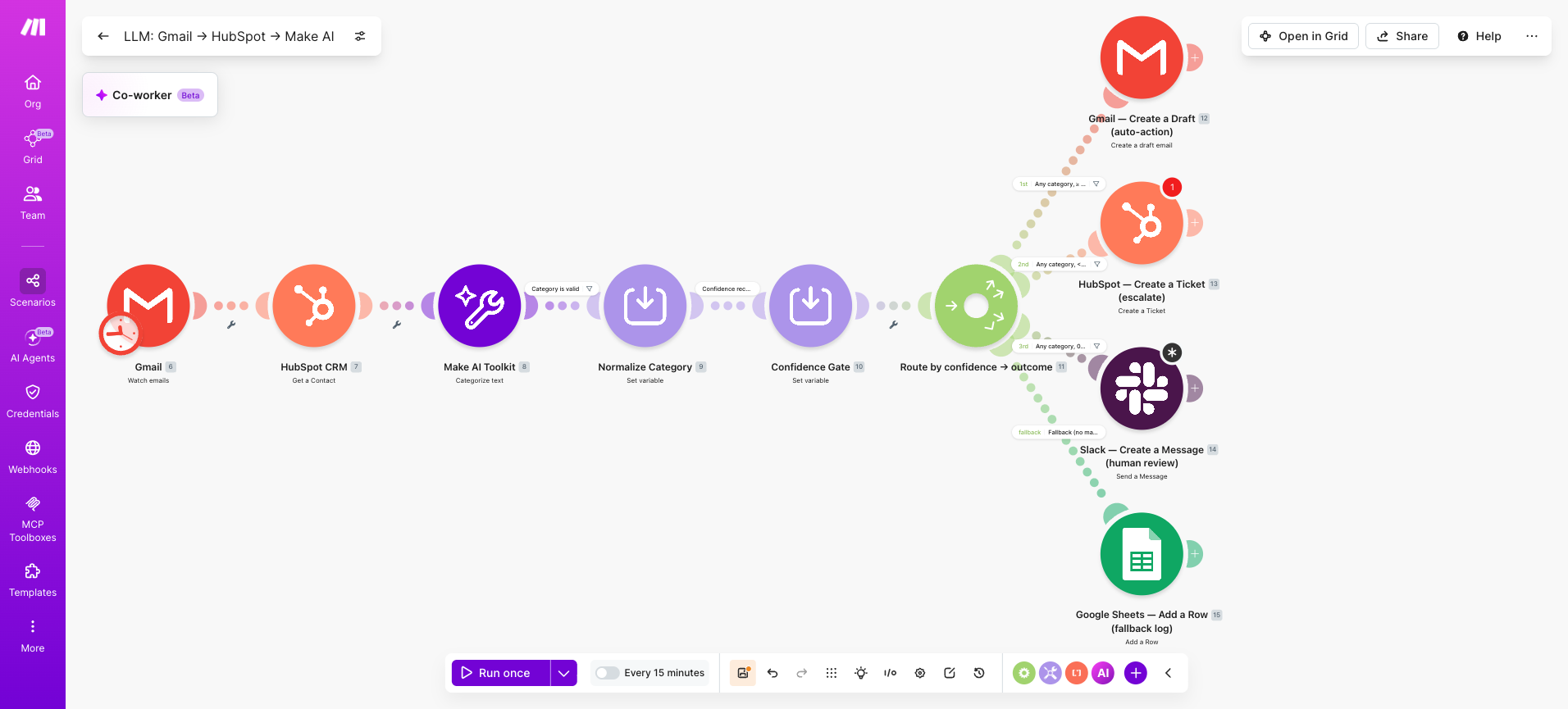
Each route is a destination system, not a code branch. Configure routes in priority order, with a fallback at the end for any bundle that matches no filter condition.
Without a fallback, bundles that fall outside your defined paths disappear silently with no log trail.
The pattern from this build extends naturally into autonomous AI agents on the Make canvas when you outgrow rules-based routing.
Three routes the demo scenario produces:
- Gmail > Create a Draft email for high-confidence auto-replies that the support team approves before sending
- Slack > Send a Message to the support channel for mid-confidence bundles needing human review
- HubSpot CRM > Create a Ticket for low-confidence or sensitive bundles requiring full escalation
Configure the fallback route to log unmatched bundles to a Google Sheet or Airtable.
This gives you a backlog to review weekly and tune your filter conditions against, rather than discovering missed cases through customer complaints.
Category + confidence | Route | Action module |
Any category, ≥ 0.85 | Auto-action | Gmail > Create a Draft |
Any category, 0.7–0.85 | Human review | Slack > Create a Message |
Any category, < 0.7 | Escalate | HubSpot CRM > Create a Ticket |
No match | Fallback | Log to Google Sheets |
How do you test and troubleshoot the integration?
Three failure modes account for almost every broken LLM integration. Test for each before turning scheduling on.
How do you run a single-bundle test?
Use the Run once button with a real sample bundle and inspect the output of every module via the bundle inspector. Three things to check on the first run:
- AI module returned a structured category, not free-form prose
- Filter passed the bundle through to the router
- Router selected the route matching the category and confidence
What are the three most common LLM integration failures?
- Malformed output: prompt drift returns prose instead of structured fields. Fix with a stricter category list and a Text Parser > Match Pattern fallback.
- Rate limit (429): provider throttles under load. Fix with Make's built-in exponential backoff and the Break error handler.
- Stale context: retrieval module read outdated CRM state. Fix by moving retrieval after deduplication or adding a timestamp filter.
How do you handle errors in production?
Attach an error handler route to the Make AI Toolkit module. Use the Resume directive for transient failures and Break for malformed responses needing manual review.
- Log to a Google Sheet
- Post to a #scenario-errors Slack channel
- Write a row to a dead-letter Airtable
What variations and next steps can you build from here?
The classify-and-route scenario is the entry pattern.
Once it runs reliably, three extensions deliver the next round of value without rebuilding the foundation you have already shipped.
Each one solves a different production problem, so the right pick depends on what broke first during testing.
Knowiing when to use AI agents vs automation is the call you make before reaching for the long-running agent extension below.
Extension | What it adds | Make module or feature |
Multi-model routing | Cheap model for classification, premium model only for drafting | Two OpenAI > Create a Chat Completion modules behind a Router |
Long-running agent | Multi-step reasoning with tool calls | Make AI Agents for autonomous decisions |
RAG-style retrieval | Ground responses in your own knowledge base | OpenAI > Add Files to Vector Store plus retrieval before the prompt |
Pick the extension matching the failure mode your first scenario surfaced, not the one that sounds most ambitious.
So what should you ship first?
You can now ship a Make scenario that takes structured or unstructured input, calls an LLM, validates the response, and routes work to the right system.
That capability is the foundation every more ambitious agent build extends from.
Pick the highest-volume unstructured input your team handles this week, apply the classify-and-route pattern from Section IV, and ship it.
Sign up for Make free on the free tier before scaling to Core. For ready-made starting points, browse the Anthropic Claude Integration pages.
Frequently asked questions
Q1: What is LLM integration?
LLM integration is the process of connecting a large language model to your business systems so it reads inputs from one app, applies reasoning, and writes outputs to another, on a schedule, without a human in the loop. The integration layer handles retrieval, validation, routing, and error recovery around the LLM call.
Q2: How do you integrate an LLM with an API?
Three paths: write direct API calls to a provider like OpenAI or Anthropic Claude, use a visual platform like Make where API connections are pre-built modules, or build with a framework like LangChain. Make is the fastest path because retries, validation, and routing are handled natively.
Q3: Do I need an API key to integrate an LLM with Make?
Not always. Make's built-in AI provider is available on every plan with no external API key required and powers the Make AI Toolkit and Make AI Agents apps. Native modules for OpenAI, Anthropic Claude, and others require your own provider API key.
Q4: How do I stop the LLM from returning unstructured prose?
Define the exact output schema in the system prompt and add a validation module after the LLM call. The Make AI Toolkit returns structured output by default. For free-text models, follow up with JSON > Parse JSON and a Filter checking required fields exist.
Q5: What does an LLM integration cost to run?
Two layers: Make charges credits per module operation, with AI-heavy modules consuming more. The provider charges per token. Most production classify-and-route scenarios run on the Core plan plus $20–80 in monthly model spend, depending on volume. See Make pricing for current rates.
Related guides
Tool and strategies modern teams need to help their companies grow.

How-to guides
How to use an AI agent to sort emails in 2026
Build a native Make AI Agents triage scenario that labels, prioritizes, and escalates incoming Gmail messages without manual review.

Raife Dowley
May 26, 2026