Jira GitHub integration: How to link commits & issues in 2026
Stop manually copying commit hashes. Learn how to automate your engineering workflow and keep Jira boards updated in real time.
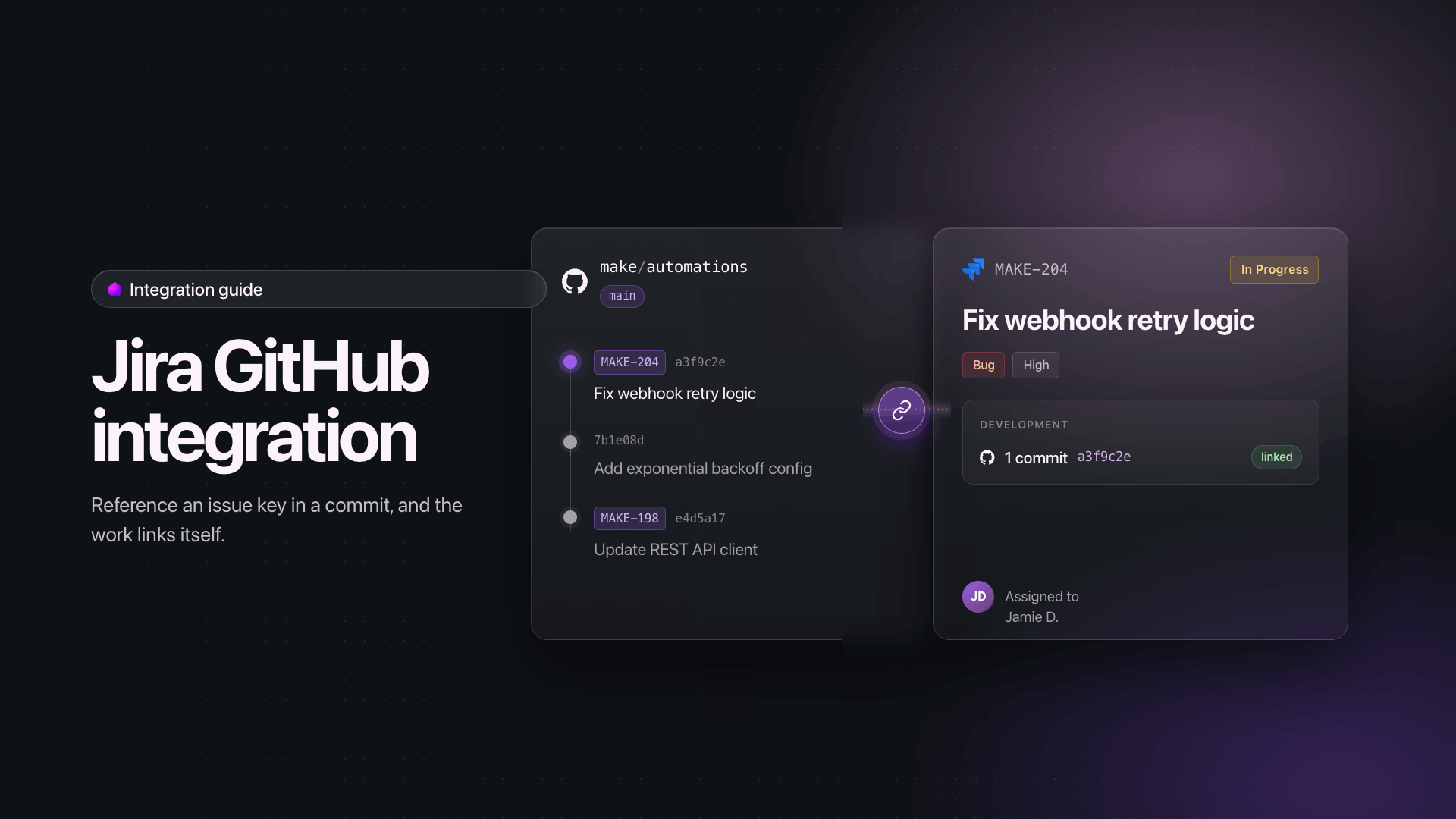
Linking Jira issues to GitHub commits in 2026 means automating the connection through a Make scenario so every commit, pull request, and status change flows between systems without manual updates.
This workflow automation guide shows how engineering teams can sync the two platforms reliably, especially as by 2026, 40% of enterprise applications will feature task-specific AI agents, up from less than 5% in 2025, raising the bar for clean delivery data.
What you need before connecting Jira and GitHub
Before building the Jira GitHub integration in Make, gather the access credentials and permissions that let the scenario read commits, parse issue keys, and post updates back to Jira.
The checklist below covers the accounts, tokens, and project settings required for a working connection on both sides.
- Make account on any plan that supports webhooks and scheduled scenario runs, plus permission to create new connection records in your team workspace.
- Jira admin access to generate an API token, confirm the project key naming convention (for example PROJ-123), and authorize the Jira - Update an Issue module against the target instance.
- GitHub repo access at owner or maintainer level so you can register webhook endpoints, issue a fine-grained personal access token, and grant read scope on commits and pull requests.
- Familiarity with regex or Make's text parser for matching issue keys inside commit messages.
For broader patterns across Jira integrations, scan the connector library before you start mapping fields.
Why manual Jira and GitHub updates break delivery
Manual Jira and GitHub updates break delivery because engineers must context-switch between two systems that hold half the truth each, and the gap between a commit landing and a ticket reflecting reality keeps growing through the sprint.
A developer pushes code, then has to remember to open Jira, find the issue, paste the commit hash, change the status, and add a comment.
That ritual gets skipped under deadline pressure, so stale issue status becomes the norm: tickets sit in "In Progress" while the pull request is already merged, or live in "In Review" days after deploy.
The context switching cost is real. Each hop from terminal to browser to Jira board fragments attention and erodes flow, which is exactly the problem AI automation explained addresses by removing repetitive coordination work.
Product managers then spend stand-ups asking "is this actually done?" because the board lies.
Release notes drift from commit history. Audit trails fragment.
Velocity charts misreport because issues close in batches on Fridays rather than when work actually shipped.
The Make scenario that links commits to issues
The Make scenario that links commits to issues is a webhook driven workflow: GitHub pushes a commit event into Make, a parser extracts the Jira issue key from the commit message, and a Jira module updates the matching issue with the commit reference, status transition, or comment.
The whole flow runs in Make's visual scenario builder, so every step is inspectable on the canvas.
Workflow diagram showing GitHub commits flowing through a Make scenario to update linked Jira issues automatically
At the entry point sits a GitHub - Custom Webhook trigger that receives push and pull request payloads in real time.
A Text parser - Match pattern module acts as the issue key parser, scanning the commit message for the standard Jira format like PROJ-123.
A Router then splits the flow: matched commits feed into a Jira Software Cloud - Update an Issue module and a Jira Software Cloud - Add a Comment module, while unmatched commits route to a logging module for review.
This pattern keeps every operation auditable, and you can extend it later by pulling shared logic into reusable scenarios through the Aggregator or by referencing common building blocks documented in the Make team's scenario design notes.
How to build the Jira GitHub integration in Make
Building the Jira GitHub integration in Make takes seven modules arranged in one scenario: a GitHub trigger, a regex parser, a Jira lookup, a Jira comment writer, a status updater behind a Router, a deduplication check against a Data store, and an error handler.
Each step below maps to one module in the Scenario Builder.
Step 1: Configure the GitHub trigger
Add the GitHub - Watch commits module as your trigger.
Create a connection with repo scope, select your target repository, set the branch to main, and limit results to 10 per run.
Schedule the scenario to run every 15 minutes.

Step 2: Extract the Jira issue key with regex
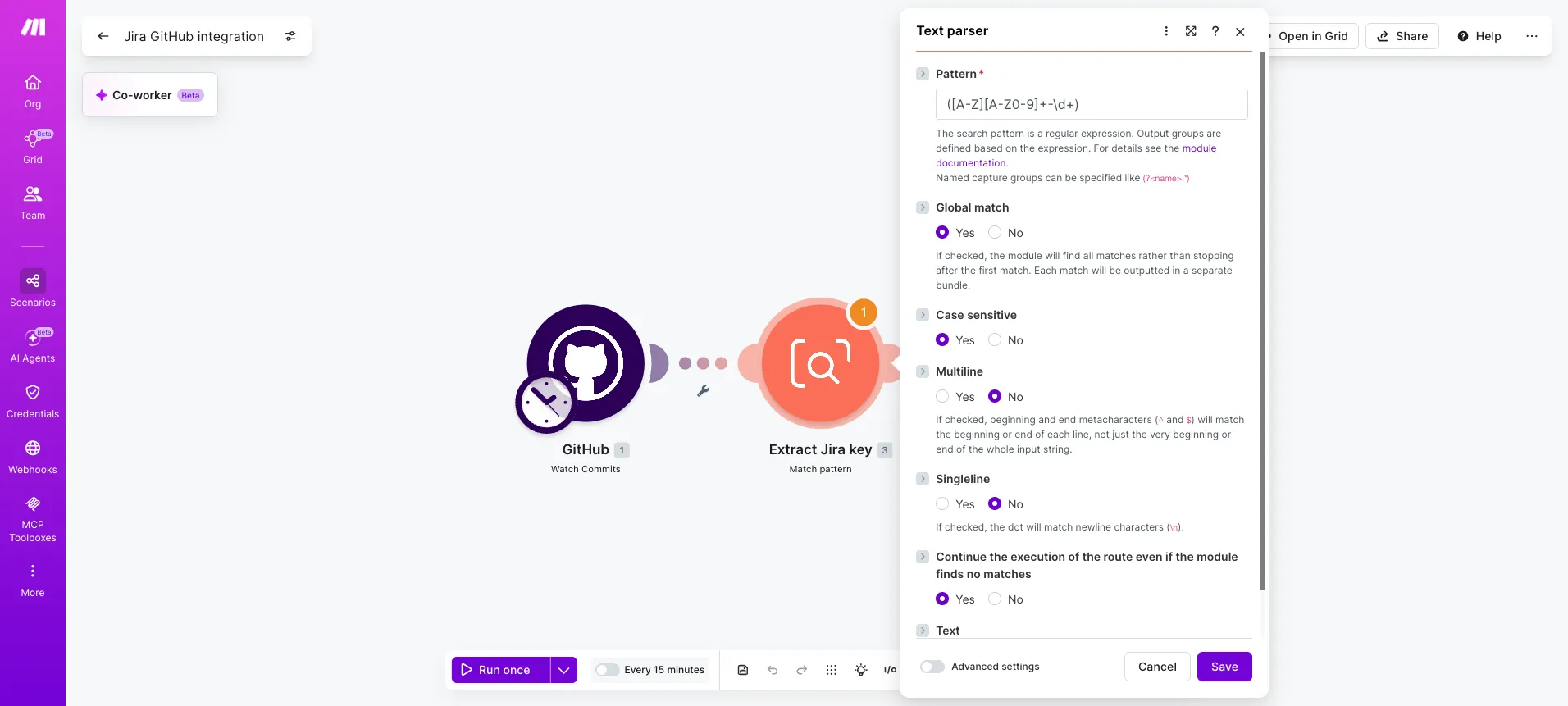
Add a Text parser - Match pattern module after the trigger. Use the regex ([A-Z][A-Z0-9]+-\d+) against the commit message. Enable global matching so commits referencing multiple tickets produce multiple bundles.
- Pattern: ([A-Z][A-Z0-9]+-\d+)
- Text input: commit.message from the trigger
- Global match: yes, case sensitive
Step 3: Deduplicate with a Data store
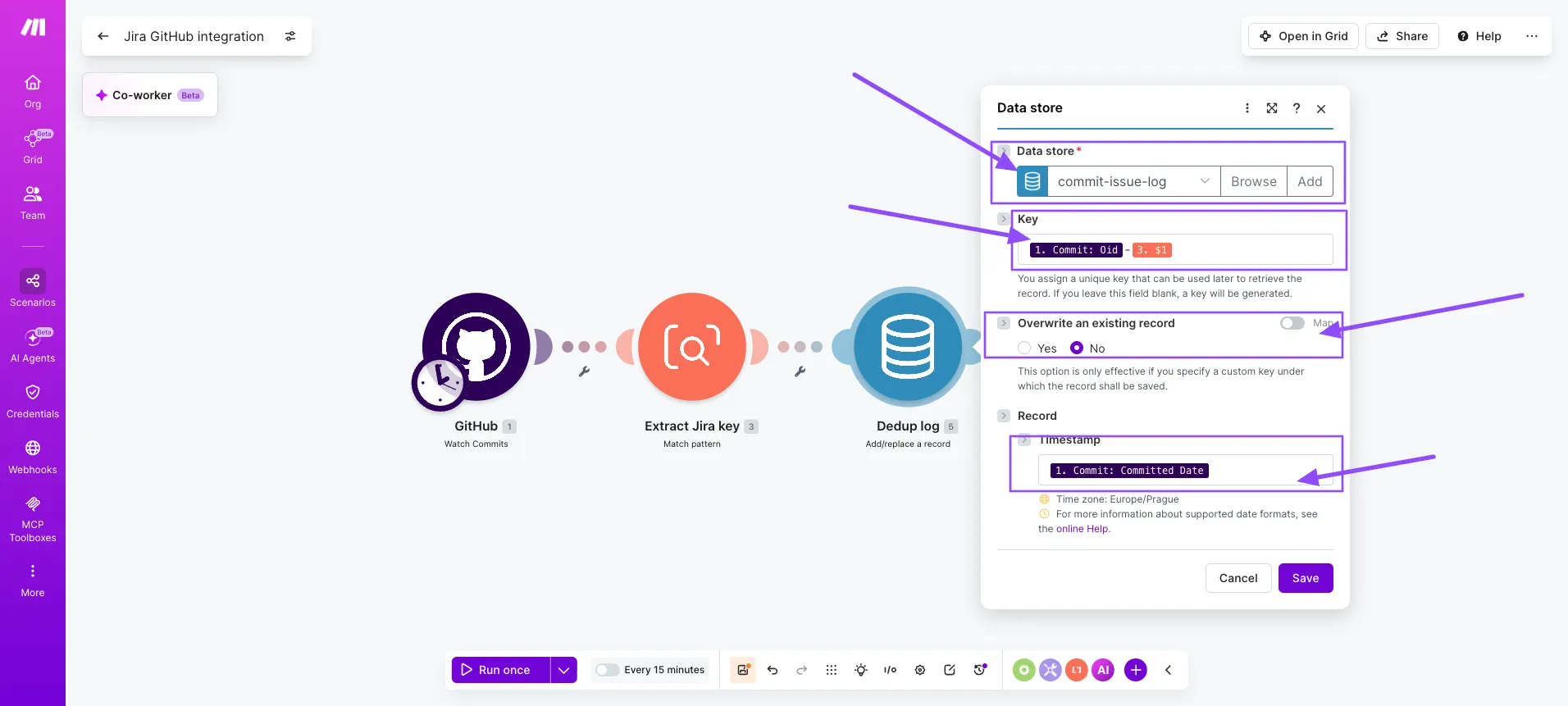
Add a Data store - Add a record module keyed on the commit SHA plus the issue key.
Set "Overwrite existing record" to no, then add a filter after this module that only continues when the record was newly created.
This prevents duplicate Jira comments on retries.
Step 4: Look up the Jira issue
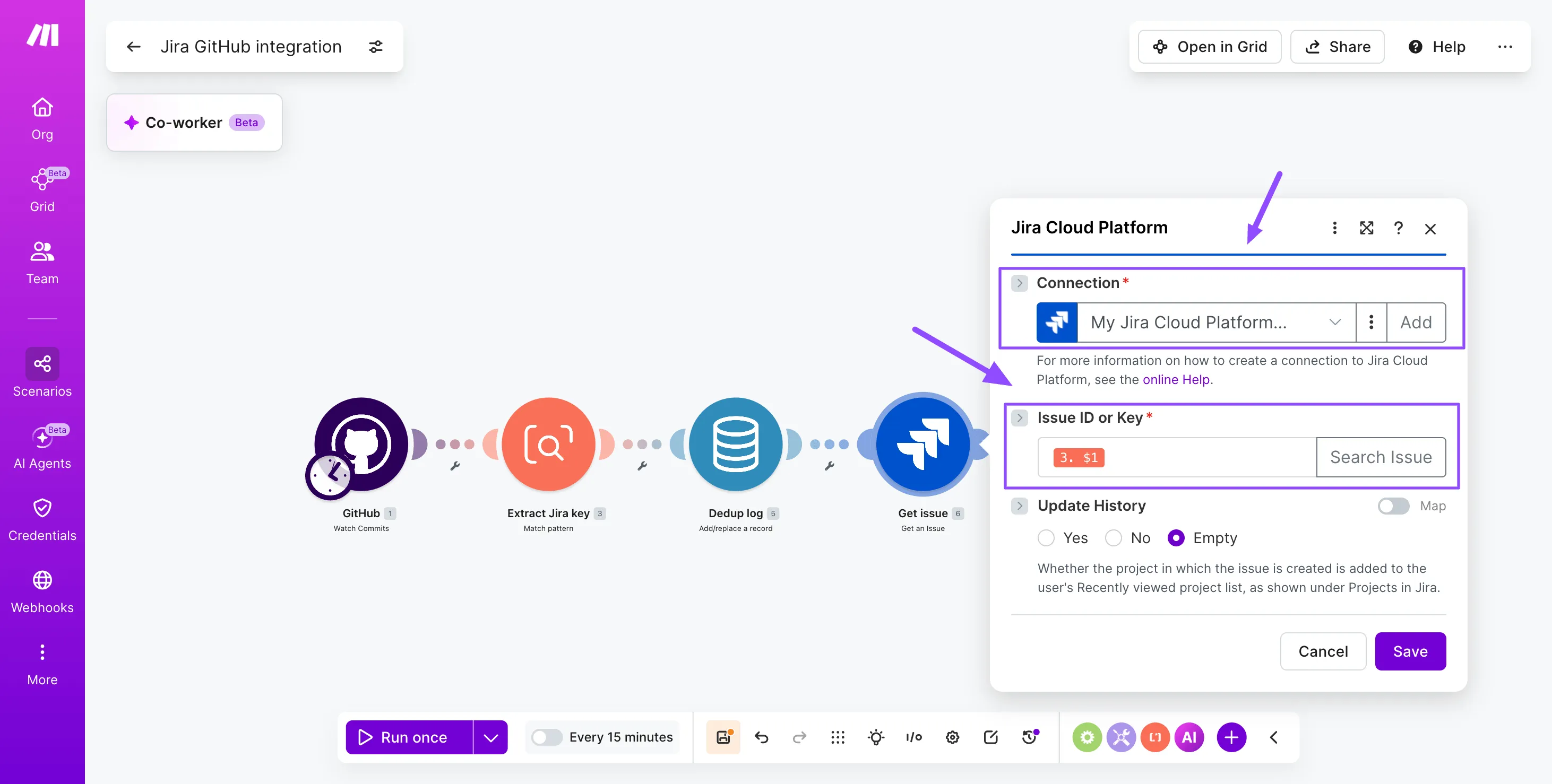
Add a Jira Cloud - Get an issue module using the parsed key.
This validates the ticket exists before posting and pulls the current status, assignee, and project for downstream routing logic.
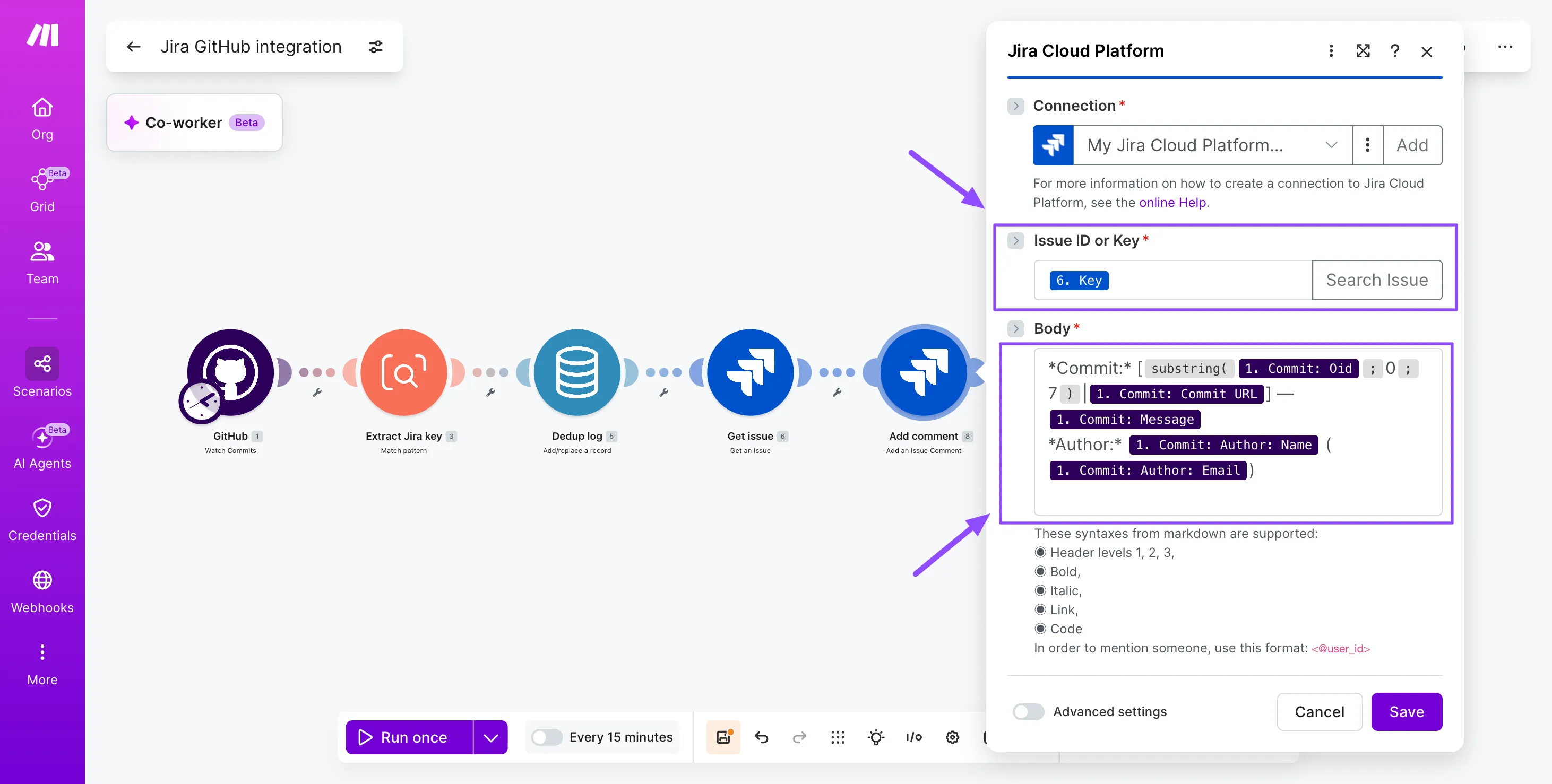
Step 5: Post the commit comment
Add a Jira Cloud - Add comment to issue module. Build the comment body with commit message, author name, short SHA, and a hyperlink to the GitHub commit URL. Format with Atlassian Document Format markers for clean rendering.
Step 6: Route status transitions
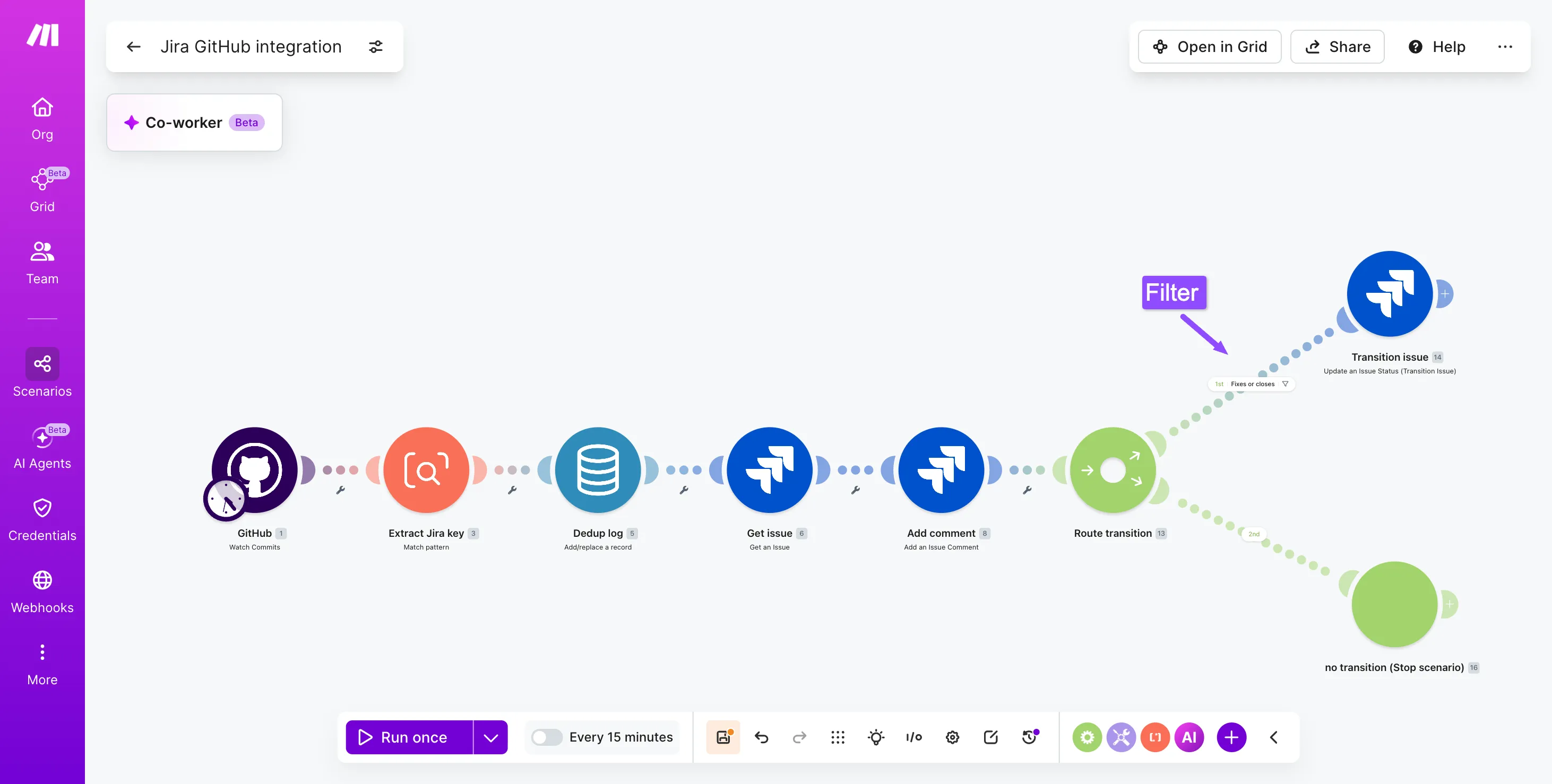
Add a Router after the comment module.
On one route, filter for commit messages containing "fixes" or "closes" and chain a Jira Cloud - Transition issue module to move the ticket to In Review.
The other route ends the scenario. For a similar branching pattern across tools, this Jira Slack integration guide shows comparable filter logic.
PRO TIP: Set the Jira Cloud - Transition issue module to ignore errors when the target status is invalid for the current workflow state. This avoids breaking the scenario when developers reference tickets already in Done.
Step 7: Add an error handler
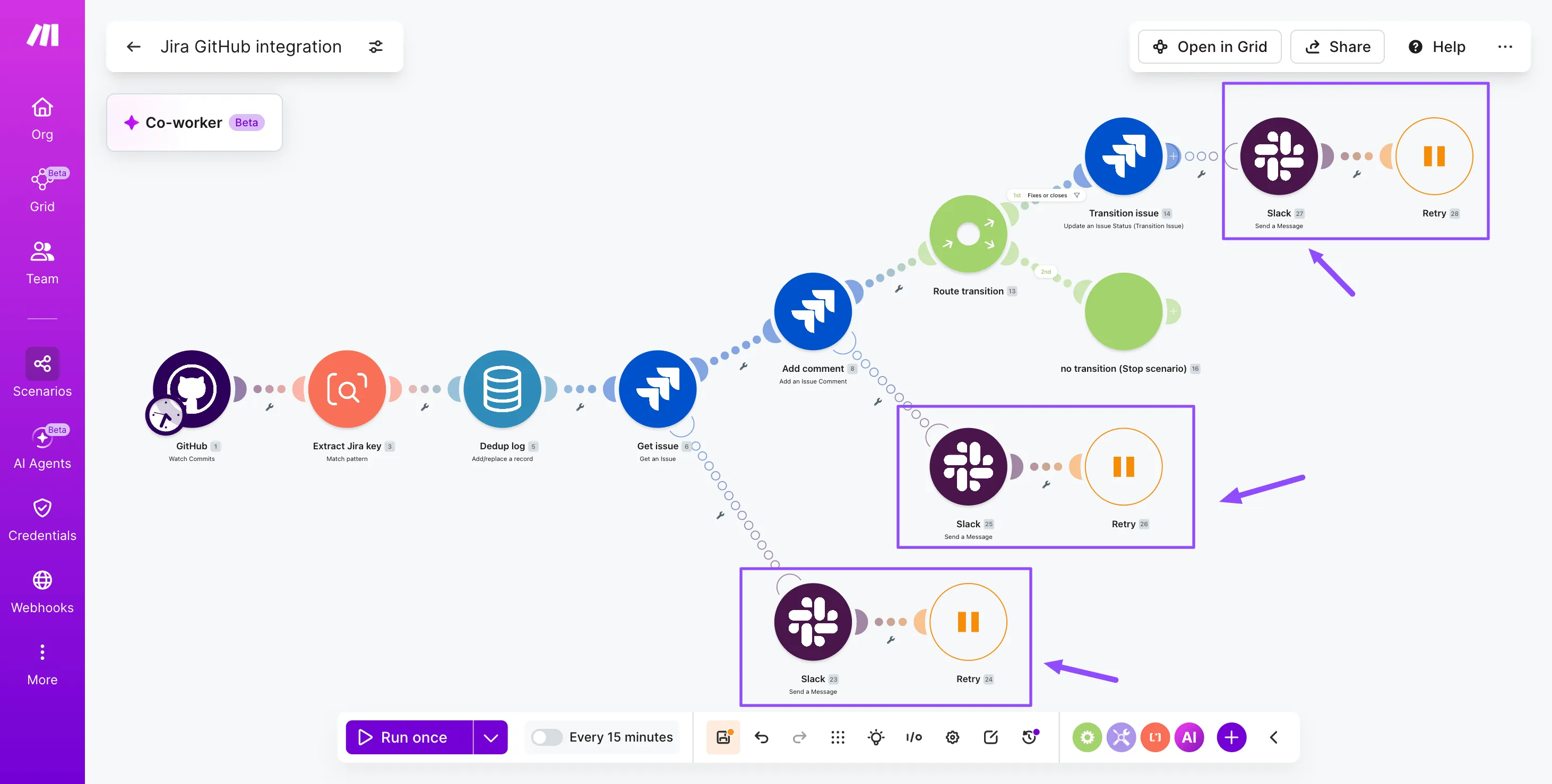
Right click each Jira module and attach a Break error handler with three retries spaced 60 seconds apart. Add a Slack - Create a message fallback to alert the team channel when retries exhaust.
This catches Jira API rate limits and transient 5xx responses without losing commits.
How to test and troubleshoot the scenario
Test the Jira GitHub integration by running the scenario once with a real commit before turning on scheduling.
In the Scenario Builder, click "Run once" and push a test commit to a branch with a valid Jira key like PROJ-123 in the message.
Watch each module light up, inspect the bundle output, and confirm the Jira - Add Comment step posted to the correct issue. If a module errors, open the execution log and check the input mapping first.
Common issues and fixes:
- Regex misses the issue key: widen the pattern to match lowercase keys and ensure the Text Parser flag allows global matches across multi line commit messages.
- 401 from Jira: refresh the connection token; for self hosted instances, route traffic through an on-premise agent docs setup.
- Duplicate comments: add a Set Variable dedupe key using commit SHA plus issue key.
- Webhook silent: re verify the GitHub secret and payload type in repository settings.
Outcomes you can expect from automated linking
Automated Jira GitHub integration through a Make scenario delivers measurable time savings, stronger traceability, and fewer status errors across engineering and product teams.
Once GitHub - Watch Commits and Jira - Update an Issue handle the cross referencing, developers stop pasting ticket keys into release notes and project managers stop hunting for the commit that closed a bug.
Before and after comparison showing manual versus automated Jira GitHub linking outcomes and time savings
Time saved compounds quickly: every commit, pull request, and merge updates the matching Jira issue without a human touch, freeing standups for actual decisions. Traceability gain shows up in audits, where each ticket carries a complete commit trail and reviewer history.
Fewer status errors mean release dashboards reflect reality, similar to how the docs team automation kept content states accurate at scale across thousands of pages and contributors.
Variations and next steps for advanced workflows
The base scenario linking Jira issues to GitHub commits extends in several directions once the core connection is stable.
Teams often layer in pull request reviews, deployment notifications, or AI triage that classifies commit messages before they reach Jira.
Each variation reuses the same Jira - Update an Issue and GitHub - Watch Events backbone, with added Router branches or AI modules.
For deeper agentic patterns, study the agentic loop concept and consider how to build AI agents that handle exception cases on their own.
Use case | Approach | Difficulty |
Auto transition on PR merge | Add GitHub - Watch Pull Requests and route merged events to Jira - Update an Issue status | Beginner |
AI commit classification | Insert OpenAI - Create a Chat Completion before Jira - Add Comment to label fix, feat, or chore | Intermediate |
Release note drafting | Use Aggregator over tagged commits, then Confluence - Create a Page | Advanced |
Start automating your Jira GitHub workflow
Automating the Jira GitHub integration in Make turns commit hashes and pull request events into living context inside your issue tracker, so engineers stop tabbing between systems to reconstruct status.
The scenario you built parses issue keys from commit messages, updates Jira fields through the Jira - Update an Issue module, and posts pull request transitions back to delivery boards without manual handoffs.
Treat this as a foundation: extend it with reviewers, deploy events, or QA gates as your process matures.
Recap value: fewer status meetings, traceable commits, accurate sprint reporting, and a single source of truth across engineering and product.
Open the Scenario Builder, clone the blueprint, and get started for free.
Frequently asked questions
Q1: Does GitHub natively link commits to Jira issues?
GitHub does not natively link commits to Jira issues. Atlassian offers a GitHub for Jira app that provides basic linking, but it has limited customization. A Make scenario gives you full control over parsing, routing, and the Jira fields you update.
Q2: How does Make detect Jira issue keys in commits?
Make detects Jira issue keys using a regular expression inside a Set Variable module. The standard issue key regex is [A-Z]{2,10}-[0-9]+, which matches project prefixes followed by a hyphen and the ticket number from the commit message.
Q3: Can I sync GitHub pull request status back to Jira?
Yes. Add a GitHub - Watch Pull Request Events trigger and a Jira - Update an Issue module in the same scenario. Map the PR state (open, merged, closed) to a Jira status transition or a custom field, so reviewers see live progress without leaving Jira.
Q4: Is this integration secure for private repositories?
The integration is secure for private repositories when configured correctly. Make stores GitHub and Jira credentials as encrypted connection objects, supports OAuth and fine grained personal access tokens, and lets you scope tokens to specific repositories. Enable team level access controls in Make for additional governance.
Q5: How many operations does this scenario consume?
The operations cost is one operation per module execution per commit. A typical run uses four to six operations: trigger, regex parse, Jira lookup, comment, and optional status update. Use a Router with filters to skip commits without an issue key and reduce operations cost.
Related guides
Tool and strategies modern teams need to help their companies grow.
How-to guides
Salesforce Outlook integration: How to sync emails and calendars in 2026
Build a Make scenario that keeps Salesforce contacts, emails, and calendar events in sync with Outlook, no manual logging required.

Raife Dowley
June 12, 2026
AI
How to integrate Jira and Slack: 2026 guide
Build a two-way scenario that turns Jira issues into routed Slack notifications and Slack messages into Jira tickets.
Raife Dowley
May 20, 2026