Jul 1, 2026 | 8 minutes
Jira Salesforce integration: Connect dev & sales teams: 2026
Build a Jira Salesforce integration in Make to sync cases, issues, and status updates between sales and engineering teams.
A Jira Salesforce integration links Jira issues and Salesforce records so engineering and revenue teams work from one shared, always-current status instead of chasing updates across tools.
In Make, that connection runs as a scenario: an automated flow built from modules, each one a single trigger or action, such as watching a Jira issue or updating a Salesforce case.
Because every module and its data are visible on the Scenario Builder canvas, the sync stays a glass box rather than a black box, so both teams can see exactly what changed and when.
A Jira Salesforce integration closes the dev-sales gap by syncing engineering tickets with customer accounts automatically, so account executives stop chasing engineers in Slack.
This guide shows the Make scenario that creates a Jira Salesforce integration in hours, not weeks. https://www.make.com/en/integrations/salesforce/jira
What you need before connecting Jira and Salesforce
Before building the Jira Salesforce integration in Make, confirm you have the right access, credentials, and field knowledge in both systems.
The checklist below covers the accounts, permissions, and technical details you need so the scenario authenticates cleanly on the first run and your field mapping survives production traffic.
Gather these before opening the Scenario Builder.
A Make account on a paid plan that supports the operation volume you expect across both apps. Patterns from the guide carry over directly.
Jira admin access to create an API token, configure webhooks, and read issue custom fields across the relevant projects.
Salesforce API access with a connected app, OAuth credentials, and permission to read and write Cases, Opportunities, or custom objects.
A documented field map listing Jira issue fields and their Salesforce counterparts, including picklist values and required fields.
Network access for Make, or the on-premise agent docs if Jira sits behind a firewall.
Why dev and sales teams fall out of sync
Dev and sales teams fall out of sync because Jira and Salesforce describe the same customer reality in two incompatible languages, and nothing automatically translates between them.
Sales logs a customer escalation as a Salesforce case with revenue context, account tier, and renewal date. Engineering tracks the underlying defect as a Jira issue with sprint, component, and reproduction steps.
The two records share a problem but never share a state, so updates live in screenshots, Slack threads, and status meetings.
The hidden tax is context-switching cost. Account executives open Jira to chase a fix, engineers open Salesforce to read account history, and both lose focus on the work they were hired to do.
Worse, lost bug context creeps in: by the time a defect reaches a sprint, the original customer impact, ARR exposure, and reproduction notes have been paraphrased through three tools.
Patterns familiar from a Jira Slack integration repeat here, only with revenue stakes attached, which is why teams formalizing this loop often revisit their broader to align field ownership and SLA expectations across both systems.
The Make scenario that fixes it
The Make scenario that fixes the Jira Salesforce integration gap is a two-way sync that mirrors Jira issues into Salesforce records and pushes Salesforce updates back into Jira, so engineering and revenue teams see the same status without manual handoffs.
The scenario listens for events on both sides, reconciles fields through a shared mapping layer, and routes the right context to the right system in seconds.
[image: High-level scenario diagram showing Jira events flowing through Make into Salesforce records and team alerts]
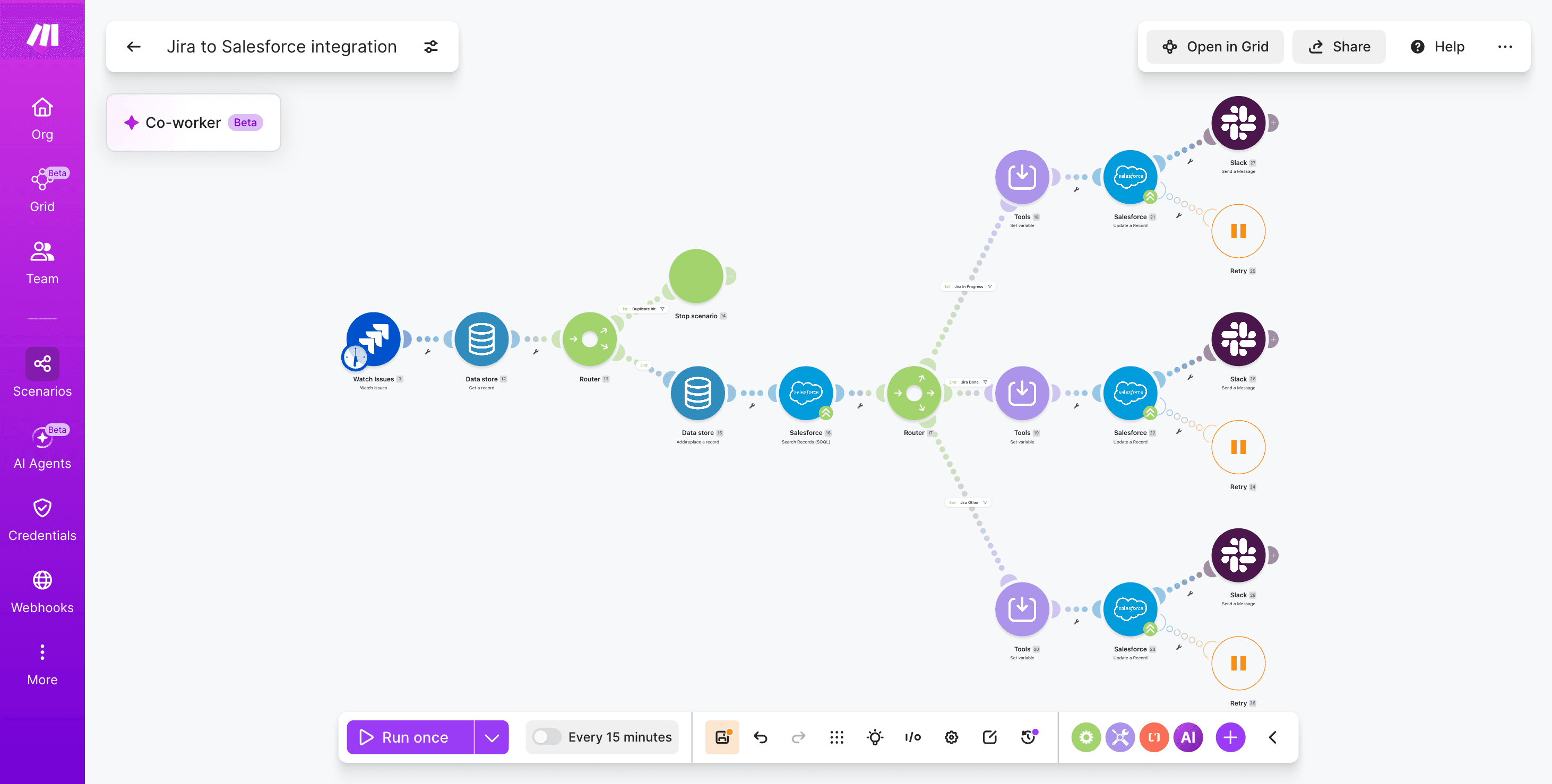
The scenario overview begins with Jira Cloud Platform - Watch Issues as the trigger, passes payloads through a Router that splits creates, updates, and status changes, then resolves the matching Salesforce object using Salesforce - Search Records (SOQL).
A Set Variable module normalizes priority, severity, and owner fields before Salesforce - Update a Record writes the result.
A second route reverses the flow with Salesforce - Watch Record Fields feeding Jira Cloud Platform - Update an Issue, and a Slack - Create a Message step pings the account team on critical changes.
This approach keeps the two-way sync auditable inside the Scenario Builder.
How to build the Jira Salesforce integration in Make
Building the Jira Salesforce integration in Make takes six modules inside one scenario: trigger on Jira changes, look up the matching Salesforce record, deduplicate, transform fields, update Salesforce, and notify the account owner.
The pattern below assumes a support workflow where a Jira issue carries a Salesforce Case ID custom field, but the same shape works for opportunities, accounts, or custom objects.
If your stack also touches ITSM tooling, the guide shows a parallel pattern you can adapt.
Step 1: Configure the Jira trigger
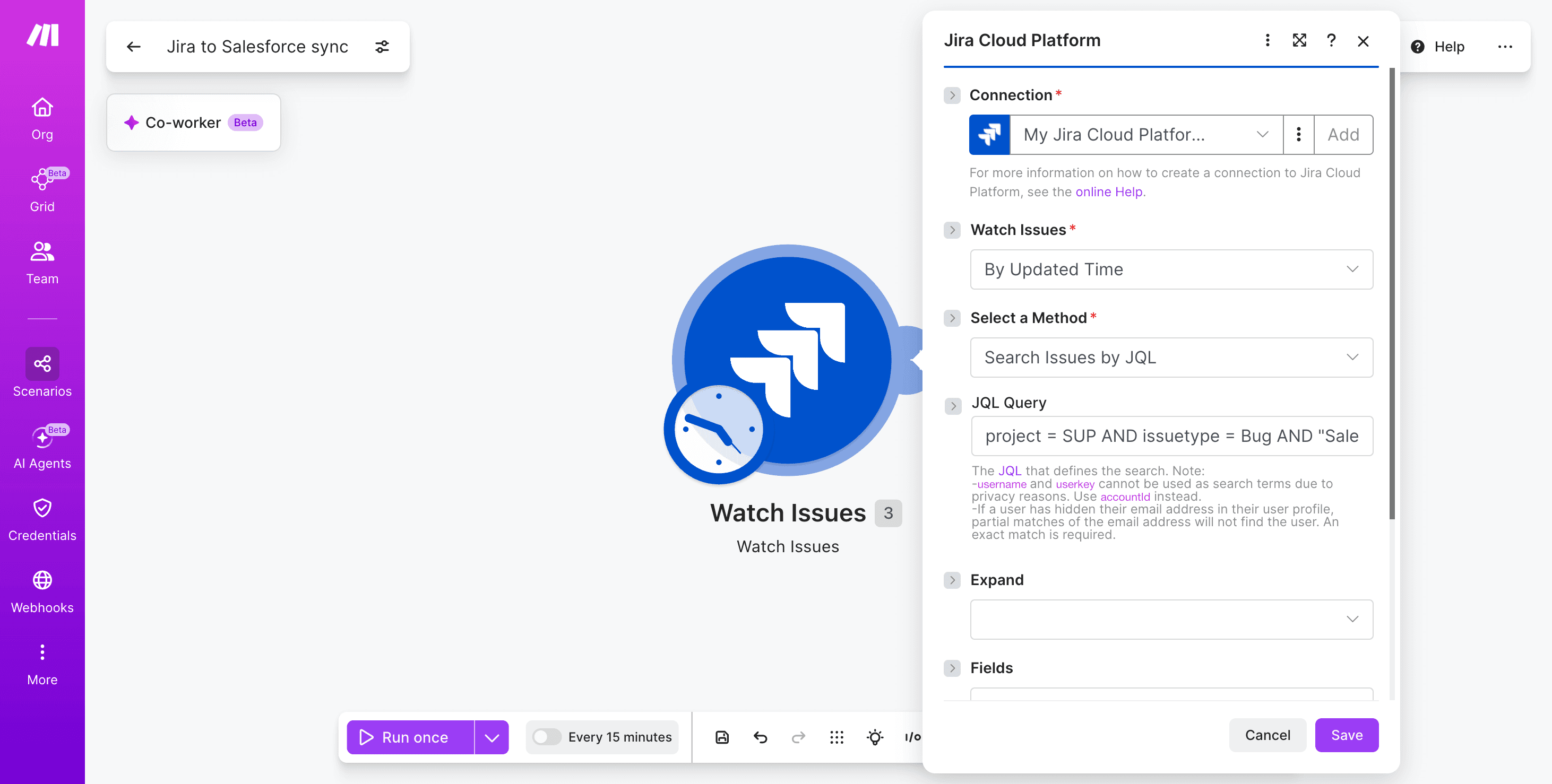
Add Jira Cloud Platform - Watch Issues as the first module on the canvas.
Authenticate with OAuth to the production Jira workspace, then scope the trigger so it only fires on issues that matter to revenue.
Set Project to your support or delivery project key.
Filter by Issue Type (Bug, Story) and Status transitions.
Add a JQL clause to require a populated Salesforce Case ID custom field.
Schedule the scenario every 15 minutes for near-real-time sync.
Step 2: Look up the Salesforce case
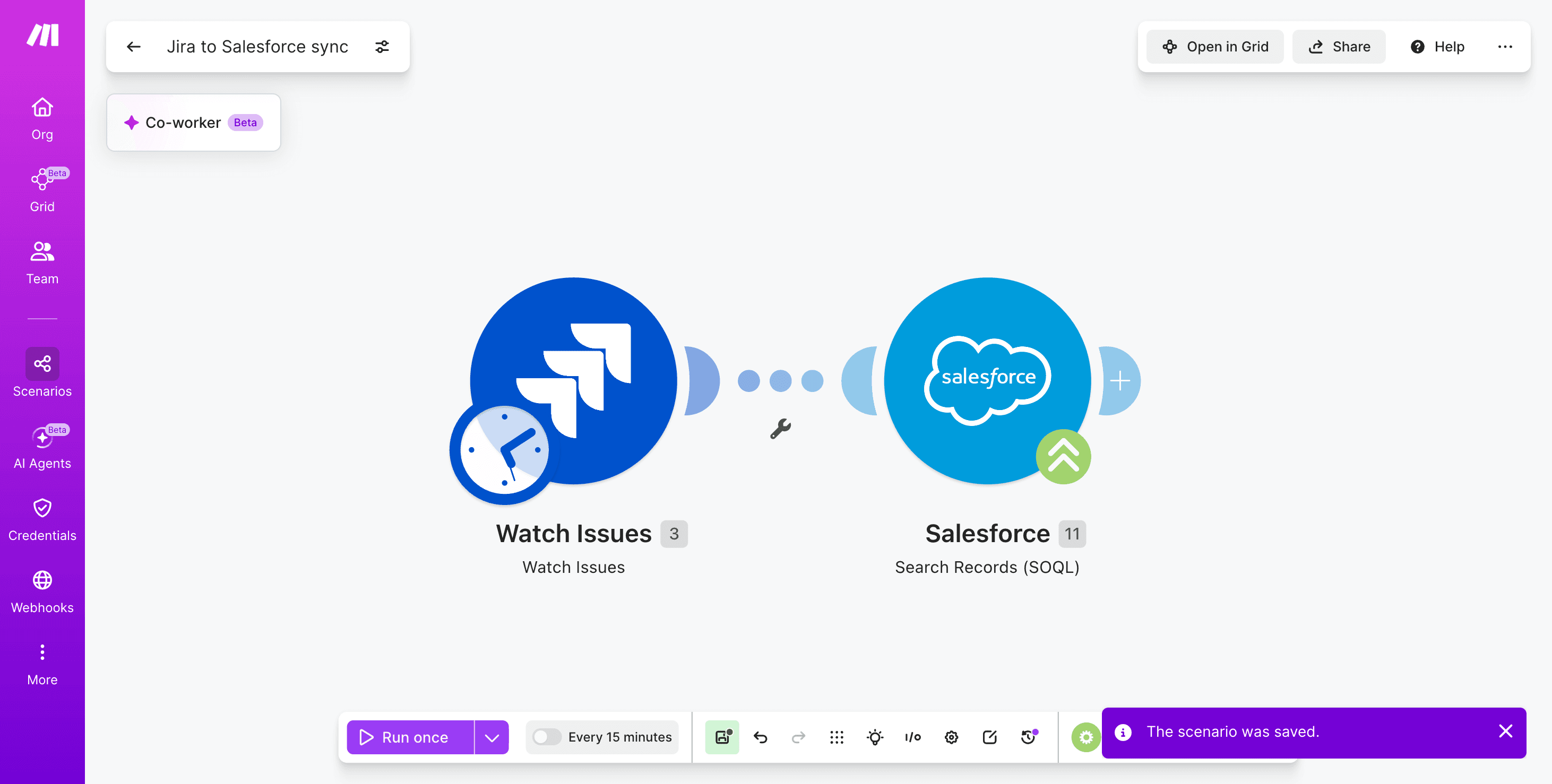
Connect Salesforce - Search Records (SOQL) to the trigger. Query the Case object using the Salesforce Case ID returned from Jira.
Limit the result set to one record and select only the fields you plan to update, which keeps each operation lightweight.
Step 3: Deduplicate with a data store
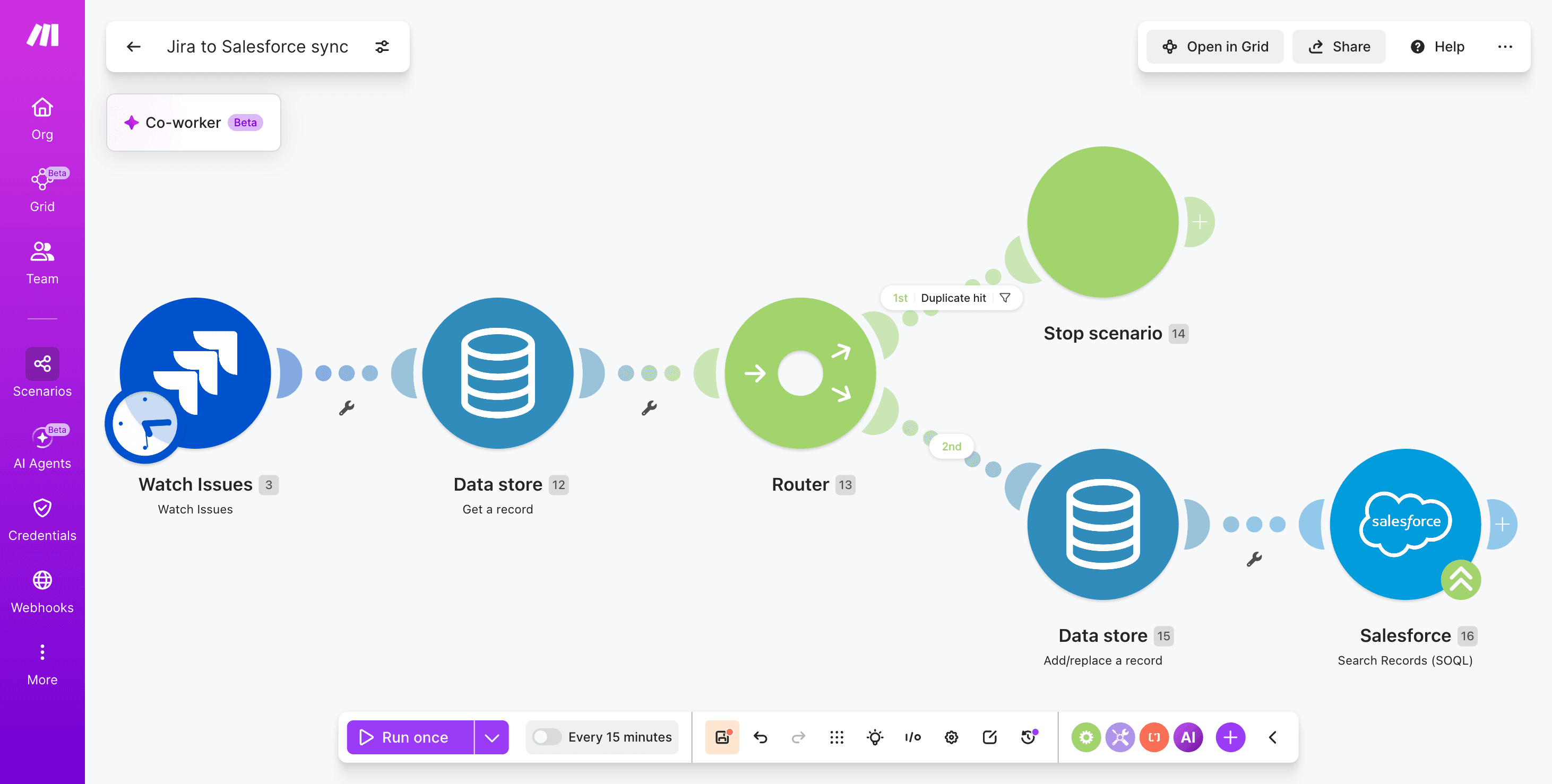
Insert Data Store - Get a Record followed by Data Store - Add a Record. Use the Jira Issue Key plus the Updated timestamp as the composite key.
If the key already exists with the same timestamp, the bundle exits through a route that ends before the update, so Salesforce never receives a duplicate write.
PRO TIP: Build the data store key as IssueKey_UpdatedEpoch and set TTL to 30 days; this lets the same Jira issue update Salesforce many times across its lifecycle while blocking replayed webhooks from creating duplicate Salesforce - Update a Record calls within the same minute.
Step 4: Transform fields with a router
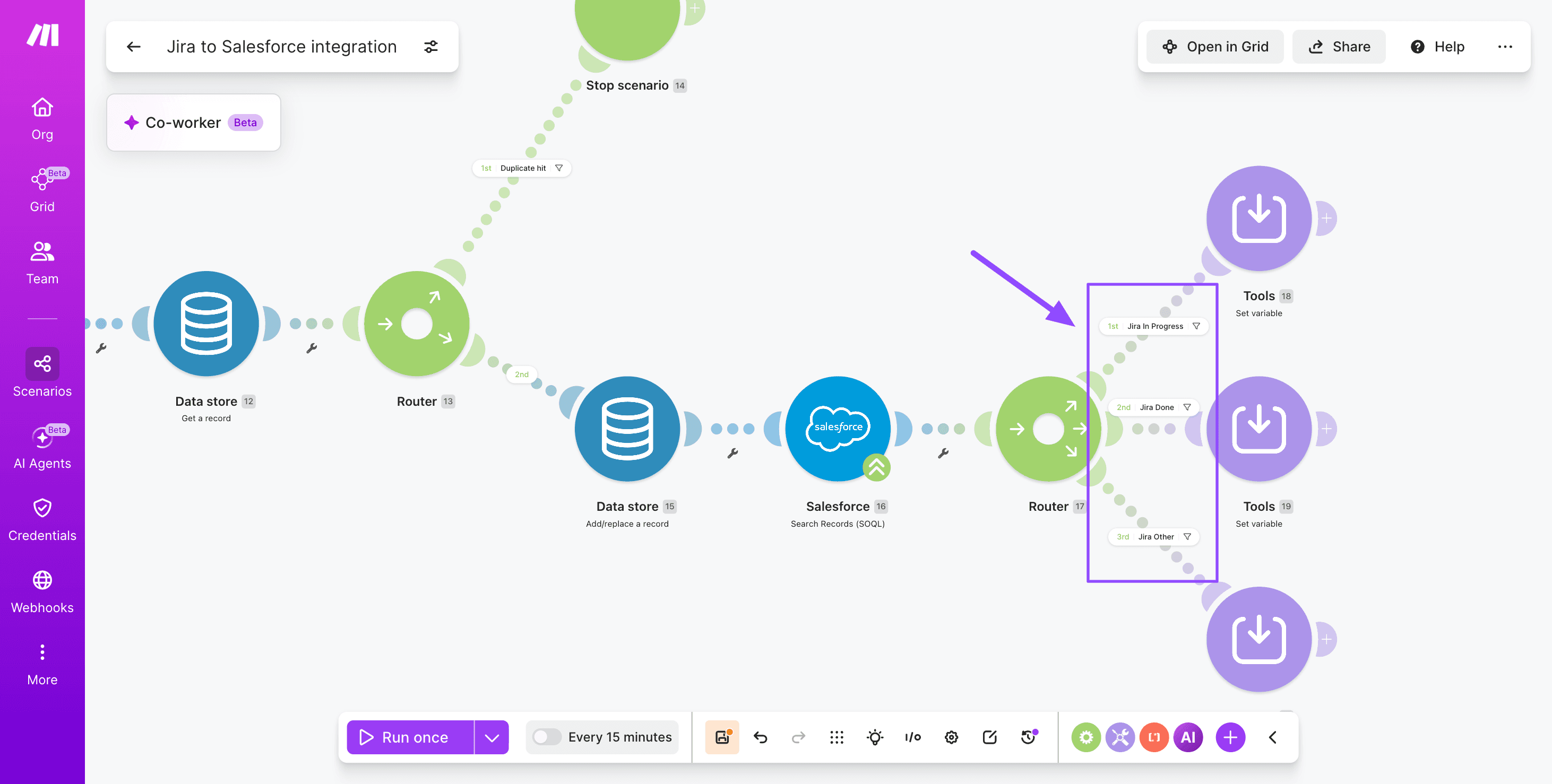
Add a Router to split paths by Jira status.
Each route uses a Set Variable module to map Jira values to Salesforce picklists, for example translating "In Progress" to "Working" and "Done" to "Closed."
Place a filter on each route so only the matching status flows through.
Step 5: Update the Salesforce record
Drop Salesforce - Update a Record at the end of each route. Map the Case Id from Step 2, the Status from your Set Variable output, and append the Jira Summary plus a link back to the issue inside the Description.
For layered orchestration across many object types, the lets you reuse this update block across opportunities and accounts without duplicating logic.
PRO TIP: Wrap the Salesforce - Update a Record module in an error handler with a Break directive set to retry three times at exponential intervals; transient API limits resolve themselves and the scenario will not stall the queue.
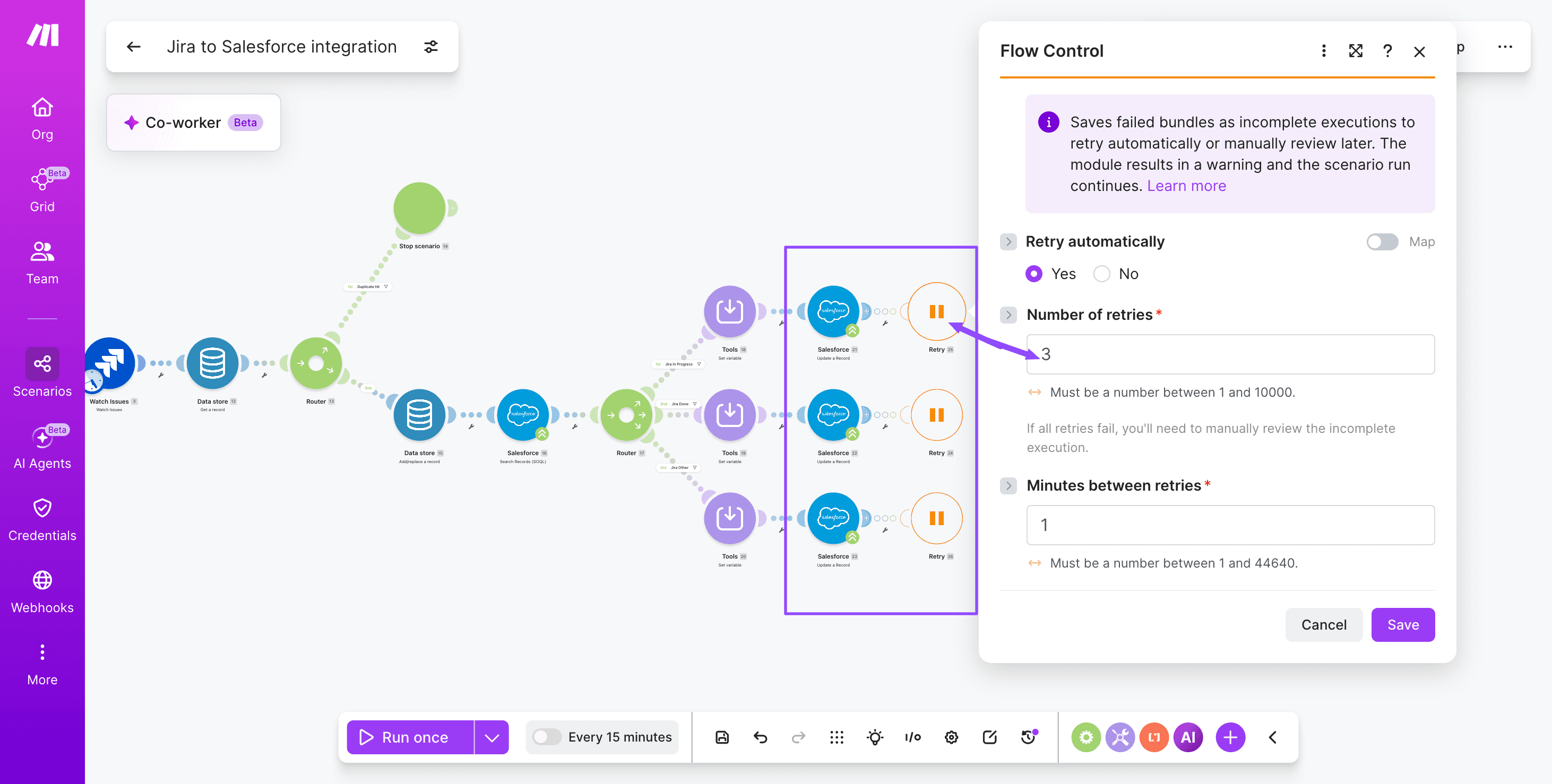
Step 6: Notify the account owner
Finish with Slack - Create a Message posting to the account owner with the Jira link, new status, and Salesforce Case URL.
You have the 2 options to choose from for your connection:
Slack (bot) (recommended for automations)
Slack (user) (acts as your user)
If a target app lacks a native module, you can still using the generic HTTP module and the same authentication pattern.
How to test and troubleshoot the scenario
Test the Jira Salesforce integration by clicking "Run once" in the Scenario Builder and triggering a real event in the source system, such as creating a test Jira issue linked to a known Salesforce opportunity.
Watch each module light up green and inspect the bundle output to confirm field values map correctly. Test in both directions using Run once: create a Jira issue tied to a Salesforce record, then update a Salesforce field that should propagate back.
Inspect the execution history to verify every operation consumed matches expectations, and reuse those logs when refining transparency through this guidance.
Common error fixes to keep handy:
Connection errors: refresh OAuth tokens in both Jira and Salesforce; confirm API scopes include read and write on issues, opportunities, and cases.
Field mapping mismatches: cast Jira numeric custom fields to text before writing to Salesforce, or use Set Variable to normalize formats.
Duplicate records: add a filter checking the external ID field before the Salesforce - Create a Record module fires.
Webhook silence: re-register the Jira webhook URL and verify the route condition matches the issue type.
Outcomes you can expect from this integration
The Jira Salesforce integration built in a Make scenario delivers faster handoffs between dev and sales, fewer status pings across Slack and email, and cleaner CRM data because every customer-reported issue carries a live link to its engineering ticket.
Account executives stop chasing engineers for updates, and developers stop fielding ad hoc questions about deal-blocking bugs, because the Salesforce - Update a Record module writes Jira status changes back into the case the moment they happen.
[image: Before-and-after comparison showing dev and sales team sync improvements after Jira Salesforce integration]
Teams running similar cross-functional scenario patterns report tighter cycle times and better pipeline visibility, as documented in the .
Expect cleaner reporting, audit-ready ticket trails, and a measurable drop in escalation noise once both systems share one source of truth.
Variations and next steps
The Jira Salesforce scenario you just built is a foundation; the same pattern adapts to support cases, account health signals, agentic triage, and revenue operations reporting.
Each variation reuses the trigger, Router, and field mapping logic, swapping target objects or layering an agentic loop for autonomous decisioning.
Teams ready to extend this further can that classify Jira issues, draft Salesforce updates, and request human approval only when confidence is low.
Use case | Approach | Difficulty |
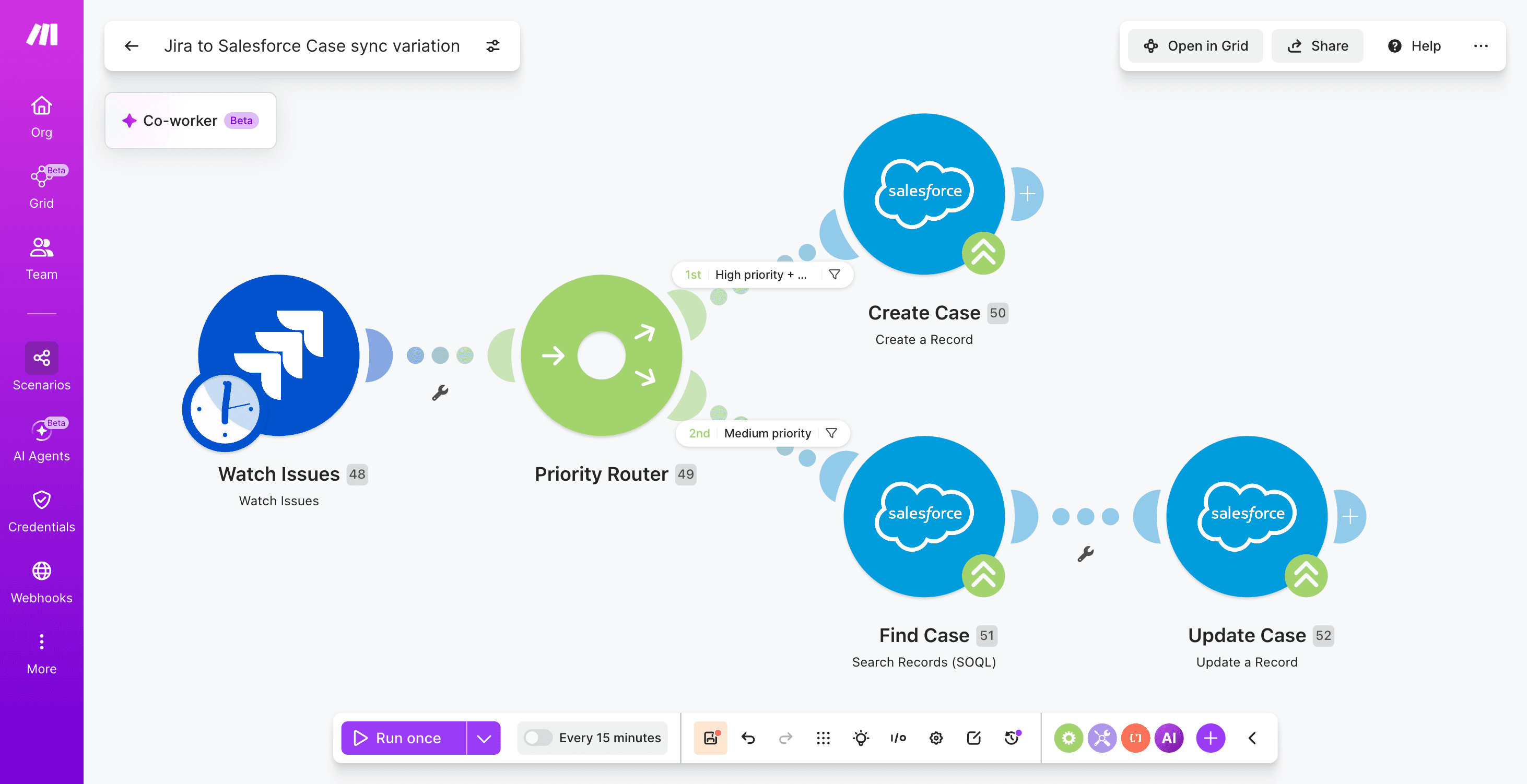
Jira bugs to Salesforce Cases | Jira Cloud Platform - Watch Issues into Router with priority filters, then Salesforce - Create a Record on Case object | Medium |
Account health signals | Jira Cloud Platform - Search Issues aggregated via Aggregator, pushed to a Salesforce custom field | Medium |
Agentic triage | Add an agentic loop concept that classifies tickets and writes back | Hard |
Weekly RevOps digest | Scheduler, Aggregator, Slack - Create a Message | Easy |
Where to next?
A Jira Salesforce integration built in Make keeps dev and sales teams aligned by turning ticket updates and opportunity changes into shared, automated signals across both systems.
With Make's Scenario Builder, modules like Jira Cloud Platform - Watch Issues, Salesforce - Update a Record, and a Router for branching logic, you get a fit-for-purpose scenario that scales as field mappings, comment syncs, and approval routes grow.
The recap is concrete: one scenario, two systems, fewer status meetings, and faster customer responses. Make connects to 3,000+ apps, so the same pattern extends to support, finance, and product analytics later.
Ready to wire your pipeline to your backlog? and ship your first sync today.
Frequently asked questions
Q1: Can Jira and Salesforce sync in real time through Make? Near-real-time, yes. Webhook triggers like Jira Cloud Platform - Watch Issues fire within seconds of a change, and Salesforce - Watch Records polls on a configured interval. True millisecond sync is not the design goal; expect latency of a few seconds to a minute depending on real-time sync limits and plan tier.
Q2: Do I need admin access in both Jira and Salesforce? You need admin or delegated permissions in both systems to create the connection. Jira requires an API token and project permissions; Salesforce requires a connected app or OAuth user with API access. Once the scenario is live, day-to-day operation runs under the service account, not your personal login.
Q3: How does Make handle field mapping between the two systems? Field mapping logic lives inside each module. You drag Jira output fields into Salesforce input fields visually, and use functions like ifempty, switch, and parseDate to reconcile picklists, custom fields, and date formats. A Set Variable module centralizes mapping rules so updates happen in one place.
Q4: Can I sync Jira comments back to Salesforce cases? Yes. The Jira Cloud Platform - Watch Issues trigger fires on issue updates, including new comments, so route the payload through a filter that isolates comment changes, then push it through Salesforce - Update a Record or create a Case Comment. Use a Router to filter internal-only comments so private engineering notes never reach customer-facing case feeds.
Q5: Is this integration suitable for regulated industries? It can be, with the right controls. Use Make Enterprise for data residency options, restrict connection scopes to least privilege, log every operation, and route sensitive fields through a Data Store with encryption. Pair with your existing audit, DLP, and access review processes.
Ready to make the automation revolution happen?